Get more done in less time by switching to a practical process that records calls, transcribes audio, and delivers clear summaries and action items you can trust.
You will learn an end-to-end plan that keeps you present during discussions while capturing what matters. We cover recording methods, bot-free options like Jamie, and bot-based assistants that auto-join Zoom, Google Meet, or Microsoft Teams.
Recent testing compared Otter.ai, Fireflies.ai, Krisp, Sonnet, Superpowered, tl;dv, Granola, and Avoma for accuracy, speaker ID, multilingual support, and integrations with CRMs and chat tools.
Expect quick picks for sales calls, multilingual teams, and collaboration, plus clear evaluation criteria so you can match tools to your team and budget. We also show where transcripts live and how to share or search them later. Learn how to save time and boost productivity without juggling apps during meetings.
Key Takeaways
- Follow a simple end-to-end process to record, transcribe, and summarize calls.
- Choose between bot-free capture or auto-joining assistants based on privacy and convenience.
- Prioritize accuracy, speaker ID, multilingual support, and integrations when selecting tools.
- Store transcripts for easy search and sharing to keep your team aligned.
- Use quick tool picks for different use cases to save time and improve productivity.
- See feature and plan fits so you can pick the best option for your meeting frequency.
What an AI meeting notes workflow looks like in practice
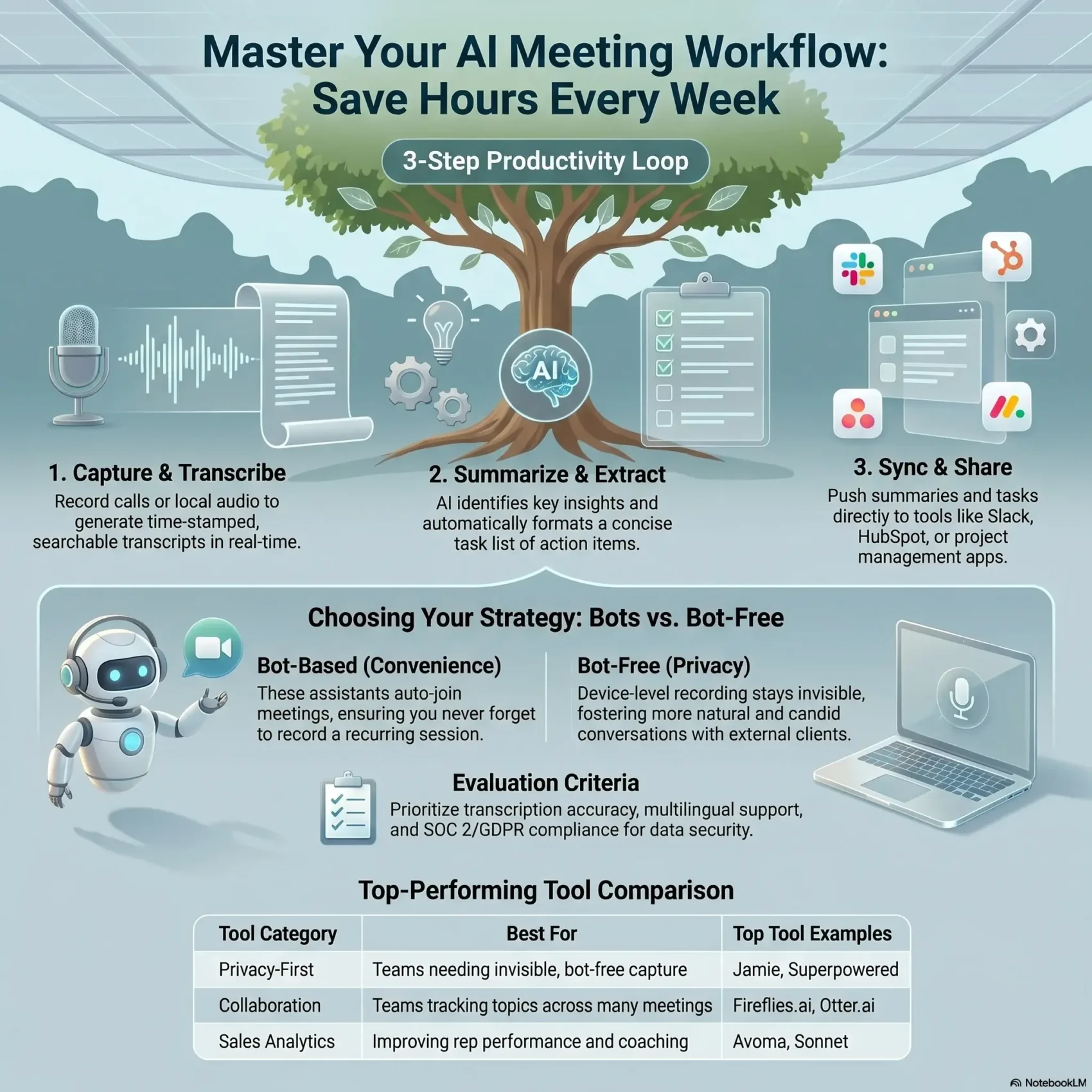
A practical capture process turns raw audio into searchable transcripts and clear action items. You start by recording a call or local device audio, then get a time-stamped transcript you can scan in minutes.
From recording to transcripts, summaries, and action items
After capture, the assistant generates concise summaries and a list of action items. This gives you a quick meeting summary and a short task list to share.
You can jump back to decisions by searching transcripts and using timestamps to play the exact moment. Some tools auto-join your Zoom, Google Meet, or Teams calls; others capture at the device level to stay invisible.
Where the data goes: storage, sharing, and search
Check retention and compliance—platforms vary. Some keep audio and text on servers with GDPR or SOC 2 controls. Bot-free options may delete audio after creating the transcript and only store secure notes.
- Capture: record audio and create time-stamped transcripts.
- Summarize: extract summaries and assign action items.
- Share: clip highlights, push tasks to your project tool or CRM.
“Know where your data lives and who can access it.”
Buyer intent check: are you choosing the right type of AI note taker?
Deciding between an auto-join bot or a device-level recorder shapes how comfortable people feel and how reliable your transcripts will be. Think about who attends, where calls happen, and whether clients might notice a bot in the participant list.
Bot-based takers auto-join meetings and remove the risk of human error. They are convenient and ensure you never forget to capture an important call.
Bot-free note takers record at the device level and often delete raw audio after creating transcripts. That approach reduces friction and supports privacy, so attendees speak more naturally.
Before you pick a tool, review its features for speaker labeling, multilingual transcription, and action extraction. Confirm the platform can push follow-up items into your task system or CRM so you cut manual work.
“Match the tool to your team culture—privacy and comfort matter as much as convenience.”
- Decide bot-based or bot-free capture.
- Check language support and speaker ID accuracy.
- Review data retention, access, and privacy settings.
Key criteria we used to evaluate tools in the present market
We measured real-world performance so you can choose the right solution for your team. Testing covered transcription accuracy across accents and technical topics, plus summary quality and task extraction. Results varied by speaker labeling, multilingual coverage, and how cleanly follow-ups were structured.
Transcription accuracy, speaker ID, and multilingual support
Check how a product handles accents, domain terms, and punctuation. Reliable speaker ID matters when you need searchable transcripts and clear attributions.
Action items, key insights, and meeting summaries you can trust
Prioritize systems that extract concise summaries and actionable items automatically. Good outputs cut manual review and speed follow-ups.
Integrations with CRMs, project tools, and team chat
Verify integrations with Slack, HubSpot, Salesforce, Notion, and Google Drive so notes and tasks flow into your existing tools.
Privacy, data stored policies, and compliance
Review where data stored, retention windows, and compliance badges like GDPR or SOC 2. Some products delete audio after creating transcripts; others keep both on servers.
- Accuracy: test accents and jargon.
- Multilingual: confirm languages you need.
- Follow-up: ensure action items and summaries are reliable.
- Integrations: push tasks to your systems.
- Privacy: check storage and compliance.
“Focus on features that save time and protect data.”
ai meeting notes workflow picks at a glance by use case
Match features to real needs so you save time after every conversation. Pick a tool that fits how your team runs meetings and who needs the transcript or summary.
Bot-free simplicity to stay fully present in every meeting
Jamie and similar bot-free note takers record at the device level so nothing shows up in the participant list. That keeps focus on the conversation and supports privacy.
Collaboration and topic tracking for busy teams
Fireflies offers topic tracking, shared transcripts, and commenting. Use it when multiple people must surface follow-ups across many meetings.
Conversation analytics and coaching for sales
Avoma stands out for talk ratio, filler-word reports, and coaching insights. Sales ops can use these features to coach reps and improve calls.
Multilingual transcription for international teams
tl;dv provides searchable, multilingual transcription and cross-meeting search so global teams can find decisions in any language.
- Stay present: choose a device-level note taker if you want no visible bot.
- Collaborate: pick topic tracking and shared transcripts for busy teams.
- Coach: use analytics for sales to improve calls and conversion.
- Translate: prioritize strong transcription and speaker labels for global work.
- Integrate: ensure Slack and CRM pushes are available for fast sharing.
“Test 1–2 tools side by side to see which features fit your team’s pace and budget.”
Jamie: Best bot-free note taker for every team’s core workflow
If you want a privacy-first option that never joins as a visible participant, Jamie captures device-level audio and keeps conversations natural.
Why bot-free matters for focus, privacy, and natural conversations
Bot-free capture avoids a participant icon that can distract clients or teammates. That keeps your team present and comfortable during talks.
Privacy is built in: audio is deleted after transcription, data stays in Frankfurt, and nothing is used to train LLMs.
Key features
Jamie produces clear summaries, accurate transcripts with speaker ID, and extracted action items. It also includes Ask AI so you can query past content fast.
- 100+ languages for global teams
- High-quality summaries and transcripts
- Integrations with HubSpot, Attio, and Asana to push follow-ups
- GDPR-compliant with AES encryption and EU storage
Plans and pricing
The free plan includes 10 meeting credits per month with a 30-minute cap. Plus (€25/month) raises credits and length; Pro (€47/month) adds unlimited credits and longer sessions. Enterprise offers custom terms.
“Choose Jamie if you want a privacy-first design that captures high-quality summaries and action items without a visible bot.”
Otter.ai: Team collaboration with auto-join for Zoom, Google Meet, and Microsoft Teams
Otter.ai joins calls automatically to capture live transcripts and create shareable summaries in real time. You get live text during Zoom, Google Meet, and Microsoft Teams sessions so teammates can follow without typing.
Live notes, summaries, and Otter AI Chat for past meetings
Real-time capture: Otter produces live transcripts and highlights during calls. It also extracts action items and short summaries for quick sharing.
Searchable history: Use Otter AI Chat to ask questions across past meetings and find decisions without rewatching recordings.
Limitations to expect: language support and speaker labeling
Otter supports English, Spanish, and French. That limited language range can be a drawback for global teams with multilingual calls.
Speaker identification is helpful but often needs manual tagging. Editing speaker labels can take extra time after a session.
- Pick Otter if you want an auto-join assistant for Google Meet and Zoom that delivers live summaries.
- You can query past calls with Otter AI Chat to pull decisions and references fast.
- Expect solid real-time transcripts, but plan for post-call cleanup on speaker labels.
- Free plan available; Pro and Business unlock more minutes and team features.
“Otter is convenient for live collaboration, though multilingual teams may want broader language support.”
Fireflies.ai: Meeting analytics, topic tracking, and searchable transcripts
For teams juggling many conversations, Fireflies makes key moments easy to find and share.
Automatic transcription captures calls, labels speakers, and creates searchable transcripts you can scan in minutes.
Smart search groups sessions by topic and surfaces highlights. Use automated recaps to extract items and action you can assign without rewatching the whole recording.
Smart search, recaps, and integrations to push tasks to your tools
The app offers summaries, soundbites, and a comment system for collaboration. Analytics include sentiment, talk time, and tracked topics to improve how your team talks.
- Use Fireflies if you need searchable transcripts across many meetings with topic tracking and collaboration built in.
- Smart search and automated recaps help you extract action items and tasks to push into your project tools quickly.
- The app provides analytics like talk time, sentiment, and topic breakdowns so you can refine conversations and boost sales coaching.
- Integrations with Slack, HubSpot, Salesforce, Notion, Dropbox, and Zapier move insights into the systems you already use.
When bots feel intrusive—and how to minimize disruption
Auto-join bots can delay starts or draw attention in the participant list. Brief attendees ahead of time to reduce surprises.
Consider controlling join behavior and audio cues in settings to limit interruptions. The free plan is a good on-ramp; paid tiers add capacity and advanced features for busier teams.
“Fireflies shines when you’re juggling many conversations and need structure, search, and automation to stay on top.”
Krisp: Cleaner audio and transcripts to boost clarity across platforms
Krisp runs on your device to scrub background sounds so voices come through clearly on calls. It installs as a local app and adds virtual audio devices that filter noise on both microphone and speaker channels. This keeps your audio clean without any visible participant or bot joining the call.
With clearer inputs, your transcription accuracy improves and you spend less time fixing transcripts. Krisp includes English-only transcription and offers a free tier with 60 minutes per day of noise cancellation. Paid plans start at $8/user/month (annual) and Pro is $16/month.
Setup is simple and the tool works across common platforms so Zoom, Google Meet, and other apps sound better. Be mindful: some features can store audio if enabled, so review privacy settings to match your policies. Krisp is GDPR-compliant.
- Choose Krisp if crystal-clear audio is your priority for meetings and cleaner transcripts.
- It runs locally, reducing background noise without adding a participant to the call.
- Free daily minutes help casual users; paid plans suit heavy schedules.
- Consider language needs—transcription currently focuses on English.
“Cleaner audio means fewer transcription errors and faster review after your calls.”
Sonnet: From conversations to CRM-ready data and action items
If your goal is turning talk into trackable CRM fields, Sonnet automates much of that heavy lifting. It captures conversations without showing a visible participant so people stay focused. The app extracts key points and creates structured outputs you can push into pipelines.
Sonnet generates action items and shareable recordings alongside standardized notes and templates. Templates make downstream CRM updates faster and more consistent for reps. That helps sales teams keep follow-ups accurate and timely.
Integrations connect Sonnet to popular CRMs so entries flow into your system automatically. Speaker analytics help you see who led parts of a discussion and which topics surfaced most often.
- Consider Sonnet if converting conversations into CRM data is a priority.
- It captures calls without a visible bot and produces action items and recordings you can share.
- Templates standardize notes and speed pipeline updates.
- Review English-only and Mac-only limits and confirm storage and retention for transcripts and audio.
Pricing plan starts with a free tier, Plus at $25, Pro at $35, and Enterprise on request. Try the free plan to see if the app matches your sales processes before you commit.
“Sonnet is best when speed and CRM accuracy matter most.”
Superpowered: Bot-free notes with strong multilingual support and integrations
Superpowered is a bot-free note taker built for multilingual teams that want fast, private capture without a visible participant. You get device-level capture that keeps conversations natural and reduces friction for external guests.
With support for 50+ languages, Superpowered is a strong fit for international organizations and cross-border collaboration. It stores no raw audio files after creating transcripts, which helps you meet privacy expectations.
- Integrations: Email, Slack, Notion, Google Drive, Salesforce, HubSpot, and Zapier move outputs into your systems fast.
- Compliance: SOC 2 Type 2 and GDPR help you enforce stricter data handling policies.
- Pricing: A flat $30/month plan with a 14-day trial keeps budgeting simple while you test quality.
- Limitations: No semantic search—plan how you’ll tag and organize content for quick retrieval.
Pros: extensive language coverage and no stored audio files. Cons: limited search features mean you may need foldering or consistent titles to find past items quickly.
“If multilingual coverage and straightforward sharing are your priorities, Superpowered deserves a close look.”
tl;dv: Multilingual transcription and AI-powered meeting search
tl;dv helps you find answers in hours of recorded calls without rewinding. It supports transcription in 30+ languages and dialects, with the product localized in seven languages for non-English users.
Search across meetings to surface decisions, clips, and recurring topics in seconds. The platform offers AI search that scans multiple sessions and AI reports that aggregate insights on a schedule.
Find insights across meetings with AI search and reports
Why use tl;dv: it compiles trends and recurring action items so your weekly reviews take minutes, not hours. Integrations push key clips and highlights into Notion, HubSpot, Salesforce, or Slack so teams can act fast.
- Choose tl;dv for AI-powered search that scans across meetings to surface insights quickly.
- Multilingual transcription covers 30+ languages and includes localization for global users.
- Scheduled AI reports compile summaries and trends across calls to save time on reviews.
- Integrations send clips and excerpts to your CRM or team channels so work moves forward.
The free plan offers unlimited Zoom and Google Meet transcription, which makes tl;dv easy to pilot. Paid plans start around $18/user/month billed yearly.
“You can add manual notes and create short video clips to highlight pivotal moments without sharing whole recordings.”
Limitations: servers can get busy and recordings may occasionally fail to start. For mission-critical calls, consider a backup recorder or local capture.
Want better audio organization and retrieval across platforms? See more on audio notes organization for tips that pair well with tl;dv’s search and reporting.
Granola: Combine human notes with AI-enhanced context in real time
Granola lets you take human notes while it transcribes and summarizes in the background.
You type your note during calls and Granola pulls related text from the live transcript to enrich what you wrote. That keeps your focus on the conversation while giving you a polished summary afterward.
It captures device-level audio, so the tool works with any conferencing app without joining as a visible participant. For in-person work, the iPhone app records on the go and keeps everything in one place.
- Enhance as you go: one click after the call fills your note with structured points and tasks derived from the transcript.
- Cross-platform: device capture works across conferencing tools and the iPhone app covers face-to-face meetings.
- Integrations: HubSpot, Slack, Notion, and Zapier push content and tasks into your systems.
- Free trial: 25 transcripts included; paid plans start around $18/month.
“If you prefer active note-taking, Granola blends your input with automated context so nothing gets missed.”
Granola is ideal when you want a hybrid plan: you lead the notes and the system creates tidy tasks and summaries afterward. Check that the app’s templates and features match how your team formats follow-ups.
Avoma: Conversation analytics and coaching for customer-facing teams
Avoma turns every customer call into coachable data you can act on. It measures talk-to-listen ratios, filler words, and long monologues so you can see how reps perform in real time.
Use these signals to run faster coaching cycles. Topic and competitor tracking link discussion points to outcomes so managers know what drives results.
AI scoring and coaching workflows speed onboarding and performance improvements across your sales and support teams. Dashboards highlight patterns when you have many meetings each week.
- Choose Avoma for deep analytics and coaching for sales and customer success.
- It tracks filler words, monologues, and talk-to-listen ratios to refine reps’ approaches.
- Topic and competitor tracking tie insights to outcomes for clearer decisions.
- Integrations with Salesforce, HubSpot, Copper, Pipedrive, and Zapier keep your CRM in sync.
- Recordings and structured analytics give repeatable insights across your organization.
“Avoma helps leaders spot patterns and turn conversations into measurable improvements.”
Pricing starts at $19/user/month (annual) for teams up to 25 users. Try it when you want consistent, measurable meeting outcomes without extra admin work.
Free plan standouts and budget-friendly starters
Start small: a free plan lets you test core transcripts, summaries, and basic sharing without committing money.
What you get for free vs. when to upgrade
Otter offers a Basic free plan with limited minutes. Fireflies gives unlimited transcription but restricts total storage to 800 minutes. tl;dv lets you transcribe unlimited Zoom and Google Meet sessions on its free tier.
Granola’s Free plan includes 25 transcripts. Jamie’s Free plan gives 10 meeting credits per month with 30-minute caps. Upgrades raise minutes, storage, and add advanced features.
- Test first: use a free plan to validate transcripts and quick summaries before you pay.
- Watch caps: if you hit minute or storage limits mid-month, upgrade to avoid gaps.
- Pick for needs: choose a starter plan that matches how often your team meets and how long sessions run.
“Start on a free tier to see real results; upgrading often pays back in saved time and fewer missed follow-ups.”
Bot-based vs. bot-free: which workflow fits your internal meetings?
Your choice of capture method affects flow, trust, and whether people speak openly. Decide if you want a visible assistant that auto-joins or a device-level recorder that stays out of view.
Meeting flow, participant comfort, and privacy considerations
Bot-based tools can keep you from missing sessions because they auto-join and start recording. That reliability helps teams that run many recurring meetings and can’t afford gaps.
Bot-free capture records local audio and keeps calls natural. Some organizations prefer this for privacy and to preserve candid discussion.
- For internal meetings where comfort matters, device-level capture reduces friction and helps people speak freely.
- If you never want to miss a session, auto-join bots ensure consistent capture across every meeting.
- Hybrid setups work: use bot-free tools internally and bots for large external webinars.
- Document standards so everyone knows how audio and notes are handled and where files live.
“Match your capture method to what makes your team comfortable and keeps recordings reliable.”
Building your workflow for Google Meet and Microsoft Teams
Start by mapping how your team runs Google Meet and Microsoft Teams calls before you pick capture settings. That planning step shows whether auto-join or device-level recording fits your culture and client comfort.
Auto-join assistants simplify capture for recurring meetings and reduce missed sessions. Many tools will auto-join Google Meet and Microsoft Teams, create live transcripts, and kick off post-call summaries automatically.
Device-level recording keeps the participant list clean and avoids visible bots. It needs a local setup but often gives stronger privacy controls and less distraction for guests.
Pushing action items to tasks, CRM, and Slack channels
Pick a platform that supports the features you need: live highlights, post-call summaries, and exported action items. Then wire up integrations so summaries and tasks route where your team works.
- Link Slack channels for instant summaries and soundbites.
- Connect HubSpot or Salesforce to push call outcomes and reduce manual entry.
- Send action items to your project tool so assigned tasks appear automatically.
- Standardize a summary template so follow-ups look the same across teams.
Run a dry run on both Google Meet and Microsoft Teams to confirm recording, summary generation, and handoffs to tasks and CRM work end-to-end. Train your team on how to start capture and where to find transcripts and action items after the call.
“Balance convenience and comfort: choose auto-join for reliability or device-level for privacy.”
Data privacy, compliance, and where your meeting data is stored
Treat storage and retention as core evaluation items when you select a platform. You need to know whether a vendor keeps audio, video, and transcripts on servers or deletes raw files after transcription.
Ask vendors for clear answers on access controls, retention windows, and whether your data is used to train models. These points affect legal risk and daily operations.
GDPR, SOC 2, encryption, and audio deletion policies
Confirm compliance badges like GDPR and SOC 2 Type 2. Also verify encryption in transit and at rest so your data stays protected from interception.
- Storage & access: review who can reach recordings and transcript text and how long files remain.
- Deletion policies: prefer providers that erase raw audio after creating the transcript if minimizing stored recordings matters to you.
- Training opt-out: check whether providers use your content for model training and whether you can opt out completely.
- Regional storage: validate storage locations to meet data residency rules (for example, EU-based storage if required).
Document these findings and add them to your procurement checklist. Share simple guidelines so everyone on your team understands how data is handled across platforms.
“Know where your data is stored and who can access it—then enforce retention and deletion rules.”
Conclusion
Treat this as a short project: set a goal, pick one tool, and run a pilot for two weeks. Try Jamie, Otter, Fireflies, Krisp, Sonnet, Superpowered, tl;dv, Granola, or Avoma to see which fits your culture and needs for meetings.
Standardize how you capture, tag, and share outputs so everyone finds summaries and action items fast. Wire integrations to your CRM, task app, and chat channels. Watch privacy settings and retention before you roll out broadly.
Start on a free plan, measure saved minutes, then scale. With the right setup you’ll save real time and keep every meeting outcome easy to find.
Found this useful?
Make SmartKeys a preferred source on Google, and our articles will surface more often in your Top Stories, AI Overviews, and AI Mode.
Add as Preferred Source