Tools
Tools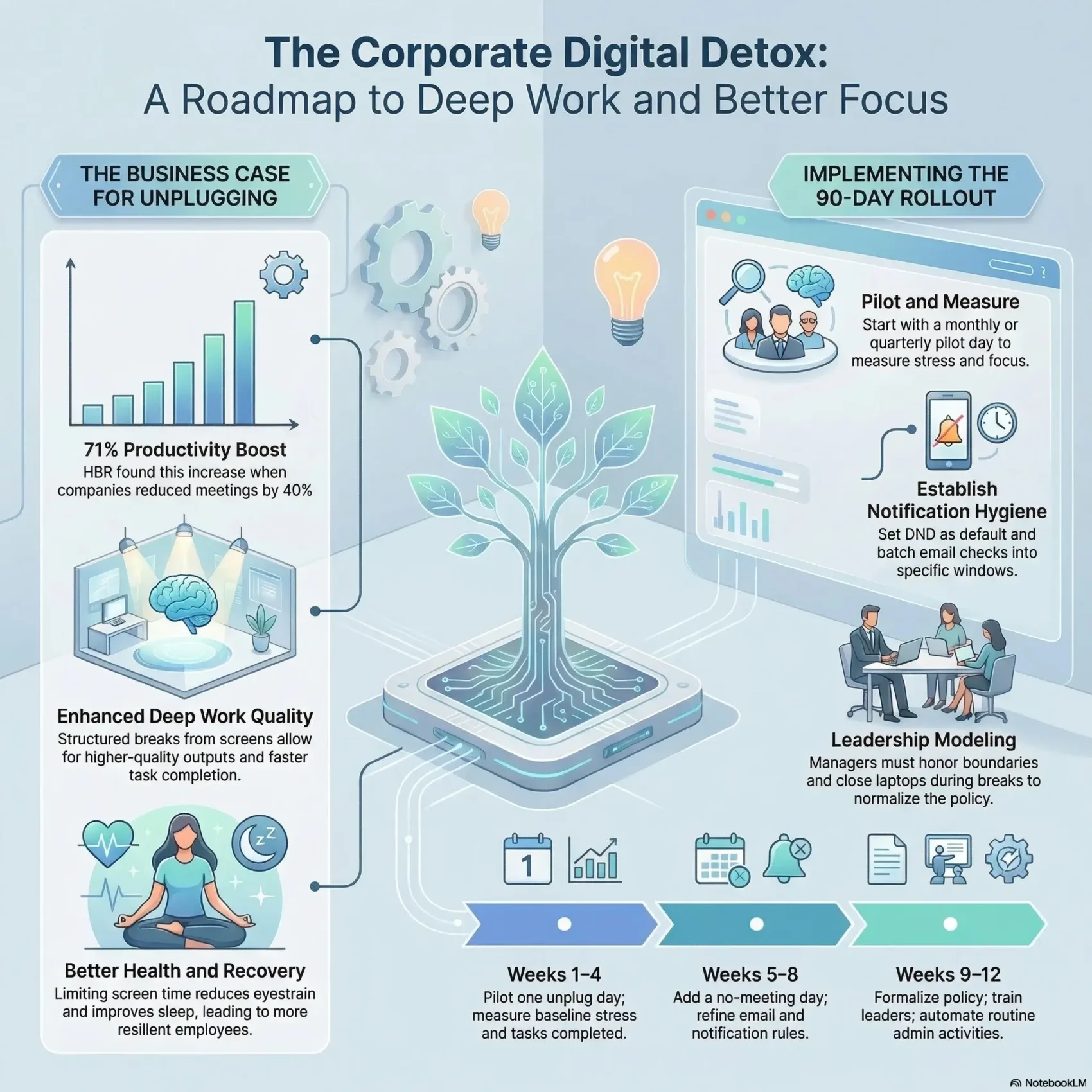
Last Updated on April 1, 2026
Work today blends with every hour of your life, and that makes staying focused harder than ever. Since remote work rose sharply, teams rely on email, phones, and constant meetings. That barrage of notifications can raise stress and erode attention.
A corporate digital detox frames a practical fix: company-led unplug days and clear boundaries that let your team step back from screens while keeping essential work running.
Unplug days are a strategic move for modern workplaces. They give your people quiet blocks to do deep work, solve problems, and align as a team. Leaders who model this behavior help normalize focused time.
This article maps a practical path: why these breaks matter, the measurable benefits for health and throughput, how to design unplug windows for hybrid teams, and a 90-day rollout you can try. For an easy routine to adapt, see a simple unplug routine you can pilot with your staff.
Key Takeaways
- Unplug days create protected time for focus and creativity.
- Structured boundaries reduce device noise and employee stress.
- Leaders should model tech restraint to make norms stick.
- These practices improve well-being and measurable team results.
- You can pilot a 90-day plan that fits hybrid and remote work.
Why a Digital Detox Belongs in Today’s Workplace
Today’s tools let teams move fast — but that same speed can scatter attention. You gain instant collaboration, file sharing, and flexible remote work, yet constant reachability can侵act your privacy and focus.
The paradox of productivity: when technology helps—and hurts
Technology powers global teams and real-time problem solving. At the same time, multiple apps, feeds, and notifications create steady distractions that interrupt deep work and harm mental health.
What a digital detox really means at work (without going “off the grid”)
A practical digital detox sets clear boundaries, not absence. You batch messages, limit notifications, and schedule focus blocks so people can concentrate when it matters most.
“Small, predictable pauses from the noise restore focus and lower stress.”
- Make quiet windows and define true urgencies.
- Reduce impulsive phone and screen checks with simple habits.
- Honor team expectations so collaboration continues on your terms.
Business Benefits You Can Expect from Unplug Days
When you schedule screen-free work blocks, the payoff shows up in calmer teams and sharper results. These windows cut the barrage of messages and let employees think without constant interruptions.
Lower stress and better mental health for your team
Structured unplug windows reduce stress by limiting constant media and message checks. You’ll notice less anxiety and clearer thinking across your staff.
Improved focus, deeper work, and measurable productivity gains
With fewer interruptions, your team finishes more tasks on time and hands-offs drop. Focus time boosts productivity and higher-quality outputs.
Health boosts: fewer screens, better sleep, and reduced eyestrain
Limiting evening screen time improves sleep hygiene. Daytime breaks cut eyestrain and headaches, so employees return feeling refreshed.
Stronger relationships and a healthier work environment
“Small, predictable pauses from the noise restore focus and lower stress.”
Face-to-face chats and offline activities strengthen bonds and trust. Over weeks, these small practices compound into a healthier work environment for everyone.
How to Design Company-Wide Unplug Days That Actually Work
Design unplug days with clear rules so deep work becomes a predictable part of your week. Start by piloting a single unplug day to test coverage and emergency paths. Use that test to decide if a weekly no-meeting day or a monthly reset fits your team.
Pick the right cadence
Begin small and scale. A pilot day lets you map critical responsibilities and measure impact.
HBR found productivity rose 71% when meetings were cut by 40%, so protect at least one day for deep work.
Device-free zones and meeting rules
Create places and times where laptops and phones stay closed by default. Keep meetings short, share agendas, and build in breaks to avoid screen fatigue.
Notification hygiene and email windows
Set DND as the default, schedule email check windows, and approve app blockers to stop attention leaks. Fewer interruptions mean fewer context switches and faster task completion.
Mindful breaks and clear escalation rules
Encourage short walks, stretch sessions, or offline note-taking between blocks. Define what is truly critical versus what can wait for the next response window.
- Pilot, then scale cadence to weekly or monthly.
- Shorter meetings with agendas and breaks.
- DND default, email windows, and approved app blockers.
- Device-free zones and clear escalation rules.
Corporate Digital Detox Policy and Boundaries
Set clear after-hours rules so your team knows when to step back and recharge. A written policy protects downtime and makes expectations fair across the workplace.
After-hours communication norms and response-time expectations
Discourage non-urgent messages outside business hours. Define response windows so employees can expect next-day follow-up by default.
Reserve urgent channels for true emergencies and require urgency tags in subject lines so everyone knows what needs immediate attention.
Clear do’s and don’ts for phones, emails, and workplace chat
- Do: Use scheduled send, set auto-away messages, and mark urgent items clearly.
- Don’t: Expect instant replies to phones or chat after hours unless on a rota.
- Switch to in-person or asynchronous notes when a topic can wait.
Change management: leadership modeling, team agreements, and compliance
Leaders must model the policy so teams follow. Teams should create short written agreements and review them quarterly.
“When leaders honor boundaries, the whole team follows.”
Practical tips: use calendar blocks, fair rotations for on-call staff, and quick pulse checks to keep the policy working.
Making Unplug Days Work for Remote and Hybrid Teams
Remote and hybrid teams need simple systems that keep service steady while protecting focus time. Clear handoffs and predictable windows make an unplug day realistic across time zones.
Asynchronous workflows and automation
Batch your emails into set check windows and schedule social media with platforms like Loomly so employees aren’t tethered to feeds all day.
Automate routine admin with tools like Smart Service and its QuickBooks sync to cut manual reentry and free time for deeper work.
Home boundaries that protect recovery
Create a separate workspace, keep devices out of the bedroom, and make meals phone-free to support sleep and health.
Use simple apps and settings—scheduled send, calendar blocks, and focus modes—to signal availability and reduce interruptions.
- Align shared hours for collaboration and clear off-hours across time zones.
- Prepare a day-before checklist so employees can hand off context before an unplug day.
- Provide playbooks for customer-facing roles: auto-replies, scheduled content, and escalation rules.
“Small routines and a few automation tools let your workplace protect focus without losing responsiveness.”
Measure, Optimize, and Scale Your Digital Detox
Track small signals—like calendar focus minutes—to reveal big gains in work quality. Start by setting baseline metrics so you can show how unplug days affect productivity and team well‑being.
Baseline and track: use pulse surveys for stress, calendar analytics for focus time, meeting counts and duration, and task throughput in your work tracker. These measures give clear before/after comparisons.
Gather feedback and iterate
Collect structured feedback from employees and managers each week. Use that input to tweak notification rules, escalation paths, and meeting limits for clarity and fewer distractions.
Sample 90-day rollout
- Weeks 1–4: pilot one unplug day, measure stress, time in focus, and tasks completed.
- Weeks 5–8: add a no‑meeting day, refine email windows and phone rules, run A/B tests.
- Weeks 9–12: formalize policy, train leaders, automate routine activities, and publish results.
“Fewer meetings often produce big productivity gains; measure meeting cuts alongside output.”
As you scale across companies, keep dashboards and short updates so employees see progress and habits stick.
Conclusion
A clear plan for unplug days helps your people protect focus without sacrificing results, and it creates a healthier work environment that lasts.
Start small: set one unplug day, trim meetings, and flip notifications to DND during focus windows. These steps show quick benefits—calmer thinking, better sleep, and stronger team relationships.
Leaders should model simple example behaviors: close the laptop during breaks, delay messages after hours, and name focus time. Ask each employee to try one new habit this week—phone-free meals or a shorter check window—to build momentum.
Commit to a 90-day plan, measure outcomes, and share wins. For a practical next step, see our productivity guide to launch tools and routines that make a healthier work environment the new way of working.