Updated August 2026. This review reflects Clay’s current Free / Launch / Growth / Enterprise structure, the dual Actions-and-Data-Credits system introduced on 11 March 2026, and the Claygent, Audiences, Signals and Functions features as they ship today.
If you last looked at Clay when it sold Starter, Explorer and Pro plans, almost every number you remember is obsolete. Clay collapsed three self-serve tiers into two, split credits into two separate currencies, and cut marketplace data costs by 50–90% on most providers.
That change matters more than any feature on the roadmap. It decides what Clay actually costs you per enriched contact — and whether the tool still earns a slot in your stack.
This review covers what Clay does in 2026, what you will really pay, where it beats a plain database, and who should look elsewhere.
Key Takeaways
- Clay overhauled pricing on 11 March 2026. Starter ($149), Explorer ($349) and Pro ($800) are retired for new customers; Launch (from $185/mo) and Growth (from $495/mo) replaced them.
- Credits now split in two: Data Credits buy third-party data, Actions pay for the platform work. Both are consumed per enrichment step, not per contact.
- Enrichments that return nothing cost neither Data Credits nor Actions — a meaningful change from the old model.
- Native CRM sync, HTTP API and webhooks start at Growth. If your workflow touches HubSpot or Salesforce automatically, Launch will not do.
- Clay is an orchestration layer, not a CRM. It complements your system of record and your sequencer rather than replacing them.
Quick Verdict: Is Clay Worth It in 2026?
When speed to personalization matters, Clay compresses pre-outreach work from days into hours. It builds lists, enriches them across 150+ providers, scores them against your ICP, and hands finished rows to your CRM or sequencer.
Who benefits most: outbound teams, RevOps functions and agencies that want control over which data source runs when, and are willing to build that logic themselves.
- Immediate win: fresher profiles and signal-driven timing lift reply rates well before you touch copy.
- Stack fit: not a CRM. Clay has a native sequencer now, but multi-step campaigns still live better in Instantly, Smartlead or Outreach.
- Cost reality: usage-based, not seat-based. Seats are unlimited on every plan; your bill tracks workflow volume.
Verdict: worth testing if data quality and flexible provider chains are what you are missing. Skip it if you want an all-in-one sender or nobody on the team will own workflow upkeep.
Try Clay for faster prospectingWhat Changed in Clay During 2026
Five shifts matter if your last hands-on experience predates spring 2026.
1. Two plans instead of three. Launch and Growth replaced Starter, Explorer and Pro. Existing self-serve customers keep legacy pricing indefinitely, but the window to move between legacy tiers closed on 10 April 2026.
2. Dual currency. Data Credits pay data partners. Actions pay for Clay running your table. Previously a single credit covered both, which hid where money actually went.
3. Data got cheaper. Clay negotiated volume discounts with its 150+ partners and passed them through — the most-used enrichments cost roughly half the credits they used to.
4. Failed lookups are free. If an enrichment returns no result, you are charged neither a Data Credit nor an Action. This closes the biggest source of surprise bills under the old system.
5. The product widened. Audiences centralizes first- and third-party data, Functions let you define scoring logic once and reuse it everywhere, Signals covers job changes and web intent, and a Clay MCP server plus an agent CLI opens the platform to AI agents directly.
“Re-run your cost model. The plan names changed, but the per-record economics changed more.”
What Clay Is and Who Should Use It
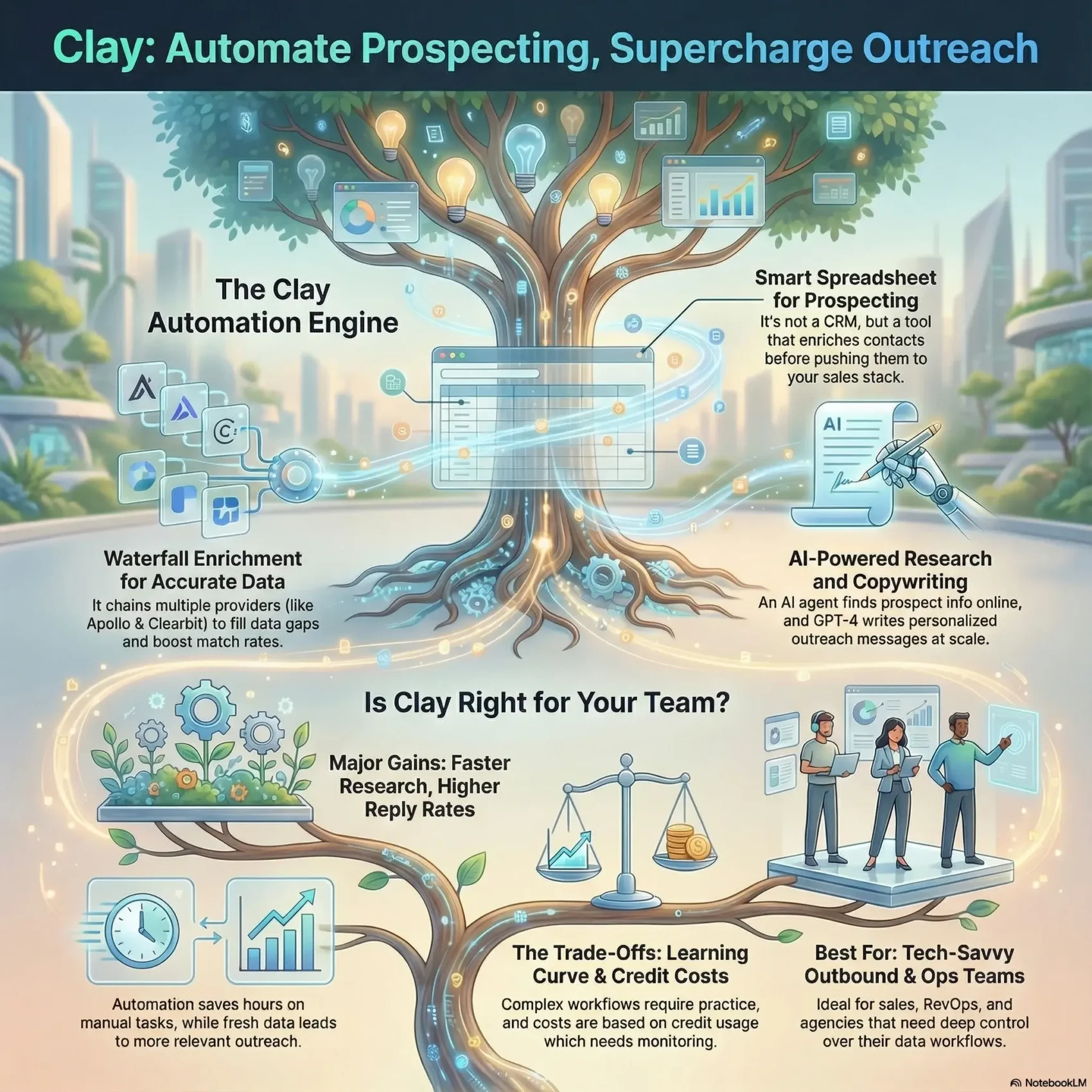
Clay works like a living spreadsheet that enriches contacts, scores them, and fires actions into your stack. Rows are records, columns are steps, and each column can chain lookups, apply logic, call an AI model, or push data outward.
Live data replaces stale exports. Clay queries Apollo, People Data Labs, Clearbit, Crunchbase, Hunter, Dropcontact and 150+ others in sequence, so fields stay current instead of ageing in a CSV.
Built for: growth teams, SDR organisations, RevOps groups, agencies and enterprises running outbound at volume. You will get the most from it if someone enjoys spreadsheet-style control and iterating on rules.
- Best fit: teams that need flexible automation and want to choose their own providers per segment.
- Governance: agencies and RevOps benefit from standardising enrichment and scoring across clients or regions. Our RevOps efficiency playbook covers where data quality sits in the wider funnel.
- Limit: small teams with tight budgets and no appetite for configuration will find simpler tools cheaper to run.
For context on how this fits alongside forecasting, engagement and intelligence tooling, see our roundup of RevOps automation tools.
Core Features That Move the Needle
Chained lookups, signal-driven timing and on-point messaging are where the hours actually come back.
Waterfall enrichment for fuller profiles
Waterfall enrichment queries providers in a priority order and stops at the first verified hit. Where one source has a gap, the next fills it — which is why multi-provider approaches consistently beat betting on a single database.
End every chain with a validation step so only verified fields move downstream. That protects sender reputation and keeps bounce rates low.
Signals and intent for better timing
Clay tracks job changes, promotions, new hires, company news and social activity on Launch and above. Web intent signals and webhook-triggered automation require Growth.
Timing beats volume. A message that lands two weeks after a champion changes companies outperforms the same message sent cold.
Claygent for web-scale research
Claygent is Clay’s AI research agent. Three native models cover most work, priced per row:
- Helium (1 credit): high-volume lookups and simple extraction.
- Neon (2 credits): qualification and structured multi-field answers.
- Argon (3 credits): genuine multi-step research where the answer sits several clicks deep.
Frontier models such as GPT-5.1 and Claude 4.6 Sonnet are also available, billed on actual token consumption with no markup. Variable-priced models show an estimate marked with a tilde before you run.
Model choice is a budget decision. Defaulting everything to Argon triples the bill for work Helium would have handled.
Functions, AI formulas and personalized copy
AI formula columns turn plain-English instructions into working logic without code — normalising titles, extracting tech stacks, classifying industries. Functions, added in March 2026, let you define that logic once and reuse it across every table.
Personalized copywriting then pulls from the enriched profile to draft short openers that reference something real rather than a merge tag.
Explore Clay core featuresClay Pricing 2026: What You Actually Pay
Clay charges by usage, not by seat. Every plan includes unlimited seats and tables, so team size does not move your subscription cost.
| Plan | Price | Monthly allowance | Key unlock |
|---|---|---|---|
| Free | $0 | 100 Data Credits + 500 Actions | 200 rows per table, waterfalls, Claygent, BYO API keys |
| Launch | From $185/mo ($167 annual) | 2,500 Data Credits + 15,000 Actions | Phone enrichment, signals, campaign integrations, Functions |
| Growth | From $495/mo ($446 annual) | 6,000 Data Credits + 40,000 Actions | CRM auto-sync, HTTP API, webhooks, web intent, priority support |
| Enterprise | Custom, annual commitment | 100,000+ Data Credits + 200,000+ Actions | SSO, RBAC, bulk enrichment, warehouse sync, growth strategist |
Both Launch and Growth run on expandable tiers: you can raise your Action allowance or top up Data Credits without jumping a plan. A 14-day trial is available without a credit card.
How Actions and Data Credits differ
Data Credits buy the data itself — an email, a mobile number, a firmographic field from one of Clay’s 150+ partners. They start at roughly $0.05 each and get cheaper as volume rises.
Actions measure Clay’s own work — running a table, calling a provider, invoking an AI model, exporting a row, pushing to your CRM. They cost under a cent each.
The distinction has a practical consequence. If you bring your own API keys, you skip Data Credits entirely and pay only Actions. That used to be effectively free; it is not anymore.
Rollover, top-ups and the fine print
- Data Credits roll over on Launch and Growth up to 2× your monthly allowance. Actions reset each cycle and do not roll over.
- Top-up credits carry roughly a 30% premium over your plan rate.
- Annual billing saves about 10% and delivers credits up front, but locks in twelve months before you know your real usage pattern.
- Legacy Starter, Explorer and Pro customers keep their pricing indefinitely; switching between legacy tiers closed on 10 April 2026.
Practical ways to control spend
Build lean chains: filter first, enrich only qualified rows, and never run every provider on every record.
- Qualify before you enrich. Scoring a company with a cheap model and discarding poor fits typically cuts total burn 40–60% versus enriching everything.
- Match the Claygent model to the task rather than defaulting to the strongest one.
- Check the credit dashboard weekly to spot the two or three columns consuming most of the budget.
- Measure cost per qualified lead before you scale, not after.
Tip: if your workflow needs CRM auto-sync, HTTP API or webhooks, budget for Growth from the start. Discovering the gate mid-build is the most common planning mistake.
Check Clay pricing and creditsSetting Up Your First Clay Workflow
Start lean and build confidence before you scale. The order of your columns decides both accuracy and cost.
Corner pieces: the fields that unlock everything else
Begin with a small table. For companies, that means domain and company LinkedIn URL. For people, full name plus person LinkedIn URL. These identifiers drive accurate matching and prevent the mismatches that poison a list later.
Use “Add enrichment” to chain providers that fill the gaps, then close with a validation provider so only reliable records survive.
Test, validate, then scale
Run a slice of your list first — a few dozen rows is enough. Spot-check the enriched output against reality. Only once match quality clears your bar should you add scoring, Claygent research and personalized hooks.
“Start small: enrich, validate, then sync with your CRM once accuracy meets your bar.”
- Save the working flow as a template so the next campaign starts from a known-good base.
- Keep the first version lean: enrich, score, write an intro, route to the sequencer.
- Add conditions and fallbacks later, once you know which edge cases actually occur.
If you are still shaping the process rather than the tooling, our guide to automating repetitive work is a useful companion.
Build your first Clay workflowHow Enrichment Actually Works Inside Clay Tables
Each column behaves like a mini workflow: it looks up a fact, cleans it, scores it, and passes the result along.
Start simple. Three to five core columns that fetch a domain or LinkedIn URL, validate the contact and apply a score will teach you more than a fifteen-step chain you cannot debug.
- Chain multiple providers to lift match rates and cover regional gaps that any single source leaves.
- End chains with validation so only verified fields push downstream.
- Add logic that skips low-signal rows entirely — the cheapest enrichment is the one you never run.
- Use AI formula columns for conditional logic; they cost nothing and keep expensive steps behind a gate.
Finish by routing qualified rows outward through native integrations or webhooks, and document what each column does in its description. Six months later, that documentation is the difference between a maintainable flow and a rebuild.
CRM, Sequencer and Workflow Integrations
Link enrichment to action: a finished row can trigger a sequence, update a record or fire a webhook without anyone copying and pasting.
Clay connects to the tools your reps already live in. HubSpot and Salesforce sync contacts, notes and scores both ways. Data warehouse connectors cover Snowflake, BigQuery, Databricks, Postgres and Fivetran.
For sending, you can push ready rows into Instantly, Smartlead, Salesloft, Outreach or lemlist — or use Clay’s native sequencer for lighter volumes. Webhooks and Zapier handle anything bespoke.
- Plan gate: CRM auto-sync, HTTP API and webhook automation require Growth. Launch covers campaign integrations only.
- Standardise handoffs: when a row hits “qualified”, route it to one owner and write outcomes back so context survives.
- Bring your own keys: using your own provider credentials skips Data Credits and improves coverage on segments you already pay for.
If you are consolidating enriched records into a single profile across marketing and sales, our overview of customer data platforms covers where that data should ultimately live.
Real-World Performance: Personalization and Time Saved
When live profile data drives the message, reply rates and booked meetings climb noticeably. Openers built from a funding round or a job change read as relevant rather than templated.
The bigger gain is cycle time. Enrichment, scoring and draft copy run in one pass, which compresses the gap between list creation and first touch from days to hours.
Clay’s own published case studies report figures such as +140% outbound-sourced pipeline at Intercom and 2× cold email performance at Rippling. Treat vendor numbers with appropriate scepticism — they are selected examples, not benchmarks — but the direction is consistent with what practitioners report.
- Personalized openers from live data lift reply rates and meeting-booked percentage.
- Example flow: pull title from a people provider, funding from Crunchbase, then write an opener referencing the raise.
- Handoffs into sequencers get smoother because the contact arrives already scored and validated.
How to measure it: track reply rate, meetings booked and credits consumed per qualified lead. Expect compounding returns as prompts and scoring rules mature over two or three campaign cycles. For the wider market context, see our breakdown of 2026 sales trends.
“Start with clean inputs and clear ICP rules — these features work best when your data and criteria are well defined.”

Pros and Cons
| Strengths | Limitations |
|---|---|
| 150+ providers in one waterfall, with genuine coverage depth | Real learning curve once chains run ten or more steps |
| Unlimited seats on every plan, including Free | Two credit currencies make forecasting harder than a flat rate |
| Failed lookups cost nothing since March 2026 | CRM sync, HTTP API and webhooks gated behind Growth |
| Claygent research plus reusable Functions cut manual work | Not a CRM; still needs a system of record alongside it |
| Deep integrations and a free tier for prototyping | Native sequencer is light next to dedicated campaign tools |
“Weigh your appetite for configuration against the gains in accuracy, personalization and time saved.”
Limitations You Should Plan Around
Knowing the edges helps you design handoffs so pipeline tracking does not break.
Clay is a research and preparation engine, not your system of record. It does not manage deal stages, forecasting or revenue reporting. Your CRM keeps that job.
Expect a genuine ramp if the team is new to logic-driven automation. Train two power users and document flows rather than hoping the knowledge spreads on its own.
Outreach is largely pre-sequencing. The native sequencer handles simple sends, but multi-step campaigns with deliverability tooling belong in a dedicated platform. Data quality also depends on the providers you connect — Clay orchestrates sources, it does not manufacture coverage where none exists.
- Complement, don’t replace: Clay enriches and routes; your CRM owns the pipeline.
- Cost management: two credit pools require active monitoring as volume grows.
- Process: document columns so flows stay maintainable when people move on.
Clay vs Alternatives: Which Fits Your Workflow?
The real choice is between a composable toolkit and an all-in-one platform. Pick the model that matches how your team works, not the longer feature list.
| Option | Strongest at | Choose it when |
|---|---|---|
| Clay | Provider choice, custom scoring, pre-sequencing logic | You want control and someone will own the build |
| Apollo / ZoomInfo | Large built-in databases and bundled sequencing | You need breadth in one contract, not depth of logic |
| Lusha | Browser-based lookups during live prospecting | Reps prospect one profile at a time in LinkedIn |
| Instantly / Smartlead | Multi-step sending and deliverability management | You already have data and need volume sending |
| folk / lightweight CRM | Simple contact management and pipeline tracking | You need a system of record, not an enrichment engine |
The practical combination is usually a database for list pulls, Clay to enrich and score across sources, then a sequencer for delivery. Our Lusha review covers the browser-extension route, and our folk.app review looks at the lightweight CRM side of the same stack. For a hands-on walkthrough of Clay’s table mechanics, see our earlier Clay.com review.
“Compare cost models, not just features: subscription and usage-based pricing diverge fast at volume.”
Best Use Cases
Clay pays off wherever clean profiles and fast personalization decide the outcome.
Outbound sales — build targeted lists, score by ICP, and pass only qualified rows to the sequencer. This is the core use case and where most teams see returns first.
Recruiting — spot recent job switchers, enrich profiles with current titles, and reach out to verified personal addresses with context that a generic InMail lacks.
VC and business development — track funding events and hiring velocity to prioritise which founders or partners to approach this month rather than next quarter.
- Marketing ops: clean and enrich contact records at scale to improve segmentation and nurture performance.
- Account-based programmes: combine industry, size and tech stack for company targeting. Our guide to account-based strategy covers how to structure those tiers.
- Handoff quality: enriched, scored records reduce the friction between marketing and sales — the theme of our piece on sales and marketing alignment.
“Blend automation with human review on sensitive segments to keep quality high.”
Who Gets the Most Value — and Who Won’t
Good fit: outbound teams, recruiters, agencies, RevOps groups and growth marketers who can configure provider chains and iterate on prompts. Agencies in particular benefit from standardising enrichment across clients and sharing one credit pool across unlimited seats.
Poor fit: bootstrapped teams on very tight budgets, organisations that want a single all-in-one app, and anyone expecting set-and-forget behaviour. Clay rewards periodic optimisation; it does not run itself.
- High-volume outreach that depends on accurate data sees the largest lift.
- Recruiters gain most from job-change signals, where timing is the whole advantage.
- Teams that enjoy tuning logic and scoring will thrive; others will find the ceiling frustrating rather than freeing.
Buyer’s Checklist Before You Commit
Start with clear goals: who you want to reach, what success looks like, and which signals actually predict a deal.
- Define your ICP and confirm the providers you need are in Clay’s marketplace.
- Map the full flow — enrichment, scoring, copy, CRM sync, sequencer handoff — and check which steps require Growth rather than Launch.
- Estimate monthly Data Credits and Actions separately from your list size and step count.
- Run a pilot on a small list and measure reply rate, meetings booked and credits consumed.
- Confirm CRM sync rules (create versus update) and field mapping to avoid duplicate records.
- Assess who will maintain prompts, rules and fallbacks once the novelty wears off.
“Decide based on pilot data, not assumptions.”
Final step: run the maths on cost per meeting or cost per qualified lead, and make the call from that number.
Start a Clay pilotVerdict
Clay prepares prospects with fresh context so reps spend their time on conversations instead of research. That is the whole proposition, and it delivers on it.
The March 2026 overhaul made the economics clearer and, for most data-heavy workloads, cheaper. It also added a second currency to forecast, and moved CRM sync behind a higher tier. Both are worth modelling before you sign.
Waterfall enrichment, signal tracking, Claygent research and reusable Functions genuinely cut manual work. Clay pairs with HubSpot, Salesforce and your sequencer rather than replacing them, so plan the handoffs deliberately.
The practical test: take the free tier or the 14-day trial, run forty rows from your real target list, and compare hit rate and cost per record against what you use today. Coverage varies enough by region and seniority that no review — including this one — substitutes for that check.
Found this useful?
Make SmartKeys a preferred source on Google, and our articles will surface more often in your Top Stories, AI Overviews, and AI Mode.
Add as Preferred SourceFAQ
What does Clay do for prospecting and enrichment?
How much does Clay cost in 2026?
What is the difference between Actions and Data Credits?
FAQ
What does Clay do for prospecting and enrichment?
Clay builds and enriches prospect lists, scores them against your ICP, and routes finished records to your CRM or sequencer. It queries 150+ data providers in a waterfall so records come back fuller than any single source would return, then applies your own logic on top.
How much does Clay cost in 2026?
Clay offers a free plan, Launch from $185 per month, Growth from $495 per month, and custom Enterprise pricing on an annual commitment. Annual billing saves about 10%, bringing Launch to roughly $167 and Growth to roughly $446 per month. All plans include unlimited seats.
What is the difference between Actions and Data Credits?
Data Credits pay for third-party data bought through Clay’s marketplace — emails, phone numbers, firmographics. Actions pay for the platform work Clay does: running a table, calling a provider, invoking an AI model or exporting a row. Data Credits start around $0.05 each; Actions cost under a cent.
What happened to the Starter, Explorer and Pro plans?
Clay retired them for new customers on 11 March 2026 and replaced them with Launch and Growth. Existing self-serve customers on Starter ($149), Explorer ($349) or Pro ($800) keep their pricing indefinitely, but the window to switch between legacy tiers closed on 10 April 2026.
Do failed enrichments cost credits?
No. Since the March 2026 change, an enrichment that returns no result consumes neither Data Credits nor Actions. This removed one of the largest sources of unexpected spend under the previous single-credit system.
Do unused credits roll over?
Data Credits roll over on Launch and Growth up to twice your monthly allowance, so a 6,000-credit plan can bank 12,000 in total. Actions reset every billing cycle and do not roll over. Enterprise customers can carry up to 15% of the prior year’s purchased credits on renewal.
How does waterfall enrichment improve data quality?
A waterfall queries providers in a priority order and stops at the first verified hit. If one source lacks a field, the next is tried. That reduces missing data and raises match rates for emails, titles and firmographics without any manual lookups, and it covers regional gaps that any single database leaves.
Which integrations does Clay support?
Native CRM sync with HubSpot and Salesforce, data warehouse connectors for Snowflake, BigQuery, Databricks, Postgres and Fivetran, plus outreach handoffs to Instantly, Smartlead, Salesloft, Outreach and lemlist. HTTP API integrations, webhooks and CRM auto-sync require the Growth plan or above.
Can I use my own API keys?
Yes, on every plan including Free. Bringing your own provider keys means you skip Data Credits entirely and pay only Actions for the platform work. AI runs are faster on Clay’s own keys, however, because of the higher rate limits Clay has negotiated with model vendors.
Which Claygent model should I use?
Helium at one credit per row handles high-volume lookups, Neon at two credits suits qualification and structured answers, and Argon at three credits is for genuine multi-step research. Frontier models such as GPT-5.1 and Claude 4.6 Sonnet bill on actual token use. Matching the model to the task is one of the easiest ways to cut spend.
Is Clay a replacement for my CRM?
No. Clay enriches and orchestrates data before syncing it outward. Keep a primary CRM for deal tracking, pipeline management and reporting, and use Clay for data hygiene, scoring and pre-outreach preparation.
How does Clay compare to Apollo or ZoomInfo?
Apollo and ZoomInfo bundle a large database with sequencing and intent data. Clay owns no database and instead orchestrates 150+ providers with custom logic on top. Choose Clay for depth of workflow control; choose a bundled database for breadth in a single contract. Many teams run both.
How do I control costs and avoid credit burn?
Qualify rows before enriching them, filter early, avoid running every provider on every record, and pick the cheapest Claygent model that does the job. Review the credit dashboard weekly to find the two or three columns consuming most of the budget, and measure cost per qualified lead before scaling.
Is there a free plan or trial?
Yes. The free plan includes 100 Data Credits and 500 Actions per month, unlimited seats and tables, multi-provider waterfalls, Claygent and a 200-row limit per table. A 14-day trial of the paid tiers is also available without a credit card.
How are GDPR and data privacy handled?
Clay is GDPR and CCPA compliant and holds SOC 2 Type II, ISO 27001 and ISO 42001 certifications, with opt-out support available. As with any enrichment vendor, you remain responsible for having a lawful basis for your own outreach in each market you target.