Tools
Tools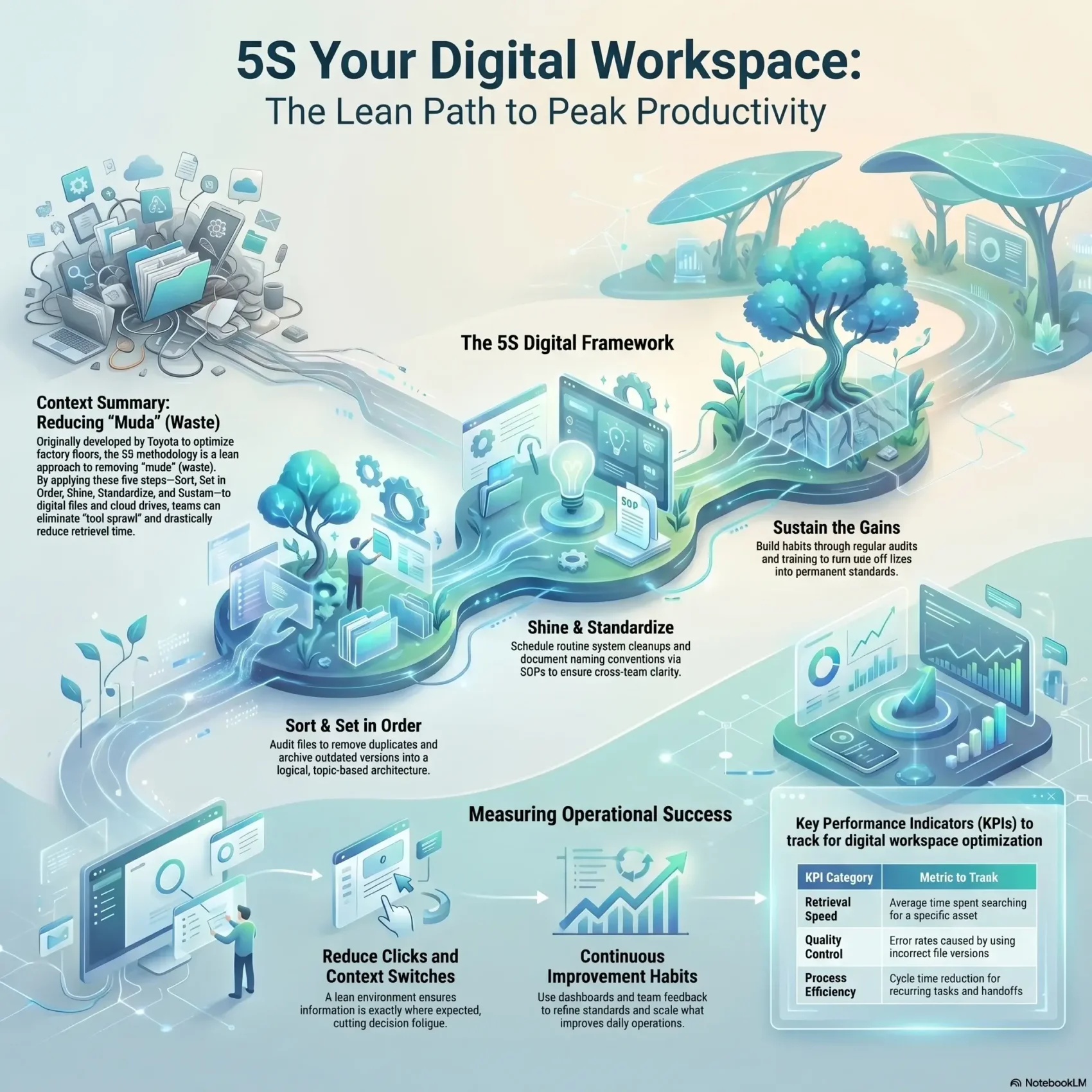
Last Updated on June 1, 2026
The 5S methodology began on Toyota shop floors to remove waste and speed up work. You can apply the same ideas to your files, emails, and cloud drives to cut wasted time and reduce errors.
In this section, you’ll see how a lean approach reshapes your environment so information is where you expect it. Small, repeatable steps help you move faster and hit goals without hunting for assets or links.
You will get practical guidance on sorting, setting order, shining up clutter, and making standards that stick. That makes teams more productive and improves efficiency across projects and business processes.
Key Takeaways
- Translate five shop-floor practices into daily routines to save time.
- A lean approach reduces clicks and context switches for better productivity.
- Clear folder naming and simple standards cut retrieval time and errors.
- Repeatable steps scale from solo work to cross-functional projects.
- Short audits and training help sustain gains and measure success.
Why a Lean Approach to Your Digital Workspace Matters Today
A lean method trims tool sprawl and makes your work environment predictable.
Modern work spans many apps, drives, and inboxes. That fragmentation slows you and your team. A clear methodology brings order, so you spend less time searching and more time on priority tasks.
Efficiency grows when you map key areas like file repositories, email, and project trackers. Start by identifying the items and workflows that cause the most friction.
With a simple strategy, you reduce errors, improve collaboration, and cut costs by removing redundant software. Management will see quick wins when you link cleaner structures to measurable goals.
- Handle tool sprawl and version chaos with one repeatable way.
- Connect your goals to folder and workflow improvements that save time.
- Prioritize areas and tasks that deliver the biggest productivity gains.

What 5S Means for Your Digital Work: From Factory Floor to Files and Folders
Tracing a shop-floor system into your file structure shows how simple rules cut chaos. The original methodology came from Toyota in the 1950s to remove waste and speed work. You’ll see how each step maps to files, folders, and everyday workflows.
Origins and connection to lean management
The method began as part of the Toyota Production System to fight muda, or waste. That lean approach built repeatable habits and clear ownership on the shop floor.
Today, the same management mindset helps teams reduce time spent hunting assets and fix slow processes.
The five principles translated for a modern environment
Each principle converts to a simple action for files and tools. Apply them in order and you get faster retrieval and fewer errors.
- Sort — remove duplicates and outdated items.
- Set in order — name and place files for quick access.
- Shine — tidy caches, versions, and permissions.
- Standardize — use templates and naming rules.
- Sustain — schedule checks and build habits.
Why this approach boosts performance and continuous improvement
When you follow the step sequence, each action supports the next. Sorting clears noise, order creates clarity, and standards lock in gains. That reduces errors and improves team performance.
“A simple, repeatable routine is the fastest way to make lasting improvement.”
Use this methodology as a low-cost way to align operations, cut waste, and make business processes more predictable.
Mapping Physical 5S to the Digital Workplace
Create clear, topic-based hubs that gather tools, procedures, and owners in one place. Treat each hub as the online equivalent of a physical work area so team members know exactly where to go for information.
Define your online work area: projects, topics, and teams
Define each area by function, not by app. A single hub for a project or topic groups related files, policies, and FAQs.
That order reduces confusion and helps your teams work faster.
Build topic-optimized pages that centralize tools and support
Standardize page layout so every hub shows tools, contact owners, support articles, and quick links in the same spots.
Centralized pages cut handoffs and gather scattered information into one system for easy retrieval.
Use deep links and clear ownership to streamline operations and communication
Add deep links to key app screens so people jump straight to the right function. List a single owner and backup contact on each page.
Lightweight management works best: assign update duties, set review dates, and connect hubs to related policies and procedures.
- Define areas by topic so team members find workspaces quickly.
- Centralize resources to reduce errors and speed processes.
- Use links and owners to keep communication clear and fast.
Sort: The First Step to Eliminate Digital Clutter
Begin with a focused audit that separates useful assets from the clutter stealing your time. This first step gives you a clear list of files, email threads, and app areas that need attention.
Run an audit across files, mail, and apps
List items by owner, purpose, and last modified date. Prioritize high-volume folders to reclaim time fast.
Apply red tags and set review dates
Mark uncertain items with who tagged them, why they may not be needed, and a review date. Move tagged assets to a holding area organized by review month to avoid premature deletion.
Archive, consolidate, or remove
Remove duplicates and outdated versions immediately. Archive completed projects and relocate items that belong to other teams. Establish clear criteria for what stays, what moves, and what goes so sorting becomes a repeatable step.
- Document file types, storage hotspots, and risky locations.
- Pair quick wins with careful review of regulated records.
- Set a cadence for mini-audits to sustain efficiency and long-term success.
Set in Order: Structure Folders, Names, and Workflows for Speed
Place essential assets where your team expects them, not where they get lost. Good order lets people finish tasks without hunting. A clear organization reduces errors and saves time.
Create a logical folder architecture aligned to teams, topics, and tasks
Design folders by topic, team, and project phase so your workspace reflects how work actually happens. Group briefs, assets, and approvals into consistent areas to cut decision fatigue.
Standardize file naming conventions for cross-team clarity
Use dates, versions, and owner initials in names so files sort predictably and cross-team communication stays clear. Make a short naming rule sheet and add it to every project hub.
Leverage cloud storage, project management, and collaboration tools
Configure agreed labels, tags, and favorites in your tools so key assets are one click away. Test retrieval with different roles to ensure the setup supports varied processes and steps.
Visual cues and shortcuts: labels, favorites, and quick-access systems
- Add emoji or color prefixes to flag status and missing items.
- Templatize folder structures so each new area starts in the right order.
- Review layout after two weeks and again at one month, then refine based on real use.
“Simple naming and fast links cut clicks and keep teams aligned.”
Shine: Keep Your Digital Environment Clean and Fast
Set predictable upkeep routines so your files and systems stay fast and reliable. A clean environment reduces slowdowns and makes day-to-day operations smoother. Small, regular chores prevent clutter from piling up and help you focus on high-value tasks.
Schedule routine cleanups: caches, duplicates, and outdated versions
Set calendar reminders for monthly and weekly steps that remove duplicates, clear caches, and archive old versions. Keep a short checklist per tool that says what to clean, how often, and who’s responsible.
Update and patch software to enhance security and performance
Patch apps and OS regularly so vulnerabilities close before they affect work. Track storage, sync errors, and backups to catch issues early and avoid interruptions.
- Automate repetitive tidy tasks with built-in utilities and vetted tools.
- Review extensions and integrations to reduce stability and security risks.
- Run quick weekly tidies of download folders and desktop icons.
You can declutter your workspace with these simple steps and invite the team to flag annoyances. Small improvements build momentum and lead to measurable improvement across your environment and operations.
digital 5S: Standardize and Sustain for Long-Term Success
Turn one-off fixes into repeatable steps that save time and reduce errors. Start by documenting what good looks like for common tasks and make those examples easy to follow.
Create SOPs, templates, and checklists for repeatable processes
Document short SOPs and checklists so every recurring process runs the same way. Build templates for folders, naming, briefs, and handoffs to cut variation and speed setup.
Train employees and reinforce best practices across teams
Deliver focused training and refreshers so your team knows where standards live and how to use them. Appoint champions who coach others and model each step during rollouts.
Audit regularly, set KPIs, and capture feedback for continuous improvement
Define simple KPIs — retrieval time, error rates, cycle time — and audit on a steady cadence. Maintain living documentation and a feedback channel so the system evolves with tools and needs.
Celebrate wins to build discipline, ownership, and engagement
Recognize quick wins publicly to build pride and reinforce the habit of continuous improvement. Small celebrations keep communication clear and motivate employees to follow best practices.
- You’ll document SOPs and short checklists so recurring work is consistent.
- You’ll deliver training and appoint champions to keep standards active.
- You’ll set KPIs and an audit cadence to measure progress and invite feedback.
“Small, repeatable steps lock in efficiency and make continuous improvement practical.”
Measure What Matters: Productivity, Efficiency, and Quality in Your Digital Workspace
Track a few clear indicators to see how your workspace habits affect day-to-day output. Start with simple, measurable goals so you don’t drown in data.
Choose metrics that align with goals: retrieval time, error rates, cycle times
Define a small set of KPIs that reflect real outcomes. Focus on retrieval time, file-related error rates, and cycle times for common tasks.
Keep dashboards simple. Show trends for productivity, efficiency, and quality by team and by workspace. Short baselines before changes let you prove impact.
Iterate your system using data, reviews, and team input
Run short reviews every few weeks to examine items that still cause friction. Correlate tool usage and folder changes with shifts in performance.
- You’ll set clear goals and pick metrics that match business objectives.
- You’ll track productivity and efficiency trends and compare before-and-after baselines.
- You’ll gather feedback from stakeholders and refine standards based on what helps daily work.
- You’ll run small experiments—like a new naming rule—and scale what improves operations.
“Simple metrics plus regular feedback make it easy to show real business value.”
Communicate wins and lessons broadly so team members see why standards evolve. That keeps communication open, builds buy-in, and makes continuous improvement a practical step for your environment.
Conclusion
Start small and focus on high-impact items. This approach helps your team cut clutter, speed routine tasks, and raise productivity across each project and workspace.
Begin with the first step—sort—then move to order and shine before you standardize and sustain. That way you build momentum and make measurable improvement while keeping managers and employees aligned.
Use templates, short SOPs, and regular audits so the methodology becomes the way teams work. Invest in training and the right tools, track simple KPIs, and direct resources where they deliver real business value.
Follow this strategy across areas, iterate as you learn, and you’ll turn small wins into lasting success for your projects, tasks, and organization.