Tools
Tools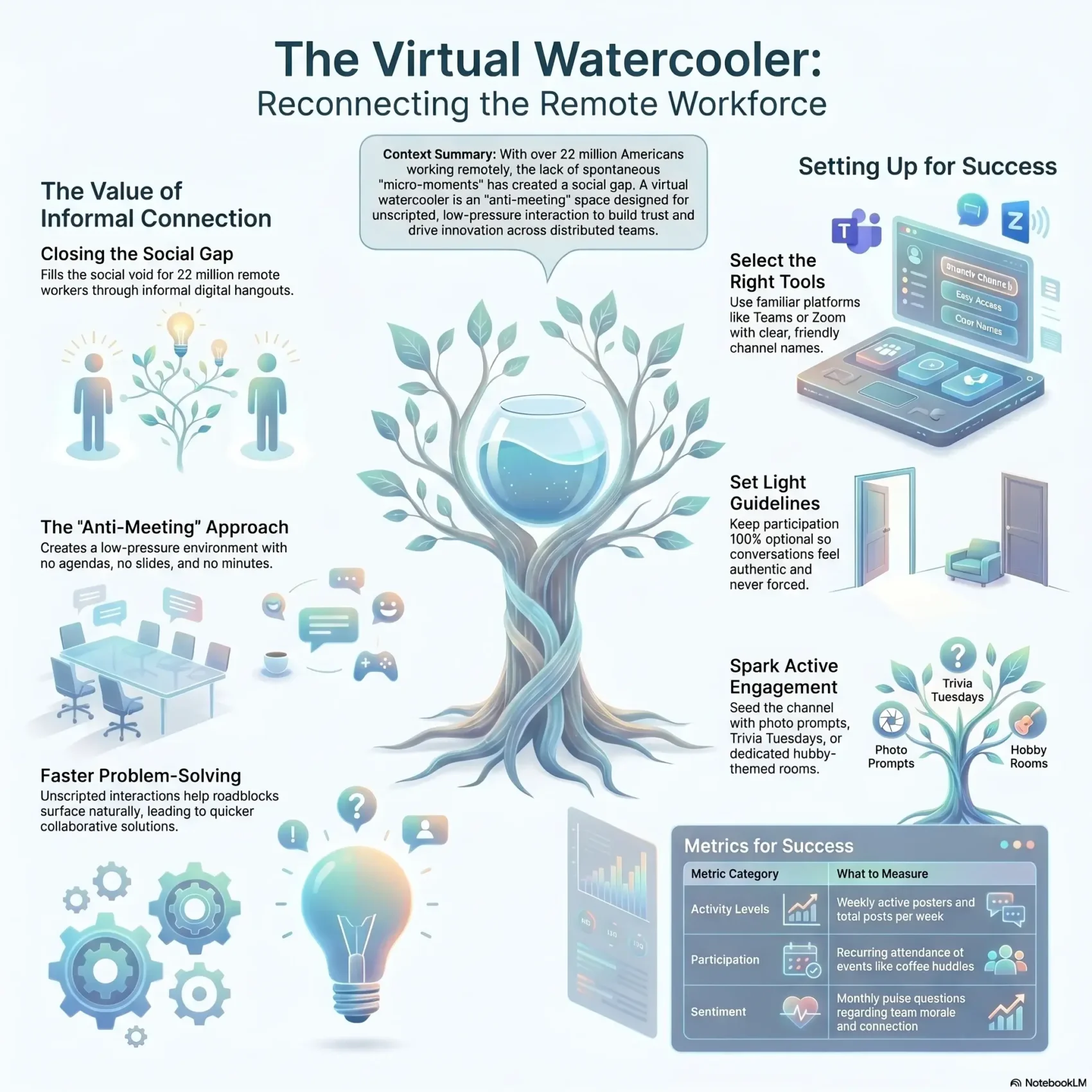
Last Updated on May 19, 2026
The rise of remote work means you and nearly 22 million Americans now log in from home, a cafe, or a shared office. A virtual water cooler recreates quick, informal chats so team members feel connected beyond tasks.
This kind of water cooler is not a meeting. It is a low-pressure space for casual conversation and light banter. Use it for memes, show-and-tell, or a quick coffee joke to keep communication friendly and human.
Pick the right platform, set light guidelines, and add tools like Krisp to keep audio clear on Zoom, Google Meet, or Microsoft Teams. The result is a welcoming environment that boosts belonging, reduces isolation, and helps employees stay energized during the work day.
Key Takeaways
- Create an always-open spot for casual chats to strengthen team bonds.
- Keep rules light so the space stays informal and low-pressure.
- Use noise-canceling tools like Krisp for clear conversation on calls.
- Try simple activities—memes, trivia, or show-and-tell—to keep it lively.
- Measure participation and tweak the approach to fit your team’s rhythm.
Why a virtual water cooler matters right now for remote teams
With almost 22 million Americans working away from headquarters, informal digital hangouts are filling a real social need. You lead a team that no longer runs into each other in hallways, so an intentional space for casual chats helps fill that gap.
Today’s remote work reality in the United States
Remote work has moved millions of employees out of the office and into home setups. That shift removes the micro-moments where people get to know one another.
The social gap: replacing office water cooler chats
Those brief exchanges once built trust and made collaboration easier. Without them, team members can feel isolated and less engaged.
- Create a low-pressure space so colleagues can drop in when it suits their day.
- Keep it optional—the “anti-meeting” approach makes conversations natural, not forced.
- Use light prompts to spark quick, off-task talks that boost teamwork and morale.
When you name the channel clearly and set friendly expectations, your team will treat casual conversation as part of how work gets done. Over time, these moments improve collaboration and make employees feel more connected across distance.
What a virtual watercooler is and how it differs from meetings
Teams that no longer share a hallway need simple, drop-in spaces where quick chats can happen. A virtual water cooler is that online spot: an always-open, informal space for small talk and friendly check-ins.
Goosechase calls it the “anti-meeting”—no agenda, no slides, and no minutes. This lets people unwind between tasks and build rapport without the pressure of a scheduled meeting.
Casual conversations vs. formal agendas
Unlike a meeting, which is goal-driven and time-boxed, this space supports unscripted conversation. Keep exchanges short: a quick thread, a voice clip, or a GIF is fine.
An always-open, low-pressure space for team members
- Open access: Join, lurk, or leave anytime.
- Light moderation: Guide tone, don’t run the chat.
- Complement, don’t replace: Use it alongside status meetings and planning sessions.
“An open channel for hobbies, news, and daily life helps relationships form naturally.”
Key benefits that boost team engagement and collaboration
Small, unscripted interactions often produce big wins for morale and teamwork. These informal chats create a low-friction way for people to connect without adding more meetings to the calendar.
Stronger bonds and trust across your remote team
You’ll see stronger bonds as employees trade quick stories and tips. Trust grows when members help in short, real-time exchanges.
Reduced loneliness and better morale over time
Regular, optional conversations reduce isolation. Over weeks, the steady social contact lifts morale and makes work feel less solitary.
Idea-sharing, innovation, and faster problem-solving
You’ll notice ideas surface in casual moments. Someone mentions a roadblock, a colleague jumps in, and solutions arrive faster.
Inclusive culture for globally distributed colleagues
An inclusive channel gives colleagues across time zones a place to be seen. Sharing daily life helps people understand work styles and communicate with more empathy.
- Clear norms: be kind, keep it light, respect boundaries.
- Less friction: noise-canceling tools like Krisp make conversations sound like office chats.
- Long-term payoff: connected employees ask for help sooner and stay engaged longer.
“Over time, your team builds a shared sense of community that feels authentic and boosts engagement.”
How to set up your virtual water cooler step by step
You can build a casual hangout that fits your team’s rhythm in just a few simple steps. Keep the process light so members feel welcome, not scheduled into another meeting.
Pick the right platform
Choose a platform that supports quick drop-ins. Zoom, Google Meet, Microsoft Teams, or Dialpad work well for chat and video.
Tip: Dialpad makes it easy to create separate rooms, and Krisp keeps audio clear during short calls.
Create a dedicated channel and name it well
Create one dedicated channel to start and give it a friendly name like Coffee Break or Water Cooler. A clear name helps members know this is a social space, not a meeting.
Set light-touch guidelines
Pin a short message with expectations: be kind, keep it light, no pressure to reply, and step out anytime. Emphasize respect and inclusion so all employees feel safe joining.
Schedule optional touchpoints
Invite people thoughtfully and offer brief, optional 10–15 minute coffee huddles once or twice a week. Seed the channel with an icebreaker question, a photo prompt, or a song to model the vibe.
- Start small: one channel, clear purpose, easy rules.
- Seed activity: post a question of the day to help members get know one another.
- Grow organically: add spin-off rooms (Pets, Food, Travel) as interest rises so the main space stays light.
“Keep it short, casual, and fun — this isn’t another meeting.”
Platforms, tools, and environments that make cooler chats work
Picking the right app and setup turns casual pauses into real connection for your team.
Choose a familiar platform so people join fast. Zoom, Google Meet, Microsoft Teams, or Dialpad work well for real-time video and group chat. Keep one place for drop-ins and another for everyday banter.
Video and chat options that fit your rhythm
Use video for high-energy moments like quick demos, celebrations, or show-and-tell. Expressions and laughter land better in video.
Use chat for low-friction threads—memes, music recs, and pet pics—that don’t need a meeting. Async chat keeps momentum without interrupting deep work.
Cleaner calls with noise cancellation
Krisp integrates with the major platform options to remove background noise. Clear audio helps people feel like they’re in the same space, even if they’re not.
Practical setup tips
- Create small video “break rooms” that people can join for a quick breather.
- Spin up interest channels (for example, #Food, #Pets, #Travel) to keep chats organized.
- Offer mobile access so employees can check in from anywhere and share a moment on the go.
- Document where to go for what—e.g., video drop-ins on Zoom, daily banter in Teams.
“When tools match how people work, short, friendly check-ins become part of your day.”
Keep norms light: cameras optional, sessions short, and no pressure to speak. When time or bandwidth is tight, suggest chat; when you want richer connection fast, choose video.
Room ideas and activities to keep conversations flowing
Fresh room themes and simple rituals keep your team’s casual chats alive and easy to join. Launch focused channels so members know where to post photos, jokes, or quick updates. A Pets room, Food channel, Travel thread, or Meme wars spot gives people a low-pressure place to share.
Try weekly rituals that set a steady rhythm. Host Trivia Tuesdays, a short coffee break drop-in, or a 10-minute show-and-tell on video to give employees a dependable moment to connect.
Seasonal events and light competitions spark participation. Run a fall baking share, a holiday sweater day, or a summer travel tips photo challenge. Use Goosechase Missions for month-long tasks that let teams get to know each other playfully.
Easy starter ideas
- Photo prompts: desk view, childhood photo, favorite vacation.
- Question of the Day: go-to coffee order or a small win this week.
- Light games: would-you-rather, quick scavenger hunts, short trivia.
“Short, regular activities help colleagues get to know one another without pressure.”
Inclusive etiquette, cadence, and measurement for sustained engagement
To keep casual chats working, set norms that make joining easy and safe for everyone. Make the channel optional, warm, and clearly labeled so team members know this is social time, not a meeting.
Make it inclusive, welcoming, and optional
Keep participation optional. Encourage people to join, lurk, or skip depending on their time and comfort. Post a short etiquette note: assume good intent, celebrate differences, keep chat workplace-friendly, and welcome new members.
Cadence ideas: drop-in break rooms, lunch hangouts, after-work socials
Offer varied rhythms so different people can take part. Try daily drop-in break rooms, a weekly lunch hangout, and a relaxed after-work social once a month.
Rotate hosts and prompts so the space stays fresh. Use video break rooms for high-energy moments and chat channels for quick posts.
Simple metrics to track participation and impact
Start with three basic measures: weekly active posters, posts per week, and returning participants at recurring events.
- Track reactions and recurring attendance to spot trends.
- Watch which topics resonate—pets, travel, or quick wins—and invest more there.
- Run a monthly pulse question to get direct feedback and tweak the experience.
“Keep it distinct from formal meetings—no agendas, no action items, just connection.”
For smoother video moments, use tools like Krisp to keep the environment clear and frustration-free. For more ideas on remote work experiences, see best practices for remote collaboration.
Conclusion
A short, friendly channel can recreate the small moments that keep colleagues connected during the workday.
Give your team a simple, always-open spot—name the channel, post a friendly prompt, and invite optional drop-ins. Use familiar platforms like Zoom, Google Meet, Microsoft Teams, or Dialpad so members join easily.
Keep it light and optional. Seed events like trivia, photo challenges, or a quick show-and-tell to keep ideas fresh. Add Krisp for clear audio and consider Goosechase for longer missions that spark playful engagement.
Track a few signals (who joins, how often, which events stick) and refine over time. Start small this week: open a short break room, post a coffee prompt, and let the space grow naturally.
When you nurture this space consistently, your colleagues will feel a stronger sense of community, trust, and support in their day-to-day work.