

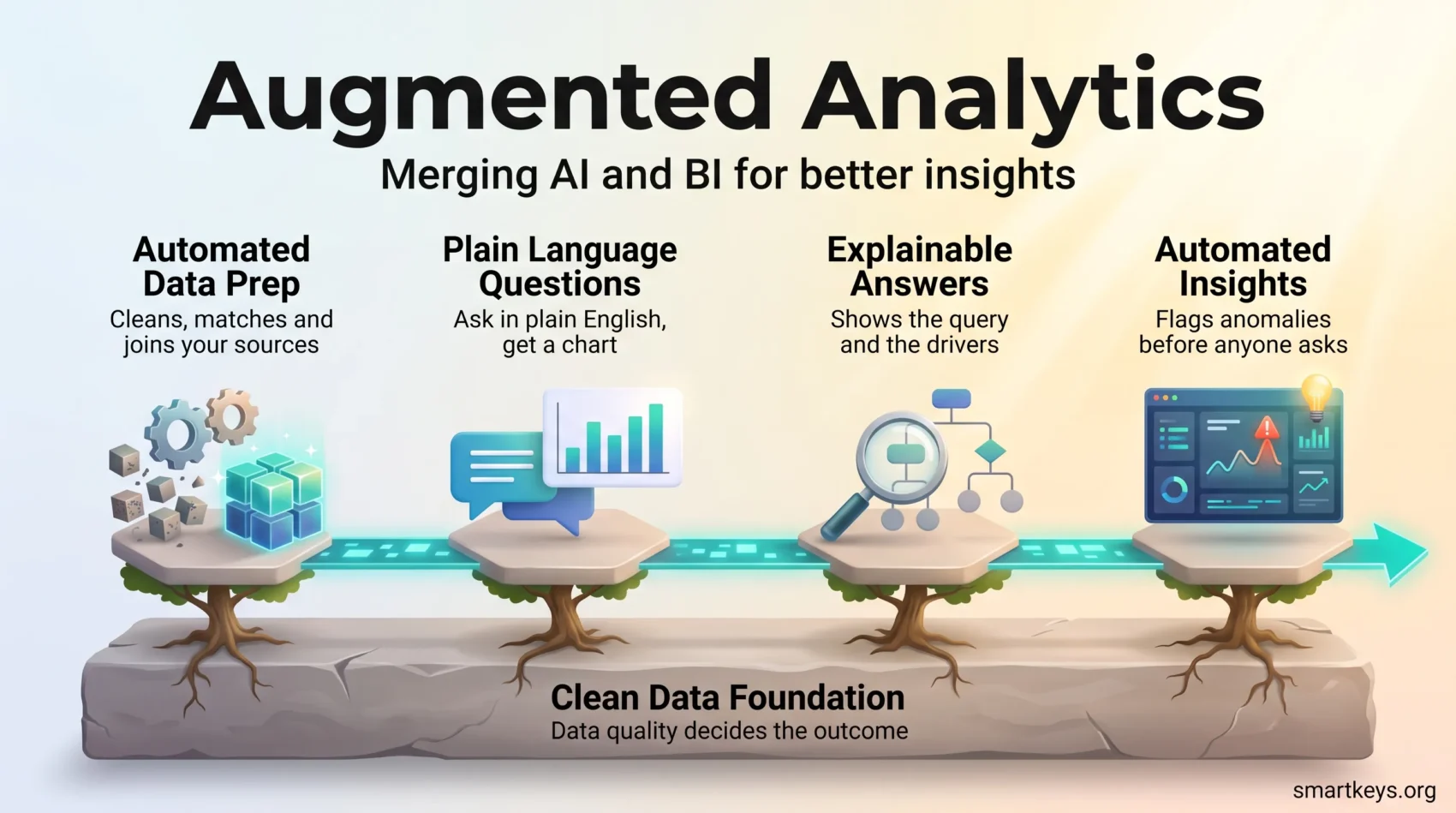
You need clear answers fast. Augmented analytics is what happens when artificial intelligence is built into business intelligence, the software your company already uses to turn raw numbers into reports and dashboards. Instead of filing a ticket and waiting days for an analyst, you type a question in plain English and get a chart, a figure and a short written explanation.
Gartner defines augmented analytics as using AI to automate analytics workflows, adding automated insights, generated explanations and collaborative exploration to the tools people already work in. Stripped of the jargon, that is three jobs: the software prepares the data, answers the question, and explains how it got there.
The value is speed with a paper trail. A marketing manager who wants to know why sign-ups dropped last week no longer waits for a dashboard change. She asks, gets a breakdown by channel, and clicks through to the table the number came from. None of this survives messy data, which is where most projects stall.
Key Takeaways
- Augmented analytics adds AI to business intelligence so non-analysts can ask questions in plain language and get usable answers.
- It automates the slow parts: cleaning data, choosing a chart, spotting an anomaly and writing the summary.
- Data quality decides the outcome. Gartner predicted in February 2025 that through 2026, organizations would abandon 60% of AI projects not supported by AI-ready data.
- Gartner has since folded the augmented analytics category into its Analytics and Business Intelligence Platforms market and opened a separate one for agentic analytics.
- Start with one measurable use case, keep a human reviewing the output, and train people before you widen access.
What augmented analytics is and why it matters now
Traditional analytics splits the work across several tools and people. Someone exports the data, someone else cleans it, an analyst builds the model, and a report lands in your inbox a week later. Augmented analytics compresses that chain into one workflow inside a single platform.
From data prep to decision in one workflow
Data preparation is the unglamorous work of getting numbers into usable shape: removing duplicates, fixing inconsistent date formats, matching a customer record in one system to the same customer in another. It has been the largest single block of most analytics teams’ time for years.
Modern platforms automate much of it. The software profiles each column, guesses its type, spots that “DE” and “Germany” mean the same country, and suggests how two tables should be joined. You review the suggestions instead of writing the rules. That is the difference between a two-day prep job and a twenty-minute one.
How generative AI opened analytics to non-analysts
The second shift is the interface. Natural language processing, the branch of AI that reads human sentences, turns “which products lost margin last quarter” into a database query. Natural language generation does the reverse, writing the sentence that goes with the chart: “Margin fell, driven mainly by three products in the accessories line.”
Every large vendor ships a version of this: Copilot in Power BI, agents inside Tableau, ThoughtSpot Spotter, Databricks AI/BI Genie, Snowflake Cortex Analyst. The buying question in 2026 is not whether a tool has a chat box, but how reliably that box returns the right number, and how differently vendors charge for it, as our comparison of Zoho Analytics and Power BI shows.
Reliability depends on the data model underneath. In the Spider 2.0 benchmark, built from real enterprise databases with thousands of columns, GPT-4o solved only 10.1% of tasks against 86.6% on the simpler first-generation benchmark, though purpose-built agents have since scored far higher on its public leaderboard. The lesson holds: plain-language querying works well against a tidy, well-labelled model and poorly against a sprawling one.
Augmented analytics compared with traditional BI
Classic business intelligence puts answers behind a queue. Analysts prepare the data, build dashboards and run scheduled reports. That suits the numbers your company reports every month, whose definitions should not change on a whim. It suits badly the one-off question raised in this morning’s meeting.
Augmented analytics flips the default: preparation is automated, the system volunteers findings nobody requested, and anyone can follow a thread of questions without booking analyst time.
Governance still decides whether any of it is trustworthy. Self-service without agreed definitions produces four versions of “active customer” and an argument. Our guide to data democratization covers how to widen access without losing control, and the analytics maturity model helps you judge where your company stands.
- Dashboard-first: analyst-led, predictable, slow to change. Right for regulated and recurring reporting.
- Insights-first: self-service, automated prep, fast exploration. Right for ad-hoc questions and early investigation.
- Most companies need both, with one shared definition of each metric behind them.
For a practical example of predictive insights that extend decision-making, see predictive analytics for business.
Core components of an augmented analytics platform
Five building blocks separate a real platform from a dashboard tool with a chat box bolted on.
Automated collection, preparation and governance
The platform connects to your sources and profiles what it finds. It flags personal data such as email addresses and phone numbers so those fields can be masked, reconciles formats, records where each number came from, and files the cleaned dataset so the next person reuses it.
That lineage record matters more than it sounds. When a director asks why revenue differs in two decks, you want to trace each figure to its source in one click. A broader data governance strategy makes that possible.
Natural language in, plain English out
You ask; the system translates the question into a query, picks the sources, returns a chart and writes a caption. The better products also show the query they ran, so an analyst can check the logic rather than trust it.
AutoML and explainable AI
AutoML, short for automated machine learning, tests many statistical models against your data and keeps the one that predicts best. It turns a week of data science into an afternoon for a competent analyst.
Explainable AI is the counterweight. It shows which factors drove a prediction, so a credit team can say why an application scored low instead of pointing at a black box. Our guide to explainable AI covers the techniques and their limits.
Automated insights and smarter visualization
Instead of waiting for someone to notice, the platform watches your key measures and raises a flag: sign-ups in one region fell outside their normal range on Tuesday. It also proposes a chart type that suits the data, sparing you the bar chart with forty categories. Turning that into something colleagues act on is a separate skill, covered in our piece on data storytelling.
From descriptive to prescriptive in one place
Four questions, one environment: what happened, why it happened, what is likely next and what to do about it. Keeping all four in the same tool removes the handoffs where context gets lost. For the forecasting layer, see how predictive analytics is changing business decisions.
The business benefits you can expect
The headline benefit is time. Questions that took days take hours, and the people asking them stop queueing.
Wider access without a bigger analytics team
A regional manager can check stock cover herself. A recruiter can see which job boards produced hires. Neither needs SQL, and neither adds a ticket. Analysts are not replaced by this; they are redirected to defining metrics, validating output and challenging results that look convenient.
Higher data literacy and more trust
People who use governed datasets weekly get better at reading them, but only with deliberate training. A structured data literacy program is usually the difference between a platform people use and one they abandon. In the EU there is a legal edge: since 2 February 2025, Article 4 of the AI Act has required companies deploying AI systems to ensure their staff have a sufficient level of AI literacy.
Problems spotted earlier
Anomaly detection catches a drop in engagement in week one rather than in the monthly review, while the fix is still cheap. Real-time data only pays off if someone is set up to act on the alert.
What has to be in place first
Start with the foundation, not the tool. Gartner’s February 2025 survey found 63% of organizations either lacked the right data management practices for AI or were unsure whether they had them, and predicted that through 2026 companies would abandon 60% of AI projects not supported by AI-ready data.
Build a clean, reliable data foundation
That means agreed definitions, reliable pipelines, and automated checks that fail loudly when a source stops arriving. Wherever the data sits, the requirement is one documented version of each metric.
Keep a human in the loop
Automated output is fast and confidently worded, which is exactly why someone who knows the business should review it before it drives a decision. Watch for model drift, the slow decay that sets in when the world changes and the model does not. A clear AI governance model says who signs off on what.
Start small and tie it to a KPI
Pick one measure someone already cares about: days of stock cover, churn in a segment, time to close a support ticket. Prove the tool moves it, then expand. Widening access before you have one convincing result is how these programs lose their budget.
Common challenges and how to get past them
Data silos and performance at scale
Answers drawn from one system while the truth lives in three are worse than no answer. Connect the sources feeding your core measures first. Then plan for load: a plain-language query that scans a billion rows is expensive, so cost control belongs in the design, as our FinOps guide sets out.
Tool complexity and uneven skills
Pick interfaces that look like consumer software and teach in short, task-shaped sessions rather than day-long courses. Buy licences for teams with a question to answer, not for everyone at once.
Trust, transparency and bias
Let people trace lineage, open the calculation and see the query. Retest models on a schedule, because one trained on last year’s customers quietly encodes last year’s patterns. Privacy sits alongside this, and what you may analyse about customers and staff keeps narrowing, as our summary of data privacy trends shows.
Use cases across industries
Retail: purchase patterns feed demand forecasts, so buyers reorder before a line sells out and stop over-ordering the one that does not move. The measurable outcomes are stockouts avoided and markdowns reduced.
Healthcare: hospitals track readmissions, staffing gaps and discharge bottlenecks, flagging a ward whose discharge times slip while the shift can still be adjusted.
Manufacturing: sensor readings feed models that predict a bearing failure before the line stops. The saving is unplanned downtime, the most expensive hour in the plant.
Financial services: behavioural signals surface fraud patterns faster than rule-based systems, which catch only what someone thought to write a rule for. Behavioral analytics explains the approach.
Telecom and subscriptions: churn models flag accounts at risk so retention teams call the right customers, which works best when the customer record is unified, the job of a customer data platform.
Most of these run against cloud warehouses such as Snowflake, Databricks or BigQuery, with the analytics layer querying data where it sits. Our overview of business intelligence tools is a good starting point.
What comes next: from augmented to agentic
The vocabulary is moving. Gartner now lists augmented analytics as transitioning into its Analytics and Business Intelligence Platforms market, and has published a separate market guide for agentic analytics. Its 2026 Magic Quadrant for Analytics and BI Platforms, which again named Microsoft a Leader, appeared in July 2026.
Agents that take the next step
An analytics agent does not stop at the answer. It decides the follow-up query, checks a second source and drafts a recommendation. That is useful and risky in equal measure, so the guardrails matter: what an agent may read, what it may change, who approves an action. Companies running several of them need an LLM ops strategy to watch cost and quality.
Analytics inside the tools you already use
The second shift is placement. Instead of opening a BI portal, you see the number inside the CRM record or the support ticket, with a suggested action attached. Embedded analytics is becoming a standard feature rather than a premium one.
Edge analytics for decisions off the network
Some decisions cannot wait for a round trip to the cloud. Processing on the device keeps them local when connectivity is poor.
Conclusion
Augmented analytics is plumbing plus an interface. It automates preparation, answers questions in plain language, and explains itself well enough that people trust the output. The gain is a shorter distance between a question and a decision someone can defend.
None of that rescues bad data. The organizations getting value in 2026 fixed definitions and pipelines first, picked one measurable use case, kept a person accountable for the answer, and only then widened access. Do the same: prove one KPI, then scale what works. The result should be fewer reporting tickets and a team that argues about what to do rather than whose number is right. Our guide to decision-making models helps with those calls.
Found this useful?
Make SmartKeys a preferred source on Google, and our articles will surface more often in your Top Stories, AI Overviews, and AI Mode.
Add as Preferred Source




