You can stop juggling things in your head. A task only feels urgent while your brain is holding it. Write it down in one fixed place the moment it appears, and the pressure drops away. That habit is what productivity systems call capture.
Capture means recording a thought as soon as it arrives, before you decide anything about it. You are not planning, prioritizing or scheduling. You are only making sure the item cannot disappear. Deciding happens later, in a short daily review.
This guide shows you how to build the habit in a single afternoon. You will learn what belongs in your capture inbox, how to turn raw notes into next steps, and which tools remove friction instead of adding it. It works with a free notes app and scales up to a team workflow.
Key Takeaways
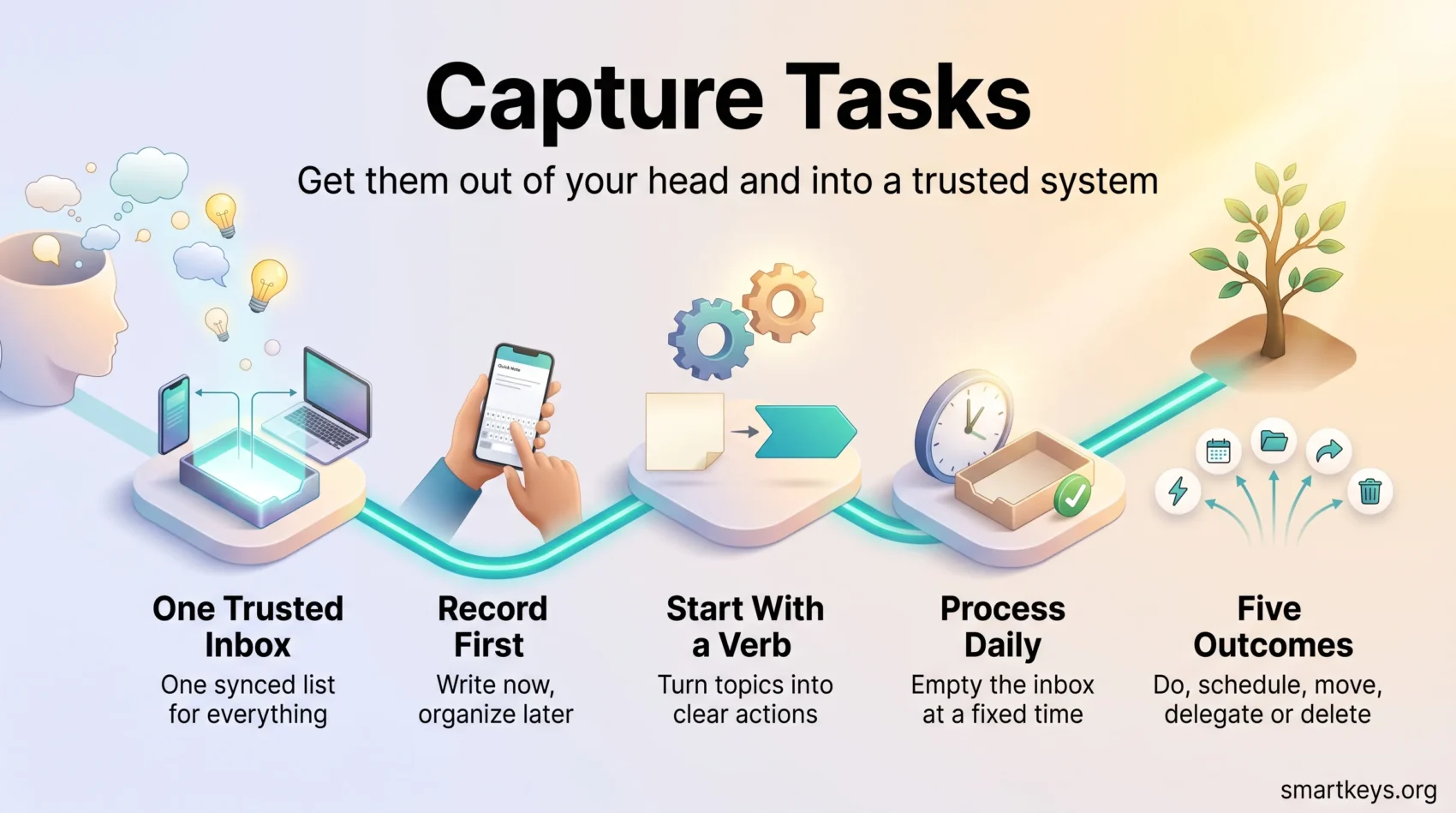
- Use one trusted inbox for everything, so you never have to think about where to write.
- Record first, organize later. Polishing an entry in the moment kills the habit.
- Process the inbox at a fixed time each day and move every item to a calendar, a project or the bin.
- Start each entry with a verb so it reads as an action, not a vague topic.
- Keep friction low enough that you still use it on your worst day.
- Capture is the entry point of a task system, not the system itself.
Why capturing tasks clears mental clutter
An unfinished task keeps asking for your attention. You are in a meeting and remember you never sent the contract. You are cooking and remember the invoice. The thought returns because nothing has confirmed it is safe to forget.
Psychologists E. J. Masicampo and Roy Baumeister tested this. In a 2011 paper in the Journal of Personality and Social Psychology, they showed that unfinished goals intrude on unrelated thinking, and that writing a specific plan removes most of that interference. The work does not have to be done. It has to be recorded in a form you trust.
That is the whole argument for capture. Memory is poor storage and expensive storage, because every item you hold takes attention from the work in front of you. We cover the mechanism in our guide to closing open loops.
What this buys you on a normal workday
The gain is concrete. A designer who notes “ask Maria for the final logo file” during a call does not lose the request in a chat thread. A freelancer who captures “renew liability insurance, expires March” in January does not pay a late fee. Three things change:
- You drop fewer commitments, so colleagues stop having to chase you.
- You interrupt yourself less, because new thoughts have somewhere to go.
- Your planning gets more honest, since you can see everything you agreed to in one list.
This matters more than it used to. Microsoft’s 2025 Work Trend Index report on the “infinite workday” found that employees are interrupted roughly every two minutes by meetings, emails and chat messages. In a day that fragmented, anything held in memory alone is at risk. Capture therefore pairs well with protected focus time.
How to capture tasks consistently
The habit only works if writing something down is faster than thinking about whether to write it down.
Step 1: pick one trusted inbox
Choose one place and use it for everything. A synced notes app is enough: Apple Notes, Google Keep, Simplenote or a plain text file in your cloud drive. The only real requirements are that it opens in about two seconds on your phone and syncs to your computer.
Do not build a folder structure yet. A single running list is the point. If you already keep a knowledge system, the inbox sits in front of it rather than inside it, as we explain in our piece on the second brain method. For an app comparison, see digital note-taking.
Step 2: follow three rules
Write it immediately. Put it in the same place every time. Review the list daily. Skipping any one of the three is what makes people abandon the habit after a week.
Start each line with a verb. “Call Anna about the lease renewal” tells you what to do. “Lease” does not, and in three days you will not remember what you meant. That is the bridge into a proper next action mindset.
Step 3: process the inbox daily
Processing is where captured lines become real work. Set a fixed slot of ten or fifteen minutes and empty the list. Every item gets one of five outcomes:
- Do it now if it takes under two minutes, following the two-minute rule.
- Schedule it in your calendar if it is time-bound. Our guide to time blocking covers sizing those blocks.
- Move it into your task manager if it belongs to a project.
- Delegate it with a clear owner and date.
- Delete it, which will apply to more items than you expect.
An empty inbox at the end of processing is the signal that the system is trustworthy. If it never empties, you are capturing work you will not do. A weekly pass catches what daily processing misses, which is the job of the weekly review. Sorting what reaches your task manager is a separate skill, covered in our guides to prioritization and task management.
Tools and workflows that remove friction
Most capture failures are friction failures. If getting an idea into your inbox takes four taps, you will skip it when you are busy, which is exactly when you need it.
Capture on the move
Three shortcuts cover almost every situation away from your desk. Put your notes app on your phone’s lock screen so it opens in one tap. Use the share sheet to push a web page or message into the same list. And dictate when your hands are busy, which is faster than typing for most people, as our guide to voice dictation explains. A photo counts too: snap the whiteboard, then pull the actions out later.
From message to action
Most work now arrives as a message rather than a thought. Email clients let you forward a message to your task manager, and both Slack and Microsoft Teams can turn a message into a task in place. The original thread stays attached, so the context survives.
Meetings are the other big source. Rather than scribbling during a call, let an assistant transcribe it and pull the commitments out afterwards, as we describe in AI meeting notes. If message volume is the real problem, the fix is upstream, in the boundaries you set around chat.
Using a board as your hub
Atlassian rebuilt Trello around this idea. Its Inbox collects anything sent from a phone, an email or a message, and Planner puts your calendar beside those items so you can drag work into real time slots. Boards then hold the projects.
You do not need Trello specifically. Asana, ClickUp, Todoist and Microsoft To Do all offer an equivalent quick-add. What matters is that the inbox stays separate from your project boards. If you do use Trello, our guide to Trello Power-Ups covers the add-ons worth installing, and simple rules can move cards for you, as our task automation playbook explains.
Task capture is not task mining
Two different things share a similar name. Everything above is personal capture: you decide what to record. Task mining is the opposite. Software records how people actually use their applications, then analyzes those logs to find repetitive steps worth automating. Tools such as Celonis, UiPath, ABBYY Timeline and ProcessMaker sit in the process intelligence market and are bought by operations teams.
If your company is considering one, governance comes first. Recording employee activity is personal data processing under the GDPR and the growing set of US state privacy laws, so it needs a legal basis, a retention limit and clear notice to staff. Our overview of data privacy at work covers what employers must get right.
For your own inbox the rule is simpler: keep sensitive details out of a quick note. “Follow up on the Berger contract” is enough. The numbers belong in the secure system you move it into.
Conclusion
Start with one inbox and three rules. Write it immediately, always in the same place, and review it daily. Add detail only when you process, so each entry becomes a calendar block, a message or a line in your task manager.
Give it two weeks. If you are still checking one list every morning and it still empties, the habit has taken. Projects, tags and automations can come later. You can also let the captured notes feed a well-built to-do list and stop there.
Found this useful?
Make SmartKeys a preferred source on Google, and our articles will surface more often in your Top Stories, AI Overviews, and AI Mode.
Add as Preferred Source