Your inbox is a delivery channel, not a to-do list. That single shift is what Inbox Zero is really about. The method was popularized by writer Merlin Mann, first in his 43 Folders series and then in a Google Tech Talk in July 2007, and it has aged better than most productivity fashions.
The pressure it answers keeps growing. Microsoft’s 2025 Work Trend Index analysis of Microsoft 365 telemetry found employees are interrupted every two minutes by a meeting, email or notification, roughly 275 times a workday, and that the average worker receives 117 emails a day, most skimmed in under a minute.
The point is not an empty screen. It is that email stops interrupting you at random and gets handled on a schedule you choose. This guide shows how to process messages with one repeatable decision, move real work into a system you trust, and protect the hours where your actual job gets done.
Key Takeaways
- Inbox Zero means zero unplanned attention on email, not zero messages.
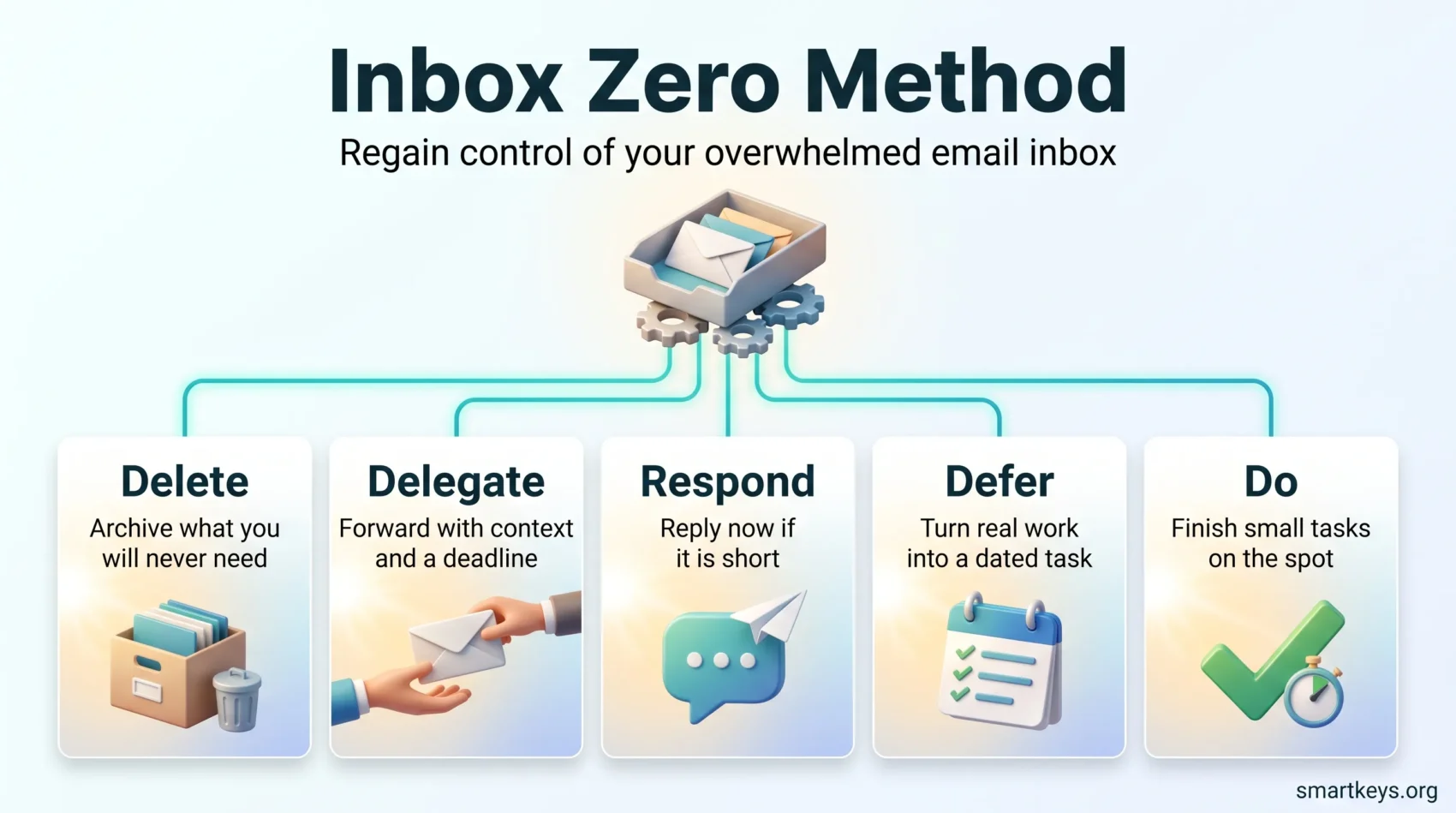
- Every message gets one decision: delete, delegate, respond, defer or do.
- Batching email into fixed blocks beats reacting to each new arrival.
- Tasks belong in a task system, not in a thread you keep rereading.
- Consistency matters more than a perfect daily count.
What Inbox Zero Really Means in 2026
The “zero” in Inbox Zero was never a message count. Mann used it to describe the amount of attention your inbox takes from you when you are not deliberately working in it. An inbox with forty archived-but-unread newsletters and no pull on your focus is closer to the goal than an empty one you refresh every four minutes.
That distinction matters because email is no longer a single stream. Most people juggle a work account, a personal account and chat tools carrying the same kind of requests. Chasing emptiness across all of them is a full-time job; choosing when each gets your attention is not.
In practice the method comes down to three habits:
- Process in blocks: handle email end to end during set windows, and keep the tab closed between them.
- Decide once: read a message, choose its fate, and move it out of the inbox. No second pass.
- Publish your rhythm: tell colleagues when you read mail, so nobody assumes a reply is coming in ten minutes.
The payoff is not a tidy screen. It is a workday where email happens at three predictable moments instead of two hundred unpredictable ones. If interruptions are your wider problem, our guide to setting instant messaging boundaries covers the chat side of the same fight.
Where Inbox Zero Came From
Merlin Mann was a productivity writer, not a software vendor, which is why the method has no product attached to it.
He ran the Inbox Zero series on his site 43 Folders in 2006 and delivered the talk that made it famous at Google in July 2007. His core argument was that email is a medium in motion: messages arrive, you convert them into something, and they leave. Treating the inbox as storage is what breaks people.
The five guiding principles
These still hold up, and they are worth rereading whenever your system starts to slip:
- Not every message deserves equal attention. Sort by what moves work forward.
- Your time is finite. Take the quick wins now and schedule the rest.
- Short replies are usually kinder than long ones. They arrive sooner.
- Guilt about a full inbox changes nothing. A rule and a review block do.
- Be honest about capacity. Say what you can deliver and by when.
Notice how little of this concerns software. The tooling has changed completely since 2007; the decision-making has not.
Is Inbox Zero Right for You?
Before rebuilding anything, spend a week measuring what email actually costs you. Guessing tends to be wrong in both directions.
Track three numbers: how many separate inboxes you open, how many times a day you open one, and how often an email pulls you out of something else. A tally on paper is enough, though a proper time audit of a normal working week gives a fuller picture.
Then match the method to your role. Inbox Zero suits you if your work has long stretches of concentration and your replies can wait an hour or two. It suits you badly on a support rota, a sales desk with inbound leads, or any role where response time is the service. Those jobs need a shared inbox with queue rules, not personal batching.
A middle path works for most people: keep one fast lane for genuinely urgent senders, defined by name rather than by feeling, batch everything else into two or three review blocks, and agree a response-time expectation with your team in writing.
Run it for two weeks before judging it. The first few days feel uncomfortable because you are breaking a checking habit, not because the system is failing. If moving email tasks into a trusted place is the part you struggle with, start with our guide to to-do lists.
What You Gain
The first change most people notice is that they stop rereading. In an unmanaged inbox, a message often gets opened several times before anything happens to it. Deciding once removes those extra passes.
The second is that important messages become findable. When routine mail is filtered out on arrival, what remains in view is genuinely what needs you.
Concretely, you can expect:
- Fewer switches between email and real work, which protects the long blocks where difficult tasks get finished.
- A shorter mental backlog, because deferred items live in a list with dates instead of in your head.
- Faster handoffs, because delegating happens at the moment you read the message rather than three days later.
- Less end-of-day dread, since you know what is outstanding and what is simply archived.
That last point is underestimated. Much of the stress of a full inbox is uncertainty about what is hiding in it, and processing removes the uncertainty even when the workload stays the same. The same logic applies to unfinished work generally, which we cover in our piece on open loops and unfinished tasks.
The Five Actions: Delete, Delegate, Respond, Defer, Do
This is the engine of the method. Every message gets exactly one of five outcomes, chosen the first time you read it.
How each action works
Delete covers anything you will never need: newsletters you have outgrown, notifications, one-line acknowledgements. Archive rather than delete if your provider gives you good search, which both Gmail and Outlook do.
Delegate means forwarding with context. A bare forward creates a second round of questions. Say what you need, from whom and by when, then move the original to a “Waiting” folder so you can follow up. Do this the moment you read the message, not after carrying it for a week.
Respond applies when the reply is short enough to write on the spot. Three sentences is a good ceiling.
Defer is for anything that needs real work. Create a task in your task manager with a date and a clear next step, then archive the thread. The email is now a reference document, not an obligation.
Do means finishing the small thing immediately: approving an invoice, booking a room, answering a yes-or-no question.
Two minutes or five minutes?
David Allen’s Getting Things Done uses a two-minute threshold: if the action takes less than two minutes, do it now, because tracking it would cost more than doing it. Some teams stretch this to five minutes for slightly longer replies.
Either number works. Mixing them does not. Pick one, apply it to every message, and you remove a decision you would otherwise make hundreds of times a week. If your work is mostly short exchanges, two minutes keeps the queue moving. If your messages tend to need a paragraph of thought, five is more realistic.
Daily sweeps and a weekly review
Daily processing keeps the inbox moving. A weekly pass keeps the system honest: it catches deferred items nobody chased, “Waiting” entries that went quiet, and folders that stopped matching your work. Our guide to running a weekly review covers the wider routine, and defining a clear next action is what makes deferred items actually restart.
Set Your Schedule: Batching, Boundaries and Notifications
A processing method only helps if you decide when to use it. Otherwise you apply the five actions two hundred times a day, one message at a time, which is the problem you started with.
Choose your blocks
Two or three blocks suit most roles: mid-morning once the first real task is underway, early afternoon, and a short shutdown pass before you finish. Avoid opening email first thing. Starting the day in your inbox means starting it inside other people’s priorities.
Give each block a hard end. Twenty-five minutes plus a five-minute buffer fits neatly with the Pomodoro Technique if you already work in intervals, and time blocking covers how to defend those windows. How many windows your role really needs, and when real-time checking still makes sense, is covered in our comparison of email batching versus real-time checking.
Turn the notifications off
This is the single highest-value change, and the one people resist most. Desktop banners, badge counts and phone alerts each convert a scheduled task into an interrupt. Given the interruption frequency Microsoft measured, removing one source of pings is a real win rather than a cosmetic one. Switch off badges as well as banners: a number on an icon is still a request for attention. If your organization runs on chat, apply the same treatment there and lean on scheduled team-wide focus time instead.
Set expectations with your team
Batching fails when colleagues expect instant replies, so fix that explicitly. Tell people when you read email, agree what counts as urgent, and name the channel for emergencies. A phone call for anything that cannot wait is a perfectly good rule.
Written norms also protect people from each other’s habits. Someone clearing their inbox at 22:00 should not create an expectation that others read mail at 22:00, and scheduled send solves most of that in one setting.
Folders, Labels and Filters That Actually Help
Elaborate filing systems collapse because they demand a decision you do not have time to make. Search has been good enough for years; folders now answer one question, which is what state a message is in.
Four containers cover almost everything:
- Action: messages that need something from you and are already on your task list.
- Waiting: things you have delegated or are expecting a reply on.
- Reference: anything you may need to find again, whether or not it is finished.
- Archive: everything else, retrievable by search.
Add a project folder only when a project generates enough mail to justify one, and delete it when the project ends.
Let filters do the sorting
Rules are the part of email hygiene with the best return on effort. Route newsletters, receipts, system notifications and automated reports out of the inbox on arrival, then read them in a batch when you choose.
Two more rules are worth having:
- Flag messages from a short list of people whose mail genuinely cannot wait.
- Send mail from unknown senders to a screening label so first contact never interrupts you.
Snooze instead of leaving things visible
Snooze removes a message until a date you pick. Use it for things that are genuinely not actionable yet: a booking that opens next month, a reply you expect on Friday. It is not a way to postpone a decision you could make now. Snoozing the same thread repeatedly means you have a deferred task pretending to be an email. Our guide to task management covers where it should live instead.
Tools: Gmail, Outlook and Beyond
You almost certainly already own everything you need. Start with the built-in features before you buy anything.
What is already in your client
Gmail and Outlook both offer rules or filters, labels or folders, snooze, scheduled send, and one-click archive. Together those cover the whole method. Add keyboard shortcuts and the mechanical part of processing gets noticeably faster, which is why we have a separate guide to keyboard shortcuts. If you write the same replies repeatedly, email response templates remove most of the typing.
Connect email to your task system
The deferred pile is where Inbox Zero usually breaks. If a task only exists as an email you promised yourself to revisit, it will be revisited at random.
Most task managers can create a task from an email, either through an integration or a forwarding address. What matters is that the task carries a due date and a next step, not just a subject line. Pick one destination and always send work there; two half-used systems are worse than one imperfect one. Our overview of productivity apps compares the main options.
Shared inboxes for teams
Personal batching does not solve a shared support address. Those need assignment, visible ownership and a status per conversation, which is what shared inbox and helpdesk tools provide. Filtering services can help with high-volume personal accounts, though most of what they do can be replicated with rules you write yourself.
Before connecting any third-party service to your mailbox, check what it can read and how long it retains data. Mail access is broad access, so trial anything new on a low-risk account.
GTD Meets Email: A Practical Processing Flow
Getting Things Done and Inbox Zero fit together neatly because they solve different halves of the same problem. Inbox Zero clears the channel; GTD gives the work somewhere to go.
For each message, ask three questions in order:
- What is this? One sentence, in your own words.
- Is it actionable? If not, archive it or file it as reference.
- What is the very next physical step? Not the project, the next action.
If that step takes under two minutes, do it now. Otherwise it goes into one of three places. Next Actions holds single-step items with dates. Waiting For holds anything you have handed to someone else, with the date you sent it. Projects holds multi-step work that needs planning before it needs doing.
Once the work is captured, archive the thread. The email has done its job. Keeping it visible only reintroduces the decision you already made.
Advanced Strategies to Stay Near Zero
Once the basics hold, further gains come from reducing volume rather than processing faster.
Touch it once
Start each block at the newest message and work down without skipping. Skipping creates a second pass, and that is where the time goes. If a message genuinely cannot be decided yet, put it in Waiting with a follow-up date rather than leaving it in view.
Cut the inflow
Unsubscribe rather than filter when you can. A filtered newsletter still arrives and still gets skimmed eventually. Spend five minutes a week unsubscribing from anything you have not deliberately opened in a month.
Also look at what you send. Reply-all threads, unnecessary CCs and vague requests all generate return mail. A clearer message with an explicit ask usually removes two rounds of clarification, and moving status updates out of email removes more. Our guide to asynchronous work covers that shift.
Common Pitfalls and Misconceptions
The most common failure is treating the number itself as the goal. People who chase a literal empty inbox tend to check more often, not less, which is precisely backwards.
Perfectionism disguised as productivity
If your inbox hits zero at 11:00 and you reopen it at 11:04 to keep it there, the system is now the distraction. Aim for zero at the end of each processing block and accept whatever accumulates in between. Tidying an inbox can feel like progress while the real work waits.
Other traps worth naming
- Over-filing: twenty folders means twenty decisions per message. Keep four.
- Zero as a scoreboard: a day with three deep hours and eighty messages left is a good day.
- No plan for busy weeks: decide in advance what you drop when you are underwater. Usually that is reading newsletters and answering FYI threads.
- Rebuilding the system instead of using it: new folders are not progress. Processing is.
It is also fine to declare bankruptcy occasionally. If a backlog has grown past a few hundred messages, archive the lot, ask anyone who needs a reply to resend, and start clean. Our step-by-step plan for clearing a large email backlog covers the gentler version, and the Inbox Infinity approach of answering only what matters describes the opposite philosophy if constant triage does not suit you.
A 60-Minute Quick-Start Plan
One focused hour is enough to set the whole thing up. Block it in your calendar and close everything else.
Minutes 0-10: prepare
Create four folders: Action, Waiting, Reference and one project folder if you need it. Turn off email notifications on desktop and phone, including badge counts. Write two filters, one for newsletters and one for receipts or automated reports.
Minutes 10-45: process
Start at the newest message and work down, applying the five actions without backtracking. Set a two-minute threshold and hold to it. Every deferred item becomes a task with a date and a next step before you archive the thread.
You will not reach the bottom of a large backlog in 35 minutes, and that is fine. What you are building is the habit and the structure. Anything older than a month can be archived unread at the end; if it mattered, it will come back.
Minutes 45-60: stabilize
Put two processing blocks in tomorrow’s calendar and a 20-minute weekly review at the end of the week, then write a five-line checklist you can follow without thinking about it.
Note where you started and check again in two weeks. The useful measures are how often you open email and whether you finished the work you planned, not how close to zero you got. For a wider system around those habits, see our guides to time management and deep work.
Conclusion
Inbox Zero survives because it is a decision rule, not a piece of software. Process on a schedule, give every message one outcome, and keep real work in a system built for work.
Start with the smallest version. Turn off notifications, pick two processing blocks, and apply the five actions for a week. Add filters once you see which senders repeat.
Judge it by whether your attention feels like yours again, not by a number at the bottom of the screen. If you only change one habit this week, make it the fixed processing blocks. Everything else in this guide gets easier once email stops arriving as a constant stream of interruptions.
Found this useful?
Make SmartKeys a preferred source on Google, and our articles will surface more often in your Top Stories, AI Overviews, and AI Mode.
Add as Preferred Source