

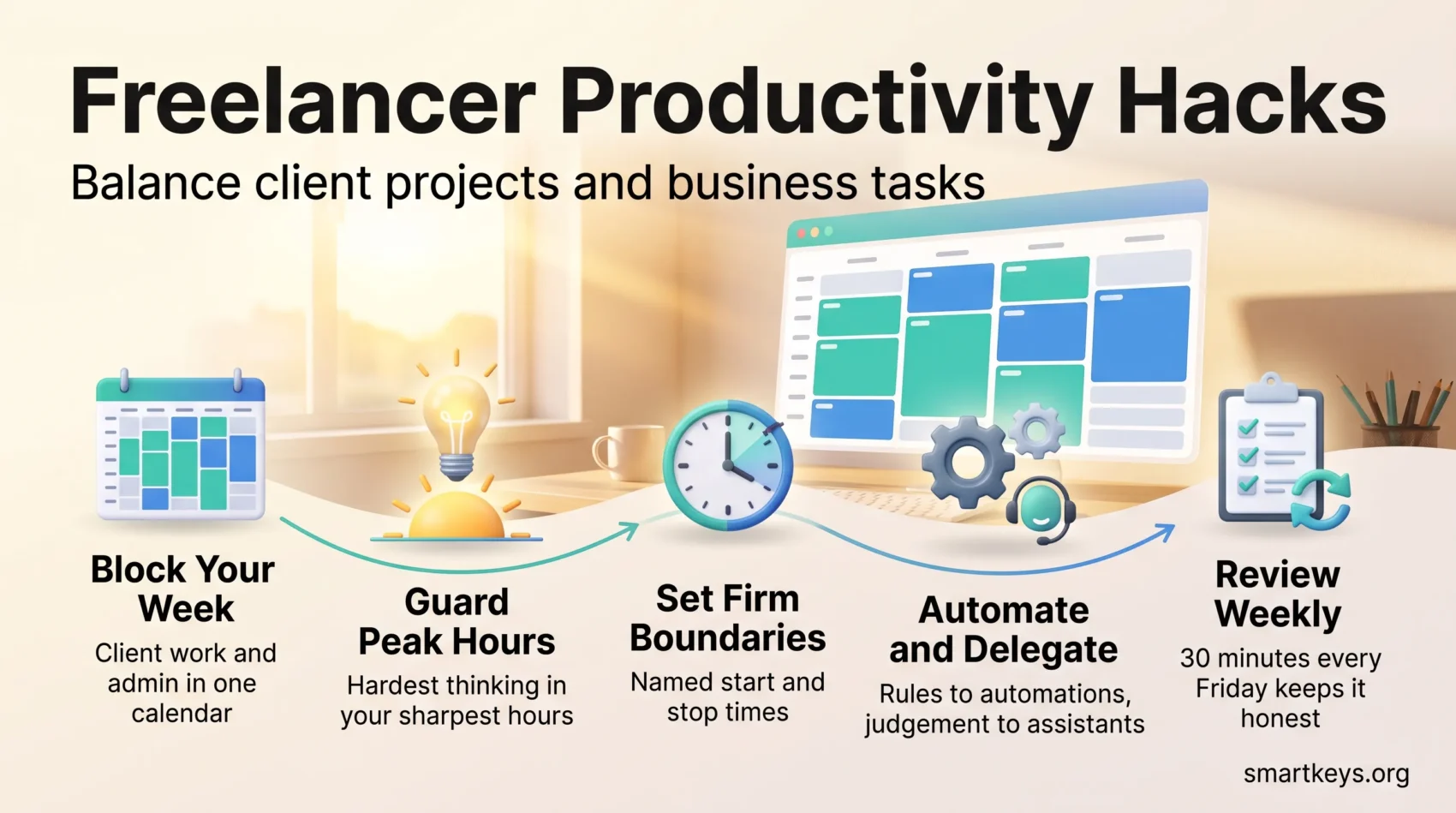
Freelancing gives you control over when and where you work. The catch is that nobody else builds the structure around it. There is no shift roster, no manager blocking your calendar, no colleague noticing that you have spent the week quoting for new work and have not touched the project due Friday.
That structure has to come from you, and it has to hold two jobs at once. You deliver client work, and you run a business: invoicing, chasing payment, marketing, bookkeeping, learning. Most freelancers plan the first job carefully and squeeze the second into whatever is left, which is usually the evening. Upwork’s Future Workforce Index, a survey of 2,400 skilled US workers run in March and April 2026, found that 38% of them now freelance, up from 28% a year earlier. So this is a common problem, not a niche one, and it applies just as much to solopreneurs running a one-person business under their own brand.
This guide covers the parts that make the biggest difference: planning a week that holds both kinds of work, protecting the hours when your thinking is sharpest, cutting the interruptions that fragment a day, choosing tools worth paying for, and handing repeatable work to automations or an assistant.
Key Takeaways
- Schedule client work and business admin in the same calendar, not in the same vague “later”.
- Put demanding work in your best hours and push routine admin into your slower ones.
- Time blocking and short timed sessions both work by removing the decision about what to do next.
- Named start and stop times protect your evenings and make your replies predictable for clients.
- Automate rule-based steps and delegate judgement-based ones so admin shrinks instead of spreading.
- A weekly review of 30 minutes is what keeps the whole system honest.
Why structure matters more when you work for yourself
An employee has a workday shaped by other people. A freelancer does not, and that cuts both ways.
The upside is real: you can start at 06:00 because that is when you think clearly, or take Wednesday afternoon off and work Saturday morning instead. The downside is that without named work hours, the day quietly expands. You check email at 22:00 because nothing officially ends the day, and the household interrupts you because nothing signals that you are unavailable.
The fix is not more willpower. It is deciding in advance when you work and on what, then letting the calendar carry the decision instead of your mood. Two habits do most of the heavy lifting.
Time blocking means giving every piece of work a specific slot in your calendar rather than keeping a list and hoping it fits. The Pomodoro technique means working in short timed stretches, traditionally 25 minutes, with a break after each one. Both remove the same friction: at the start of a block you already know what you are doing, so you begin instead of deliberating.
Plan your week with time blocking
Block the week before it starts, not while it is happening. Twenty minutes on Friday afternoon is enough. For a fuller routine around this, see our guide to weekly planning.
Start from one monthly goal
Weekly blocks work better when they serve something bigger. Pick one measurable outcome for the month, such as landing two retainer clients, launching a new service package or clearing every overdue invoice. Write it where you will see it daily.
When you block the week, ask which slots move that goal forward. If none do, the week will be busy but not directional.
Sort work into categories first
Before placing anything on the calendar, group your work into five buckets: client projects, admin, marketing and new business, finance, and learning. Most freelancers skip this step, and it is the one that reveals the problem. When you see that marketing has no hours at all this week and finance is a vague plan to “do invoices sometime”, you understand why new work dries up in quiet months.
Colour-code and leave gaps
Give each category a colour in your digital calendar. You can then judge a week at a glance: a screen that is 90% client colour means you are busy but not building anything.
Then leave gaps. Buffers absorb overruns, and every freelance week has them. A call booked for 30 minutes runs to 50. A file arrives corrupted and needs rework. Fifteen minutes of slack between blocks is the difference between one late meeting and a lost afternoon.
Anchor the big things, then fill in
Put client milestones and fixed appointments in first, then layer everything else around them. Add one Power Hour: a single 60-minute block for the small jobs that each take ten minutes and never feel urgent enough to schedule, such as invoice follow-ups, a proposal tweak and three short replies. Doing them in one batch is far faster than spreading them across the day, because you pay the cost of switching into admin mode only once.
Put your hardest thinking in your best hours. If you are sharpest before 11:00, that window belongs to design, writing or analysis, not to your inbox. Our guide to time blocking covers how to build your first blocked week.
Use timed sessions to start difficult work
The hardest part of a demanding task is usually the first five minutes. Timed sessions shrink the commitment: you are not agreeing to finish the report, you are agreeing to work on it for 25 minutes.
How the standard rhythm works
Francesco Cirillo’s original method is simple. Set a timer for 25 minutes, work on one task, then take a 5-minute break. After four sessions, take a longer break of 15 to 30 minutes. Our guide to the Pomodoro technique covers the full method, including where it fits badly.
That last point matters. Twenty-five minutes suits tasks you can pick up and put down: editing, admin, research, email, and anything you have been avoiding, because the timer makes starting feel small. It suits it much less well when you need an unbroken hour to hold a complex problem in your head. That kind of work is deep work, and a bell every 25 minutes interrupts exactly the state you were trying to reach.
Adapt the length to the task
Treat 25 minutes as a starting point, not a rule. Chain two or three sessions when you are deep in a build, use a single one for a batch of small items, and try 50 minutes on and 10 off if creative work keeps getting cut short.
A few things make sessions hold:
- Decide the task before the timer starts. “Work on the Henderson project” is not a task. “Draft the three homepage headline options” is.
- Keep a parking lot. When an unrelated thought arrives, write it down and carry on. It will still be there in five minutes.
- Note how long things actually took. After two weeks you will quote more accurately, which is worth more than the productivity gain.
- Take the break away from the screen. Scrolling is not a break for the part of your brain that was working.
Prioritize what moves your business forward
Client work always feels urgent, because someone is waiting. Business work rarely does, because nobody is. That asymmetry is why freelancers finish a busy quarter with no pipeline.
The standard fix is an urgency and importance grid: sort each item by whether it is urgent, important, both or neither. Urgent and important gets done now. Important but not urgent gets a calendar slot, which is the whole point, because that quadrant holds your marketing, your skill development and your pricing review. Urgent but not important gets delegated or done fast. Neither gets dropped. In practice, one protected block a day is enough to keep a freelance business moving: an hour on Tuesday to write a case study, ninety minutes on Thursday to rework your rates.
Start the day with the highest-impact task before you open anything reactive. Email, chat and your project board are all other people’s priorities arriving in your morning. Deal with your own first. If chronic delay is the pattern rather than the exception, our guide to overcoming procrastination goes into why it happens.
Set work hours and boundaries that hold
A firm start and a firm stop protect your evenings and sharpen your days. Pick your hours and treat them as appointments you have made with yourself.
Build a closing ritual
The stop is harder than the start. Without a signal that the day is over, work stays half-open in your head all evening. A five-minute closing routine fixes it. Pick tomorrow’s single most important task and give it a slot in your best hours. Note the two or three tasks that support it, close every tab, clear the desk, and turn off notifications until morning.
Deciding tonight removes the hardest decision from tomorrow morning. You sit down and start, instead of spending the first half hour working out where to begin.
Publish your availability
Scheduling tools cut the back-and-forth that eats a working morning. Calendly is the common choice: it shows clients your real availability, syncs with your calendar and video tool, and can enforce minimum notice and buffers around each booking. The Standard plan costs $10 per seat per month when billed annually or $12 when billed monthly, and the free tier covers one active event type. Our Calendly vs Doodle comparison covers the alternatives.
Set buffers before and after meetings so one call cannot eat a focus block. Put your response windows in your email signature, then honour them, because consistency is what actually trains expectations. Our guide to setting work boundaries covers the conversations that go with it.
Set up a workspace that removes friction
A workspace either helps you concentrate or quietly costs you attention all day, and most of the fixes are cheap and permanent.
Start with the physical setup: screen at eye level, forearms roughly level with the desk, feet flat. Bad ergonomics does not announce itself. It just means you shift, stand up and lose the thread more often than you otherwise would. Our guide to ergonomics and work efficiency covers the specifics.
Lighting matters as much and gets ignored more. Working under a single dim overhead lamp strains your eyes by mid-afternoon. Daylight plus a task lamp beats either alone, as our guide to workspace lighting explains.
Sound and clutter
Noise you cannot control is worse than noise you can. Headphones, a closed door, or an agreed signal to the household that you are in a focus block all work. Ambient audio or an app like Brain.fm can mask irregular background noise, though some people concentrate better in silence. Test it rather than assuming.
Clear the surface around your keyboard. Every object in your peripheral vision is a small pull on attention, and a stack of unopened post is a to-do list you did not agree to.
“A clear desk and a predictable soundscape mean less time spent refocusing and more time finishing things.”
Manage energy, breaks and sleep
Two hours at 09:00 and two hours at 16:00 do not produce the same amount of work. Most people have a window where thinking is noticeably easier, and the cheapest available productivity change is to stop spending it on email.
Find your curve
Track your energy for a week: note roughly every two hours whether focus was high, medium or low. A pattern usually appears within days. Then schedule demanding work into the high windows and move bookkeeping, filing and routine replies into the low ones. Small shifts in how you use your time compound faster than most people expect.
Breaks and sleep
Short breaks away from a screen reset attention better than a change of tab does. Standing up and moving is better again; our guide to movement breaks covers what fits into a normal working day.
Sleep is the thing freelancers cut first and should cut last. The CDC and the American Academy of Sleep Medicine both recommend seven or more hours a night for adults, and short sleep degrades exactly what freelance work depends on: judgement, concentration and patience with clients. Our guide to sleep and productivity covers what the evidence supports.
Cut digital interruptions
A working day gets fragmented by dozens of small interruptions, and the cost is not the seconds each one takes. It is the time spent getting back to where you were.
Willpower is a poor tool for this; removing the option is better. Site and app blockers such as Freedom cut access across your devices during a focus block. Forest gamifies it instead: a virtual tree grows while you stay in the app and dies if you leave.
Beyond apps, three habits do most of the work:
- Put the phone in another room. Not face down on the desk. In another room.
- Batch email into two or three windows a day instead of leaving it open, and tell clients when those windows are.
- Turn off every notification that is not a real emergency. Almost none are.
Our guide to managing work notifications covers how to audit them properly.
Build a lean admin stack
A small, well-chosen set of tools saves hours a week. A large one just moves the problem, because every extra app is another place to check. You need three things: a way to track time, a way to invoice and track money, and a way to see what is due.
Time tracking
Toggl Track is the usual choice for logging hours by client and category. Do not track only billable work. Logging marketing, admin and learning too is what tells you whether your rates cover the unbilled half of the job, which for most freelancers is a third or more of the week. Note that Toggl Plan, the separate planning product, is now legacy; our Toggl Plan review explains where its features moved.
Invoicing and accounts
Pick one finance app and let it handle invoices, expenses and payment reminders. FreshBooks is built around freelance and small-agency invoicing. QuickBooks Online and Xero are fuller accounting platforms that fit better once you have an accountant or more complex tax obligations. Automating payment reminders is the single highest-value setting in any of them.
Projects and deadlines
For deliverables, a simple board is usually enough. Todoist, Trello, Asana and Monday.com all work, and the right one is the one you will actually open. Set recurring reminders for the things with no external deadline: monthly reconciliation, quarterly tax set-aside, annual backup check. Once a quarter, look at what you are paying for and cancel what you have not opened.
Paper still has a place. Some people plan the day in a notebook because it keeps them off screens and makes priorities feel concrete. That hybrid works well, as long as deadlines and reminders live in one digital calendar that stays the single source of truth.
Automate and delegate the repeatable work
Once the stack is in place, look at what you still do by hand every week. Saving attachments, adding new contacts, sending the same follow-up email and posting scheduled content are all steps that follow the same rule every time. Write them down for one week. The list is usually longer than you expect.
Automate the rule-based steps
Automation platforms such as Zapier or IFTTT connect your apps, so an event in one triggers an action in another. For example, a signed proposal can create a project in your board, a folder in your cloud drive and a first invoice draft, without you copying anything across.
Start with one workflow, not ten. Write down what it does, then check it weekly for the first month. A silent failure, such as an invoice that never went out, costs more than the manual step you replaced.
Delegate the work that needs judgement
Automation handles predictable tasks. Work that needs context, such as inbox triage, research, formatting or first-pass customer follow-ups, suits a virtual assistant better, because a person can make the small calls a rule cannot.
Start with a few hours a week and a short written checklist for each task. Describe the outcome you want, not every click. Then track the hours you get back and spend them on sales, product work or your best focus blocks. Our guide to outsourcing tasks covers how to decide what to hand off first and how to run a low-risk trial.
Systemize client work so it repeats itself
Most of the time lost around client projects is lost at the start: the same questions get asked, the same files get chased, the same scope conversation happens from scratch.
Standardize the intake
Write one discovery questionnaire and reuse it: goals, audience, existing assets, deadline, budget range, decision-maker. Pair it with a materials checklist so clients send logos, copy and access at the same time instead of over three weeks of emails.
Separate the free conversation from the paid one. A 20-minute discovery call establishes whether the project is a fit. Deep strategic input is work, and belongs in a paid session rather than a call you give away.
Keep a record you can sell from
Log every engagement in one spreadsheet: client, project type, outcome, what you charged, any testimonial. Two years in, this is what turns writing a proposal into a 30-minute job instead of an afternoon. Define handoffs and approval points in the proposal itself, because most review loops that spiral come from nobody agreeing how many rounds were included.
Review the week and adjust
Close the week with a short check-in. Thirty minutes on Friday is enough, and it is what stops the system drifting into something you no longer follow.
Compare what you planned against what you actually did. The gap is the useful part. Then:
- Note two or three things that went well, so you keep doing them.
- Identify one bottleneck and one distraction pattern, and pick a single change to test next week.
- Recalibrate the estimates that were wrong, and block more realistic time for that kind of work.
- Set three goals for next week and put them in the calendar before anything else claims the space.
Changing one thing a week works better than redesigning the whole system every few months. If your goals keep slipping rather than your schedule, our guide to goal setting covers how to write ones you can act on.
Conclusion
None of this is complicated. It is a calendar that holds both halves of the job, a set of hours you actually stop at, a workspace that does not fight you, and a weekly half hour to notice what is not working.
Start with one change rather than all of them: block next week by category, or set a stop time and keep it for five days. Add the next piece once the first has stuck. For a broader look at the underlying methods, see our guide to time management techniques.
The aim is not to squeeze more hours out of the day. It is to make the hours you already work go to the things that keep both the client relationships and the business healthy.
Found this useful?
Make SmartKeys a preferred source on Google, and our articles will surface more often in your Top Stories, AI Overviews, and AI Mode.
Add as Preferred Source




