

In a working day that is constantly interrupted, managing your time is harder than ever. The time blocking method stands out because it is simple: you divide the day into named segments and give each one a single job. Instead of a list of intentions, you get a calendar that already answers what you should be doing right now.
This article covers how the method works, what it realistically does for your focus, how to set up your first time-blocked week, where it fails, and which tools are worth using. If you want the task-level cousin of this approach, with hard stops on individual tasks, our timeboxing playbook covers it in depth.
Key Insights
- Time blocking converts open-ended to-do lists into concrete calendar commitments.
- It protects deep work by making your focus time visible to colleagues and to yourself.
- It cuts the decision cost of starting a task, where procrastination usually begins.
- It forces prioritisation: a calendar has a hard limit, a list does not.
- It gives personal commitments the same standing as work commitments.
- It only works with buffers. A schedule with no slack collapses on the first surprise.
- It pairs well with the Pomodoro Technique and task batching.
What Is the Time Blocking Method?
Time blocking is a scheduling method: you assign every part of your working day to a specific category of work in advance. Rather than reacting to whatever arrives, you decide the shape of the day first and then defend it. The to-do list still exists, but it feeds the calendar instead of competing with it.
Understanding the Concept of Time Blocking
The core idea is that attention is finite, and a calendar is the only tool most people already use to allocate finite resources. A block might be ninety minutes of writing, forty minutes of email, or an hour reserved for nothing. Related methods sit inside this frame: the Pomodoro Technique breaks a block into shorter intervals, while batch processing groups similar tasks into one block to reduce switching costs. The shared goal is a longer runway for uninterrupted, cognitively demanding work.
How a Time Blocking Schedule Works in Practice
Start by planning a day or a week, then split it into blocks: a morning block for correspondence, an afternoon block for a report. Each block names one type of work, so you never decide what to do at the moment you should be doing it.
Because the commitment lives in your calendar rather than in your head, it also becomes visible to others. That visibility is half the benefit: a block labelled “draft Q3 analysis” is harder for a colleague to book over than an empty slot. Reviewing those blocks each week is what turns the habit into a real time management system. For an alternative walkthrough, see Asana’s guide to time blocking.
Why Time Management Breaks Down
Traditional time management assumes you control your day. Current workplace data suggests otherwise. Microsoft’s 2025 Work Trend Index analysis of anonymised Microsoft 365 signals found that employees are interrupted roughly every two minutes during core hours by a meeting, email or chat, adding up to about 275 interruptions per day. It also found that 57% of meetings are ad hoc calls with no calendar invite, and that half of all meetings land in the 9 to 11am and 1 to 3pm windows, which is exactly when most people do their best thinking.
That is the environment time blocking is built for. It does not remove interruptions, but it gives you a defensible position.
Defining Time Management and Productivity
Time management is the practice of deciding, in advance, what your hours are for. It is less about speed than allocation: choosing which work gets your best hours and accepting that the rest gets what is left. Clear priorities make that choice possible, which is why a prioritisation framework is a prerequisite rather than an optional extra.
Common Challenges with Traditional Time Management
Several problems show up repeatedly when people rely on lists alone:
- Overwhelming to-do lists: a list can grow without limit, so it never tells you what has to be dropped.
- No sense of capacity: without a calendar view, it is almost impossible to see that you have planned eleven hours of work into an eight-hour day.
- Vague tasks: large items such as “finish the proposal” resist starting because the first step is undefined.
- No boundary between work and everything else, which is a common route to an unclear schedule and a longer working day.
Time blocking addresses the capacity problem directly, because a day only holds so many blocks.
The Benefits of Time Blocking
Time blocking gives the day a structure, and structure lowers the ongoing cost of deciding what to do next. Every benefit below follows from that one mechanism.
Enhanced Focus and Increased Productivity
A named block discourages multitasking, because it has already answered the question of what deserves your attention. It also creates a visible container for protected focus time, which matters when ad hoc meetings can appear at any moment. Depth on the work that counts usually matters more than the number of tasks closed, and only a long block makes depth possible.
Reduction of Procrastination
Procrastination usually starts at the moment of transition, when you finish one thing and have to choose the next. Time blocking removes that choice. The block has a start time, a name and an end, which converts an open-ended intention into a scheduled commitment. Pairing this with a rule such as tackling the hardest task first makes the effect stronger, because the block you are most likely to avoid is the one you have already committed to before the day fills up. For tasks you keep putting off even inside a block, a strict timebox against procrastination adds a hard stop that makes starting feel smaller.
Improved Task Prioritization
A time-blocked schedule forces a decision a list never demands: what actually fits. If only three substantial blocks fit into a day, the fourth priority moves or gets dropped. That constraint is uncomfortable and useful. It also exposes recurring commitments that quietly consume your best hours, which is often the first thing a time audit uncovers.
Better Work-Life Balance
Blocks are not only for work. Exercise, meals, collection times and evening cutoffs can all be scheduled, and once they are, they carry the same weight as anything else on the calendar. This is a practical answer to the pattern Microsoft describes as the “infinite workday”, where meetings after 8pm rose 16% year over year. A block that ends the day is a decision made once rather than renegotiated every evening.
Getting Started with Time Blocking
Setting up a time-blocked week takes about thirty minutes. The steps below are deliberately minimal, because elaborate systems rarely survive the second week.
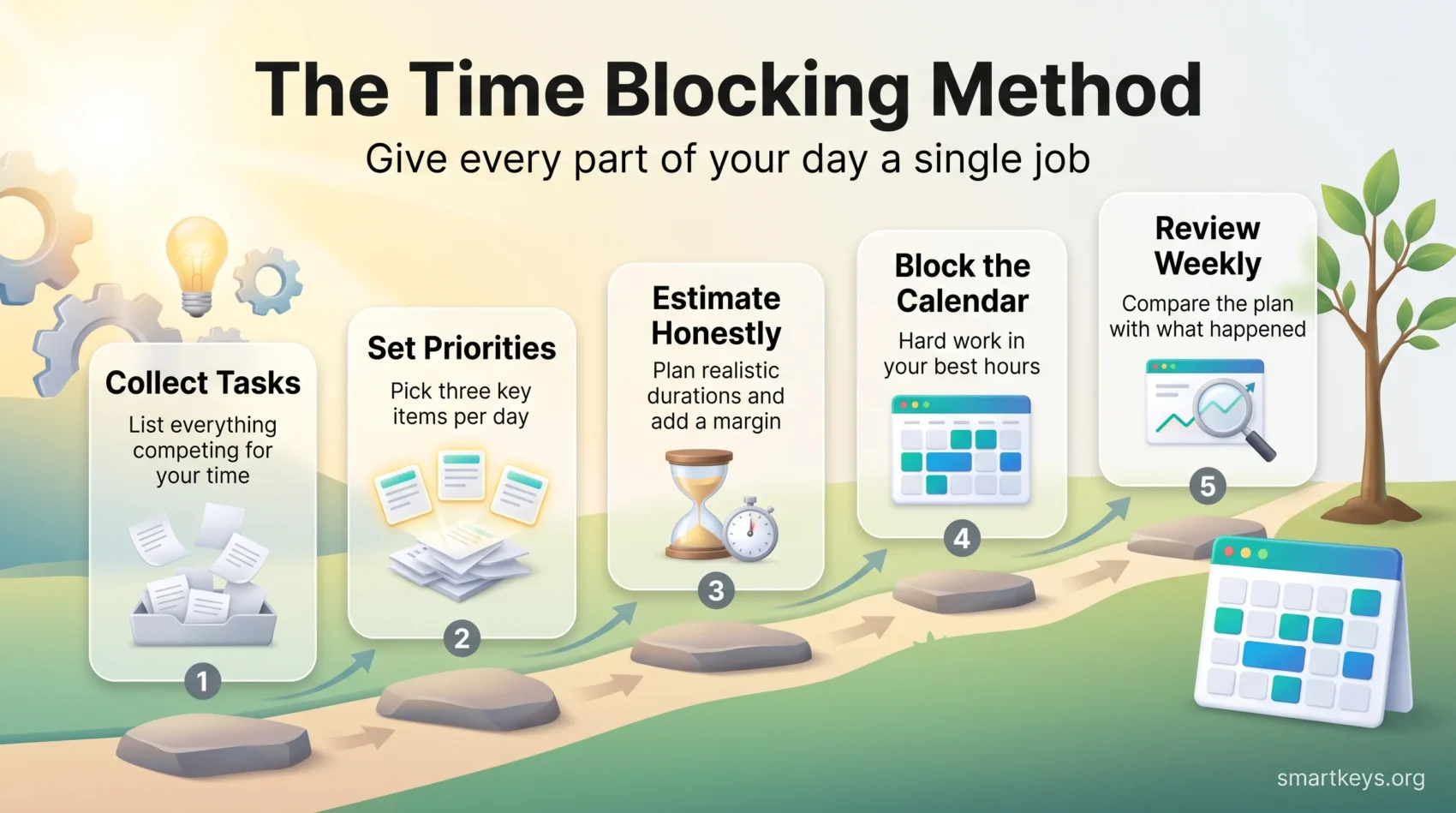
Steps to Implement Time Blocking in Your Routine
- Collect your tasks: write down everything competing for your time this week, work and personal.
- Prioritise: pick no more than three significant items per day. Everything else is filler for the gaps.
- Estimate durations honestly: then add a margin. Parkinson’s Law says work expands to fill the time available. The planning fallacy, our habit of underestimating how long tasks take, pushes harder in the other direction, so most people plan too little time.
- Block the calendar: place the demanding work in your best hours and the administrative work in your worst. Leave gaps on purpose.
- Review weekly: a short weekly planning session is what keeps the system honest, because it compares what you planned with what happened.
Tips for Effective Time Allocation
- Know your power hours: track your alertness for a week and schedule accordingly. This is the core of managing energy rather than only time.
- Group similar tasks: consolidating calls, email or reviews into one block reduces the cost of switching contexts.
- Silence the inputs during a block: a block is only real if you also turn off the notifications that would break it.
- Schedule the recovery: breaks belong on the calendar too, not in whatever time is left over.
These habits make the schedule usable rather than aspirational, and they leave room for the overruns that will happen anyway.
How to Create Your Time Blocking Schedule
A good schedule starts from how you actually work, not from an ideal day. Building it around your real patterns is what makes it possible to run your calendar instead of being run by it.
Crafting Your Ideal Daily Schedule
Observe your routine for a few days and note when you concentrate easily and when you fade. Most people have a strong morning window and a weaker mid-afternoon stretch, though the pattern varies more than the advice usually admits.
Then assign work to match. Demanding, creative or analytical work goes into the strong windows; email, expenses and scheduling go into the weak ones. Grouping similar tasks in one block keeps transitions low, which is where much of the gain comes from.
Digital Calendars and AI Scheduling Tools
Google Calendar and Outlook remain the practical foundation, because a block only works if it is visible to the people who might otherwise book you. Both support focus time, working hours and colour coding, which is usually enough.
A newer category of AI scheduling assistants, including Motion, Reclaim.ai and Morgen, goes further by placing and re-placing blocks automatically when meetings collide with your planned work. These tools remove the rescheduling admin that causes most people to abandon time blocking, and they suit calendars that change hourly. They are less useful if your day is already predictable, where simpler scheduling automation does the job at lower cost. Whichever you choose, the tool cannot decide your priorities for you.
Integrating Time Blocking into Daily Life
Time blocking is a container, not a complete system. It works best combined with a method for what happens inside the block and a way of checking whether your estimates were right.
Combining Time Blocking with Other Productivity Methods
Pairing time blocking with the Pomodoro Technique gives you structure at two levels: the calendar decides what the next two hours are for, and the timer decides the rhythm of work and rest inside them. This combination helps you:
- Sustain attention across a long block by building in short, planned breaks.
- Reduce fatigue, since the break is scheduled rather than taken when concentration has already gone.
- Keep one task in view at a time rather than sliding into parallel work.
Using Time Tracking for Better Insights
Tracking how long blocks actually take turns time blocking from a plan into a feedback loop. After two or three weeks you can:
- See which categories of work consistently overrun, and adjust the block length instead of the ambition.
- Estimate future tasks from your own history rather than from optimism.
- Identify the recurring commitments that produce the least value for the time they take.
Common Pitfalls of Time Blocking
People abandon time blocking for two reasons: they plan too tightly, or they treat the plan as a contract rather than a forecast.
Recognizing and Overcoming Challenges
Underestimating duration is the standard failure. Add roughly 50% to your first estimate for any unfamiliar task, then recalibrate against your tracked data.
- Build in buffers: leaving 15 minutes between blocks absorbs overruns without cascading into the rest of the day.
- Keep one flexible block per day for whatever the day produces. Without it, a single urgent request destroys the schedule.
- Balance work and breaks deliberately. DeskTime’s original analysis of its user data popularised a 52 minute work, 17 minute break rhythm; a later analysis of 2021 data from the same company reported a longer 112 minute work and 26 minute break pattern. Treat both as starting points to test, not as targets.
Maintaining Flexibility in Your Schedule
A rigid schedule fails on contact with a normal week. Treat the plan as a default you can override with a reason, and move blocks rather than deleting them. If a block gets displaced three weeks running, that is information about your priorities, not a failure of discipline.
It also helps to separate blocks that are genuinely fixed, such as meetings with other people, from blocks that are yours to move. Only the second kind should absorb disruption.
Time Blocking vs. Time Boxing
The two terms are often used interchangeably, but they solve different problems. Time blocking allocates a period to a category of work, and if the writing takes longer, it simply continues in another block. Time boxing sets a hard limit on one task and stops when the limit is reached, whatever the state of the work. Many people use both: blocking to shape the week, boxing inside blocks where a task has no natural stopping point. The details of setting limits that hold are in our guide to timeboxing.
Real-Life Applications of Time Blocking
The method scales from an individual calendar to a team norm, and the team version carries the larger gain.
Time Blocking in Professional Settings
In organisations, time blocking works best when it is shared. A team that agrees on protected focus windows, or a no-meeting morning, converts an individual tactic into a structural one. Since most interruptions come from colleagues, this is the difference between defending your calendar alone and having it defend itself. Publishing your blocks, with names specific enough to be respected, is the minimum version.
Benefits for Freelancers and Remote Workers
For freelancers, blocks do double duty: they organise the work and make billable capacity visible, which is what stops you overcommitting to a fourth client. Separating client delivery, business development and admin also prevents the invisible creep that eats into an independent working week. For remote workers, a schedule with a defined end supplies the boundary an office used to provide by closing.
Found this useful?
Make SmartKeys a preferred source on Google, and our articles will surface more often in your Top Stories, AI Overviews, and AI Mode.
Add as Preferred Source




