

Your calendar is the only place where your intentions meet reality. Everything else is a wish list. If the schedule does not reflect what you intend to do, the day gets filled by whoever asks first.
The pressure is measurable. Microsoft analysed anonymised usage signals from Microsoft 365 and found employees are interrupted every two minutes during core working hours, roughly 275 times a day. The same report found 57% of meetings are ad hoc calls with no invite at all, and that meetings after 8 p.m. rose 16% year over year.
Calendar management is the set of habits that keeps that pressure from deciding your week. This guide covers the practical version: one calendar instead of three, defaults that stop meetings sprawling, blocks that protect concentrated work, and a short review that keeps it honest. None of it needs new software.
Key Takeaways
- Keep one calendar that shows every real commitment, work and personal, so nothing is booked twice.
- Use time blocking and batching to protect concentrated work from a day full of interruptions.
- Set shorter default meeting lengths once, and the change applies to every invite you send afterwards.
- Ask for a purpose and an outcome before you accept an invite, and decline the ones that cannot answer.
- Review weekly and audit quarterly, because a calendar system drifts out of date within a month.
Why calendar management matters right now
A tidy schedule shows free windows, urgent items and the shape of your week at a glance. That single view is what makes planning fast. You decide in seconds whether a request fits, instead of hunting through three apps.
A messy one costs you in small, repeated ways. Double bookings force apologies. Work that never got a slot slides past its deadline. Each is minor alone, and together they eat the hours you meant to spend on real work.
There is a second cost that is easier to miss. When your schedule is unreadable, colleagues cannot plan around you, so they interrupt instead. An honest calendar is a service to your team, not just to you.
- Speed: planning takes minutes when priorities and free time sit in one place.
- Protected attention: clear blocks keep deep work and personal time from being booked over.
- Less friction: a reliable view lets your team coordinate without a stream of messages.
One rule carries most of the benefit: accept only what matches your priorities and fits the space you actually have. Everything else gets declined, delegated or moved.
What good calendar management looks like
You should be able to glance at a week and know what needs your attention and what can wait.
A working definition
Good calendar management means every entry is readable without opening it. The title says what the event is for, the duration matches the work, and the purpose lines up with something you care about. When those three things hold, you spend less energy switching between tasks and more of it finishing them.
What goes wrong without it
- Double bookings and missed appointments turn ordinary days into damage control.
- Vague entries such as “sync” or “catch-up” hide what is expected of you until you are in the room.
- Scattered tasks fragment attention, so nothing gets the uninterrupted stretch it needs.
Signals you need a reset
Watch for three patterns. Recurring overlaps mean two calendars are competing. Unexplained gaps mean work is happening that never got scheduled. Entries you cannot decode a week later mean your naming has slipped.
The fixes are unglamorous. Name meetings so the purpose is obvious. Size each one to the work, not to a default hour. Block time for tasks, not just meetings. Then run a short weekly planning session to bring the view back in line with reality.
Set up your calendar system before you add more tasks
Get the foundations right so new requests land in the right place automatically.
Merge your calendars into one view
Work and personal calendars that live apart will eventually collide. The fix is to show them in one place, even if they stay separate underneath.
To display an Outlook calendar inside Google Calendar, open Outlook on the web and go to Settings, then Calendar, then Shared calendars. Under “Publish a calendar”, pick the calendar, choose “Can view all details”, publish it and copy the ICS link. ICS is the standard file format calendars use to exchange events. In Google Calendar, select the plus sign next to “Other calendars”, choose “From URL” and paste the link.
One warning worth taking seriously. A published ICS link is readable by anyone who has it, so treat it like a password.
Fix your defaults, colours and reminders
Defaults decide most of your schedule, because almost nobody changes them per event.
- Shorten the default duration. In Google Calendar this sits under Settings, then Event settings. Outlook has an equivalent option that ends events a few minutes early, documented by Microsoft as “shorten duration for all events”.
- Colour code by type. Internal, external and personal each get a colour, so you can read the day without reading the words.
- Match reminder lead times to the event. Five minutes for an internal call, a day for anything that needs preparation.
- Check your time zone settings. Microsoft found nearly a third of meetings now span multiple time zones, so this is no longer an edge case.
- Standardise names. Purpose, participants and the link, in that order.
If you publish a booking page, offer only the windows you genuinely want filled. A link that exposes your whole week will fill your whole week.
Techniques that block time and cut stress
Work in deliberate chunks instead of reacting all day. The techniques below are variations on one idea: decide in advance what a stretch of time is for.
Time blocking and time boxing
Time blocking means dividing the day into named blocks, each with one objective. You make the decision once, in advance, so you are not deciding again while tired.
Time boxing adds a hard end time. A block says “draft the proposal”. A box says “draft the proposal, 9 to 11, then stop”. The stop is the point: it prevents one task from eating the afternoon and forces you to ship something imperfect rather than nothing.
Task batching and day theming
Batching groups similar work into one block: all approvals together, email in two or three passes rather than continuously. The saving comes from setting up once instead of ten times, so batch processing pays off on any task with a real warm-up cost.
Day theming goes further and gives whole days a subject: Mondays for planning, Thursdays for customer calls. It suits roles with separable areas and fits badly where work arrives unpredictably.
Buffers for the unplanned
Leave short gaps between meetings. Ten minutes is usually enough to write up what was decided or absorb the call that ran long. Without buffers, one overrun cascades through the rest of the day.
Reserve one slot in your best hours for urgent requests. Protecting a window for interruptions is what stops interruptions from landing everywhere else.
- One objective per block, written in the title.
- Core blocks repeating weekly, so colleagues learn your rhythm and plan around it.
Tools and AI assistants that take the admin out of scheduling
Most scheduling pain is coordination, not calendars. Two kinds of tool remove most of it.
Booking links
Scheduling tools give you a link that shows your real availability, handles time zones, attaches the video link and sends reminders. A four-message email exchange becomes one. If you run different kinds of meetings, use a separate booking page for each. Automated scheduling covers how to set this up without handing your whole week away.
Meeting assistants
Meeting assistants handle the work around a meeting rather than the meeting itself. They attach an agenda beforehand, record and transcribe during, and produce a summary with action items afterwards. That last part matters most: when summaries are reliable, attendance becomes optional for people who only needed the outcome, and a good AI meeting notes workflow turns the recording into something people read.
Two cautions. Recording carries consent and data protection duties that vary by country, so check your rules first. And a summary only helps if someone owns each action item by name.
Keep the stack small
Every tool needs configuring, maintaining and explaining to new colleagues. Pick the smallest set that covers booking, conferencing and notes, then stop. Judge it by your own numbers: fewer reschedules and more completed focus blocks.
Make meetings shorter and sharper
Short meetings force clearer decisions. Parkinson’s Law, the observation that work expands to fill the time available, was written about bureaucracy in 1955 and describes calendars perfectly.
Fifteen to thirty minutes by default
Change the default duration in your calendar settings and every invite you create afterwards inherits it. Sixty minutes then becomes a deliberate choice you have to justify, which is the right way round.
Invites people can act on
A good invite answers three questions before anyone joins: what is this for, what has to be decided, and what should I read first. Name it so the subject is clear from the calendar view, for example “Decision: Q3 pricing tiers” rather than “Pricing”. Attach the pre-read and add the right video link.
Keep the guest list to people who will speak or decide, and share the summary with everyone else. Our guide to running effective meetings goes deeper on agendas, and a meeting notes template makes the follow-up consistent.
- Default to 15 or 30 minutes and treat an hour as the exception.
- Reserve the last few minutes for decisions, owners and dates.
- Send the summary to everyone who did not need to be there.
Track the minutes you get back and spend them deliberately, or other meetings will quietly reabsorb them. For the broader picture, see our guide to time management techniques.
Audit your calendar and rank what matters
A quarterly audit shows which meetings and routines actually earn their place.
The quarterly audit
Scan the last three months and sort every recurring event into three piles: keep, redesign, remove. For each, ask what changed because it happened. Anything that survives only because nobody cancelled it belongs in the third pile. A meeting audit gives you the numbers behind the recurring calls.
The Urgent-Important Matrix
This matrix, popularised by Stephen Covey, sorts work along two axes. Urgent and important gets done now. Important but not urgent gets scheduled, and that quadrant decides your year. Urgent but not important gets delegated. Neither gets dropped.
The practical move: take the important work that is not yet urgent and give it a block this week, before a deadline turns it into an emergency. Our guides to the Eisenhower Matrix and prioritisation cover the scoring in detail.
Focus sprints
The Pomodoro Technique, developed by Francesco Cirillo, runs 25 minutes of single-task work followed by a short break. The interval matters less than the commitment: for those minutes, one task only. Combined with batching, a block becomes several clean sprints rather than one long drift.
Measure the outcome, not the effort. Completed focus blocks per week is a more honest number than hours logged.
Team calendars without the chaos
When a team shares one trusted view, coordination gets faster and interruptions drop. Anyone should be able to answer “when is this person free, and for what” without asking.
Shared views and access
Share availability, not content. Most teams only need to see who is free when, which calendar tools show as busy or free without exposing event details. Add two conventions: a naming standard so entries are readable by anyone, and a written rule about when to book a meeting and when to post an update instead. That removes the guesswork that leads to interruptions, while leaving each person in charge of their own day.
Operating rhythms
Set recurring blocks for planning and status, and keep them short. A fifteen minute planning block plus a written status update beats two half-hour meetings. Protect a shared no-meeting window, which is what a focus time policy formalises. Keep one-to-ones booked even when things are calm: they are the first thing cancelled and the first thing missed.
Async first
Default to asynchronous updates in a document or channel, and reserve live time for decisions, sensitive topics and real back and forth. This matters most for distributed teams, where a live meeting means someone joins at an unreasonable hour and the written record is the only thing everyone shares.
Decline the meetings that do not need you
Not every invitation deserves your presence, and declining is a normal professional act rather than a slight. Treat an invite as a request for your scarcest resource and ask for clarity before you spend it.
Ask what the meeting is for and what will be decided. If the organiser cannot explain your role or the decision expected, propose a pre-read, a shorter slot or a written update. Most people respond well to the question, because they had not thought about it either.
Recordings and summaries change the maths. When they are standard, skipping a session no longer means missing the outcome, and a fifteen minute decision huddle can replace an hour of one-way information sharing.
- Require a purpose and an outcome in every invite you accept.
- Route status and information sharing to written channels.
- Leave recurring meetings you have stopped contributing to, rather than attending on autopilot.
Two habits make this sustainable. Learn to set boundaries in language that is warm and specific, and delegate meetings where someone else is closer to the work. A not-to-do list stops the decision being relitigated every week. Finally, protected time only works if your alerts respect it, which is where notification settings earn their keep.
Start with these five steps
You do not need a new system. You need five decisions.
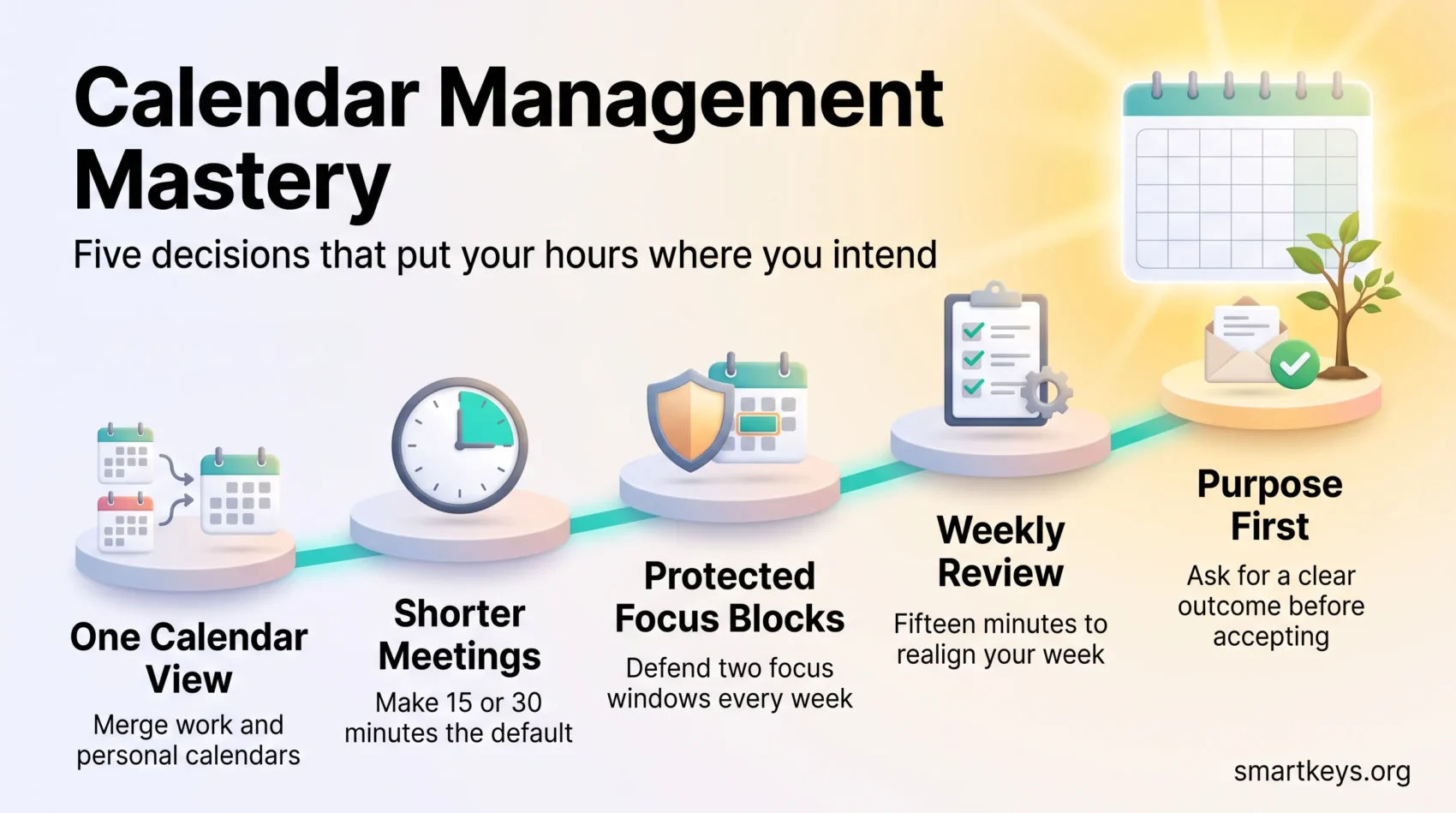
Merge your calendars into one view so nothing gets booked twice. Shorten your default meeting length to 15 or 30 minutes. Block two protected windows a week for concentrated work and defend them. Add a fifteen minute weekly review. Ask for a purpose and an outcome before you accept anything new.
Set aside an afternoon for the first four and the fifth becomes a habit within a fortnight. The point is not a beautiful calendar. It is that next week, the hours go where you intended.
Found this useful?
Make SmartKeys a preferred source on Google, and our articles will surface more often in your Top Stories, AI Overviews, and AI Mode.
Add as Preferred Source




