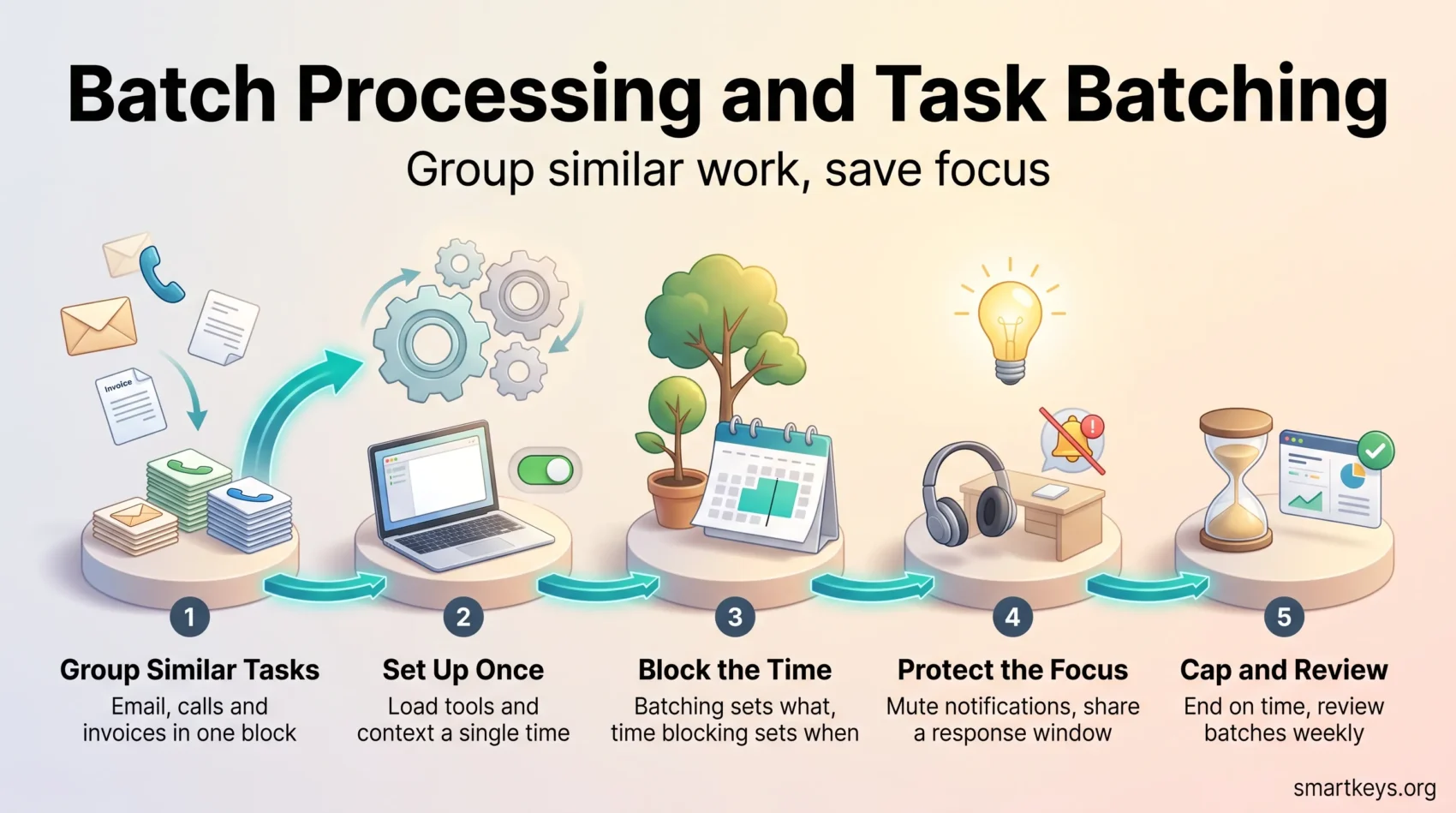
Batch processing means grouping similar work and handling it in one dedicated block instead of one item at a time. You answer all your email in one sitting, make all your calls back to back, or approve every invoice in a single session. Because you group similar tasks, you switch between unrelated work less often, keep your focus for longer and end the day with less mental clutter. In personal productivity the same idea is usually called task batching.
The term carries two meanings that are worth separating from the start. In personal productivity, batch processing means collecting similar work (emails, calls, invoices, reviews) and handling it in one block. In computing, it means running jobs against a large volume of accumulated data without user interaction. The underlying logic is the same in both cases: setup happens once, and everything that follows rides on it. This guide covers both, starting with the personal version.
Key Takeaways
- Batch processing cuts disruptions by grouping similar tasks into one block.
- The gain comes from paying the setup cost once instead of once per item.
- Batching tells you what belongs together; time blocking tells you when it happens.
- Recurring batches are good candidates for automated tasks, which frees even more time.
- Batches that grow too large create their own problems, so cap them deliberately and review them weekly.
Introduction to Batch Processing
Batch processing groups similar tasks together within set time blocks. It reduces the need to constantly switch between tasks, which drags on productivity. By staying inside one type of work, you keep the same mental context loaded and make each session more effective.
Typical personal batches look like this: answering email twice a day, writing two articles in one morning, scheduling a week of social media posts in one sitting, or handling all expense reports on Friday afternoon. In each case the tools, files and headspace you need are loaded once and then reused.
The computing version of the idea has been formalised for years. Jakarta Batch, standardised as JSR 352 and first released with Java EE 7 in 2013, is now maintained at the Eclipse Foundation. It defines a job specification language and runtime for batch applications. Batch jobs of this kind handle billing runs, report generation and data conversion without any user input.
Chunk-oriented processing is a core part of such systems. The read-process-write loop runs over one chunk of data at a time, and the runtime stores a checkpoint at the end of each chunk. If a job fails halfway through, it resumes from the last checkpoint rather than starting over. That is exactly why batch remains the default for overnight financial and billing work. The same loop can also be split across segments of the input and run in parallel.
What is Task Batching?
Task batching is the personal side of batch processing. It means grouping similar tasks into a single, uninterrupted block of time. This reduces the mental fatigue caused by constant context switching, the effort of dropping one kind of work and reloading another.
Understanding the Concept of Task Batching
Task batching works because resuming interrupted work is expensive. In a well-known observational study of information workers, Gloria Mark and colleagues found that people spent an average of 11 minutes 4 seconds on a working sphere before switching or being interrupted. When interrupted work was picked up again the same day, it took an average of 25 minutes 26 seconds to get back to it, because people worked on other things in between (Mark, Gonzalez & Harris, CHI 2005).
Speed is not the whole cost. A later controlled experiment by the same group found that people compensate for interruptions by working faster. They finished in about the same time with no loss of quality, but they reported significantly higher stress, frustration, time pressure and effort than the uninterrupted control group (Mark, Gudith & Klocke, CHI 2008). Batching does not just buy back minutes. It lowers the price you pay for them. For a deeper look at that trade-off, our guide to the science of multitasking covers the underlying research.
How Task Batching Works
You sort your work into groups and give each group a slot. Group your emails, your calls, your approvals and your admin. Structured methods like the Pomodoro Technique or GTD (Getting Things Done, David Allen’s system for capturing every commitment in one trusted list) sit on top of this comfortably. What makes it pay off is single-tasking within the block. The label you use matters less than the reduction in switching between unrelated kinds of work.
Why Batching Works
Batch processing has become a key strategy in personal workflows and in sectors like finance and healthcare for the same reason: setup is expensive and repetition is cheap. Grouping similar work gives you better focus, better use of your calendar, and less end-of-day fatigue.
Less Context Switching, More Focus
Every switch between unrelated tasks means reloading a different set of files, tools, people and rules. Stay inside one category and that context stays loaded. The American Psychological Association summarises research by psychologist David Meyer suggesting that even brief mental blocks from shifting between tasks can cost as much as 40 percent of someone’s productive time (APA, Multitasking: Switching costs). The exact figure depends on the tasks, but the direction is consistent.
Fewer switches also mean fewer of the small errors that creep in when you resume something half-finished. You also carry less of the low-grade mental clutter that comes from tracking several open threads at once.
Enhanced Time Management
Batching gives related tasks a visible place in your week rather than letting them leak into every gap. That makes your commitments clear to you and to colleagues. It also makes estimation easier, because you plan one block of forty minutes instead of twelve unpredictable interruptions. Our guide to time management techniques covers how batching fits alongside prioritisation and delegation.
Energy Conservation and Reduced Burnout
Batching also helps conserve mental energy. Structured sessions with clear start and end points are less draining than a day spent reacting, and they make it far easier to stop. Fewer open decisions also means less decision fatigue, the drop in judgement that follows a long run of small choices. This is one of the more practical defences against burnout: not working less, but working in shapes your attention can actually hold.
Steps to Master Batch Processing
Getting batching right starts with knowing which tasks belong together, then deciding which batches deserve your best hours.
Identifying Similar Tasks
Start by identifying tasks that can be grouped together. Useful ways to sort them:
- By activity: review your daily work to see which tasks share a common theme, tool or audience.
- By setup cost: tasks that need the same app, the same files or the same headspace belong in one batch.
- By project: when a project needs several different steps, grouping them keeps the details fresh from one step to the next.
- By context: consider when and where tasks arise, such as time of day or location.
One rule holds across all of these: keep demanding creative work and quick admin in separate batches. Writing a proposal between two rounds of expense approvals breaks the concentration the proposal needs.
This works far better when everything is written down first. Capturing tasks out of your head and into one list is what makes the patterns visible.
Prioritizing Your Tasks
After identifying similar tasks, the next step is prioritization: deciding which batches to tackle first, based on urgency and importance. Useful techniques include:
- The Eisenhower Matrix to sort tasks into four quadrants based on urgency and importance.
- Eating the frog, which means putting the batch you least want to touch early in the day.
- The 4 D’s to decide what to do, defer, delegate or drop before you batch anything at all. Work you hand off entirely, for example by outsourcing low-value tasks, never needs a batch slot.
Proper prioritization lays a solid foundation for efficient batch processing, because it keeps low-value work from crowding out the batches that matter.

Effective Scheduling for Batch Processing
A batch only helps if it has a fixed place in your week. Align demanding batches with your peak energy and let the calendar hold them for you.
Using Digital Tools for Scheduling
Platforms like Google Calendar and Asana make this easy. They let you:
- See your tasks and deadlines in one view.
- Set reminders for specific batch sessions.
- Reserve time slots for specific tasks, so focused work has a home.
Recurring calendar entries do most of the work here. Automated scheduling tools can take the booking friction out of batches that involve other people, such as a weekly block of client calls.
Optimizing Your Calendar
Consider your natural energy cycles when planning your day. Focus on:
- Scheduling demanding batches when you are most alert, and routine admin when your energy dips.
- Blocking longer periods for deep batches so they are not chopped up by meetings.
- Leaving buffer time between blocks so one overrun does not topple the rest of the day.
Our guide to calendar management goes further on protecting those blocks once they exist.
Minimizing Distractions During Batch Processing
A batch that gets interrupted every ten minutes is just a normal day with a label on it. Protecting the block matters as much as planning it.
Setting Up a Focused Work Environment
A few steps make the biggest difference:
- Controlling notifications on your devices before the block starts, not after the first ping.
- Clearing clutter from your physical workspace.
- Putting complex batches in the part of the day when your brain is freshest, often the morning.
A handful of simple focus tools, such as a timer, a site blocker or a pair of headphones, can do more than any elaborate system.
Communicating Availability to Your Team
Be clear with your team about your focus periods. Let them know when you are working on batch tasks so nobody is surprised by a slower reply. Consider:
- Using status indicators in Slack or Teams to signal when you are unavailable.
- Sharing a calendar that shows your focused work sessions.
- Setting an expected response window, so people know when, not whether, they will hear back.
That last point matters more than it looks. Batching only works if colleagues trust the delay, and a stated response window is what earns that trust.
Common Challenges in Batch Processing
Batching can backfire in a few predictable ways. The most common is over-batching, where one batch quietly absorbs far more work than a single session can handle.
Overcoming Over-Batching Pitfalls
A batch that grows past the point where you can finish it in one sitting stops being a batch and becomes a backlog. To prevent that:
- Cap the block, not the list: decide the batch is over when the time is up, and carry the remainder forward.
- Group tasks logically, in sizes that match your energy at that time of day.
- Watch the latency: anything with a deadline shorter than your batch interval does not belong in the batch.
- Plan breaks inside long batch days. Skipping them feels efficient but erodes focus by the afternoon.
Flexible Scheduling Strategies
Priorities shift and surprises happen, so a batching schedule needs some give. Three approaches help:
- Time blocking: reserve blocks for different types of tasks, but leave room for adjustments.
- Buffer periods: add short gaps between blocks to absorb interruptions.
- Regular reviews: a weekly planning session is the natural place to check whether your batches still match the work.
The deeper fix is structural. Batching is a way of moving from reactive to proactive work, and it only holds if the rest of your week is built to support it.
Reviewing and Adjusting Your Batches
Treat your first batching plan as a draft. For two weeks, note how long each batch actually takes compared with the time you planned. The gaps show you which batches are too big, which ones keep getting interrupted and which ones could move to a better time of day.
Then ask a few simple questions. Did grouping these tasks improve your focus and the quality of the work? Did anything urgent wait too long? Did two task types feel awkward together? Adjust one thing at a time, and repeat the check whenever your workload changes.
The Role of Data Automation in Batch Processing
On the systems side, data automation is what makes batch processing reliable at scale. It uses scheduling, orchestration (coordinating several jobs in the right order) and monitoring to handle large data sets with little manual involvement.
Streamlining Operations Through Automation
Banks, hospitals and accounting teams use data automation to run complex jobs on a schedule instead of by hand. That reduces manual effort and makes the results repeatable. Automation tools typically provide event-based triggers, retry logic and job monitoring, which is what turns a script into something a team can rely on. The main benefits:
- Less manual work for recurring jobs.
- The ability to handle large data sets without extra staff.
- Better visibility and control over what ran, when and with what result.
Finance teams are the clearest example, since month-end close is a batch process whether or not anyone calls it one.
Integrating Data Automation Tools
Modern platforms need far less custom scripting than they once did, which makes them easier to point at a new data source. Common approaches include:
- Structured scripts or pipelines for data extraction and transformation.
- Visual, low-code builders for teams without dedicated engineering support.
- API-based connectors that move data between systems on a schedule.
On the individual scale the same logic applies to automating recurring tasks. Anything you batch the same way every week is a candidate for handing over entirely.
Combining Batch Processing with Other Productivity Techniques
Batching rarely works alone. It becomes much stronger when you pair it with a method that decides when each batch happens.
Batch Processing vs. Time Blocking
Batch processing answers what goes together; time blocking answers when it happens. They are not competing methods, and used alone each has a gap. A batch with no slot never starts, and a slot with no batch fills up with whatever is loudest.
A simple rule of thumb: batch repetitive, similar tasks such as email, social media posts or invoices. Give complex, one-off work its own time block without anything else mixed in.
Building a Hybrid System
In practice, a week might hold two short email batches a day, one block of calls on Tuesday afternoon and three long morning blocks for deep project work. GTD fits in front of this: capture everything in one list, then assign each item to the batch where it belongs. Our broader guide to task management shows how these pieces fit into a single system.
Real-World Applications of Batch Processing
In business systems, batch processing handles large volumes of data whenever the result does not need to be instant.
Industries Benefiting from Batch Processing
Some notable examples:
- Finance: processing card transactions, payroll and invoicing runs.
- Data analytics: collecting and analysing data over longer periods, such as compiling weekly or monthly reports.
- Digital marketing: updating customer segments for targeted campaigns and evaluating campaign performance.
Typical Batch Workloads
Across those sectors the same categories of work keep showing up, because they share one property: the result is needed on a schedule, not the instant the data arrives.
- Regulatory and compliance reporting, where the reporting period itself defines the batch.
- Data warehousing and business intelligence, where loads run overnight so that dashboards are ready in the morning.
- Machine learning model training on accumulated historical data.
- Backups and system maintenance, scheduled for low-demand hours.
The trade-off is deliberate: batch buys lower infrastructure cost and higher throughput by giving up immediacy. Where immediacy is the point, as in fraud checks, live personalisation or operational alerting, real-time data processing is the right tool. Most organisations end up running both.
Conclusion
Batch processing is less a productivity hack than a way of accounting for setup costs honestly. Whether you are grouping an afternoon of invoices or scheduling an overnight data load, you pay that cost once instead of repeatedly. The saving shows up as focus at the personal scale and as throughput at the system scale.
The limits are worth naming too. Batching trades immediacy for efficiency, so anything truly urgent has to live outside it. Batches that grow past what one sitting can absorb quietly turn into backlogs. Kept to a sensible size, defended on the calendar and reviewed every few weeks, though, the method holds up: fewer switches, clearer commitments, and a day that ends where you meant it to.
Found this useful?
Make SmartKeys a preferred source on Google, and our articles will surface more often in your Top Stories, AI Overviews, and AI Mode.
Add as Preferred Source