You probably lose more of your week to routine work than you realize. In Smartsheet’s Automation in the Workplace survey, more than 40% of workers said they spend at least a quarter of their work week on manual, repetitive tasks, with email, data collection and data entry taking the most time.
This playbook shows how to find that work and hand the mechanical parts to software. Task automation means letting a tool carry out a defined action for you, such as copying a form entry into your CRM, so nobody has to remember to do it.
You will see how to pick the right candidates, choose a tool that fits your existing apps, run a pilot, and turn the hours you win back into numbers your finance team accepts.
Key Takeaways
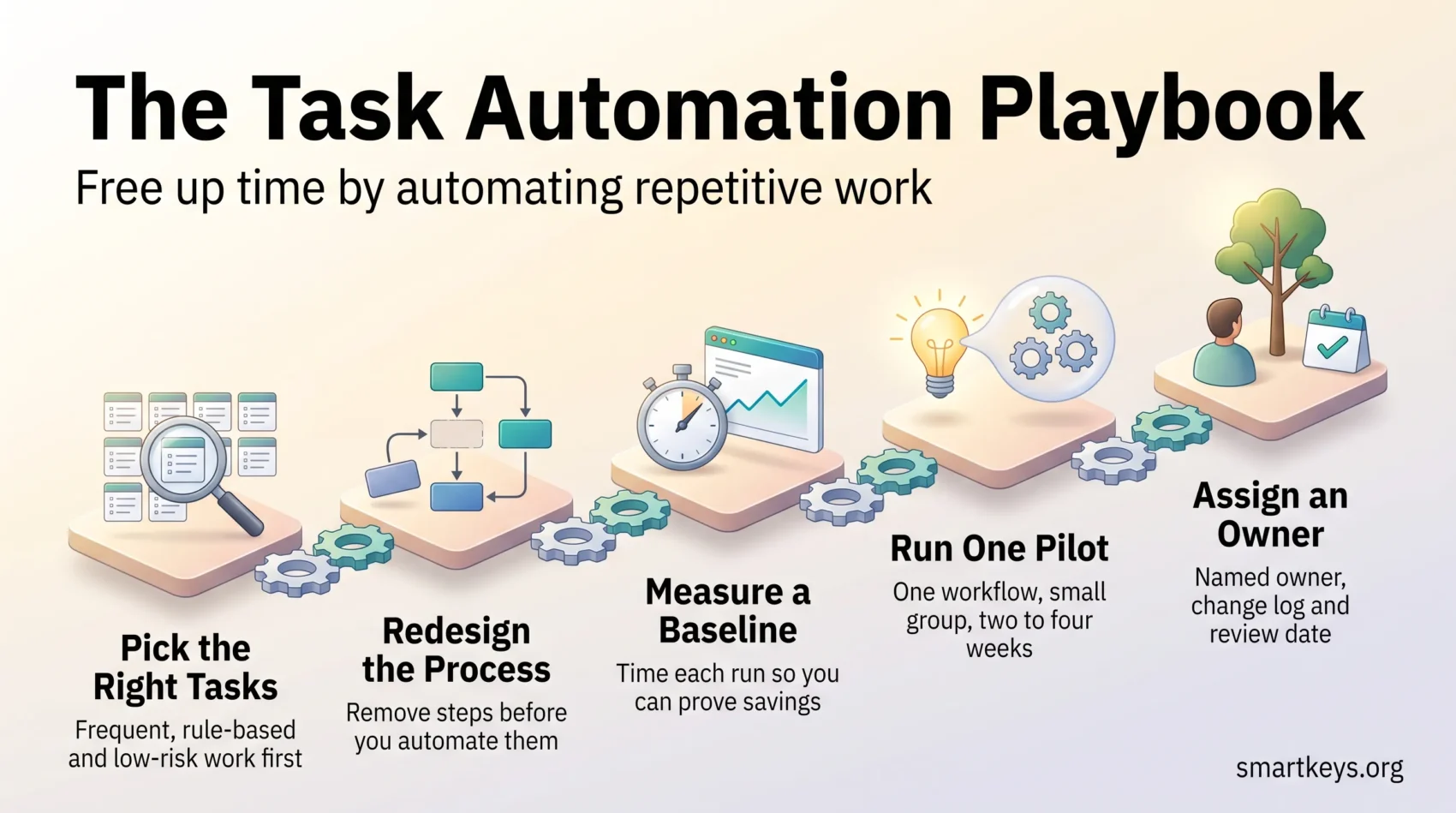
- Automate the work that is frequent, rule-based and low-risk before anything clever.
- Redesigning the process matters more than the tool you buy.
- Measure a baseline first, or you cannot prove what the change was worth.
- Start with one pilot workflow and a small group of users.
- Give every workflow you ship a named owner, a change log and a review date.
Why automating repetitive work pays off now
Automation software is now cheap and simple enough that a non-technical team can build a working flow in an afternoon. The evidence on returns has also become clearer, and it does not flatter the buy-a-tool approach.
McKinsey’s State of AI survey, fielded in May and June 2026, found that nearly nine in ten organizations use AI regularly in at least one business function and 44% say it is scaling across the enterprise. Yet only 37% could attribute any impact on earnings to it, and just 6% qualified as high performers. What set that 6% apart was not the software: nearly three quarters of them had fundamentally redesigned workflows, against about a quarter of everyone else.
The lesson is blunt. Bolting a tool onto a broken process gives you a faster broken process. The return comes from removing steps, not automating every step you already have.
There is also a good reason to start small. Microsoft’s Work Trend Index report from June 2025, based on anonymized Microsoft 365 activity, found employees are interrupted every two minutes during core working hours, roughly 275 times a day. Every notification you remove is attention you get back.
- You reclaim the hours going to copy-paste, chasing approvals and re-entering data.
- Customers get consistent handling, because the flow does not depend on who is at their desk.
- Your team absorbs a busy month without overtime or extra headcount.
- You can show the result plainly: hours saved, errors avoided, requests handled.
What task automation is, and how it fits your workflows
Start with one routine action that steals minutes every day. That is where the fastest win sits.
From single actions to connected processes
Task automation handles one defined action you used to do by hand, such as sending a confirmation email or updating a record.
Business process automation links several of those actions into a sequence, so data moves between systems in the right order without anyone shepherding it.
Robotic process automation (RPA), meaning software bots that imitate clicks and keystrokes in an application, covers systems that offer no proper connection point. It suits old software never built to talk to anything else.
AI agents, programs that choose the next step themselves within limits you set, sit at the far end. They help when work needs judgment and carry real risk when money or a commitment is involved. Our guide to AI agent workflows covers where that line sits.
What you can realistically expect
- Fewer mistakes in routine updates, and handoffs that stop waiting for someone to notice them.
- Shorter cycle times, because the flow triggers the moment something happens instead of the next morning.
- Less tedium for the team. In a 2021 Zapier survey of 2,000 US knowledge workers at companies under 250 staff, about 70% said automation made them more productive and 34% said automating data entry reduced errors.
Start small: automate one action, check the output for a week, then add the next step.
How to find the right tasks to automate
The best candidates are rarely dramatic. They are two-minute actions that happen fifteen times a day and never reach anyone’s project plan.
Signal checklist
- Is the action manual and mechanical, such as copy-paste or form entry?
- Does it repeat on a schedule, or every time something specific happens?
- Can a clear event trigger it, like a form submission or an inbound email?
- Would the same steps work across the whole team, or does everyone do it differently?
- If it goes wrong, is the damage small and easy to reverse?
If the last answer is no, leave it for later. Payment runs, contract signatures and anything touching payroll need a human in the loop.
Typical candidates include moving data between two apps, scheduling social posts, raising invoices on a fixed date, creating a ticket from a web form, routing approvals, and sending the three answers customers ask for every week.
Talk to the people doing the work first, because they know which handoff always stalls. A week of tracking helps too: our guide to conducting a time audit explains how to log where the hours actually go.
Score each candidate on frequency and time per run, then write down its trigger, the systems it touches, who owns it and what success looks like. Ten minutes of that saves hours of rebuilding later.
How to automate tasks step by step
Pick one small, measurable process inside a single team. You can map it, test it and fix it without a project board.
Map the work before you build anything
List the steps in order, note which system each touches, and mark every point where the work waits for a person. The waiting is usually where the time goes, not the typing. Our guide to standard operating procedures covers how to write the process down without producing a document nobody reads.
Score the candidates and choose one
Weight frequency, time per run, error rate and how much the task irritates people. Take the one that frees the most time for the least building, not the most interesting problem.
Choose a tool that fits your existing stack
Check that it connects natively to the apps holding your data, that it logs what it did, and that a colleague can read the configuration in six months. A cheap tool nobody can maintain is not cheap.
Pilot with a small group, and tell them what changed
Run the new flow with a handful of users for two to four weeks, and agree the success measures before you switch it on. Walk people through what the automation now does, what it does not do, and who to tell when it misbehaves.
Measure, then scale what works
Track time per run, error and rework rates, and what users say. If the pilot hits its targets, turn the setup into a template and move on. If it does not, work out whether the problem was the tool or the process underneath. Our guide to personal productivity metrics covers how to measure progress without drowning in dashboards.
Plan for the obstacles that show up
Four problems stall most rollouts, and all four are cheaper to handle early than late.
The first is the team. People assume an automation is aimed at their job, so say plainly what it takes over, what it does not, and who to tell when it misfires. Involving the people who do the work while you design the flow removes most of the resistance, and our guide to change management strategy covers how to run that conversation.
The second is the connection between apps. Two tools that both advertise an integration may still not pass the one field you need. Test the real data path before you commit to a license.
The third is the data underneath. An automation copies whatever it finds, so duplicate records and inconsistent date or currency formats spread faster once a flow runs unattended. Clean the source first.
The fourth is upkeep. Connected apps change their fields and screens, and a flow that fails silently is worse than one that fails loudly. Decide who receives the alert when a run breaks, and read the logs once a month.
Tools and platforms to automate work across your systems
Match the tool to the shape of the problem rather than the size of the vendor.
Workflow and project platforms
These orchestrate steps using templates, rule-based triggers and approval routing, and suit work that already lives inside one system. Our ClickUp review and Asana review cover what the built-in automation actually handles on each plan.
No-code and low-code builders
Drag-and-drop builders let non-developers assemble a working app or form flow, which shortens the queue for IT. See what non-technical staff can realistically build with low-code platforms for the limits worth knowing first.
Integration hubs
An integration hub connects apps with no direct link, so a new row in one place creates a record in another. Our Zapier versus Make comparison covers the two common choices for small teams, and iPaaS as the backbone of business integration explains what changes when the same job runs at company scale.
RPA and hyperautomation for legacy work
Use bots where volume is high, rules are stable and the system offers no connection point. That is narrower than vendors suggest, and it needs maintenance every time the screen changes. Our overviews of hyperautomation and business automation trends cover how that market shifted toward AI-driven tooling.
Tools built for one function
Often the fastest win is a tool that already knows the job: a sequence builder for sales and marketing, covered in our guide to email workflow automation, or finance automation for accounting. For internal questions, HR chatbots take the repeat requests, and for customers our review of AI chatbots in customer service covers what they resolve and where a person is still needed.
- Check the integrations you need today, not the logo wall.
- Ask how the tool handles a failed run: silent retry, alert, or nothing.
- Look at permissions and audit logs before a flow touches customer data.
- Find out how pricing scales with runs, users or credits. That is where the surprise arrives.
- Pilot one workflow end to end before signing an annual contract.
Where AI fits, and the rules that now apply
AI extends automation from following rules to handling messy input.
Three capabilities do most of the useful work. Machine learning, meaning models that learn patterns from past examples, classifies requests so your team handles only the exceptions. Document understanding reads invoices, IDs and delivery photos and pulls the fields out, which removes a large slice of manual entry. Conversational systems answer routine questions and pass the rest along with context attached.
In practice that looks like lead scoring that puts the right ten names at the top of a sales list, support triage that tags a ticket before an agent opens it, and invoice capture that fills the header fields for a human to confirm. Our guide to AI in business operations sets out where the wider returns have and have not appeared.
Two cautions. Model output needs a review step wherever a mistake costs money or trust, so build the checkpoint in rather than adding it after the first bad week. And if you serve customers in the EU, Article 50 of the AI Act has applied since 2 August 2026: people must be told when they are interacting with an AI system, unless that is obvious. A one-line disclosure in your chat widget covers it. All of it depends on your data being in order, the subject of our guide to data governance strategy.
Proving the ROI of workflow automation
Capture the baseline before you change anything, or your numbers will not survive a single question.
Time the current process: minutes per step, where approvals stall, how often something is redone. Note wait times too, because waiting is usually the bigger number and the easier win.
Metrics that matter
- Time and cost saved: convert minutes per run into money using a fully loaded labor rate, then multiply by real monthly volume.
- Error and rework rates: quality gains are often larger than the time saved.
- Capacity: how many more requests the same team handles without new hires.
- Cycle time: how long the process takes end to end, which is what customers notice.
- Team feedback: whether the work feels less tedious, which predicts whether people keep using the flow.
Counting the true cost
Include build time, the license, maintenance when a connected app changes, and the cost of the errors the old process produced. A flow needing three days of fixing every quarter is not free.
Getting stakeholders on side
Run the pilot, then write one page: the baseline, the result, two screenshots and a quote from someone who does the work daily. It wins budget faster than a long report.
Not everything worth removing needs software. Sometimes the answer is to hand the task to someone else or drop it, covered in our guides to effective delegation and team-wide focus time. Grouping similar jobs into one block is often enough on its own, which our guide to batch processing covers.
Scaling up without losing control
Expand only once the first flow has run clean for a month.
Reuse instead of rebuilding
Reuse the same triggers, approval patterns and notification templates across flows. Modular pieces roll out faster and are quicker to fix when something upstream changes.
- Pilot one flow, turn it into a template, then copy it to the next similar process.
- Keep a catalog recording each flow’s owner, inputs, outputs and dependencies.
- Track usage, success rate and exception volume against a business outcome.
Govern it, then review it
Short role-based walkthroughs and a one-page reference beat a formal training program, and involving people while you design removes most of the resistance. Then decide who may build a flow, who approves one touching customer data, and where changes get logged. Give every workflow an owner and a review date, and retire those that no longer match how the work is done. An abandoned automation quietly doing the wrong thing is worse than none.
Conclusion
Pick one workflow, measure what changes, and scale only what works.
The tooling is no longer the hard part. Integration hubs, no-code builders and function-specific platforms put a working automation within reach of any team, and AI has widened what counts as automatable. The 2026 evidence is equally clear that buying software is not the same as a return: the organizations seeing one redesigned the process first.
So keep it small. Baseline the process, remove the steps that should not exist, automate what is left, and check the result after a month. Involve the people who do the work, document what you built, and give it an owner. Start with one workflow this week.
Found this useful?
Make SmartKeys a preferred source on Google, and our articles will surface more often in your Top Stories, AI Overviews, and AI Mode.
Add as Preferred Source