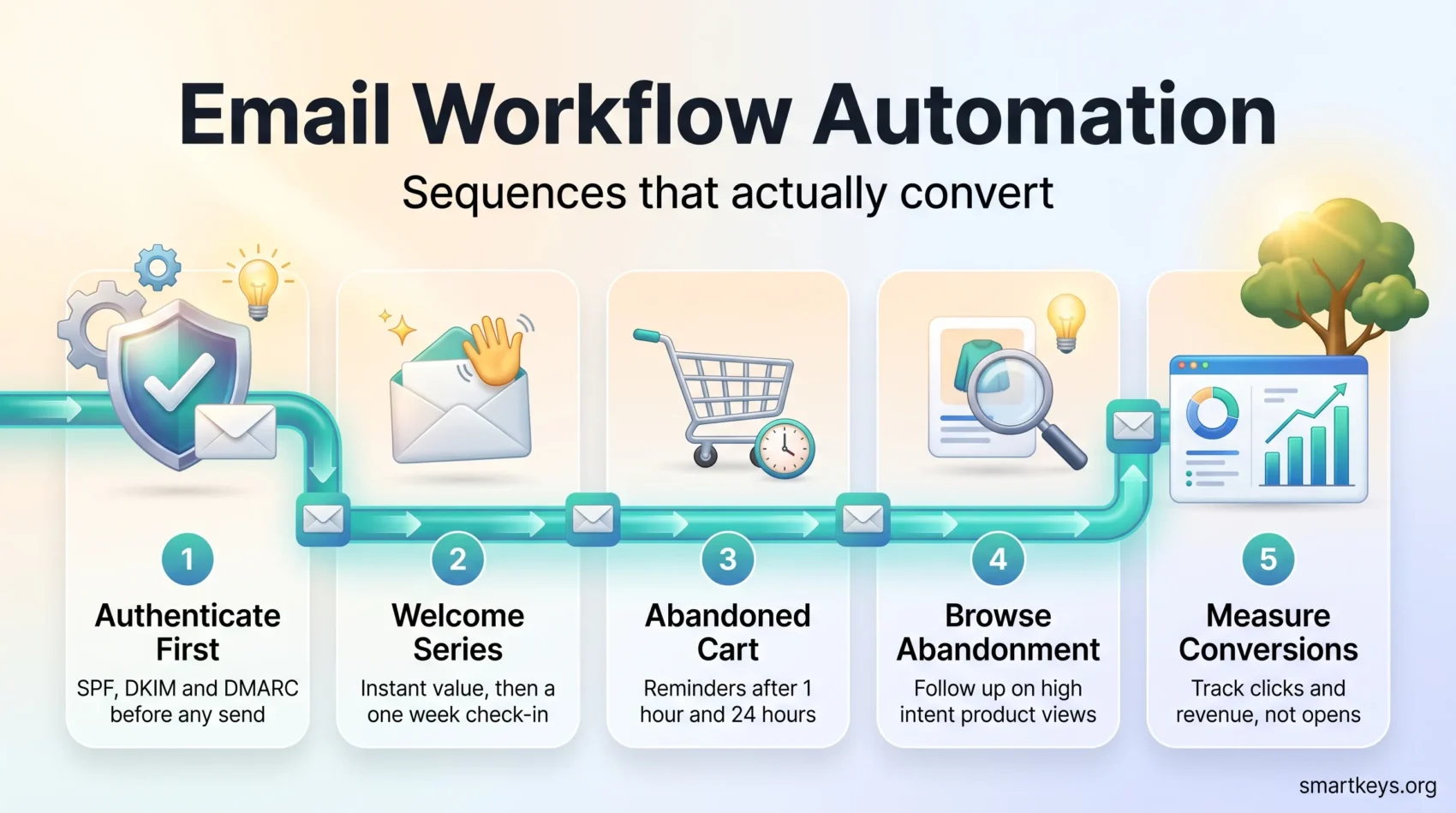
An email workflow turns a single trigger into a timed sequence that reacts to what someone actually does — no manual list pulls, no calendar guesswork. Built well, it becomes the highest-earning part of an email program.
The 2026 numbers are lopsided. Klaviyo’s analysis across more than 183,000 brands found automated flows generate roughly 41% of email revenue from just 5.3% of sends, with about 3× the click rate and 13× the placed-order rate of one-off campaigns. Omnisend’s 2026 ecommerce report puts the same gap in cash terms: $2.87 earned per automated send against $0.18 per scheduled campaign send.
The catch: most brands build one or two flows and stop there. Abandoned cart and welcome messages alone drive 76% of all automation-generated orders. Add browse abandonment and those three cover 87%. Everything beyond them is largely unclaimed revenue.
This guide walks through the building blocks, the flows worth building first, the 2026 sender rules that decide whether any of it reaches an inbox, and where AI agents earn their place.
Key Takeaways
- Flows out-earn campaigns by roughly 16× per message — build them before you send more broadcasts.
- Start with welcome, abandoned cart and browse abandonment. They account for 87% of automated orders.
- Authentication is no longer optional: non-compliant bulk mail is now rejected outright, not filtered.
- Open rates are inflated by privacy proxies. Judge flows on click-to-conversion and revenue per recipient.
- AI agents can draft, segment and schedule — but keep a human review step before anything sends.
Why an optimized email workflow matters right now
An efficient sending system turns one-off pushes into ongoing, measurable journeys that run without constant oversight. That change saves your team time and removes the most repetitive part of the job.
Efficiency and revenue at scale
Omnisend’s 2026 analysis of 27 billion emails found automated messages delivered 24% higher open rates, six times stronger click engagement and 19 times higher conversion rates than scheduled campaigns. Nearly one in three clicks on an automated email ended in a purchase.
The often-quoted $36-to-$1 return on email still circulates, but it dates from Litmus and DMA research last refreshed in 2024. Treat it as a directional argument for the channel, not a forecast for your own program. Flow-level revenue per recipient is the number worth defending in a budget meeting.
How automation reduces manual sends and stress
Replace one-off blasts with sequences that run around the clock. You cut repeated list pulls and keep follow-up consistent even in weeks when nobody has time to plan a campaign. This is the same logic behind wider business automation trends: move recurring decisions into a system once, then supervise instead of executing.
“Automation ensures consistent, timely messaging triggered by user behavior, reducing repetitive manual sends.”
- Frees your team to focus on strategy, not routine.
- Reaches people at the moment intent is highest rather than on a publishing calendar.
- Stops sends when goals are met, preventing over-messaging and complaints.
What an email automation workflow is and how it works
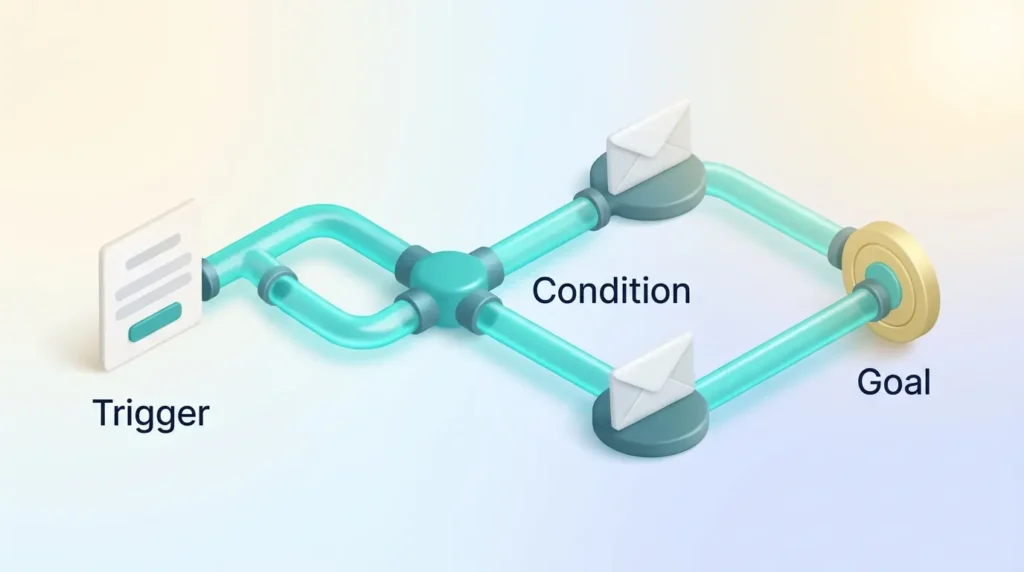
A simple trigger can start a chain of timed steps that adapt to behavior. Think of the process as four parts: triggers, conditions, actions and endpoints. Each shapes how a person moves through the flow.
Triggers, conditions, actions, and endpoints explained
Triggers kick things off — a signup, a download, a purchase. Conditions then split people by criteria like region, list membership or past order value.
Actions are the tasks you run: send content, wait, update a field, add a tag. Endpoints (goals) stop the sequence the moment a conversion or click happens.
“Designing clear goals up front makes every action count toward a measurable result.”
Example flow: trigger to goal with branches
- Trigger: user downloads a guide.
- Action: send thank-you message; wait 3 days.
- Condition: if not opened, send a reminder; if opened, tag as “Engaged”.
- End: notify sales on click; exit the flow when the goal is met.
Set your goals and map the customer journey
Define one concrete outcome per sequence and use it as your north star. That keeps every message, CTA and branch aligned to a measurable result.
Examples help. Aim for goals like “convert a first-time browser within 14 days,” “get a new user to their first success within a week,” or “recover 20% of abandoned carts in 30 days.”
Define outcomes and align with journey stages
Map the stages — awareness, evaluation, purchase, post-purchase, loyalty — and match content to each step. Segment by lifecycle so people see stage-appropriate offers rather than whatever campaign shipped that week.
Translate business KPIs into workflow metrics: trial-to-paid time, repeat purchase rate, reactivation targets. Sequence value-building messages that support progress instead of pushing a premature sale. The same logic underpins most customer retention strategies — earn the next step before you ask for it.
- Pick one clear outcome per flow.
- Route people by lifecycle stage for relevant content.
- Plan guardrails: frequency caps and exit rules.
- Document assumptions, milestones and dependencies.
“A simple stage map shows where to test content types and where to remove friction.”
Choosing your platform and tooling for workflows
Your platform choice shapes how fast you can build, test and scale. Look for a visual builder that lets you assemble journeys without code and change them the same afternoon.
No-code builders, templates, and multi-channel orchestration
No-code editors let non-developers drag, drop and preview content across devices. Most major platforms now include A/B testing and dark-mode previews, which cuts QA time noticeably.
Template libraries speed up common journeys while keeping your brand consistent. Prioritize templates that support dynamic fields so subject line, body and product blocks pull reliable data from your database.
- Visual editor with conditional logic and goal nodes.
- Device previews, A/B testing and multi-channel send options.
- A template library that matches your brand and use cases.
Which platform fits depends on your model. Ecommerce teams on Shopify usually land on a purpose-built ecommerce ESP — our Mailchimp vs Klaviyo comparison covers that trade-off. B2B teams weighing a full marketing suite against a lighter automation tool will find the details in ActiveCampaign vs HubSpot, our HubSpot Marketing Hub review, and MailerLite vs ActiveCampaign if budget is the deciding factor.
What to check before you commit
Confirm the platform handles throttling, exposes flow-level revenue reporting, and connects natively to your CRM and product data. Check export terms too: a platform you cannot leave cleanly becomes a strategic problem two years later.
Deliverability in 2026: the rules that decide whether anything lands
This is the section that changed most since the last update. Authentication used to be a best practice. Since February 2024 for Google and Yahoo, and May 2025 for Microsoft’s consumer domains, it is the price of admission.
Who counts as a bulk sender
All three providers use the same threshold: roughly 5,000 or more messages per day to their consumer addresses, measured per sending domain. Cross it once and you should treat yourself as a bulk sender permanently.
The checklist
- SPF, DKIM and DMARC published and aligned. A policy of p=none is the accepted minimum; p=quarantine or p=reject is the direction of travel. Yahoo additionally expects DKIM keys of at least 1024 bits.
- One-click unsubscribe via the List-Unsubscribe and List-Unsubscribe-Post headers (RFC 8058) on marketing and subscription mail, honored within two days. Transactional messages such as order confirmations and password resets are exempt.
- Spam complaint rate below 0.3% in Google Postmaster Tools, with 0.1% as the working target. Crossing 0.3% makes your domain ineligible for delivery mitigation until it stays clean for seven consecutive days.
- Valid forward and reverse DNS (PTR) on sending IPs, plus TLS on the connection.
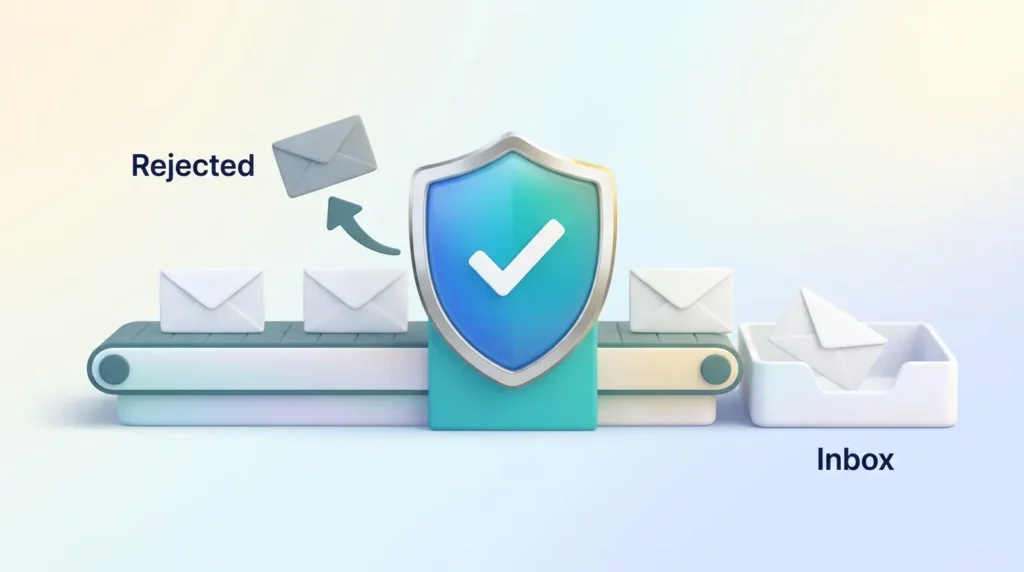
“Enforcement grew teeth in November 2025: non-compliant traffic moved from temporary rate-limiting errors toward permanent rejections.”
That distinction matters. A rejected message does not land in spam — it bounces back to your server and the recipient never sees it in any folder. Google returns 550 5.7.26, Yahoo 550 5.7.9 and Microsoft 550 5.7.515.
Yahoo and Google also track complaints independently, so a sender who looks clean in Postmaster Tools can still be in trouble at Yahoo. Monitor both dashboards. If your program touches EU or US state privacy rules alongside these technical requirements, our privacy compliance framework maps the consent side of the same problem.
Building your first email workflow step by step
Focus on one trigger at a time, then shape paths that mirror real choices and pacing. Start small so you can test fast and avoid noisy sends.
Select triggers, segment users, and order actions
Pick a clear entry point: a signup or a purchase. Then split people by the one or two attributes that genuinely change what they should read.
Order actions so value comes first: welcome, educate, then offer. Map tags and field updates after each action so your CRM stays in sync.
Add waits, goal checks, and exit criteria
Match waits to your sales cycle. Short gaps work for low-consideration products; longer waits suit high-ticket buys where people need time to compare.
Configure goal checks like “made a purchase” to end the flow early. Set exit rules for unsubscribes, replies and missing data so nobody gets stranded mid-sequence.
- Document the diagram so teammates understand each step.
- Build a sandbox test plan with seed contacts and walk every path before launch.
- Review metrics weekly for the first month, then settle into a monthly cadence.
“Test with real seed contacts to catch edge cases before going live.”
Email workflow fundamentals: triggers, timing, and order
Map triggers, timing and message order to the moments that matter. Pair each trigger with a clear action — signup, browse, add-to-cart, purchase — so every message feels earned.
Set timing that matches real decision windows: an immediate welcome, cart reminders at 1 hour and 24 hours, onboarding nudges after first login. These cadences protect momentum without crowding the inbox.
- Order messages so value comes first, then prompts and offers.
- Apply frequency caps and quiet hours to respect people across time zones.
- Pause or skip steps when someone shows strong engagement, to avoid redundancy.
Build default branches for missing data so no one stalls. Exclude anyone already in a higher-priority flow to prevent overlap.
“Properly ordered actions improve deliverability by keeping engagement signals consistent.”
Finally, document the logic in plain language. That makes future edits safe and keeps content aligned to each stage.
Create high-impact welcome and onboarding sequences
Welcome messages remain the single highest-engagement automation across every major dataset. Design three to five messages that front-load value and adapt when someone clicks or completes an action.
A three-to-five step welcome journey that adapts to behavior
Map a clear path: welcome, quick-start guide, feature spotlight, social proof, one-week check-in. Use behavior-based branches to skip steps a person has already completed.
- Immediate: welcome and how to get started, with one CTA.
- Day 1–2: show the core feature that drives retention, with a short tutorial.
- Day 3–5: spotlight a secondary benefit and include a brief customer example.
- Day 7: milestone check-in offering help if first value hasn’t landed yet.
Onboarding tips that drive first value
Focus on one thing — the feature most tied to long-term retention. Progressive profiling collects preferences slowly, so you learn without adding friction at signup.
Measure early activation: first click, setup completion, time to first success. Remove friction wherever those stall. If your team answers the same onboarding questions repeatedly, a library of email response templates keeps the manual replies as fast as the automated ones.
“Deliver quick wins early and let behavior guide the next message.”
Recover revenue with abandoned cart and browse workflows
Cart recovery is where the numbers are. Together with welcome, abandoned cart drives roughly three quarters of all automation-generated orders. A tight cadence captures intent and preserves margin when you test incentives carefully.
Timing, incentives, and dynamic product content
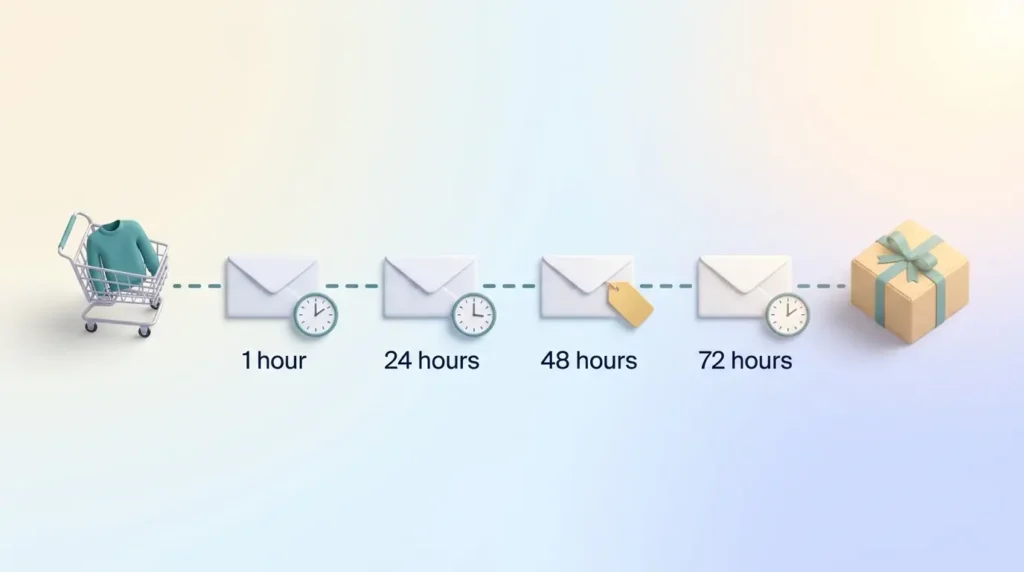
Start with a reminder around 1 hour after abandonment to catch hot intent. Send a second at 24 hours with social proof or gentle urgency. If there is still no response, follow at 48 hours with a targeted incentive, then a final push at 72 hours.
Include dynamic product blocks that pull the exact items left behind. Instant recognition beats a generic “you left something” every time — the same principle that drives e-commerce personalization on-site.
- Test discounts only after earlier reminders fail, to protect margin.
- Add browse triggers for high-intent views that never reach the cart. This is the third of the big three flows and the one most often missing.
- Use multichannel nudges where the person opted in, since a growing share of these journeys start on a phone. See our mobile commerce trends breakdown for the wider picture.
- Segment by discount affinity so full-price buyers see fewer offers.
“Stop messages the moment an order completes to avoid redundant contacts.”
Monitor recovery rate, average order value and time-to-completion to tune cadence. A simple sequence you can launch and iterate:
- 1 hour: reminder with product images and a one-click return link.
- 24 hours: social proof plus mild scarcity.
- 48 hours: targeted incentive for price-sensitive segments.
- 72 hours: final reminder and clear exit rules.
The flows almost nobody runs
Two underused automations are worth your attention. Back-in-stock emails post the highest conversion rate of any automation type — around 6.5% — yet are deployed by well under 1% of brands. Birthday messages produce average order values roughly four times higher than normal, but require you to collect a date at signup. Both are cheap to build once the data is there.
Transactional and post-purchase flows that build trust
Transactional sequences reassure buyers with timely confirmations and clear next steps. Start with an immediate order confirmation, follow with shipping updates that include tracking, and close with a delivery note. These cut “where’s my order?” tickets and keep your brand predictable.
Order, shipping, delivery, and follow-up
Send the confirmation right away with purchase details and expected timelines. Push a shipping notice with tracking so people can check progress without contacting support.
After delivery, schedule a short check-in to gather feedback, offer help and suggest complementary items. Keep promotion minimal in the earliest messages — this is where customer loyalty is either earned or quietly lost.
- Contingencies: handle delays or split shipments with clear details and repeat updates.
- Channels: email first, then optional SMS based on stated preference and urgency.
- Exit rules: stop messages after cancellations or returns to avoid confusion.
“Timely, factual updates turn transactions into trust-building moments.”
Re-engagement and win-back workflows
Win-back sequences start by defining when a contact is genuinely inactive — typically 30 to 90 days, depending on purchase cadence. Match that window to your product so the outreach feels timely rather than intrusive.
Personalize beyond a first name. Reference the last browse or purchase. Use subject lines that hint at value, not just a discount.
Include a clear last-chance message before removing unresponsive contacts. That step is not just courtesy: unengaged subscribers generate complaints, and complaints are now the metric that decides your inbox placement.
“Give people a low-friction way to tell you their preferences instead of forcing a full unsubscribe.”
- Define inactivity by both time and behavior.
- Segment high-value lapsed contacts for bespoke incentives.
- Offer a preference center and a one-question survey to learn why they went quiet.
- Suppress the truly inactive to keep your complaint rate under control.
Personalization and segmentation that increase relevance
Smart segmentation pairs real-time behavior with dynamic modules so messages adapt without manual versioning. Split by action, lifecycle stage and stated preference.
Behavioral data, dynamic content, and subject lines
Use behavioral triggers to swap content blocks based on recent browsing or purchase history. Apply if/then rules to adjust tone, CTA and offer by segment.
Craft subject lines that promise clear value and match what’s inside. Avoid clickbait, and test variations rather than guessing.
The hard part is rarely the email tool — it’s the data feeding it. Teams that struggle here usually need a cleaner foundation first: a customer data platform to unify profiles, a deliberate first-party data strategy as third-party signals keep shrinking, and zero-party data collected through preference centers and quizzes.
- Switch modules for product affinity, price sensitivity and geography.
- Enrich profiles slowly through friendly prompts rather than long forms.
- Set sensible defaults for missing data so templates never break.
- Document segmentation logic so the program stays maintainable as it scales.
“Personalization beyond a name turns data into measurable value.”
Content that converts: subject lines, CTAs, and value
Good subject lines promise value quickly and match what people find inside. That alignment builds trust and protects long-term engagement.
Writing lines that earn the click
Be specific and benefit-led. Tell the reader what they get. Test question versus statement, but favor clarity over cleverness.
- Write one promise per subject line.
- Run A/B tests on subject lines, send times and CTAs — one variable at a time.
- Keep CTAs singular and action-oriented.
- Front-load value with a strong opening line and relevant preview text.
Structure content for scanners — short paragraphs, bold subheads, clear buttons. The same discipline that makes internal messages readable applies here; our guide to email clarity covers the mechanics.
Where AI agents fit in 2026
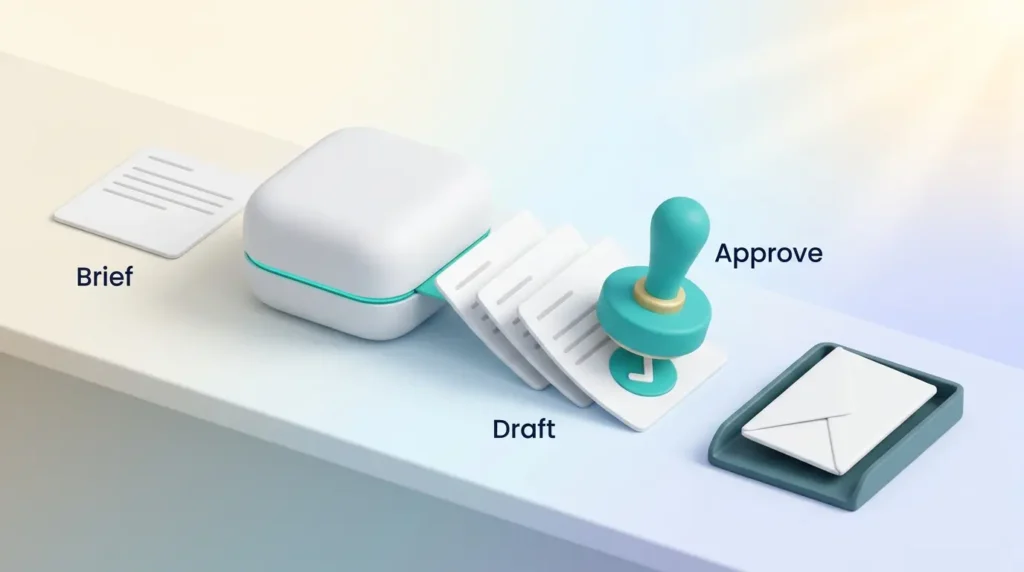
The tooling changed shape this year. Every major platform now ships an agent layer — Klaviyo’s Marketing Agent, HubSpot Breeze, Customer.io, Braze and ActiveCampaign among them. The difference from earlier AI features is meaningful: a subject-line helper returns a recommendation, while an agent can take a natural-language brief, break it into subtasks, call the platform’s APIs and hand back a configured campaign for review.
What that means practically
Agents are strongest at the work that is tedious rather than judgment-heavy: drafting variants, building segments from a description, proposing send times, flagging flows whose performance has drifted. Klaviyo reported $3.8 billion in attributed value across its platform during Black Friday and Cyber Monday 2025, framing it as the first AI-powered BFCM.
Adoption is broad but shallow. A 2026 HubSpot figure puts full end-to-end campaign automation by agents at around 19% of marketing teams, while surveys consistently show three quarters of marketers using generative AI daily. The gap is governance, not capability — one April 2026 survey found fewer than half of companies enforce a generative AI usage policy with technical controls.
Guardrails worth setting now
- Run agents in shadow mode against historical campaigns before giving them send rights.
- Keep a human approval step on anything that reaches a customer.
- Log what the agent changed, so a performance drop is traceable.
- Restrict which segments and templates an agent may touch.
The broader pattern here is familiar from other functions: the win comes from AI augmentation rather than handing over the wheel.
Testing, QA, and launch
Before you press send, run a tight QA loop that simulates every path and device view. Check desktop, mobile and dark mode so layout problems surface before recipients see them.
Device rendering, link checks, and path testing
Click every link, including dynamic ones, and confirm tracking parameters survive substitution. Broken links cost clicks and trust.
Walk every branch with seed contacts. Verify triggers fire, actions run in order, and people move in and out of the right paths.
- Validate personalization fields so nobody receives “Hi [FirstName]”.
- Review headers, footers and compliance details, including the visible unsubscribe link and a valid postal address.
- Check timing windows, frequency caps and quiet hours.
- Confirm suppression rules so nobody gets duplicate or conflicting messages.
- Soft-launch to a small segment and watch metrics and error logs closely.
- Document QA steps and keep a rollback plan that pauses sending quickly.
“A short, repeatable QA checklist saves you from costly mistakes and protects deliverability.”
Measure, optimize, and scale
Start with the moments that matter: clicks, conversions and downstream revenue. Build one simple dashboard per sequence so you can act on clear signals.
Why open rate is no longer your headline metric
Privacy proxies pre-fetch images, which inflates opens for a meaningful share of your list. Omnisend recorded open rates rising for a fifth straight year — from 26.6% in 2024 to 30.7% in 2025 — while click rates fell. Reading that as improvement would be a mistake.
The more honest signal in the same dataset: click-to-conversion jumped 53% year over year. Fewer people clicked, but those who did were far likelier to buy. Track click rate, click-to-conversion, revenue per recipient, unsubscribe rate and complaint rate. Use open rate for trend-spotting within a single flow, never for cross-channel comparison.
A/B testing cadence and continuous improvement
Run focused tests on high-leverage elements — subject lines, send times, content blocks, CTAs. Keep one test running at a time so results stay readable.
- Use segmentation analysis to find responsive audiences and prune the rest.
- Map paths to spot where people drop off, then fix content or timing there.
- Keep a testing calendar so experiments don’t overlap and muddy results.
- When a flow wins, clone and adapt it for matching segments.
“Measure what matters and let data drive cadence and content changes.”
Compliance and preference management
Respecting consent protects your sender reputation as much as your legal position. Capture opt-ins with timestamps so you can prove consent and trace when someone agreed.
Include a clear unsubscribe link and a valid physical mailing address in every footer, alongside the technical one-click header covered earlier.
Use a preference center so people can choose frequency and topics. Letting someone opt down beats losing them entirely.
- Suppress bounces and complainers automatically.
- Respect user-level flags so automation never overrides a personal choice.
- Adopt double opt-in where required to improve list quality and cut spam reports.
The regulatory picture keeps moving, particularly across US state laws and EU rules — our roundup of data privacy trends tracks what changed this year.
“Document consent dates, honor preferences, and run regular hygiene to keep lists healthy.”
Workflow examples and templates you can copy
Ready-made outlines let you launch faster and learn from real responses. These cover welcome, nurture, promotional and event-triggered flows.
Welcome, lead nurture, promotional, and event-based flows
Start with a short welcome series: immediate thank-you, quick value, one-week check-in. For lead nurture, map a 7–14 day path with resources, a case example and a light offer.
Promotional sequences run tighter: announce, remind, last call across 3–7 days. Event triggers such as birthdays or milestones use one personalized send plus a follow-up.
- Triggers and timing: signup, download, cart, or date-based event.
- Branching: split on opens or clicks to keep content relevant.
- Frequency: keep momentum without fatigue.
Building a reusable module library pays off quickly. The general approach is covered in our guide to using templates to streamline repetitive tasks, and the same modular thinking applies to a task automation playbook for the work around the sends.
Your first 90 days
If you are starting from nothing, sequence the work rather than building everything at once.
- Days 1–15: fix authentication. SPF, DKIM, DMARC, PTR, one-click unsubscribe. Register for Postmaster Tools and Yahoo’s feedback loop. Nothing else matters if mail bounces.
- Days 16–45: build the welcome flow and the abandoned cart flow. Measure revenue per recipient, not opens.
- Days 46–75: add browse abandonment and a post-purchase check-in. Clean the list and set suppression rules.
- Days 76–90: add back-in-stock or birthday if your data supports it. Start one A/B test per flow.
“Small content tweaks inside a solid structure often yield outsized gains.”
Conclusion
Pick one flow, prove its impact, then scale what works. The evidence is consistent across every major dataset: a handful of well-built sequences out-earn a much larger volume of broadcasts.
Get the technical foundation right first, because in 2026 a non-compliant sender does not land in spam — it does not land at all. Then build the big three flows, judge them on conversion rather than opens, and let AI agents handle the drafting while you keep the judgment calls.
If your own inbox is the thing drowning rather than your sending program, that’s a different problem with different tools — start with the Inbox Zero method or, if the backlog has already won, our guide to conquering an email backlog.
Found this useful?
Make SmartKeys a preferred source on Google, and our articles will surface more often in your Top Stories, AI Overviews, and AI Mode.
Add as Preferred Source