HubSpot Marketing Hub is the marketing half of a platform that now spans CRM, sales, service, content and operations. It is genuinely good software, and it is genuinely expensive once you cross from Starter into Professional. This HubSpot Marketing Hub review covers what each tier costs in 2026, which features actually justify the jump, what Breeze AI adds, and when a cheaper tool does the same job.
The short version: the free tools and Starter are easy to recommend. Professional is a real commitment — $800 per month plus a mandatory $3,000 onboarding fee — and only pays back if you use workflows, custom reporting and the shared CRM properly.
Key Insights
- Free tools include up to 2,000 email sends per calendar month with HubSpot branding, for up to two users.
- Marketing Hub Starter is priced per seat and starts at $20 per seat per month month-to-month, with a lower rate on an annual commitment. It includes 1,000 marketing contacts.
- Professional is $800 per month for 3 Core Seats and 2,000 marketing contacts, plus a one-time $3,000 onboarding fee. Extra seats start at $45 per month.
- Enterprise is $3,600 per month for 5 Core Seats and 10,000 marketing contacts, plus a one-time $7,000 onboarding fee. Extra seats start at $75 per month.
- Agent Hub, HubSpot’s AI agent layer, is included for Professional and Enterprise customers and billed per result rather than per seat.
- G2 ranked HubSpot the #3 Best Global Software Company in its 2026 Best Software Awards, behind Salesforce and Google.
What HubSpot Marketing Hub Actually Is
Marketing Hub is not a standalone email tool bolted onto a database. It sits on the same contact record as HubSpot’s free CRM, which is the single biggest reason teams pick it: an email open, a form fill, a page view and a closed deal all live on one timeline. That shared record is what makes segmentation and attribution work without a data engineer.
In practice you get email marketing, landing pages, forms, live chat, ad management, social scheduling, blogging, lead scoring, workflow automation and reporting — with the depth of each feature gated by tier rather than sold separately. If you want to see how that all-in-one model compares to a dedicated CRM, our Salesforce vs HubSpot comparison and our Salesforce CRM review are the useful counterpoints.
Who It Fits
- Small teams that want a free CRM and a working email tool in the same place, and expect to grow into automation later.
- Marketing teams of roughly 3 to 20 people who need workflows, lead scoring and custom reports and are tired of stitching four tools together.
- B2B companies with a real sales handoff, where marketing and sales need to see the same contact history.
Who Should Skip It
- Solo founders and small lists who only need newsletters. Beehiiv or a lean email platform will cost a fraction of Starter.
- Ecommerce brands whose value sits in product and purchase data. Klaviyo versus Mailchimp is the more relevant decision there.
- Agencies managing many client accounts, where a multi-tenant platform like GoHighLevel is built for the job.
- Teams that mainly need a light, fast contact database. A tool like folk or Pipedrive is a better fit than a marketing platform.
HubSpot Marketing Hub Pricing in 2026
HubSpot moved to a seat-based model, and that changes how the bill grows. Starter is charged per seat. Professional and Enterprise are flat prices that bundle a fixed number of Core Seats, with additional seats priced on top. Marketing contacts are billed separately again.
Free Tools
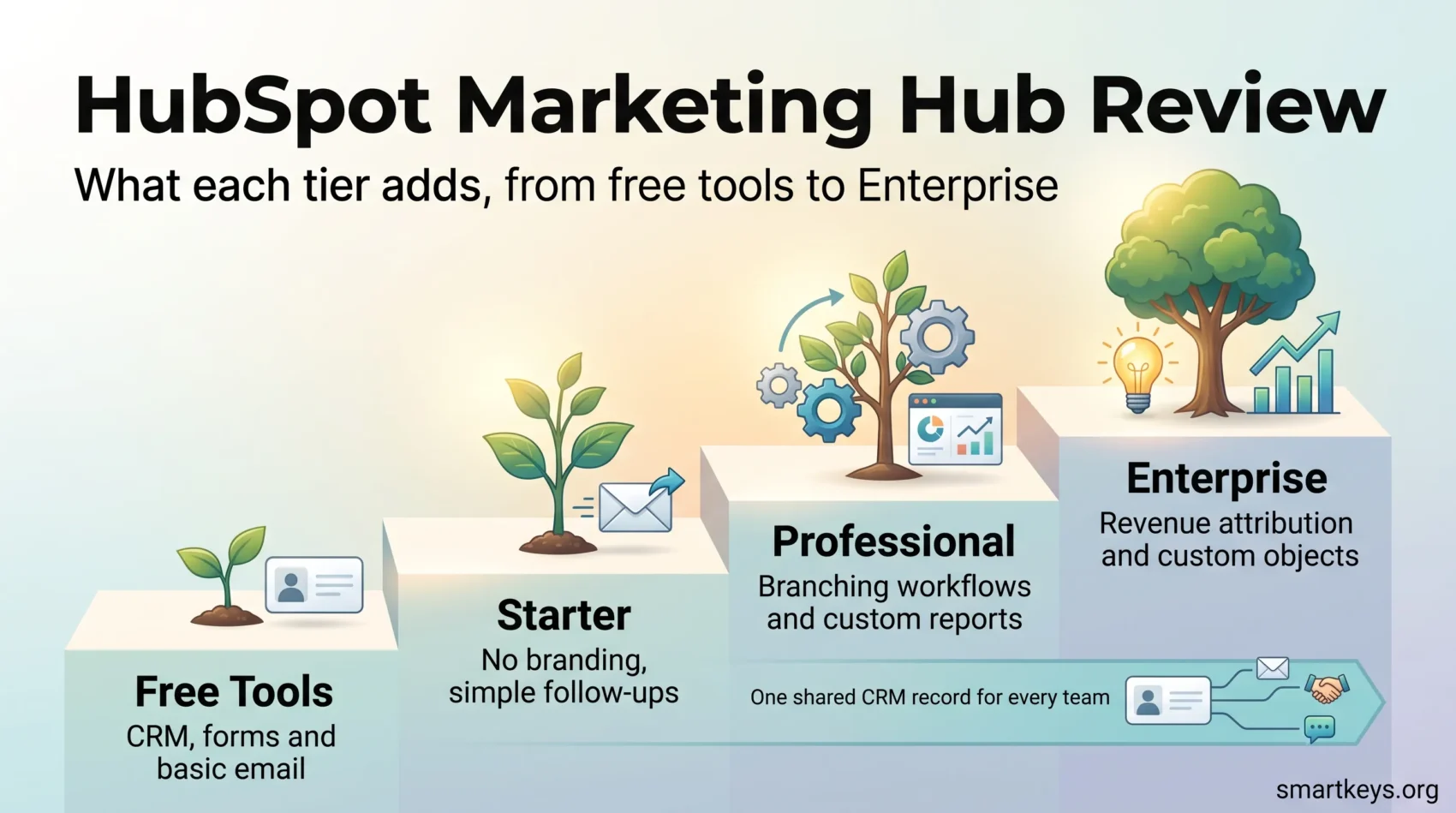
The free tier is unusually generous and not a time-limited trial. You get the CRM, forms, live chat, ad management, basic email and simple landing pages. The main limits are 2,000 email sends per calendar month, HubSpot branding on everything you publish, and up to two users. It is a legitimate long-term option for a small team that mostly needs a contact database and occasional campaigns.
Marketing Hub Starter
Starter removes HubSpot branding and unlocks basic automation, and it is priced per seat: $20 per seat per month on month-to-month billing, with a discount for an annual commitment. It includes 1,000 marketing contacts and an email send limit tied to that contact tier — five times your contact allowance per calendar month.
Starter is the right entry point for most small teams. What it does not give you is the thing people actually buy HubSpot for: multi-step workflows with branching logic, custom reporting, and A/B testing.
Marketing Hub Professional
Professional is where the platform becomes the platform, and where the price becomes a decision. It is $800 per month, includes 3 Core Seats and 2,000 marketing contacts, and additional Core Seats start at $45 per month. HubSpot also requires a one-time Professional Onboarding package for $3,000.
That onboarding fee is the most common billing surprise in HubSpot reviews, and it is worth planning for: in year one your Professional commitment is closer to $12,600 than $9,600.
What you get for it: omnichannel workflow automation, campaign management, custom reporting, A/B testing, SEO recommendations, dynamic personalisation and teams-based permissions. If you are comparing that feature set against a dedicated automation platform, our ActiveCampaign vs HubSpot comparison is the closest head-to-head.
Marketing Hub Enterprise
Enterprise is $3,600 per month with 5 Core Seats and 10,000 marketing contacts, additional seats from $75 per month, and a one-time $7,000 onboarding fee. It adds custom objects, advanced permissions, multi-touch revenue attribution, sandboxes and organisation-level controls. Below roughly 50 people, most teams do not need it.
The Costs People Miss
- Onboarding. Mandatory and non-refundable at Professional ($3,000) and Enterprise ($7,000).
- Marketing contacts. Your base plan includes a fixed allowance and you pay for blocks above it. Independent pricing trackers put the Starter overage at roughly $50 per additional 1,000 contacts, so a growing list quietly moves the bill.
- Seats. Core Seats beyond the bundled ones are $45 (Professional) or $75 (Enterprise) per month each.
- Annual commitment. The advertised prices assume you commit for a year. Month-to-month costs more.
The practical rule: model the twelve-month cost including onboarding and your projected contact count before you compare HubSpot to anything else. On sticker price alone, almost every alternative wins.
Features That Actually Earn Their Keep
Email Marketing and Templates
The drag-and-drop editor is one of the better ones on the market, and the template library is large enough that most teams never open a code block. Personalisation tokens pull directly from CRM properties, so an email can reference a deal stage or a last-visited page without an export-import cycle. Deliverability reporting, engagement breakdowns and send-time data sit on the same screen.
Where it is beaten: pure-play email tools often move faster on design and automation-per-dollar. Our MailerLite vs ActiveCampaign and Brevo vs ConvertKit comparisons cover that end of the market, and the Mailchimp review is the closest mainstream alternative.
Workflow Automation
Workflows are the strongest argument for Professional. You build them visually, trigger them on almost any CRM property or behaviour, and branch on conditions. Typical uses: nurture sequences that adapt to what a contact clicked, internal notifications when a lead crosses a score threshold, automatic list membership, lifecycle stage updates and task creation for reps.
Starter gives you simple follow-up automation. Branching logic, delays tied to CRM data and cross-object actions are Professional features.
Lists, Segmentation and Contact Management
Active lists update themselves as contacts meet or stop meeting criteria, and because criteria can reference any CRM property, including deal and ticket data, segmentation gets sharper than most standalone marketing tools allow. This is the part that quietly justifies the all-in-one approach — and the reason a migration off HubSpot later is painful.
Landing Pages, Forms and Lead Scoring
Landing pages and forms are competent rather than best-in-class: fine for gated content and campaign pages, less flexible than a dedicated builder. If conversion pages are the core of your business, compare against a purpose-built option in our ClickFunnels vs Leadpages breakdown. Lead scoring is solid, and manual scoring is available from Professional upward.
Breeze and AI Inside HubSpot
HubSpot’s AI sits under the Breeze brand, with Breeze Assistant as the conversational layer and Agent Hub as the agent framework. The important change for buyers is the billing model: Agent Hub is included for Professional and Enterprise customers and charged per result rather than per seat. HubSpot publishes the rates directly — $0.50 per resolution for the Customer Agent, $1.00 per lead for the Prospecting Agent and $0.10 per answer for the Data Agent. Custom agents built in Agent Builder consume HubSpot Credits.
Pay-per-result is a meaningful improvement over per-conversation billing, because you are not charged for an agent that fails to help. It also makes costs harder to forecast: usage scales with volume, and credits do not carry over between months. Treat AI spend as a variable line item, not a fixed one.
For teams evaluating AI support agents specifically, our Tidio review and Zendesk review cover the dedicated alternatives, and our Clay AI review looks at AI-driven prospecting.
Reporting and Analytics
Reporting is where HubSpot separates from cheaper tools, and it is also where the tier gate bites hardest. You can track traffic by source, device and country, email open and click rates, form and page conversion, lead-to-customer progression, and revenue tied to campaigns. Exports run to CSV and XLSX.
Custom report building, custom dashboards and multi-touch attribution are Professional and Enterprise features. On Starter you get useful standard reports and very little ability to reshape them. Attribution in particular is the reason larger teams accept the Enterprise price: being able to credit revenue across touchpoints, inside the same system that holds the deals, is not something you replicate cheaply.
If SEO reporting is what you are missing, HubSpot’s recommendations are directionally useful but shallow compared with a dedicated tool — see our SEMrush review or Surfer SEO vs Ahrefs.
CRM Integration: The Real Product
The CRM is free and shared across every Hub. That is the architectural decision everything else follows from. Sales reps see which emails a prospect opened. Marketers see which campaigns produced closed revenue. Service tickets appear on the same record.
The trade-off is lock-in. The longer you run, the more of your process lives in HubSpot properties, workflows and reports, and the harder a move becomes. That is not a reason to avoid it, but it is a reason to be deliberate about property naming and documentation from day one. Our overview of how CRM has evolved and our Salesflare review put the alternatives in context, and current sales trends explain why the shared-record model keeps winning.
Strengths and Weaknesses
What HubSpot Does Well
- One contact record across marketing, sales and service, with no integration to maintain.
- A free tier that is actually usable, so you can validate the fit before paying.
- Workflow automation and custom reporting that hold up at real complexity.
- HubSpot Academy, which remains one of the better free training libraries in the industry.
- Published, per-result AI pricing at a time when many vendors stay vague about it.
Where It Falls Short
- The Starter-to-Professional jump is steep, and the $3,000 onboarding fee is not optional.
- Marketing contact overages make the bill grow with list size, not with value delivered.
- Individual modules — landing pages, social, SEO — are good, not best-in-class.
- Annual commitments are the norm, and the advertised prices assume one.
- Switching costs rise steadily the longer you stay.
Verdict
HubSpot Marketing Hub is the right answer for teams that will genuinely use the shared CRM: B2B companies with a sales handoff, marketing teams that need branching automation, and organisations that want reporting they can defend in a board meeting. For those teams, Professional at $800 per month plus onboarding is defensible.
It is the wrong answer for anyone buying it as an email tool. At that job it is several times the price of the alternatives and no better at it. Start on the free tools, move to Starter when branding and send limits pinch, and only step up to Professional when you can name the specific workflows and reports you need. That is the honest test — and it is the one most buyers skip.
Found this useful?
Make SmartKeys a preferred source on Google, and our articles will surface more often in your Top Stories, AI Overviews, and AI Mode.
Add as Preferred Source