Salesflare is a customer relationship management (CRM) tool built for small B2B sales teams that hate typing things into a database. A CRM is the system where a company keeps its contacts, deals and follow-ups in one place. Salesflare’s pitch is that it fills most of that in for you by reading your email, calendar and phone activity, so the pipeline stays current even when nobody updates it. This review covers what it does in 2026, what the three plans cost, what verified reviewers praise and criticise, and who is better served elsewhere.
Key Takeaways
- Salesflare starts at $29 per user per month billed annually, or $39 billed monthly.
- Its core selling point is automatic data entry: contacts, email threads, meetings and calls are logged without manual input.
- Verified reviewers rate it 4.8 out of 5 on G2 and 4.7 out of 5 on Capterra.
- Reporting and analytics are the most common complaint, so data-heavy sales teams should test that first.
- A 30-day free trial runs without a credit card, which is long enough to judge the automation properly.
What Salesflare Is and Who It Fits
Salesflare is a sales CRM aimed at small and medium businesses selling to other businesses. That focus matters. B2B deals usually involve a handful of named contacts, a long email thread and several meetings, which is exactly the material Salesflare knows how to read. It is not built for high-volume consumer sales or heavily customised enterprise processes.
The product sits at the light end of the market. Our Salesforce CRM review shows the other extreme: far more capability, far more setup. Salesflare trades configurability for speed, and most teams are running with real data on the first afternoon.
A good fit looks like this: two to twenty sales people, deals that take weeks rather than minutes, most communication happening over email and LinkedIn, and nobody whose job it is to administer a CRM. If you need custom objects, territory rules or advanced forecasting, look at Pipedrive or a heavier platform instead.
Key Features of Salesflare
Automated Data Entry
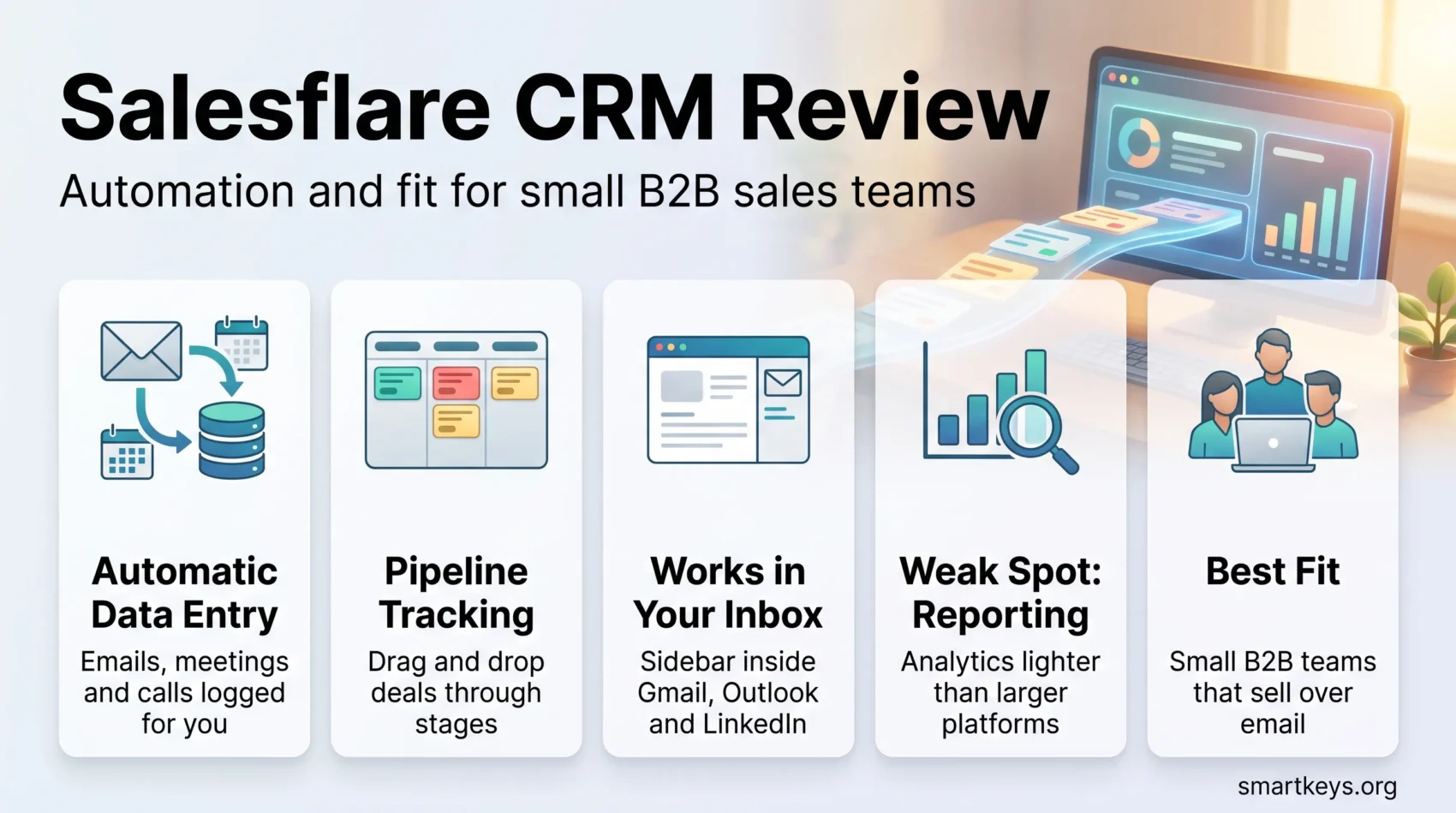
This is the feature the whole product is built around. Once you connect Gmail or Outlook, Salesflare scans your mailbox and calendar and creates contacts and companies from what it finds. It attaches email threads, meetings and calls to the right account, and pulls in public company details such as address and industry.
In practice that removes the step most sales people skip: a rep finishes a call and the call is already logged against the deal. The trade-off is that the CRM only reflects what is in your inbox, so a deal handled over WhatsApp or in person still needs a manual note.
Pipeline and Lead Tracking
Deals appear on a drag-and-drop board, one column per stage. Capterra reviewers score sales pipeline management 4.9 out of 5, the highest-rated part of the product. Salesflare also flags accounts that have gone quiet, a small feature that catches a lot of forgotten follow-ups.
Lead scoring here means ranking prospects by how engaged they are: whether they opened your emails, clicked your links and visited your site. It is engagement-based rather than a model you build yourself, so treat it as a prompt to prioritise, not as a forecast.
Email Tracking and Sequences
Every plan tracks email opens, link clicks and website visits, and can send personalised bulk email from your own address. Automated multi-step sequences, where a follow-up sends itself if nobody replies, are a Pro feature. If outbound follow-up is your main workflow, the entry tier will not cover it.
For anything approaching real marketing automation, Salesflare is not the tool. Teams running newsletters and nurture campaigns usually pair it with a dedicated platform such as those in our Mailchimp vs Klaviyo comparison, or step up to HubSpot Marketing Hub.
Lead Credits and Enrichment
Salesflare includes a lead finder that returns contact details for prospects, billed in credits: 5 a month on Growth, 100 on Pro and 250 on Enterprise. Extra credits cost $39 for 250, $69 for 500 and $129 for 1,000.
Five credits a month is a sample, not a prospecting budget. If contact data is central to how you sell, a specialist tool is cheaper: see our reviews of Lusha, ZoomInfo and Clay.
Where You Actually Work
Salesflare puts a sidebar inside Gmail, Outlook and LinkedIn, so you can see an account’s history, add a contact or move a deal without opening the CRM in another tab. There are also iOS and Android apps. Reviewers rate the sidebars highly and the mobile app less so.
Salesflare Pricing in 2026
Salesflare publishes its prices, which is not universal in this market. There are three plans, all priced per user per month, and annual billing is the cheaper option.
The Three Plans
- Growth: $29 per user per month billed annually, $39 billed monthly. Automatic CRM data entry, email, link and website tracking, the Gmail, Outlook and LinkedIn sidebars, the mobile app, personalised email campaigns and 5 lead credits.
- Pro: $49 per user per month billed annually, $64 billed monthly. Everything in Growth plus automated email workflow sequences, user permission management, custom dashboards and 100 lead credits.
- Enterprise: $99 per user per month billed annually, $124 billed monthly, minimum 5 users. Everything in Pro plus guided setup and training, data migration help, a dedicated account manager and 250 lead credits.
The free trial runs 30 days and does not ask for a card. Salesflare states that the listed price is the price, with no separate charge for features already in your plan. Lead credits are the one genuine extra.
How the Price Compares
At $29 a seat, Salesflare sits in the same band as most small-business CRMs and above the free tiers that Bitrix24 and HubSpot offer. What matters is not the sticker price but what the entry tier includes. Salesflare’s cheapest plan carries the automation that defines the product, whereas several competitors reserve their better features for higher tiers.
The Pro jump to $49 is the one to think about, because email sequences and permissions are what a growing team needs. For five people that is $2,940 a year. Before committing, compare how the alternatives price the same capabilities in our Freshworks CRM vs Pipedrive comparison and our Pipedrive vs Insightly comparison. Larger teams comparing full platforms should also see Salesforce vs HubSpot and Freshworks CRM vs Salesforce.
What Verified Reviewers Say
Salesflare rates 4.8 out of 5 on G2 across roughly 300 reviews, and 4.7 out of 5 on Capterra across 139 reviews, where 97% report a positive experience. Both samples are small next to the major platforms, so read them as a consistent signal rather than a statistical verdict.
What People Praise
- Setup speed. Connecting a mailbox and seeing a populated pipeline takes minutes.
- The automation. Automatic email logging and contact enrichment remove the admin that makes teams abandon a CRM.
- Follow-up reminders. Reviewers repeatedly credit the nudges with catching deals that would otherwise have gone cold.
- A clean interface. The product does not bury everyday actions under configuration screens.
- Support. Responsiveness is a consistent theme in positive reviews.
What People Criticise
- Reporting depth. The most common complaint. Custom dashboards arrive on Pro, and even then the analytics are lighter than on larger platforms.
- Customisation limits. You get custom fields, but not the deep structural changes bigger CRMs allow.
- The mobile app. Functional, but behind the desktop experience.
- Data import. Messy CSV files are where new users most often get stuck.
Capterra’s feature-level scores tell the same story from another angle: sales pipeline management 4.9, contact management 4.7, lead management 4.5. Salesflare is strongest at running deals and weakest at analysing them.
Where Salesflare Falls Short
Two limits deserve a plain statement before you buy.
First, reporting. If your sales manager wants cohort analysis, custom attribution or a board-ready revenue model, Salesflare will frustrate them. Teams that need that export to a spreadsheet or a business intelligence tool; our Zoho Analytics vs Power BI comparison covers what that layer costs.
Second, scope. Salesflare is a sales CRM, not a business suite: no support ticketing, invoicing or proposals. Those gaps get filled by connecting other tools, for example Proposify for proposals or QuickBooks Online for invoicing. That works, but it is a stack rather than one system.
Integrations
Salesflare connects natively with the tools most small B2B teams already run: Gmail and Google Workspace, Microsoft 365 and Outlook, Google Calendar, Drive and Sheets, LinkedIn and Sales Navigator, Mailchimp, Constant Contact, Dropbox and Box. Capterra lists more than twenty native integrations, modest next to the app marketplaces of the large platforms.
The gap is covered by Zapier plus a documented API. If your workflow depends on chaining several systems together, check how much of that you would end up paying an automation tool to do: our Zapier vs Make comparison and our Workato vs Zapier comparison both cover that cost.
Verdict: Who Should Buy Salesflare
Salesflare is a good buy for a small B2B team that sells over email, has no CRM administrator and has abandoned a CRM before because keeping it current was too much work. The automation is genuine, the entry plan is not crippled, and the 30-day trial is long enough to see whether the automatic logging captures how your team actually sells.
It is the wrong buy if reporting drives your decisions, if you need heavy customisation, or if you want one system for sales, marketing and support. There, the setup cost of a larger platform buys something real.
The practical test is simple: run the trial with your own mailbox for two weeks, then look at the pipeline without touching it. If it reflects reality, Salesflare has done its job. For the wider context, see our overview of CRM trends in 2026.
Found this useful?
Make SmartKeys a preferred source on Google, and our articles will surface more often in your Top Stories, AI Overviews, and AI Mode.
Add as Preferred Source