

This QuickBooks Online Review for 2026 is a practical look at what Intuit’s accounting platform actually does for small and medium-sized businesses, what it now costs, and where it falls short. QuickBooks Online is the default answer for a lot of US small business owners, which makes it worth checking whether the default is still right for you.
We cover the plan structure after the August 2026 price change, the features that matter day to day, the honest limitations, and how the platform compares with FreshBooks and Xero. By the end you should know whether QuickBooks Online fits your business or whether a cheaper, narrower tool would serve you better.
Key Takeaways
- QuickBooks Online lists at $38 to $340 a month across four plans, with seat counts as the main dividing line.
- Intuit raised Essentials, Plus and Advanced prices for renewals from 1 August 2026; Simple Start was left unchanged.
- Reporting, bank feed automation and the app ecosystem are the platform’s real strengths.
- Cost creep is the most common complaint: payroll, payments and add-ons are billed separately.
- Service-only businesses and single-owner operations often get better value from FreshBooks, Xero or QuickBooks Solopreneur.
What QuickBooks Online Is Built For
QuickBooks Online is cloud accounting software aimed at small and mid-sized businesses that need proper double-entry books rather than a spreadsheet. Everything runs in the browser or the mobile app, so your bookkeeper, your accountant and you can look at the same ledger without emailing files around.
The core loop is straightforward: connect your bank and card accounts, let the feed pull transactions in, categorise them, and reconcile. On top of that sit invoicing, bill payment, expense tracking and reporting. The four plans differ mainly in how many people can log in and how much of the reporting, inventory and project tooling you get.
- Four tiers: Simple Start, Essentials, Plus and Advanced, sized by seat count and feature depth.
- Real-time books: bank feeds keep the ledger close to current without manual imports.
- Mobile access: iOS and Android apps handle receipt capture, mileage and basic invoicing.
- App ecosystem: Intuit advertises more than 300 integrations, which is where most workflow gaps get closed.
That combination is why QuickBooks Online sits in so many stacks. It is rarely the cheapest and rarely the most elegant, but it is the one your accountant almost certainly already knows.
Key Features of QuickBooks Online
Three capabilities do most of the daily work: reporting, the interface itself, and the automation that keeps the ledger current.
Comprehensive Reporting Tools
The QuickBooks Online reporting tools are the strongest part of the product. Profit and loss, balance sheet, cash flow, accounts receivable ageing and sales by customer are all available out of the box, with filtering by class, location, project or customer depending on your plan. Higher tiers add custom report builders and saved report groups you can schedule by email.
For most owners the practical value sits in the ageing report and the cash flow view: knowing who owes you money and when it is likely to land is the difference between a manageable month and a scramble. Our guide to cash flow management for small businesses covers the habits those reports are meant to support.
User-Friendly Interface
QuickBooks Online is not a beautiful product, but it is a legible one. The dashboard puts income, expenses, profit and loss and bank balances on one screen, and the navigation has stayed broadly stable for years. Capterra reviewers rate ease of use at 4.2 out of 5, slightly below the overall score, which matches the common experience: simple tasks are simple, while inventory, sales tax and multi-currency all carry a learning curve. Accountant access is free and does not consume a paid seat.
Automation Capabilities
The automation in QuickBooks mostly happens in the background. Bank rules categorise recurring transactions, recurring invoices and bills go out on schedule, payment reminders chase overdue customers, and receipt capture matches photographed receipts to transactions. Advanced adds workflow automation for approvals and reminders.
None of this replaces a bookkeeper. It removes repetitive data entry, which is a real saving, but the categorisation still needs review. Our overview of finance automation and our look at business automation trends cover where automation genuinely pays back.
QuickBooks Online Review: Pros and Cons
Every accounting platform trades something away. Here is where QuickBooks Online earns its price, and where it costs more than you expected.
Advantages for Small Businesses
- Accountant familiarity: the benefit that outweighs most feature comparisons. Finding a US bookkeeper who knows QuickBooks is trivial.
- Depth of reporting: the reporting library is broader than most direct competitors offer at the same tier.
- Integration coverage: Intuit lists over 300 connected apps, so payroll, expenses, e-commerce and CRM data can flow in without custom work.
- Scalability: the same ledger carries you from sole trader to a 25-seat business without migrating platforms.
- Mobile capability: phone-based receipt capture and mileage tracking cut month-end cleanup.
Limitations to Consider
- Price increases: Intuit raises prices regularly. Essentials, Plus and Advanced all went up for renewals from 1 August 2026, and this is the most consistent complaint in user reviews.
- Per-seat pricing: seats are the main lever between tiers. A five-person team on Plus pays $140 a month where Xero would charge $90 with unlimited users.
- Add-on costs: payroll, payments processing and several premium apps are billed on top of the subscription, so the headline price understates the real bill.
- Support quality: customer service scores 4.0 out of 5 on Capterra, the lowest of the rated categories, and support complaints are a recurring theme in written reviews.
- Internet dependency: there is no meaningful offline mode, so a poor connection means no books.
- One subscription per company: running two legal entities means two subscriptions, which surprises owners coming from desktop versions.
QuickBooks Online Pricing in 2026
Pricing is where most buying decisions are made, and it changed in August 2026.
Comparison of Different Tiers
These are Intuit’s published list prices as of August 2026:
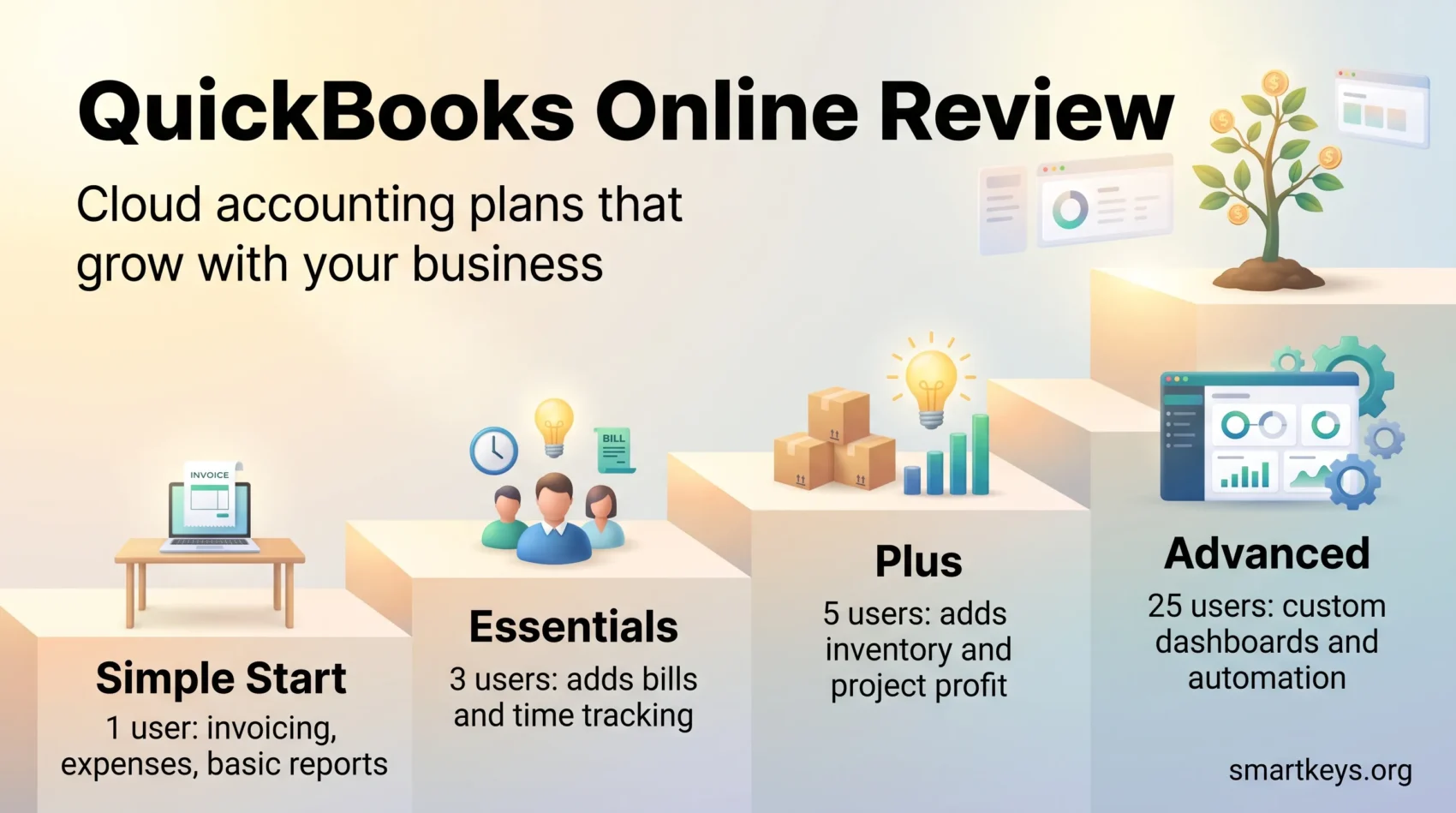
- Simple Start: $38 per month, 1 user plus 2 accountant logins. Invoicing, expense tracking, basic reports.
- Essentials: $85 per month, 3 users plus 2 accountants. Adds bill management, time tracking and multi-currency.
- Plus: $140 per month, 5 users plus 2 accountants. Adds inventory tracking, project profitability and budgeting.
- Advanced: $340 per month, 25 users plus 3 accountants. Adds custom dashboards, workflow automation, batch invoicing and Excel integration.
Intuit’s own product update confirms that Essentials, Plus and Advanced increased for renewals on or after 1 August 2026, while Simple Start, the free tier, Lite and Ledger were left unchanged. For self-employed people who do not need full double-entry books, QuickBooks Solopreneur is priced separately and sits well below Simple Start, with NerdWallet listing the paid tier at $20 a month.
Cost Analysis for SMBs
The list price is the starting point, not the total. Before committing, work out:
- Whether you need payroll. QuickBooks Payroll is a separate subscription with a per-employee fee on top.
- Whether you will take card payments through QuickBooks, which carries processing fees per transaction.
- How many people genuinely need a login. Seats are the fastest way to get pushed up a tier.
- Which paid apps you will connect. Several popular integrations carry their own monthly cost.
Intuit offers a 30-day free trial or a steep introductory discount for the first three months, but not both. Take the discount, then budget from the list price, because it expires long before your books do. Our piece on cloud cost optimization covers keeping subscription creep visible across the rest of the stack.
How QuickBooks Online Simplifies Accounting
Two workflows account for most of the time small businesses spend in accounting software: getting paid, and paying people.
Streamlined Invoice Management
QuickBooks Online invoicing covers creation, branding, scheduling, delivery and chasing. You can set recurring invoices for retainer clients, attach payment links so customers can pay by card or bank transfer, and let automated reminders handle the awkward follow-up.
The part that matters most is visibility. The receivables ageing report shows exactly which invoices have crossed 30, 60 and 90 days, which is the input to every cash flow decision you make. If you invoice internationally, our guides to digital wallets in work payments and open banking cover how those payment rails are changing.
Integrated Payroll System
QuickBooks Payroll plugs into the same ledger, so wage costs, tax liabilities and benefit deductions post automatically rather than being re-keyed. It calculates withholding, files payroll taxes in supported states, and gives employees a self-service portal for pay stubs and tax forms.
Two caveats: payroll is a separate paid subscription rather than a feature of your accounting plan, and state tax filing coverage varies by tier. Teams with staff in several countries hit the limits quickly, and our overview of global payroll solutions covers what changes once you cross borders.
Comparing QuickBooks Online with Competitors
QuickBooks Online is the incumbent, not automatically the best fit. Two alternatives deserve serious consideration.
QuickBooks vs FreshBooks
FreshBooks starts at $23 a month for Lite and is built around invoicing and time tracking for service businesses. It is friendlier than QuickBooks for freelancers and small agencies, but Lite caps you at five billable clients, double-entry accounting only arrives on Plus at $43, and each additional team member costs $11 a month. There is no real inventory management, and payroll is an add-on.
Choose FreshBooks if you sell time and send invoices. Choose QuickBooks if you hold stock, need class or location tracking, or want reporting your accountant can work with directly. Our FreshBooks review goes through the plans in detail.
QuickBooks vs Xero
Xero runs $25 for Early, $55 for Growing and $90 for Established, and every plan includes unlimited users. For a team of five, that pricing model is decisively cheaper than Plus at $140. Xero’s Early plan is heavily capped, at 20 invoices and 5 bills a month, so most businesses land on Growing or above.
The trade-off is ecosystem. QuickBooks has deeper US payroll and sales tax handling and a larger pool of accountants who use it daily. Xero wins on multi-user pricing and is often preferred outside the US. Our Xero review covers the differences properly, and if expense management is your actual pain point, Expensify versus QuickBooks is the more relevant comparison.
User Ratings and Feedback
On Capterra, QuickBooks Online holds 4.3 out of 5 from more than 8,500 verified reviews, with ease of use rated 4.2 and customer service 4.0. That profile is consistent across review platforms: the software itself is well regarded, and support is the weak point.
The praise clusters around reliability, the breadth of reporting, bank feed accuracy and the fact that any accountant can pick it up. The criticism clusters just as tightly around three things: annual price increases, the difficulty of reaching a knowledgeable support agent, and features being moved to higher tiers over time.
Treat aggregate scores as a rough signal rather than a verdict. Accounting software is sticky, so review populations skew toward long-term users with strong opinions. The more useful exercise is to run a month of your own transactions through the trial.
Best Practices for Using QuickBooks Online
Most complaints about accounting software are really complaints about setup. A few hours of care at the start saves months of cleanup.
Tips for Effective Setup
- Build the chart of accounts deliberately: start from your real expense categories, not the default list.
- Connect banks before importing history: live feeds are more reliable than CSV imports and reduce duplicate entries.
- Set bank rules early: every rule you create in week one removes a monthly decision.
- Customise invoice templates: add your logo, payment terms and a payment link before you send the first one.
- Run the ageing report weekly: a five-minute habit that catches receivables problems while they are still fixable.
- Set reorder points if you hold stock: Plus and Advanced can warn you before you run out.
Common Mistakes to Avoid
- Letting the bank feed pile up: categorising three months at once guarantees errors. Weekly is manageable, monthly is the outer limit.
- Skipping reconciliation: matching to statements is what makes the numbers trustworthy. Unreconciled books are guesswork.
- Misclassifying expenses: personal spending on the business card and miscategorised capital purchases are the two that cause real tax problems.
- Ignoring who has access: review user permissions when people leave. Financial data deserves the same care as any other sensitive system, a point our guide to data privacy at work makes in more detail.
- Assuming the cloud is your backup: export reports periodically. Cloud hosting protects against hardware failure, not your own mistakes.
- Leaving accountant access until year end: monthly review catches problems while they are cheap.
Integrations That Enhance QuickBooks Online
The integration layer is where QuickBooks Online stops being an accounting tool and becomes the financial spine of the business. Intuit advertises more than 300 connected apps, and Advanced subscribers get a curated set of premium integrations on top. The categories worth looking at first:
- Payments and expenses: receipt capture and card management tools that push categorised spend straight into the ledger.
- CRM: connecting sales and finance data so quotes, invoices and revenue reconcile. Salesforce, HubSpot and Bitrix24 all have QuickBooks connectors.
- E-commerce: syncing orders, fees and inventory from platforms such as Shopify, which removes a large amount of manual reconciliation.
- Document signing: tools like DocuSign for contracts and approvals tied to billing.
- Workflow automation: when no native connector exists, Workato or Zapier can bridge the gap. Our comparison of Zapier and Make covers the lighter-weight options.
- Business intelligence: reporting layers that sit on top of QuickBooks data for forecasting and scenario planning, an area where predictive analytics in finance is changing what small teams can do.
One warning: every integration is another place duplicate records can appear. Add connectors one at a time, reconcile after each, and remove any you stop using.
Conclusion
QuickBooks Online remains the safe default for US small businesses, and for good reasons: solid double-entry books, the deepest reporting in its class, a large integration ecosystem and an accountant pool that already knows it. Nothing in this QuickBooks Online Review suggests it is the wrong choice for a growing business that holds inventory or runs projects.
The case against it is cost. List prices rose again in August 2026, seats push you up the tiers quickly, and payroll and payments are billed separately. A five-person service business could pay less than half as much on Xero, and a solo consultant a fraction on Solopreneur or FreshBooks.
Run the trial with your own numbers, price the add-ons you will actually use, and compare the total against one narrower alternative. If QuickBooks still wins, you will have chosen it rather than defaulted into it. Our looks at small business trends and AI in SaaS cover what is changing around the ledger.
Found this useful?
Make SmartKeys a preferred source on Google, and our articles will surface more often in your Top Stories, AI Overviews, and AI Mode.
Add as Preferred Source




