Cloud cost optimization means paying for the computing capacity your product actually needs, and nothing more. It is a habit, not a one-off cleanup.
The scale of the problem is documented. Flexera’s 2026 State of the Cloud Report puts wasted cloud spend at 29% of the total, the first rise in five years, and finds that 84% of organizations struggle to manage what they spend.
Modern architectures make this harder. When an application is split into dozens of small services (microservices) and run on a cluster manager like Kubernetes, no invoice line tells you what a feature costs.
This guide treats the bill as a business conversation: how to tell healthy growth from waste, which levers reduce cloud costs without slowing your product, and how to keep the savings from leaking back.
Key Takeaways
- Tie spend to product and customer metrics before you cut anything.
- Waste removal and right-sizing come first, then discount commitments.
- Storage tiers and data transfer fees hide some of the easiest savings.
- Budgets, ownership tags and alerts keep the savings from returning.
- AI and GPU workloads are now the fastest-growing line on most bills.
Why Your Cloud Bill Keeps Growing
Bills climb when teams ship features faster than anyone tracks the resources those features consume. That is normal, and most of it is fixable within a quarter.
The measure that separates good growth from bad is unit economics: cost divided by something the business cares about, such as cost per paying customer or cost per environment.
Say your monthly bill goes from $40,000 to $52,000. If customers grew from 800 to 1,200 in that period, cost per customer fell from $50 to about $43. That is healthy. If customer numbers stayed flat, the same $12,000 needs an explanation.
Common cost drivers you can control this week
- Idle virtual machines and storage volumes left behind after tests and demos.
- Oversized storage tiers, verbose logging, and data moved between regions for no reason.
- Development and staging environments running through nights and weekends.
- Workloads nobody owns, spun up by a team that moved on.
When a higher bill is healthy and when it is waste
Treat an increase as waste when usage rises but no business signal moves with it. Sudden storage growth with no new customers, or a cluster that doubled in size the week after a config change, both need an owner and an answer.
Map each driver to one action: delete unused resources, resize what is oversized, and put a budget alert on the accounts that keep surprising you. For where cloud spending is heading, see our overview of cloud computing trends.
What Cloud Cost Optimization Actually Means
Optimization means matching the right compute, storage and services to each workload while still meeting performance, security and compliance targets.
That last part matters. Blunt cost cutting is easy and usually backfires. Shrink the database behind checkout and you save $300 a month while losing sales. Real optimization removes spend that buys you nothing and protects spend that buys you something.
The industry calls this FinOps: a way of working that puts engineering, finance and product in one conversation about cloud spend. The FinOps Foundation’s 2026 survey drew 1,192 practitioners representing more than $83 billion in annual cloud spend, which shows how mainstream it has become. Our guide to FinOps best practices covers how to run it in a small team.
Balancing performance and compliance against spend
Rank workloads before you touch them. Some cannot slow down at all. Some sit under rules requiring a specific managed service. The rest are where you experiment, for example by moving a spiky job to serverless functions that only run when triggered.
If you are still deciding where workloads should live, our guides to hybrid cloud strategy and cloud-native architecture cover the trade-offs.
Get Visibility and Allocate Costs to What Matters
Visibility turns a billing statement into a business tool. When usage maps to customers, features, teams and environments, every dollar connects to a decision you can make.
Unit economics: cost per customer, feature, team and environment
Start with two or three views your leadership actually asks about. Cost per customer is the usual first one. Cost per environment most often reveals an easy win, because production is rarely the surprise.
Flexera found 49% of organizations now use unit economics to measure cost per service, up from 40% the year before.
Real-time data versus daily batch reports
Hourly allocation catches spikes while they are still small. A daily report misses a runaway job that started at 9am and ran until midnight. Use near-real-time cost feeds for alerting even if your reporting stays daily. Our guide to real-time data in business covers the same trade-off elsewhere.
Tagging and showback that engineers actually use
Tagging means attaching labels such as team, product and environment to every resource, so the bill can be split by those labels later. Showback reports each team’s share back to them; chargeback actually bills it internally.
Keep the tag list short. Three or four required tags that everyone applies beat twelve that half the team ignores, and enforcing them in your infrastructure templates works better than reminders. Consistent labelling is a data governance problem wearing a different hat.
Bringing Kubernetes and multiple providers into one view
Kubernetes hides costs by design: it packs many workloads onto shared machines, so the machine bill says nothing about which team caused it. Cluster cost tools split that shared bill back out by namespace or label.
Data platforms such as Snowflake and Databricks pose the same problem, billing by query rather than by server. If you run across more than one provider, pull everything into one dashboard first, or you will fix the small bill and miss the large one. Teams building on data lakes and business intelligence stacks hit this early.
Set Guardrails: Budgets, Governance and a Cost-Aware Culture
Guardrails let teams move fast without anyone reviewing every decision.
Budgets should reflect how your product is packaged. A free trial tier and an enterprise deployment have different economics, so give them different budgets and alert thresholds. A free tier that costs more per user than a paid one is a pricing problem, and you only see it if the two are separated.
Tie budgets to service levels
A workload with a 99.99% uptime commitment costs more to run than one at 99.5%, and that difference should be visible rather than absorbed.
Remove shadow cloud with ownership tags
Shadow cloud means resources outside your visibility, usually created for a quick experiment and never closed. Separate accounts per cost centre, plus a required owner tag, remove most of it. Anything without an owner gets a deadline, then gets deleted.
Showback only works if engineers trust the numbers, so fix allocation first. The same access discipline that supports a zero trust security model also stops people spinning up resources nobody can trace.
Cut Waste and Right-Size What You Run
A weekly hygiene sweep catches most waste before it reaches the bill. Short repeatable checks find unattached storage volumes, forgotten backups and idle machines.
Find idle resources before the next billing cycle
Run an automated scan each week and surface anything with near-zero use. Flag it, notify the owner, then delete on a fixed schedule.
- Look for unattached disks, idle instances and long-lived development environments.
- Automate safe deletion of orphaned snapshots after a retention window.
- Use native alerts such as AWS Cost Explorer and Budgets, or the Azure and Google Cloud equivalents, before buying a third-party tool.
Right-sizing with data-driven thresholds
Right-sizing means moving a workload to a smaller machine when the data shows it never uses the larger one. Set thresholds on processor, memory and disk activity, then act on anything sitting well below them across a full billing period rather than a quiet weekend.
A practical starting rule: review any instance averaging under 20% processor use over 30 days, and check its memory and disk figures before you shrink it. Some workloads are memory-hungry and processor-light, and shrinking those by processor alone causes outages.
Keep headroom for traffic spikes through autoscaling rather than permanently oversized machines, and turn recommendations into pull requests so engineers stay in control of the change.
Use Pricing Levers Wisely: Reserved Instances, Savings Plans and Spot
The right commitment depends on how predictable a workload is. Sort workloads into steady, spiky and interruption-tolerant, then match each to a pricing model.
Order matters: clean up waste first, then commit. Committing to capacity you were about to delete locks in the mistake for one to three years.
Reserved Instances versus Savings Plans
Both trade flexibility for a discount over a one-year or three-year term. Reserved Instances tie you to a specific instance type. Savings Plans commit you to an hourly dollar amount instead, which survives a change of instance family.
AWS publishes up to 72% off On-Demand pricing for EC2 Instance Savings Plans and up to 66% for the more flexible Compute Savings Plans; Azure and Google Cloud run comparable programmes. Take the deeper discount only for workloads you are confident will still exist in a year.
Spot instances for batch jobs and model training
Spot instances are spare provider capacity sold cheaply on the condition that it can be reclaimed at short notice. AWS advertises up to 90% off On-Demand pricing for them. They suit work that can restart without harm: continuous integration builds, batch pipelines, rendering, and machine learning training that saves checkpoints. They do not suit a database or anything holding a user session.
Automate the mix
Commitment management tools rebalance reservations as usage shifts, and spot orchestration tools fall back to on-demand capacity when spot supply disappears. Both earn their fee once your bill reaches five figures a month. The case for automating routine operations applies here too.
Two habits keep the mix honest: cover baseline capacity rather than peak, and check realized savings against what you committed to each quarter.
Trim Storage and Network Fees
Where you keep data and how often you move it create some of the largest hidden bills. Neither shows up as a headline cost, which is why both grow unchecked.
Right tier, right time
Object storage is sold in tiers. Frequent-access storage costs the most per gigabyte; archive tiers cost a fraction of it but charge for retrieval and take longer to read. Lifecycle policies move data between tiers automatically after a set age.
Automatic tiering services, such as S3 Intelligent-Tiering, watch access patterns and move objects for you. They are a sensible default when you cannot predict which data will be read again.
- Set lifecycle rules to move or delete old logs, snapshots and exports.
- Audit backup retention against what compliance actually requires, not what someone set in year one.
Reduce egress and cross-region transfer
Egress is the fee for moving data out of a provider’s network or between its regions. Inbound data is usually free, outbound rarely is, and the charge grows quietly with your traffic.
Keep chatty services and their data in the same region, and cache what is read repeatedly. For sustained high-volume transfer, dedicated links such as AWS Direct Connect, Google Cloud Interconnect or Azure ExpressRoute usually cost less than metered egress. Moving processing closer to where data is produced, the idea behind edge computing, cuts transfer volume at the source.
Build Cost Awareness into Development
Decisions made during design set most of your bill before a single machine is provisioned. Bringing cost into that conversation is cheaper than optimizing afterwards. Autoscaling, containers and serverless functions all let capacity follow demand instead of sitting idle overnight.
Shut down environments you are not using
Schedule development and test environments to stop at night and over weekends. A machine running 168 hours a week when the team uses it for 45 costs roughly three and a half times what it needs to. This is the easiest saving on most bills, and it needs no ongoing attention. Teams building internal tools on low-code platforms should apply the same rule to their sandboxes.
Make cost a stated requirement
Track usage by product, feature and environment through the development cycle, and put the numbers in sprint reviews. When an architecture choice has a monthly price attached, teams weigh it differently. Include cost targets in design reviews alongside performance and reliability, and set expiry dates on test resources at the moment they are created.
Monitor in Real Time: Anomalies, Alerts and Automation
When a cost anomaly starts, hours matter. A misconfigured job can add thousands before a monthly report exists.
Anomaly detection services learn your normal spending pattern and flag deviations from it. All three major providers offer this at no extra charge, so enable it on day one.
Alerts people can act on
An alert saying “spend is up” gets ignored. One naming the resource, the change, the owner and the projected monthly impact gets fixed. Route alerts to the team that owns the resource, not to a central inbox.
Automated playbooks can pause or scale down non-critical workloads without waking anyone. Keep the alert list short, because fatigue is what quietly kills most monitoring setups.
The New Line Item: AI and GPU Spend
AI workloads have become the fastest-growing and least predictable part of many cloud bills. They deserve their own treatment rather than being folded into general compute.
The shift is measurable. The FinOps Foundation’s 2026 survey found 98% of practitioners now manage AI spend, up from 31% two years earlier, and named managing AI costs the top forward-looking priority. Flexera reports generative AI usage at 58% of organizations, making it the third most widely used public cloud service.
Three things make AI spend different. Graphics processors cost far more per hour than standard compute. Usage-based pricing on hosted models means one popular feature can multiply your bill overnight. And inference, the cost of running a model in production, recurs long after training ends.
- Meter model calls per feature and per customer from the first release, not after the first surprise.
- Run training on spot capacity with checkpointing; keep inference on reliable capacity.
- Set hard spending limits on hosted model interfaces, which usually have no ceiling by default.
- Route simple requests to a smaller, cheaper model and save the largest one for cases that need it.
Governance matters as much as metering. Our guides to AI governance and AI in business operations cover the wider picture, and data centre energy demand explains why this capacity is priced the way it is.
Tools That Help You See and Control Spend
Judge tools on visibility, allocation accuracy, integrations, ease of use and total cost.
Start with what you already pay for
Native consoles cover more ground than teams expect. AWS Cost Explorer, Azure Cost Management and Google Cloud Billing all provide budgets, alerts, anomaly detection and right-sizing recommendations at no extra cost. Use them for a few months before buying anything.
When a dedicated platform earns its price
Move to a specialist tool when one of these becomes true: you run across more than one provider, you need cost per customer or per feature rather than per account, or your Kubernetes clusters make shared costs impossible to split.
The market includes broad visibility platforms, commitment managers, spot orchestrators and cluster cost tools. Most charge a percentage of your cloud spend or of the savings they find, so run the maths on a full year before signing. Vendors here consolidate regularly, which is a reason to read contract terms closely; our piece on SaaS consolidation covers what to watch for. If your data already flows through an integration platform, billing feeds can often use the same pipeline.
Forecasting, KPIs and Continuous Improvement
Forecasting by workload turns guesswork into a plan. Use historical usage and your product roadmap to set budgets that hold up.
Forecast by workload with scenarios
Analyse past usage per service or pipeline and build three cases: steady state, rapid growth, and a refactor that reduces spend. Model each so you can see how a launch would land.
Track KPIs that connect to the business
The metrics worth reporting monthly:
- Cost per customer and cost per key feature.
- Gross margin impact of infrastructure spend.
- Forecast accuracy, so you learn how much to trust your own numbers.
- Percentage of spend covered by commitments, and how much of that goes unused.
- Percentage of resources carrying valid ownership tags.
Putting these numbers in front of the teams that influence them, rather than finance alone, is what data democratization looks like in practice. The same discipline shows up across large-scale data operations.
Conclusion
Treat cloud spend as a measurable lever on product decisions rather than a bill that arrives.
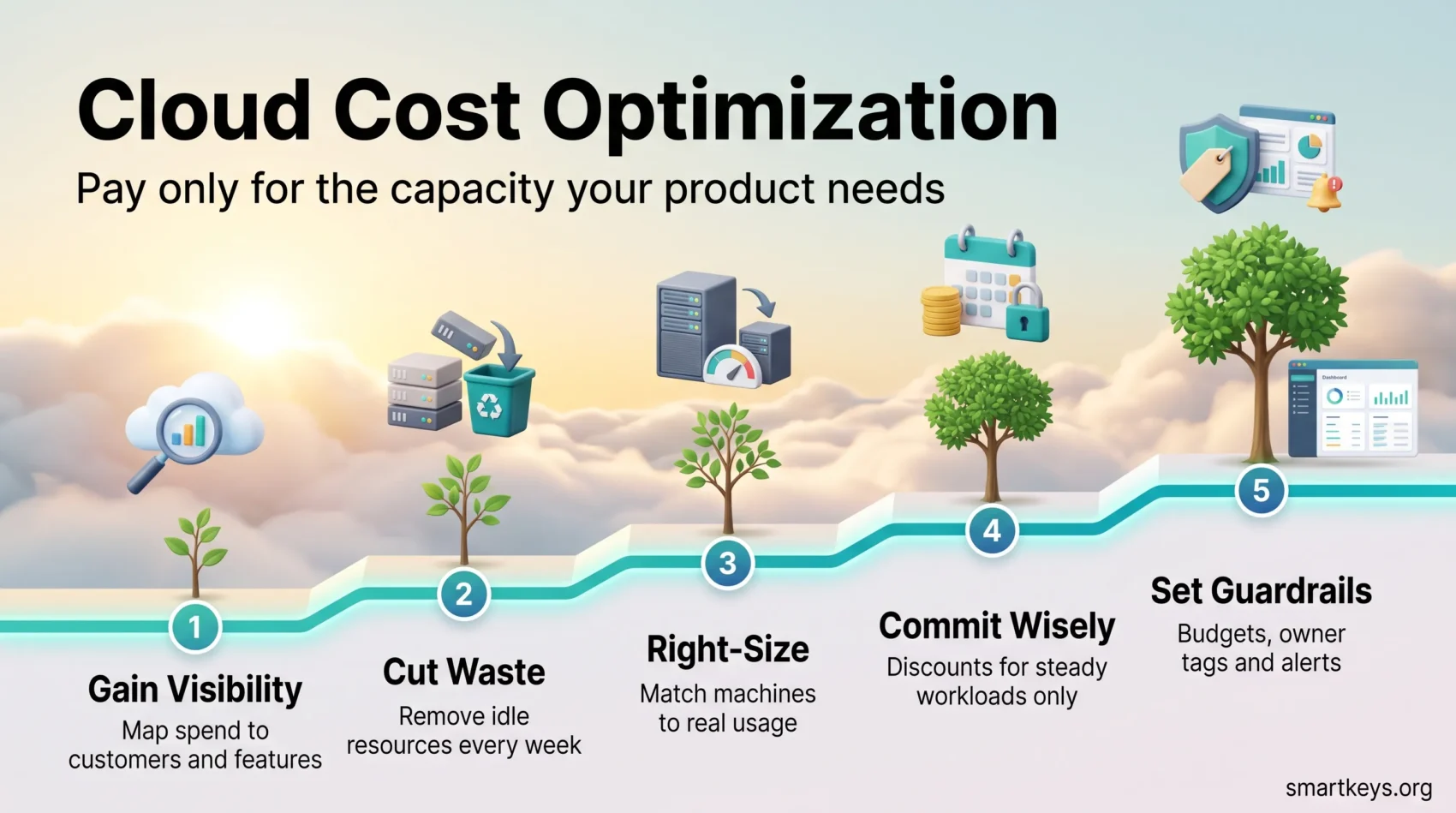
Start with visibility, because you cannot optimize what you cannot attribute. Remove obvious waste next, since it needs no commitment. Then apply discounts to what remains, and put budgets, tags and alerts in place so the savings stay.
With nearly three in ten cloud dollars wasted across the industry, the first pass usually pays back the effort. The harder part is the second year, when new services and new teams quietly rebuild the same problems. That is what the guardrails are for.
Found this useful?
Make SmartKeys a preferred source on Google, and our articles will surface more often in your Top Stories, AI Overviews, and AI Mode.
Add as Preferred Source