

Your cloud bill changes every month, and nobody can fully explain why. That is the problem FinOps was built to solve. FinOps is short for cloud financial operations: a working practice in which finance, engineering and product share one view of what technology costs and decide together what it is worth.
It is not a cost-cutting programme. The aim is to spend the right amount and know what you get. Sometimes the right call is to spend more, because a faster database wins more customers than it costs.
This is harder than ordinary budgeting: cloud resources are bought by the second through thousands of small engineering decisions, and the bill arrives afterwards, itemised by machine type rather than by customer.
The discipline has also outgrown its name. In the FinOps Foundation’s State of FinOps 2026 survey of 1,192 practitioners, who together manage more than $83 billion in annual cloud spend, 98% said their teams now manage AI spend, up from 31% two years earlier. 90% manage SaaS and 64% licensing.
Key Takeaways
- FinOps is a shared operating model for finance, engineering and product, not a budget cut.
- Visibility comes first: you cannot allocate, forecast or optimise what you cannot see.
- Rightsize workloads before you buy discounts, or you lock in waste for a year.
- Unit economics, such as cost per customer, turn a raw bill into a business decision.
- In 2026 the practice covers AI, SaaS and licensing, not just public cloud.
Why FinOps Matters Now
Most disagreements about cloud cost are really disagreements about data. Finance sees an invoice, engineering sees a dashboard of instances, and neither answers the question the business is asking. A single source of truth ends that argument. It need not be sophisticated; it has to be one place everyone accepts. Build role-specific views on it rather than one giant report:
- Finance needs a forecast and a clear explanation when the month misses it.
- Engineering needs cost attached to the thing it controls: this service, this feature, this environment.
- Product needs cost per customer or per transaction, so pricing rests on real margins.
A concrete case: a team ships a search feature that triples database reads. Without per-feature visibility nobody notices for a month; with it, the team sees the increase next day and decides whether the feature earns it. The point is not to stop the spend but to make it a decision instead of a surprise, which is why real-time data in business decisions matters here.
The FinOps Lifecycle: Inform, Optimize, Operate
The FinOps Foundation describes the work as three repeating phases, and different parts of a business are usually in different phases at once.
Inform means getting an honest picture: a baseline of spend, allocated to owners and benchmarked. Until that is done, every optimisation argument is guesswork.
Optimize means acting on it: resize workloads that are too big for their job, buy discounts where usage is predictable, shut down what nobody uses.
Operate means making it stick, through policies, automated checks and a review cadence so savings do not quietly erode.
Leadership sets priorities, finance owns forecasts, engineering applies the changes, product owns the unit economics. A FinOps practitioner connects the four, which is why the role tends to appear once annual spend passes a few million dollars.
Build Your Operating Model and Cloud Center of Excellence
A Cloud Center of Excellence is a small cross-functional group that sets the rules everyone else follows. It is an advisory body, not an approval queue: if engineers must file a ticket to launch a server, the model has failed.
The 2026 survey data suggests a default. 60% of FinOps teams run a centralized function that enables embedded champions inside product and engineering teams, and 21% use a hub-and-spoke structure. Organisations spending more than $100 million a year typically employ 8 to 10 practitioners. Smaller companies rarely need a dedicated team; one person with a clear mandate and a monthly review is enough to start.
Reporting lines matter more than headcount. 78% of teams now report to a CTO or CIO, and teams with executive sponsorship have far more influence over which cloud services get chosen: 53% versus 24%. Without a senior sponsor, a FinOps team ends up reporting on decisions rather than shaping them.
Ownership, KPIs and showback
Every account, service and environment needs a named owner. Anomalies get fixed quickly when somebody’s name is on them, slowly when they belong to “the platform”.
Two terms are worth separating. Showback tells a team what its usage costs without moving money; chargeback bills that cost to their budget. Start with showback: it changes behaviour without triggering months of argument about whether the allocation is fair. Then track a short list of KPIs rather than a dashboard nobody reads:
- Commitment coverage: the share of eligible usage covered by a discount agreement.
- Commitment utilisation: how much of what you bought you actually used.
- Unit cost: cost per customer, per order, or per whatever unit your business counts.
- Forecast accuracy: how close last month’s prediction came to the invoice.
Support the model with office hours and templates rather than enforcement. Clear decision-making models help, because most cost disputes are really unclear decision rights.
Core Practices That Cut Waste
Rightsizing means matching the machine to the job it actually does. Teams routinely pick an instance size by guessing high, then never revisit it. Watching real CPU, memory and disk usage for a few weeks usually reveals servers running at a fraction of their capacity. Automate that check instead of running it as a quarterly project: build rightsizing recommendations into your infrastructure-as-code pipelines, the scripts that define servers in code, so new resources start at a sensible size.
Use storage tiers. Data nobody has opened in six months does not need your fastest and most expensive storage. Lifecycle rules move it automatically, and tools such as S3 Intelligent-Tiering decide for you when access patterns are unpredictable.
“Catch spikes early: alerts for runaway queries or scaling bugs save you from huge overspend.”
- Detect anomalies: set spend alerts so a misconfigured job is caught in hours, not at month end.
- Clear routine waste: release idle IP addresses, delete orphaned disk snapshots, pause analytics clusters overnight.
- Control licensing: review commercial software charges bundled into machine images and retire unused licences.
Match the cadence to the workload: daily for dynamic customer-facing services, weekly or monthly for steady internal ones. For the tactical detail behind each move, see our guide to cloud cost optimization strategies.
Cloud Procurement: Savings Plans and Reserved Instances
Commitments trade flexibility for a discount. You promise a provider a level of spend or usage for one or three years and pay considerably less than the pay-as-you-go rate. AWS states that Compute Savings Plans reduce costs by up to 66% against On-Demand pricing, while the narrower EC2 Instance Savings Plans reach up to 72%. Those are ceilings for three-year, all-upfront commitments on particular instance families, not what a typical portfolio achieves.
Both are commitments; they differ in what you lock in. A Savings Plan commits you to an hourly dollar amount across instance families and regions, which suits an estate that keeps changing shape. A Reserved Instance commits you to a specific configuration and rewards that precision with a deeper discount, which suits a stable workload such as a long-running production database. A practical split: cover predictable baseload with commitments, leave the variable top layer on demand or on spot capacity.
Rightsize first, then buy
Commit to an oversized fleet and you lock in the waste for the whole term, at a discount that hides it. Resize first, watch the new baseline for a few weeks, then buy against it.
Review coverage and utilisation monthly. Low coverage leaves money on the table; utilisation below roughly 95% means you are paying for capacity you are not using. Upfront payments are also a financing decision, so treat the commitment portfolio as part of cash flow management, and if you sell on consumption, read it alongside usage-based pricing.
Cost Visibility and Allocation: Tagging, Budgets and FOCUS
Start with the native tools, then add a central platform when the detail runs out. AWS Cost Explorer, Azure Cost Management and Google Cloud’s billing reports are free and good enough to learn your spending patterns. Their limits show up when you need multi-dimensional analysis or one view across providers.
Enforce a small tagging standard rather than an ambitious one. Four labels carry most of the weight: owner, product, environment and cost center. A standard with twenty required tags gets ignored and leaves you worse off than four that are applied. Audit for tag drift automatically, because untagged resources are where unexplained spend collects.
Shared costs need a rule agreed in advance. Networking, logging and a shared cluster cannot be attributed cleanly, so pick a defensible split, write it down, and revisit it rarely. Arguments about methodology cost more than the amounts in dispute.
FOCUS: one format across providers
Comparing bills across clouds used to mean rebuilding the same report three times, because every provider names its columns differently. FOCUS, the FinOps Open Cost and Usage Specification, is an open standard defining a common shape for billing data. Version 1.4 was ratified on 4 June 2026, adding columns for invoice reconciliation and commitment tracking. Among organisations managing more than $100 million a year, 68% already use or are experimenting with it, so FOCUS support is now a fair question to put to vendors during digital procurement.
Accurate allocation depends on the quality of the underlying records, which is really a data governance strategy problem, and standard business intelligence tools often handle the reporting. It also helps to declutter your digital workspace so the one report that matters is not buried among nine that are not.
Managing Kubernetes and Multi-Cloud Costs
Kubernetes hides cost behind a layer of abstraction. A cluster appears on the bill as a group of machines, while the workloads driving the spend are containers sharing those machines. Allocation has to happen inside the cluster or not at all: label every workload with its owning team and product, and the cluster bill becomes a set of team bills you can discuss.
Two automation features do most of the work. Horizontal Pod Autoscaling adds and removes copies of a workload as demand changes. Vertical Pod Autoscaling adjusts how much CPU and memory each copy reserves, which matters because teams tend to reserve far more than they use. Policy tools such as Open Policy Agent block an expensive storage class or an oversized request before deployment, rather than flagging it on next month’s invoice.
The pattern is the same across providers even though product names differ. Feed each cloud’s own recommendations, AWS Cost Explorer and Budgets, Azure Advisor, Google Cloud Recommender, into your engineering backlog so optimisation becomes normal work. Architecture drives much of this, which is why cloud-native architecture and a deliberate hybrid cloud strategy belong in the same conversation as cost, alongside wider cloud computing trends.
Measure What Matters: Unit Economics and Forecasting
Total spend tells you almost nothing on its own. A bill that doubles is bad news if traffic was flat and good news if you onboarded three times as many customers. Unit economics resolves that by dividing cost by the thing your business counts.

Pick one primary metric. Cost per customer works for most SaaS businesses, cost per transaction suits payments and marketplaces, cost per thousand API calls suits platforms. The choice matters less than having one number leadership recognises.
Report it monthly next to the events that could explain a change: releases, migrations, vendor price rises, a large new customer. Most unexplained increases have an obvious cause once you see them side by side; anomaly alerts handle the urgent cases in between.
A cloud forecast built once a year is wrong by February. Use a rolling forecast combining historical usage, the roadmap and known seasonal peaks, refreshed monthly, and write down the assumptions: customer growth, request rates, data growth, planned migrations. When it misses, you then argue about which assumption was wrong rather than whether the model is any good, the same discipline that underpins predictive analytics in finance.
“When unit economics are clear, acceptable cost increases follow revenue, and inefficiency becomes visible and actionable.”
Beyond Cloud: AI, SaaS and Licensing
The biggest change in 2026 is scope. FinOps teams were created to manage infrastructure bills and now manage most of the technology budget. Alongside the 98% managing AI spend and 90% managing SaaS, 64% cover licensing, 57% private cloud and 48% data centers.
The FinOps Foundation updated its framework to match, adding a capability called Executive Strategy Alignment and publishing separate guidance for public cloud, SaaS, data center, data cloud platforms and AI.
AI is the hardest of these to manage, for a structural reason. Inference costs scale with usage rather than headcount, so a popular feature can multiply its own bill without anyone changing a line of code. Model choice, prompt length and caching all move the number materially. Treat an AI feature as a unit-economics question in its first week, not after the first alarming invoice. The energy side is becoming its own budget line, as our look at AI data center energy costs sets out, and AI in SaaS covers the wider picture.
SaaS rewards a different tactic: licence recovery. Seats keep being bought and almost never returned, so an annual review of logins against paid seats usually repays the effort. Vendor overlap is the second target, and it grows as the market consolidates, a trend traced in SaaS consolidation.
Conclusion
FinOps works when it becomes routine. The organisations that do it well are not the ones with the best tooling. They are the ones where a monthly review actually happens, the numbers are trusted, and somebody owns each line.
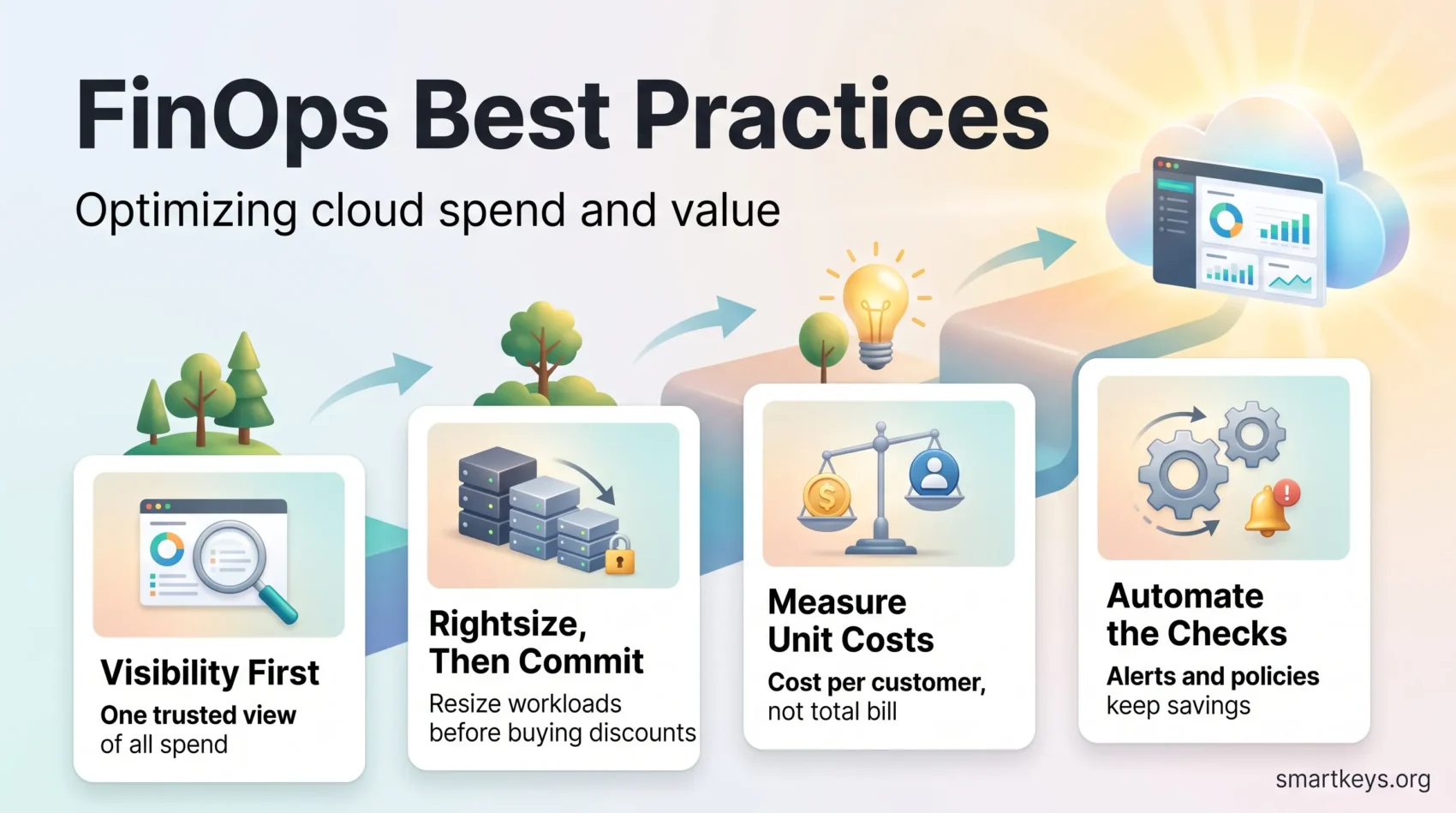
Build it in order. Visibility first, because allocation, forecasting and optimisation all depend on it. Rightsize before you commit. Measure in units your business understands. Then automate the checks so savings hold without anyone policing them.
Start small: one report everybody believes beats a platform nobody opens.
Found this useful?
Make SmartKeys a preferred source on Google, and our articles will surface more often in your Top Stories, AI Overviews, and AI Mode.
Add as Preferred Source




