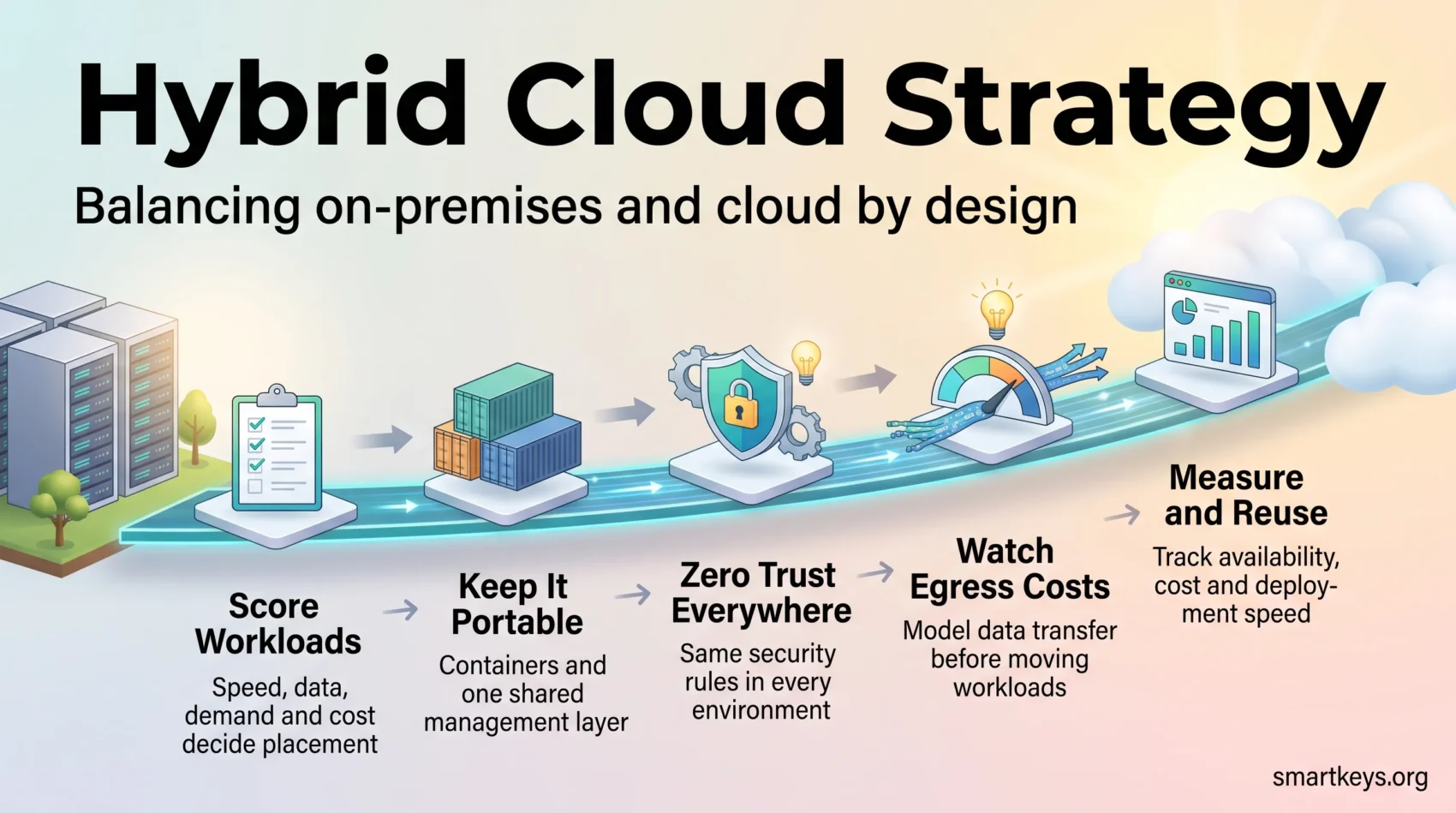
Updated September 2026. A hybrid cloud strategy decides which of your systems run on hardware you control and which run with a public cloud provider such as AWS, Microsoft Azure or Google Cloud. For most companies this is no longer a stopgap. It is the setup they choose on purpose.
The survey data backs this up. In Flexera’s 2026 State of the Cloud Report, 73% of respondents said they use hybrid cloud, up from the year before. The useful question is no longer “cloud or data center?” It is narrower: where does this workload belong? The answer depends on speed, data, rules and cost.
This guide gives you a scoring method for placing workloads, the building blocks that keep them movable, a security model that works everywhere and the cost traps to avoid.
Key Takeaways
- Hybrid is the default, not the fallback. Nearly three quarters of organizations in Flexera’s 2026 survey already use it.
- Score workloads before you move them. Speed requirements, data sensitivity, demand patterns and cost should decide placement, not habit.
- Sovereignty is now a design question. Where data and compute legally sit shapes the architecture, especially in regulated industries.
- EU switching fees end on 12 January 2027. Contracts that renew past that date deserve a close read now.
- Keep your options open. Containers and one shared management layer let you move a workload later without rebuilding it.
What a Hybrid Cloud Is
A hybrid cloud connects your on-premises systems (servers in your own building or a rented data center) with a private cloud and one or more public cloud providers. Network links and APIs, the interfaces that let software talk to other software, make these separate environments work as one estate. Each workload can then run where it performs best.
Three related terms get mixed up often, so here they are side by side:
| Model | What it combines | Typical reason to choose it |
|---|---|---|
| Hybrid cloud | Private or on-premises plus public cloud | Control over data location, speed and cost for the same application |
| Multicloud | Two or more public providers | Best-of-breed services, resilience, negotiating leverage |
| Distributed cloud | Provider hardware installed inside your site | Cloud tools where data legally cannot leave the building or country |
Many enterprises run all three at once. That works, as long as one team owns the rules for what runs where. For the wider market picture, see our overview of cloud computing trends in 2026.
What Changed in 2026
If your hybrid plan was written before this year, four shifts probably affect parts of it.
1. Moving workloads back is selective, not a mass exodus
Cloud repatriation means moving a workload from a public cloud back to your own or a local provider’s infrastructure. It happens, but mostly one workload at a time. A company might bring a steady, data-heavy analytics system back in-house while keeping its customer app in the public cloud.
Geopolitics adds a new motive. Gartner calls this “geopatriation.” It predicts that by 2030 more than 75% of European and Middle Eastern enterprises will move virtual workloads to lower-risk setups, up from less than 5% in 2025. Treat vendor claims of a wholesale retreat from public cloud with caution: the pattern is deliberate placement, not reversal.
2. Sovereignty moved from legal review to architecture
Data sovereignty means data stays under the laws and control of a specific country or region. Gartner forecasts worldwide sovereign cloud infrastructure spending of $80 billion in 2026, up 35.6% from 2025. Governments are the biggest buyers, followed by regulated industries and critical infrastructure such as energy and telecoms.
Several EU rules push in this direction. DORA, the EU’s digital resilience law for financial firms, has applied since January 2025. NIS2 adds security and supply chain duties for critical sectors. None of them simply demands that data stay in one country. All of them are easier to meet when you control the audit trail. Our guide to sovereign cloud and data residency covers vendor options. For country-specific storage rules, see data localization laws and what they mean for SaaS.
AI regulation matters too, but the timeline moved. The EU’s AI Omnibus entered into force on 27 July 2026 and pushed most high-risk AI obligations back to 2 December 2027. Our EU AI Act compliance guide explains which duties already apply.
3. AI workloads changed the placement math
Training AI models needs expensive GPU capacity and moves huge amounts of data. Large datasets are slow and costly to move, an effect engineers call data gravity. So many teams train models where the data already sits, sometimes on their own GPUs. Inference, the step where a trained model answers requests, runs close to users.
Vendors followed. In April 2026, Microsoft said Azure Local, which runs Azure services on your own hardware, now scales to thousands of servers and can run fully disconnected. Google Distributed Cloud offers connected and air-gapped versions, meaning physically cut off from outside networks. If you are building AI services, our LLM Ops strategy guide covers the cost and monitoring side.
4. Egress fees have an EU end date
Egress fees are what a cloud provider charges when data leaves its network. Rackdog’s 2026 Egress Fees Index puts internet egress from US regions at about $0.085 to $0.09 per GB at AWS, Azure and Google Cloud, after a small free allowance.
The EU Data Act changes this for companies leaving a provider. From 12 January 2027, providers may no longer charge switching fees, including egress fees tied to switching. There is one important limit: the ban does not cover parallel multicloud use, where data flows continuously between providers, so those transfer charges can continue. Check auto-renewal clauses now, before an old contract carries old terms past the deadline.
Key Benefits of a Hybrid Cloud Strategy
Cost control without oversized hardware. Keep steady systems on infrastructure you already own and rent public capacity for peaks. A retailer, for example, can handle holiday traffic in the cloud instead of buying servers that sit idle eleven months a year.
Compliance you can prove. You decide where regulated data lives. Patient records or payment data can stay in environments you control, while less sensitive services use flexible public tools.
Faster response where it counts. Latency is the delay between a request and a response. Running time-critical parts near users or machines helps factory floors, retail stores and telecom networks. Our guide to edge computing for business explains how processing close to the source works.
Resilience by design. Spreading workloads across sites and providers removes single points of failure and shortens recovery after an outage.
Modernization at your own pace. Breaking applications into portable parts lets you move step by step instead of betting everything on one big migration.
Hybrid Cloud Architecture Essentials
Every hybrid setup rests on three foundations: reliable connections, portable software packaging and one way to manage it all.
Connectivity
Design network links, VPN tunnels (encrypted connections over the internet) and API gateways so data flows securely and predictably. Dedicated private connections to your cloud provider beat the public internet for anything time-sensitive or high-volume.
Virtualization and containers
Virtualization splits one physical server into several isolated virtual machines. This uses hardware better and makes it easier to move systems between your data center and a private cloud.
Containers package an application together with everything it needs to run, so it behaves the same on your own servers and on a public provider. This is the single most important decision for keeping workloads movable. Our primer on cloud-native architecture goes deeper on the patterns.
One management layer
Kubernetes is open-source software that starts, scales and restarts containers automatically. Standardize on it, and add Red Hat OpenShift or a managed Kubernetes service if you need vendor support. One control plane, a single place to see and steer all environments, lets you apply the same rules everywhere.
- Write reference architectures that state where each type of workload and its data should live.
- Build in identity, secrets management and network rules from day one.
- Load-test with realistic traffic before you promise service levels to the business.
A Hybrid Cloud Strategy Framework You Can Use
With the building blocks clear, the next step is turning them into decisions your teams can follow.
Step 1: Tie business goals to metrics
Write a short statement that tells teams where workloads should live and why. Then pick two to five measurable targets. Examples: 99.99% availability for the checkout system, new test environments in hours instead of weeks, or a set cost per transaction.
Vague goals produce vague architectures.
Step 2: Decide between portability and provider-specific services
Portable designs run anywhere but may miss out on a provider’s fastest or cheapest managed services. Provider-specific services are powerful but harder to leave. Decide per workload type, write the rule down, and stop reopening the debate in every design review.
Step 3: Choose your cloud mix deliberately
Every additional provider adds its own logins, networking, billing and skills. Add a second or third provider only for a real capability gap, not for a lock-in fear you have not put a number on. Sector-specific platforms can also fill gaps; see our look at industry cloud solutions.
Step 4: Build one operating model
- Centralize identity, policies and management so environments do not drift apart.
- Standardize how you provision, monitor and recover systems.
- Write a playbook that sets the migration order and names the training each team needs.
Security, Governance, and Compliance
When systems span your own sites and external providers, security controls must work the same everywhere. Otherwise your weakest environment sets your real level of protection.
Zero trust as the baseline
Zero trust means no user or system is trusted by default, even inside your network. Every request is verified, and people and services get only the access they need. Our article on how businesses adopt zero-trust cybersecurity shows how companies roll this out.
Distributed estates also suit a composable security model. The cybersecurity mesh architecture explains how to connect existing security tools into one policy layer.
Consistent policies and shared responsibility
Apply the same data-handling rules on-premises, in private cloud and in every public region. Policy as code, writing these rules as machine-readable files, lets software enforce them automatically and collect audit evidence along the way.
Then clarify shared responsibility with each provider: which security tasks they handle and which remain yours. A data governance strategy helps define who owns which data and how it is classified.
- Send security logs from all environments into one SIEM, a system that collects and correlates security events, so you can spot threats that cross boundaries.
- Automate compliance checks for the frameworks you actually report against.
- Test backups and recovery on a schedule, and set your recovery targets from measured results.
- Plan ahead for encryption that will resist future quantum computers; our guide to quantum-safe encryption lists the deadlines.
Workload Placement, Performance, and Cost
Placement is the core discipline of a hybrid cloud strategy. Score each application on the signals below, then let the score settle the decision.
A placement scorecard
| Signal | Points to on-premises or private | Points to public cloud |
|---|---|---|
| Response time | Under 10 ms, tied to local systems | Tolerates internet delays |
| Data sensitivity | Regulated or bound to a location | Public or already anonymized |
| Demand pattern | Flat and predictable | Spiky or seasonal |
| Data moved | Terabytes crossing boundaries daily | Small payloads that can be cached |
| Rate of change | Stable, rarely updated | Frequent releases, benefits from managed services |
Cloud bursting and the egress trap
Cloud bursting means your own servers handle normal load and only the overflow goes to a public cloud. It works when the peak is short and little data travels back. It fails when data keeps moving back and forth.
Model transfer costs before you commit. A job that sends 2 TB out every night moves about 60 TB a month. At list prices near $0.09 per GB, that single job can cost thousands of dollars a month.
- Cache aggressively and put a content delivery network (CDN) in front of anything users access.
- Resize instances regularly and tune autoscaling so idle capacity actually shuts down.
- Document which provider you use for which strength, so extra capacity is a decision, not a default.
Waste is a real risk. Flexera’s 2026 survey found respondents estimate 29% of their cloud spend is wasted, even though 71% run a cloud center of excellence and 63% have a FinOps team. FinOps is the practice of making engineering, finance and product teams jointly responsible for cloud costs. Our guides to cloud cost optimization strategies and FinOps best practices cover tagging, rightsizing and commitment discounts in detail.
Hybrid Cloud Management and Operations
Day-to-day operations depend on seeing the whole estate from one place. Without that, each environment gets its own team and nobody has the full picture.
Centralized visibility
Send logs, metrics and traces from every environment into one analytics layer. That speeds up troubleshooting and lets you plan capacity from real data instead of vendor forecasts.
Management tools in 2026
- Azure Arc brings servers, Kubernetes clusters and databases outside Azure into Azure’s management console.
- Azure Local runs Azure services on your own hardware and supports connected and fully disconnected operation.
- Google Distributed Cloud offers connected and air-gapped versions with a Kubernetes-first approach.
- AWS Outposts installs AWS hardware in your data center. It supports a subset of AWS services and does not manage other providers.
- Red Hat OpenShift and Nutanix are options if you want to avoid depending on one hyperscaler.
Automation for delivery teams
Automate deployment with infrastructure as code (IaC), which defines servers and networks in files instead of manual clicks. CI/CD pipelines then test and release software automatically, so applications behave the same in every environment.
High-Value Hybrid Cloud Use Cases
Disaster recovery and resilience
Copy data to remote sites and separate providers so you can hit tight recovery targets. RTO (recovery time objective) is how quickly a system must be back. RPO (recovery point objective) is how much recent data you can afford to lose. Automate failover and run drills until recovery is routine.
The technical plan only works if the people side is ready too. Our guide to workforce contingency planning covers role coverage and testing routines.
Application modernization
Break large, tightly coupled applications into smaller services and package them as containers. You gain portability and faster releases, and you can extend older systems with managed databases or serverless functions without a full rewrite.
AI, analytics, and edge
Train where the data already lives to avoid moving terabytes. Run inference near users to cut delays. Keep sensitive data preparation inside your own environment and send only compute-heavy, non-sensitive steps to public GPUs. For inference on devices and local sites, see our overview of edge AI in business.
From Planning to Deployment: A 90-Day Start
The framework becomes real once you put it on a calendar. Here is a realistic first quarter.
Days 1 to 30: assess
List what you run, who owns it and what depends on it. Score applications against the placement table above. Review service agreements and contract renewal dates before you move anything, especially with the EU switching-fee change in January 2027.
Days 31 to 60: set guardrails
Write the rules before you scale. Create IaC templates and policy-as-code rules, introduce zero-trust access and set up shared monitoring. Add budget alerts, a tagging standard and your target metrics.
Days 61 to 90: migrate a first wave
Start with low-risk workloads that people will notice. Set checkpoints and a rollback plan for each wave, then measure results against your targets before the next one.
- Map owners, connections and data flows for each system.
- Place each workload in a defined landing zone, a prepared cloud environment with security and network settings already in place, and record why.
- Save runbooks and templates so wave two runs faster than wave one.
Four Mistakes That Sink Hybrid Projects
- Lift and shift without redesign. A virtual machine moved to the cloud unchanged often costs more and gains nothing.
- Leaving data transfer out of the business case. Egress and inter-region fees can turn a projected saving into a loss.
- Running two operating models. Separate tools per environment double the effort and halve visibility.
- Treating sovereignty as a legal footnote. Where data may legally sit is an architecture constraint. Classify workloads before you design, not after.
Conclusion
A hybrid cloud strategy works when placement is a decision, not an accident. Score your workloads, write the rules down and let the scorecard settle arguments that would otherwise drag on for months.
Build for portability so today’s placement can change tomorrow, and let security controls follow applications wherever they run. Then measure availability, cost per unit of work and deployment speed. Reuse what worked, and your hybrid estate becomes an advantage instead of a never-ending migration.
Found this useful?
Make SmartKeys a preferred source on Google, and our articles will surface more often in your Top Stories, AI Overviews, and AI Mode.
Add as Preferred Source