

You face constant pings, too many platforms, and a creeping sense of exhaustion. Work tech overload is what happens when the tools meant to help you start competing for your attention instead. It is not a personal weakness. It is a design problem.
The scale is measurable. Microsoft analysed anonymised Microsoft 365 activity signals and found the average worker is interrupted every two minutes during core hours, roughly 275 times a day. Zylo’s 2026 SaaS Management Index adds that companies leave 36% of their software licences unused, while large enterprises keep adding around 21 applications a month. Tools keep arriving; attention does not scale with them.
This article is a practical roadmap: how to spot fatigue early, what causes it, and which changes give back real hours. Along the way you will find ideas for repetitive tasks automation and for combating digital fatigue before it turns into burnout.
Key Takeaways
- The World Health Organization classifies burn-out as an occupational phenomenon, not a personal failing.
- Microsoft measures interruptions every two minutes during core hours, about 275 a day.
- Around 36% of company software licences sit unused, so consolidation rarely costs capability.
- Fewer tools, fewer notifications and protected focus blocks give back measurable hours.
- Rollouts that respect different learning speeds keep the whole team on board.
Why work tech overload is spiking right now
Start with the term. Burn-out, in the World Health Organization’s ICD-11 classification, is an occupational phenomenon rather than a medical condition. It has three markers: energy depletion, growing cynicism about the job, and reduced professional efficacy. That framing points the fix at how work is organised, not at the individual.
Three things changed at once. Software got cheap to buy, so tools multiplied. Communication moved into always-on channels. Work became distributed, which pushed coordination into writing and calendars.
Microsoft’s data shows the result: 117 emails and 153 chat messages per weekday, and more than 50 messages sent or received outside business hours. Meetings after 8 pm rose 16% year over year, and 57% of meetings now happen as ad hoc calls with no invite at all. None of those looks unreasonable alone. Together they leave very little uninterrupted time.
Gallup’s State of the Global Workplace put global employee engagement at 20% in 2025, its lowest level since 2020. Tool overload is not the only cause, but it is one of the few a manager can fix in a quarter.
The modern reality: pings, platforms, and pressure
- Response time became a proxy for commitment. When fast replies read as dedication, people stay in their inbox instead of doing the work they were hired for.
- Every new app brings its own notifications. Ten tools each sending reasonable alerts produce an unreasonable day.
- More platforms mean less clarity. If a decision could live in three places, everyone ends up asking in chat.
How to tell your team is overwhelmed by technology
Overload rarely announces itself. It shows up as small behaviour changes that are easy to mistake for attitude problems. Spotting them early protects both people and output.
Chronic stress and burnout signals that drain productivity
Irritability, narrower focus and rising cynicism are the classic markers, and they map onto the WHO’s three dimensions of burn-out. A useful early question: is someone quietly extending their day just to stay level? When people work an extra hour to catch up on messages, the workload has not grown. The overhead has. Burnout prevention habits work better as a team norm than as individual advice.
Sleep disruption, anxiety, and mood shifts
Late messages and evening deadlines keep work active in the mind after the laptop closes. Poor sleep then cuts focus the next day, the work takes longer, and it gets pushed later again. Staff often report headaches, eye strain or flat motivation without connecting them to device habits. Asking about the pattern, not just the symptom, surfaces the cause. Managing stress for better productivity starts with removing the trigger rather than coping harder.
Information fatigue from nonstop tools and updates
Past a certain volume, people stop processing messages and start skimming them. That is when the operational damage begins.
- Handoffs get missed because the detail sat in a channel nobody reads.
- People avoid meetings and threads, which looks like disengagement but is self-protection.
- Error rates climb, especially late in the day, as attention runs out.
Root causes: too many tools, too little focus
The problem is rarely any single tool. It is the total number of places work can appear. Once alerts arrive from email, calendar, task board, chat and phone, attention fragments, and each switch carries a cost.
Research published in Harvard Business Review put a figure on that cost. Across 137 users at three Fortune 500 companies and 3,200 days of recorded work, people toggled between apps and windows nearly 1,200 times a day. They spent just under four hours a week reorienting themselves, roughly 9% of annual working time.
Platform sprawl and scattered notifications
Sprawl is largely a purchasing story. Zylo found business units control 81% of software spend while IT manages just 15%, which is why nobody holds a full picture of the stack. Tools get added by teams solving a local problem, and the notification load lands on everyone. Unapproved apps make it worse, which is why shadow IT in remote work is a fatigue issue as much as a security one.
Meeting-heavy days, inbox pressure, and blurred boundaries
Meetings multiply interruptions. Even useful syncs become disruptive when they fill the middle of the day and push real work into the evening. Microsoft found half of all meetings fall between 9 and 11 am or 1 and 3 pm, precisely when most people think best. Email adds a second pressure: every message arrives looking urgent. That blurs the line between work and personal time, and recovery is what makes focus possible the next morning. A formal right to disconnect policy gives people something concrete to point to.
- Name one place for files, one for status, one for discussion, and retire duplicates.
- Tighten meeting scope and write decisions down, so nobody must attend to stay informed.
- Set explicit instant messaging boundaries so “available” does not mean “immediately”.
The cost of overload: people first, business next
When digital demands stack up, the cost shows first in people and then in results. The WHO links unmanaged workplace stress to reduced professional efficacy, which is a clinical way of saying good people stop producing their best work.
That human toll becomes a business problem quickly. Expect missed deadlines, more rework and falling morale as staff track the same project across four tools.
From mental health impacts to turnover, missed deadlines, and lower output
These signals are worth tracking, because each one is measurable:
- Engagement drops and strong performers leave quietly. Replacing them costs more than the tools you were justifying.
- Deadlines slip when the current version lives in a different app than people expect.
- Output falls from attention drag, not workload. The hours lost to switching appear on no timesheet.
- Decisions get worse. Tired teams pick the obvious option rather than the right one.
Measure these signals, then give staff real recovery time. Managing employee burnout is cheaper than replacing the people who hit it.
Actionable ways to simplify your tech stack and reduce fatigue
A short list of clear rules, backed visibly by leadership, gives back hours each week. Start with the changes that need no budget approval.
Run audits and consolidate
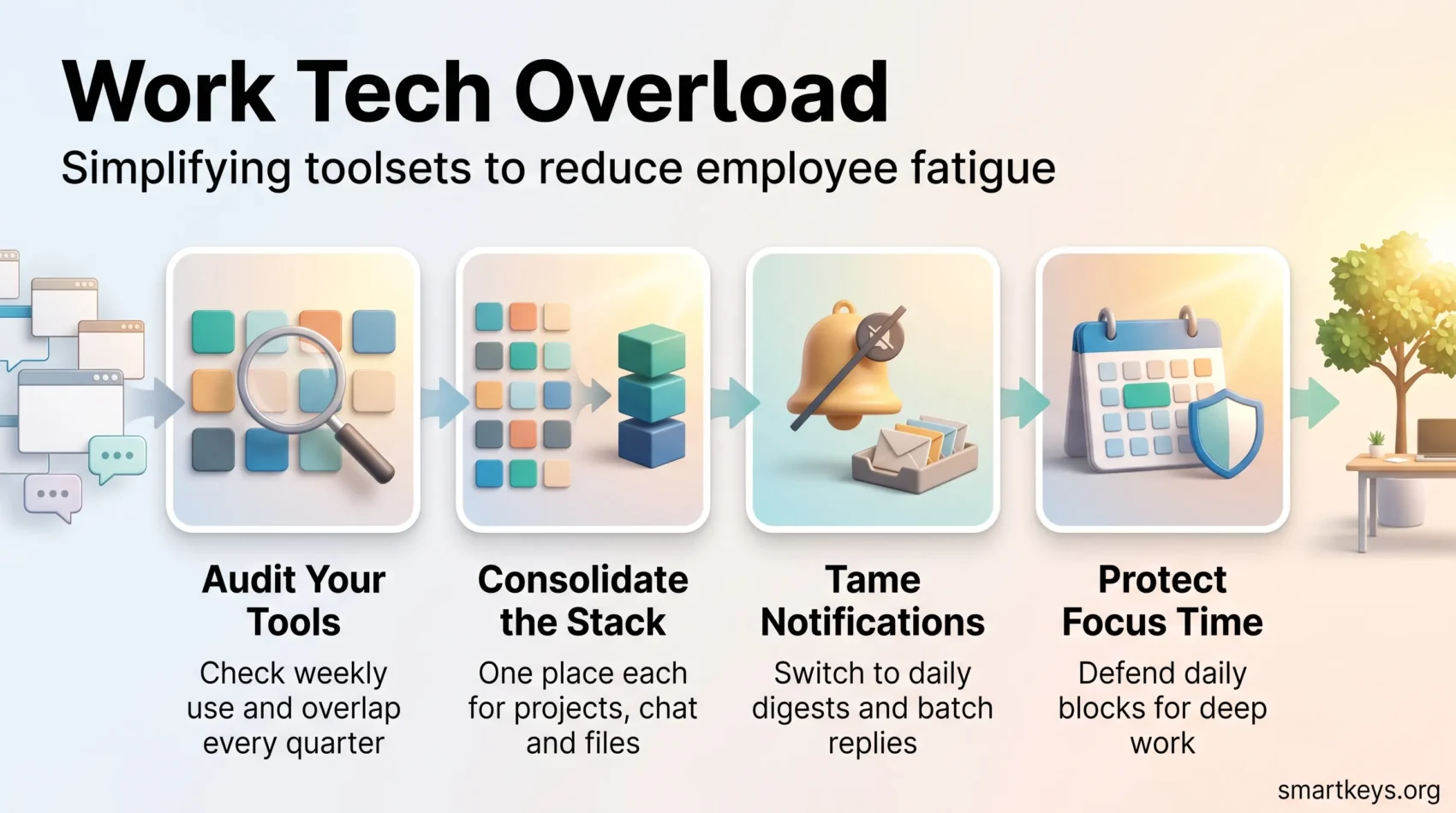
Run a tools audit once a quarter. For each app, ask three questions: who actually opens it weekly, what would break if it disappeared, and which other tool already does this. With 36% of licences unused on average, most teams find savings without losing a capability. Then name the single best place for projects, chat and files, and say so in writing. A meeting audit does the same job for the calendar. If consolidation is on the table anyway, SaaS consolidation trends explain why your vendors are moving the same direction.
Tame notifications and batch responses
Turn notifications into something people choose rather than something that happens to them. Switch each app to a daily digest where possible, and mute everything that is not time-critical. Our guide to managing work notifications covers the settings tool by tool. Then batch the replies. Email batching means checking at set times, which turns dozens of interruptions into two or three deliberate sessions. If the inbox is past saving, the inbox zero method gives you a way back.
Fix meetings, reset email, and protect deep focus
- Invite fewer people, shorten the default slot, require an agenda. Running effective meetings is mostly these three rules.
- Move status updates out of calls entirely. Asynchronous communication tools let people read at their own pace.
- Protect a daily block for concentrated work with time blocking or a team-wide focus time policy.
- Agree that nonurgent messages wait until working hours, and use scheduled send so good intentions do not ping anyone at 10 pm.
“Small management moves beat endless app chasing. They save time, cut errors, and help people recover.”
Leaders who visibly keep their own focus blocks make the change stick. For the habit side, deep work strategies and the Pomodoro technique give people a structure to work inside.
Designing for every worker: confidence, training, and inclusion
Simplification only works if everyone can use what remains. People learn new tools at any age, though not at the same pace, and a rollout that ignores that quietly excludes part of the team.
Support self-efficacy, meaning a person’s belief that they can handle the task, with paced learning paths and peer mentors. Practice should happen during the working day, not in someone’s own evening. A mentor plus a one-page guide makes new software feel like part of the job. The principles behind remote onboarding and training apply to any tool change.
Remove age bias with respectful rollouts
- Offer small-group sessions, office hours and two-minute videos, so asking for help is normal.
- Budget practice time in the first week instead of expecting people to absorb it around a full day.
- Use a real example from your own company, so training maps onto actual tasks.
- Check who is struggling before go-live. Multigenerational teams need more than one format.
“Self-efficacy shapes motivation: when people feel capable, they learn faster and stick with change.”
Management should measure adoption rather than assume it. Treat long experience as an asset: people who have seen several tool migrations spot the risks early.
Conclusion
The fix for work tech overload is subtraction, not another app.
The evidence points one way. Microsoft measures an interruption every two minutes, Harvard Business Review research puts the switching cost at nearly four hours a week, and Zylo finds a third of licences unused. The path forward is unglamorous: audit the stack, consolidate onto fewer tools, reset meeting and email norms, and defend focused time like a deadline.
Pick one change and run it this week. Cutting notifications to a daily digest, or protecting one ninety-minute block, shows whether the problem was ever really the workload. For a wider view, see productivity trends for 2026, and setting boundaries for the personal half of the job.
Found this useful?
Make SmartKeys a preferred source on Google, and our articles will surface more often in your Top Stories, AI Overviews, and AI Mode.
Add as Preferred Source




