

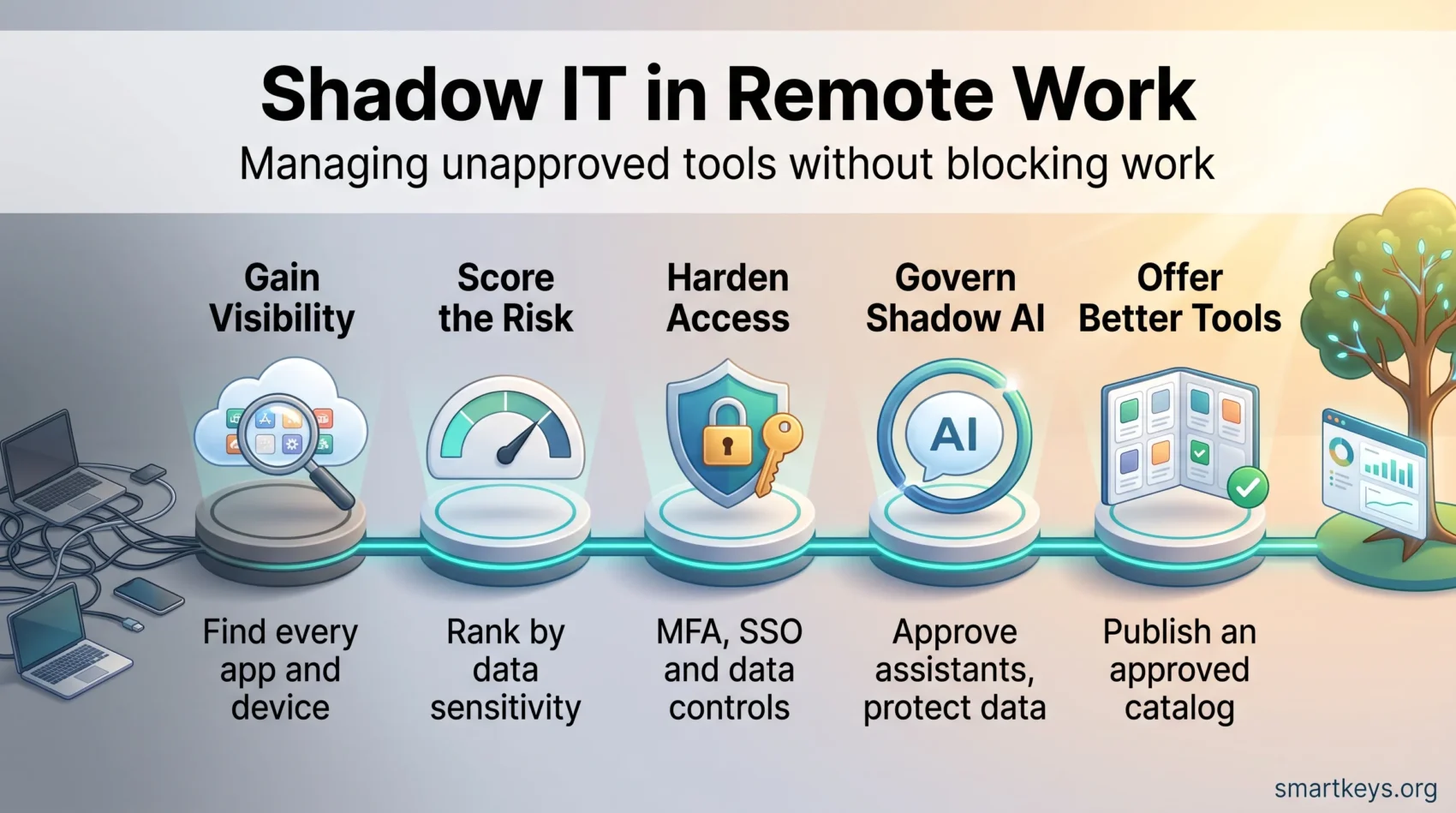
Shadow IT is any software, hardware or cloud service people use for work without IT approving it. In a distributed team it starts small: someone opens a free Trello board, or moves a client file into a personal Dropbox because the company drive is slow that morning.
Nobody is trying to cause harm. They are trying to finish the work. But once company data sits in an account IT does not control, you lose the ability to protect it, audit it or delete it.
The scale is no longer marginal. BetterCloud surveyed 525 IT and security professionals in July 2026 and found only 56% of the applications in use carry IT approval. The other 44% sit outside oversight entirely, while average app counts rose 11% year over year.
This article gives you a practical path: what shadow IT looks like now, why shadow AI is the fastest growing part of it, what it costs, and how to gain visibility and apply a compact control stack without blocking the work.
Key Takeaways
- Roughly 44% of the applications in use at a typical company have no IT approval (BetterCloud, July 2026).
- Shadow AI is now the biggest growth area: IBM found it involved in 43% of security incidents in its 2026 report, more than double the previous year.
- The global average cost of a data breach reached $4.99 million in 2026, a record and a 12% rise on 2025 (IBM).
- Unapproved tools usually signal an unmet need, so treat each one as feedback rather than only as a violation.
- Start with discovery, then risk scoring, then controls.
- MFA, SSO, device management, a CASB and DLP cover most of the exposure in the first few months.
- A published catalog of approved tools and a fast approval route reduce hidden use more reliably than blocking does.
What Shadow IT Means in a Remote and Hybrid Workplace
Unmanaged apps and personal devices appear quickly in distributed teams, and they change where your company data actually lives. A clear definition lets your department act instead of arguing about scope.
A plain definition
Anything your people deploy or use for work without formal approval counts as shadow IT. That covers personal phones, tablets and laptops, cloud apps signed up for with a personal email, browser extensions, and software installed straight onto a work machine.
Typical examples: a Slack or Trello workspace opened outside the corporate tenant, files parked in a personal Google Drive, or a paid design tool expensed by one team and never registered with IT.
Why it is growing again
People adopt familiar tools because they want speed. When the sanctioned option feels slow or is missing a feature they need, users pick alternatives to finish work. Remote and hybrid setups also remove the informal check of a colleague noticing what is on your screen, and phones, printers, webcams and wearables all touch the same home network as the work laptop. Our guide to cybersecurity for remote work covers that layer in more detail.
There is a budget angle too. Departments buy niche tools on a company card to hit a deadline, and the subscription quietly renews for years. That is why subscription fatigue and unplanned cloud spend often surface in the same audit as shadow IT.
Practical note: the tools people choose show you where your official stack falls short, so say clearly what is sanctioned, what is tolerated, and how to request something new.
Shadow AI: The Fastest Growing Category
Shadow AI is shadow IT with a sharper edge. It means people pasting work content into AI chatbots, browser assistants or writing tools that nobody has vetted. The difference matters: with a file-sharing app the data simply sits somewhere you did not choose, while an unvetted AI service may also retain the input, have staff review it, or use it to train a model.
IBM’s 2026 Cost of a Data Breach Report found the share of security incidents involving shadow AI more than doubled in a year, reaching 43%. More than two thirds of the organizations surveyed had no governance process to limit it. Among companies attacked through their own AI models, 92% had failed to control access properly, and only four in ten restricted access to their AI systems at all.
What this means for you: an AI acceptable use policy is now part of a shadow IT program, not a separate project. Name the approved assistants, state plainly what may never be pasted into any of them (customer records, source code, unpublished financials), and give people a sanctioned option good enough to use. Our overview of AI collaboration tools is a starting point for that list.
Real-World Shadow IT Examples You Are Likely Seeing
The same patterns show up in most companies, and recognizing them makes the inventory work faster.
Unapproved cloud apps and personal accounts
App sprawl starts when a team opens a workspace tied to personal email addresses. Files then move into consumer storage and leave your retention rules behind. If storage is the recurring complaint, comparing Dropbox Business and Google Workspace beats another warning email, and the same applies to messaging when you weigh Slack against Microsoft Teams.
BYOD and connected home gadgets
Personal laptops and phones reach corporate systems without device management, encryption or current patches, while home printers, cameras and smart speakers sit on the same subnet. A written bring your own app policy sets the baseline a personal device must meet before it gets access.
Rogue projects and informal sharing
“Users create virtual machines, add browser plugins, or pass files by USB to meet deadlines.”
These side channels are hardest to unwind, because there is no account to suspend and no owner on record. When someone leaves, the access often goes with them only in theory: BetterCloud found 18% of organizations had a breach caused by offboarded users who kept access.
Quick wins: inventory applications, map endpoints, stop data leaving governed paths, and offer credible alternatives from a shortlist of vetted productivity apps.
The Risks You Need to Control
Every unsanctioned app, device or subnet is a possible way in. The exposure falls into four groups, and it helps to price each one rather than treat “risk” as a single word.
Cyberattacks and malware
Unapproved apps and personal gadgets often lack encryption, patching and access controls, which makes credential theft and lateral movement easier. Lateral movement means an attacker who gets into one low-value account then works sideways into the systems that matter.
Data breaches and leaks
Files in personal cloud accounts bypass your backup, retention and recovery. IBM put the global average cost of a breach at $4.99 million in its 2026 report, a record and 12% above 2025, with the US average at $11.5 million. Containment now takes 247 days on average, up from 241, reversing five years of improvement.
Compliance exposure
Compliance is not optional. HIPAA, GDPR and PCI DSS all require control over where sensitive information sits and who can reach it. GDPR fines can reach 20 million euros or 4% of prior-year global turnover, whichever is higher.
Since 2 August 2026, the EU AI Act’s transparency rules also apply, and they reach ordinary employers using AI systems, not just the companies building them. Our guide to EU AI Act compliance covers the deployer duties, and our guide to employee data privacy rules sets out the rest.
Operational cost and duplication
Duplicate subscriptions and siloed data slow teams down and create support overhead. Vendor mergers make tracking what you own harder still, a point we cover in SaaS consolidation trends.
How to Detect, Assess and Prioritize Shadow IT
Visibility comes first. You cannot manage what you cannot see, so start discovery across your network, your identity provider and your cloud services.
Gain visibility. Run network scans and CASB discovery. A CASB, or cloud access security broker, sits between your users and cloud services and reports which apps are actually in use. Build an inventory linking every app to its users, its login method, and the data it touches.

Map endpoints and identities. Catalog the corporate and personal devices that reach your systems, and review OAuth grants: OAuth is the “sign in with Google” style permission that lets one app read data in another, and stale grants are a common quiet leak.
Score and triage. Rank each finding by data sensitivity, number of users, and whether anything is shared externally. Deal with the highest exposure first rather than the longest list.
- Remove unused applications and revoke stale OAuth tokens.
- Consolidate duplicates onto approved alternatives.
- Feed findings into your SIEM so new discoveries raise an alert instead of waiting for the next audit.
Then make the policy practical. Define a request workflow so the next tool goes through approval instead of around it. Continuous inventory beats an annual sweep, because the gap between sweeps is where shadow IT accumulates. Workforce analytics tools can also show which sanctioned apps people quietly abandoned.
Build Policies People Will Actually Follow
Write policies that solve a real need instead of listing bans. Short, plain-language guidance tells employees what is allowed, what is not, and how to ask for something new.
Acceptable use, BYOD and request workflows
Keep it simple and specific. A one-page request workflow promising a decision within a stated number of days does more than a twenty-page standard nobody opens. A hybrid work policy template is a useful place to anchor the device and access sections.
- A short acceptable use statement naming permitted devices and tool categories.
- BYOD basics: encryption, screen lock, current patches and endpoint protection before access is granted.
- Conditional approval: pilot with a small group, check the security posture, then roll out.
- A published catalog of approved tools, organized by use case, so teams can self-serve.
Training that changes behavior
Teach phishing recognition, safe data handling and third-party app permissions using scenarios people recognize, such as sharing a file with an external client or granting an AI plugin access to a mailbox.
“Small daily habits prevent big incidents.”
Get department heads to co-own joining and leaving. Access should be granted and removed the day a role changes, which is where good remote onboarding and offboarding pays for itself. Then close the loop and tell people what happened to their requests.
Secure the Stack: Controls That Reduce Risk Fast
A small set of controls covers most of the exposure. Start with the ones that deploy quickly.
Access hardening
Enforce multi-factor authentication everywhere and pair it with single sign-on, which cuts password reuse and gives you one place to switch access off. Require device management on any endpoint that touches company data, so patching and encryption are enforced rather than requested. Use a CASB to discover cloud apps, score their risk, and apply rules by category and permission level.
Data safeguards
Encrypt data at rest and in transit, and set data loss prevention rules so sensitive files cannot leave approved systems unnoticed. Apply least privilege, meaning people get what their role needs and nothing more, and keep backup and recovery tested.
Architecture and detection
Longer term, architecture matters as much as tooling. A zero trust approach stops treating the network as a trusted zone, the right assumption once half your applications live outside it, and a cybersecurity mesh extends that idea to distributed identities and devices. Feed CASB, endpoint and identity telemetry into one monitoring stack so unusual behavior surfaces early. For what is coming next, see our overview of cybersecurity trends.
Balance Control With the Reasons People Went Around You
Reducing risky workarounds works better as a trade than as a crackdown. People left the official tool for a reason, and if that reason survives the block, they will find another workaround.
Monitoring has limits here. Heavy surveillance pushes behavior further underground and carries its own legal duties, as our piece on AI in employee monitoring sets out. Being open about what you log, and why, holds up better.
Publish a vetted catalog and migrate the history
List approved tools by use case so teams can pick something safe in a minute. Migrate existing boards, files and chat histories where you can, because people give up a shadow tool far more readily when their history comes with them.
Collect needs through short surveys and pilot groups, name a champion in each department, and keep a lightweight exception process for time-limited trials.
- Track progress: a simple dashboard for adoption and decommissioning.
- Show results: share cases where the approved tool genuinely worked better.
- Review quarterly: add what people need, retire what nobody opens.
Conclusion
Treat unsanctioned tools as signals and you turn a policing problem into a product problem. Each one shows where your sanctioned stack is too slow, too limited or too hard to reach.
Start with visibility, then act on the worst first. Discover what is in use, classify the data it holds, and close the highest exposures before working down the list.
Harden access with MFA, SSO, device management, a CASB and DLP, and add an AI acceptable use policy, because shadow AI is where the growth is. Then track what matters: fewer incidents and fewer people who feel they have to go around you. For wider context, see cloud computing trends and data privacy trends.
Found this useful?
Make SmartKeys a preferred source on Google, and our articles will surface more often in your Top Stories, AI Overviews, and AI Mode.
Add as Preferred Source




