

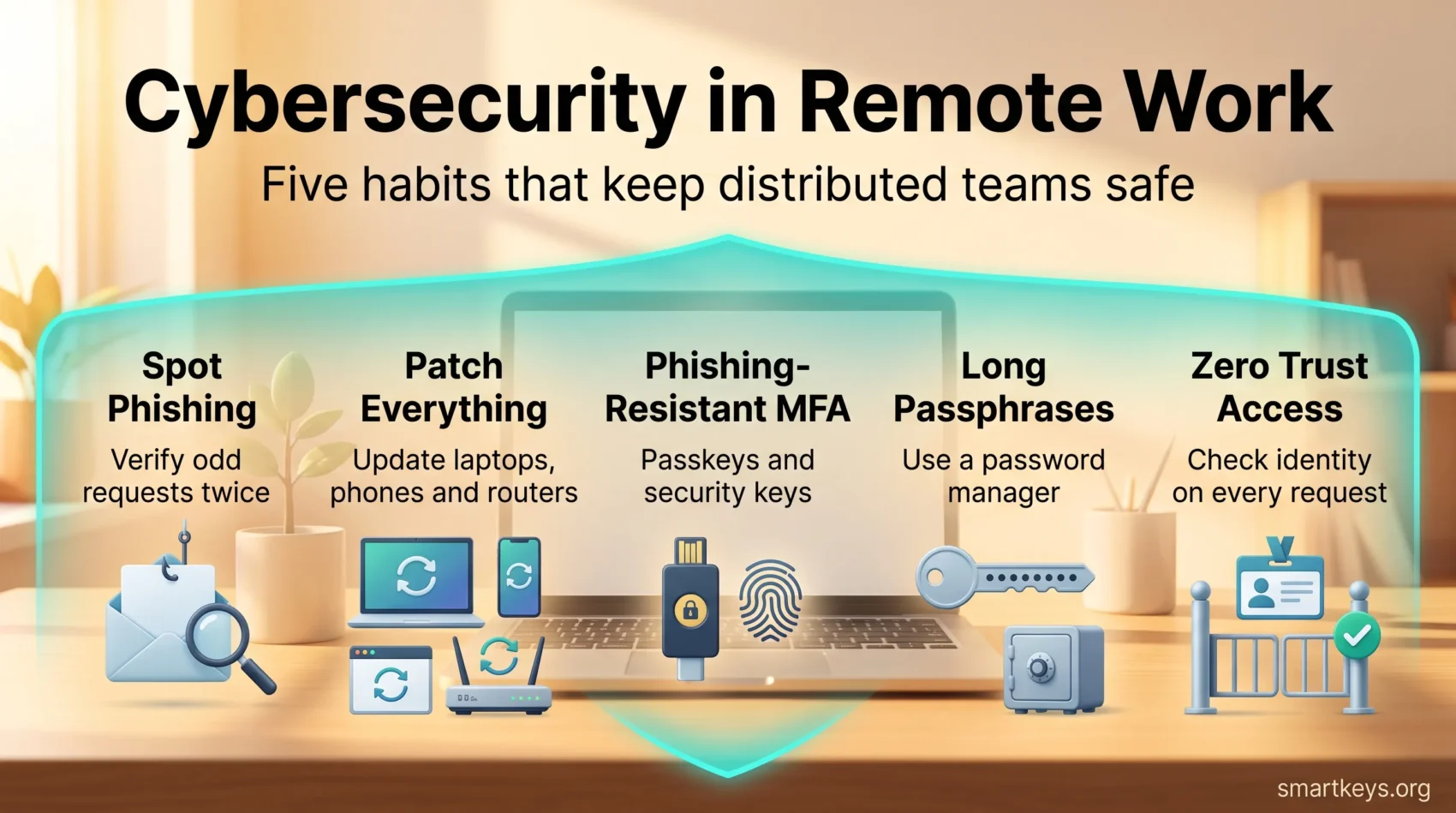
In today’s digital era, cybersecurity has become inseparable from remote work. Distributed teams log in from home networks, coworking spaces and airport lounges, and each connection widens the surface an attacker can probe. Cybercriminals know this and target remote setups deliberately.
Navigating your daily tasks online requires understanding that cybersecurity is not solely an IT concern. It’s a collective responsibility touching everyone who opens a laptop outside the office. By embracing cybersecurity best practices for remote work, you safeguard sensitive data, protect your organization’s integrity and make a distributed team something a business can rely on.
Key Takeaways
- Phishing and social engineering remain the most common way attackers reach remote workers.
- Unpatched software is now the leading entry point into corporate networks, according to Verizon’s 2026 DBIR.
- Encrypted, identity-aware access matters more than a VPN tunnel on its own.
- Current NIST guidance favours long passphrases and phishing-resistant MFA over forced complexity rules.
- Employers should run regular security audits and keep remote work policies in writing.
Understanding the Critical Nature of Cybersecurity in Remote Environments
The shift to remote work has made the critical nature of cybersecurity impossible to ignore. Employees working from many locations face higher exposure through unsecured networks and personal devices, and those two factors alone complicate the job of keeping data safe.
Cybersecurity protocols for remote work exist to close that gap. Digital-first communication gave attackers more channels for phishing, and remote work risks climb further on public Wi-Fi. Teaching staff to recognise those attempts is one of the cheapest defences available.
Securing devices remotely is also harder. Unauthorized access and data breaches can start with malware, a reused password or a router nobody has updated in years. Regular audits, prompt patching and a well-informed workforce remove most of that risk before it becomes an incident.
The Rise of Remote Work and Its Cybersecurity Implications
Remote work has settled into a durable pattern rather than fading away. The Survey of Working Arrangements and Attitudes shows roughly a quarter of paid full days in the US were worked from home in May 2026, with about 26% of full-time employees hybrid and 12% fully remote. That is a permanent change in where corporate data lives, and it needs a security model built for it.

The rise of remote work brought vulnerabilities that office-bound security models never had to handle. Company data now sits on home networks, personal tablets and unmanaged browsers. Many businesses adopted collaboration tools at speed without fully working through the security implications, and the cost of getting it wrong keeps climbing: IBM’s 2026 Cost of a Data Breach Report puts the global average breach at $4.99 million, up 12% year over year.
Attackers have also become faster. The same IBM study found that one in four malicious breaches was AI-enabled, and those incidents cost around $6 million on average. Generative tools make convincing phishing messages and voice impersonation cheap to produce, which hits distributed teams hardest because so much trust is established over chat and video rather than in person.
Companies can respond in concrete ways. Identity-aware access, multi-factor authentication and disciplined patching remove most easy openings, and training employees to question unusual requests closes much of what remains. If you are also weighing the operational side of distributed teams, our guide to remote work productivity covers the habits that keep output steady.
Common Cyber Threats Faced by Remote Workers
As remote work matured, so did the threat landscape around it. Knowing what the main risks look like is the first step to blocking them.
Phishing, Social Engineering and AI-Generated Deception
Phishing remains the most reliable route into a remote organization. Attackers send messages mimicking internal tools, payroll notices or IT requests, and a distributed team has fewer chances to verify in person. Verizon’s 2026 DBIR reports that 62% of breaches involved a human element, and that click rates are around 40% higher on mobile devices, where smaller screens hide the warning signs. Generative AI has removed the clumsy grammar that used to give scams away, and voice cloning now supports impersonation over calls. Verifying unusual requests through a second, known channel is the habit that defeats most of them.
Malware and Ransomware Threats
Malware, including ransomware, remains a serious risk. These programs lock files, steal credentials and spread from a personal device into company systems. Verizon’s 2026 report found ransomware present in 48% of breaches, and remote endpoints are an attractive way in because they are often less monitored than office hardware. Modern endpoint protection that watches behaviour rather than only matching known signatures gives the best chance of catching an infection early.
Unpatched Software and Exposed Remote Access
The biggest shift in recent years is where attacks start. Verizon’s 2026 DBIR found that 31% of breaches now begin with the exploitation of a software vulnerability, overtaking stolen credentials as the leading initial access vector. Home routers, VPN appliances and personal laptops running months-old software are the classic examples. Enforcing automatic updates on managed devices, and setting a clear expectation for personal ones, closes this gap faster than any other single measure.
Data Breaches and Unauthorized Access
Data breaches in remote environments often trace back to something ordinary: a shared login, a file sent to a personal account, or an ex-employee whose access was never revoked. Prompt offboarding, least-privilege access and encrypted storage limit the damage when something does go wrong. For context on how distributed work reshaped the workplace, see how remote work is changing the workplace.
Cybersecurity Remote Work: Key Strategies for Protection
Protecting a distributed workforce takes a few strategies applied consistently. The three below do most of the work.
Moving from VPN-Only Access to Zero Trust
A Virtual Private Network encrypts traffic between a device and the corporate network, and it still has a place, especially on public Wi-Fi. What it does not do is verify that the device or the person behind it should be trusted once inside. That is why many organizations now layer identity and device checks on every request rather than relying on a single tunnel. Distributed architectures such as cybersecurity mesh extend that idea across cloud services and remote endpoints, and it pairs naturally with a considered hybrid cloud strategy.
Building Password Policies That Match Current NIST Guidance
Password advice has changed, and a lot of corporate policy has not caught up. NIST’s current digital identity guidelines require a minimum of 15 characters where a password is the only factor, and eight where it is combined with another. They also state that verifiers should not impose composition rules such as forced symbols and mixed case, and should not force periodic changes unless there is evidence of compromise. They do require checking new passwords against a blocklist of known compromised credentials. In practice: encourage long passphrases, supply a password manager, and drop the quarterly reset ritual.
Phishing-Resistant Multi-Factor Authentication and Passkeys
Multi-Factor Authentication adds a second check beyond the password, and it blocks a large share of credential-based attacks. Not all MFA is equal, though. Codes sent by SMS or generated in an app can be phished or relayed in real time. Phishing-resistant methods rely on cryptographic authenticators bound to the legitimate site, which is what passkeys and hardware security keys provide. Rolling those out to administrators and finance staff first is a sensible sequence. Biometric authentication is increasingly part of that same picture on managed devices.
Best Practices for Secure Remote Work
Good habits protect a remote team more reliably than any single product. These measures form the core of secure remote work practices.
Patching Devices, Browsers and Home Network Gear
Keeping software current is the cornerstone of remote security, and the measure most directly supported by breach data. Updates carry fixes for vulnerabilities attackers are already exploiting. Enable automatic updates on laptops, phones, browsers and extensions, and remind staff that the home router counts too. Where devices connect through smart home equipment, our overview of IoT in remote work explains what else belongs on that list.
Employee Training and Awareness Programs
Regular security awareness training equips your team to spot phishing, suspicious attachments and unusual payment requests. Short, frequent sessions with realistic simulations work better than an annual slide deck. Training also needs to cover the newer patterns: AI-generated messages, deepfake voice calls and requests that arrive through chat tools rather than email.

Combining disciplined patching with continuous training strengthens your security posture and gives employees the confidence to work remotely without guessing. Building those routines into the working day is easier when the team already has strong remote work habits in place.
Employer Responsibilities in Ensuring Cybersecurity
Remote work puts a real obligation on employers. Getting the basics right makes distributed teams sustainable rather than risky.
Establishing Remote Work Policies
Clear written policies remove ambiguity. They should set expectations around unapproved tools and shadow IT and cover:
- Guidelines for using personal devices securely.
- Instructions on how to access company resources safely.
- Rules for AI tools, including what data may never be pasted into them.
- Protocols for reporting suspicious activity or security incidents.
Without these policies, employees improvise, and improvisation is where shadow IT starts. Employers who explain the reasoning behind each rule get far better compliance than those who just publish a list.
Conducting Regular Security Audits
Regular audits surface the gaps policies alone will not catch and confirm whether remote work security measures are actually in place. A thorough audit should cover:
- The security posture of company hardware, software and cloud services.
- User access controls, including accounts that should have been closed.
- Encryption of data at rest and in transit.
- Where data is stored, which matters under data localization laws.
For regulated industries, RegTech tools can automate much of the evidence gathering that audits require.
Cybersecurity Tools and Technologies for Remote Workers
The right tooling reduces how much depends on individual vigilance. Two categories matter most.
Endpoint Protection and Anti-Malware
Reliable endpoint protection defends devices against malicious software and, increasingly, against suspicious behaviour that no signature would catch. Modern suites from vendors such as Bitdefender, Microsoft and CrowdStrike combine anti-malware with detection and response features, and the protection built into current versions of Windows and macOS is far stronger than it used to be. Coverage matters more than brand: every device that touches company data should be enrolled, updated and visible to whoever owns security.
File Sharing and Collaboration Platforms
Secure file sharing keeps collaboration from becoming a leak. Platforms such as Google Drive, Dropbox and Microsoft OneDrive offer encrypted transfer, granular permissions and audit logs, but the value comes from configuring them: expiring share links, restricting external sharing by default, and reviewing who can reach sensitive folders. Consolidating work into a single well-governed digital HQ also reduces the number of places data can escape from, and AI-powered collaboration tools should be assessed against the same standard before they are approved.
The Role of IT Departments in Remote Cybersecurity
IT teams carry much of the load in a distributed organization, giving employees the tools and knowledge to work securely from anywhere.
Providing Ongoing Support and Training
Cybersecurity training is a core IT responsibility. It prepares people to handle phishing, ransomware and the newer AI-assisted variants of both, and regular sessions keep the team current on what attackers are actually doing. Responsive support matters just as much: when reporting a suspicious email is quick and blame-free, incidents get flagged early instead of quietly ignored.
Maintaining Secure Network Infrastructure
Secure infrastructure limits how far an intrusion can spread. IT teams configure firewalls, enforce access policies and monitor for unusual patterns. As workloads move outward, understanding current cloud computing trends helps teams secure services that no longer sit in a data centre they control.
Encrypted access, password managers and centrally managed devices form the practical backbone of that work. Together they let people work securely from anywhere, which is precisely what makes the new generation of remote roles viable. For a comfortable and effective setup at home, see our guide to home office productivity.
Found this useful?
Make SmartKeys a preferred source on Google, and our articles will surface more often in your Top Stories, AI Overviews, and AI Mode.
Add as Preferred Source




