IoT has quietly become part of how distributed teams work. At the end of 2025 there were 21.1 billion connected IoT devices worldwide, 14% more than a year earlier, and IoT Analytics expects roughly 39 billion by 2030. Over the same period remote work stopped being an emergency measure: 26% of paid workdays in the United States are now worked entirely from home, against 7% in 2019, according to WFH Research. Put those two numbers together and the home office is no longer a laptop on a kitchen table. It is a small, sensor-rich network that your employer partly depends on.
That shift is why IoT remote work is worth understanding properly rather than as a buzzword. Connected devices can remove friction from a remote day, and they can also open a door into your company’s data. This guide covers what the technology does well in 2026, where it still disappoints, and what changed in the standards and rules that govern it. For the wider picture beyond remote teams, see how IoT is changing business operations.
Key Takeaways
- 21.1 billion connected IoT devices were in use worldwide at the end of 2025, up 14% year on year (IoT Analytics, October 2025).
- 26% of paid US workdays are now fully remote, compared with 7% in 2019 (WFH Research).
- Mirai variants still dominate attacks on consumer-grade connected devices (Kaspersky Securelist, Q2 2026).
- EU Cyber Resilience Act deadlines are close: vulnerability reporting from 11 September 2026, full obligations from 11 December 2027.
- Matter 1.5, released in November 2025, added cameras, closures and energy-tariff data to the interoperability standard.
The Rise of IoT in the Workplace
Connected sensors reached the workplace before they reached most homes. Commercial buildings use occupancy, temperature, light and air-quality sensors to run heating and cooling against real use rather than a fixed schedule, and to work out how much of an office is actually occupied on a Tuesday. In a hybrid organisation that question has direct financial weight, because desk ratios and lease decisions now rest on measured attendance instead of assumptions.
The same components have become cheap enough for individual workspaces. A remote employee today may have a smart plug, a thermostat, a video doorbell, a wearable and a mesh router in the room where they work, without ever describing any of it as an IoT deployment.

What matters for distributed teams is that these devices produce data someone can act on: whether a meeting room was used, whether a shipment moved, whether a machine is about to fail. That is the useful part. The rest, the app that lets you dim a bulb from a phone, is convenience rather than transformation. For broader context on how remote work itself is developing, see our overview of remote work trends.
Understanding the Internet of Things (IoT)
The Internet of Things is a network of physical objects with sensors, software and connectivity that lets them collect and exchange data. The definition is broad on purpose, which is why the term covers everything from a soil probe to an industrial robot.
Most of these devices speak lightweight protocols rather than ordinary web traffic. MQTT, a publish-and-subscribe protocol, suits small sensors and intermittent mobile connections. CoAP is designed for constrained devices that cannot afford the overhead of HTTP. Both exist because a battery-powered sensor cannot behave like a laptop.
Above the devices sits a management layer. Platforms such as AWS IoT, Microsoft Azure IoT and Google Cloud handle provisioning, device identity, firmware updates and data routing. Increasingly the analysis happens close to the sensor rather than in a distant data centre, which cuts latency and the volume of raw data sent upstream. That pattern is worth understanding on its own terms, and we cover it in detail in our guide to edge computing and future workflows.
How IoT Remote Work Enhances Collaboration
Distance makes collaboration harder in a specific way: people lose the ambient information they used to pick up by sharing a room. Connected devices can restore some of that signal, though not all of it.
Real-time Data Sharing and Communication
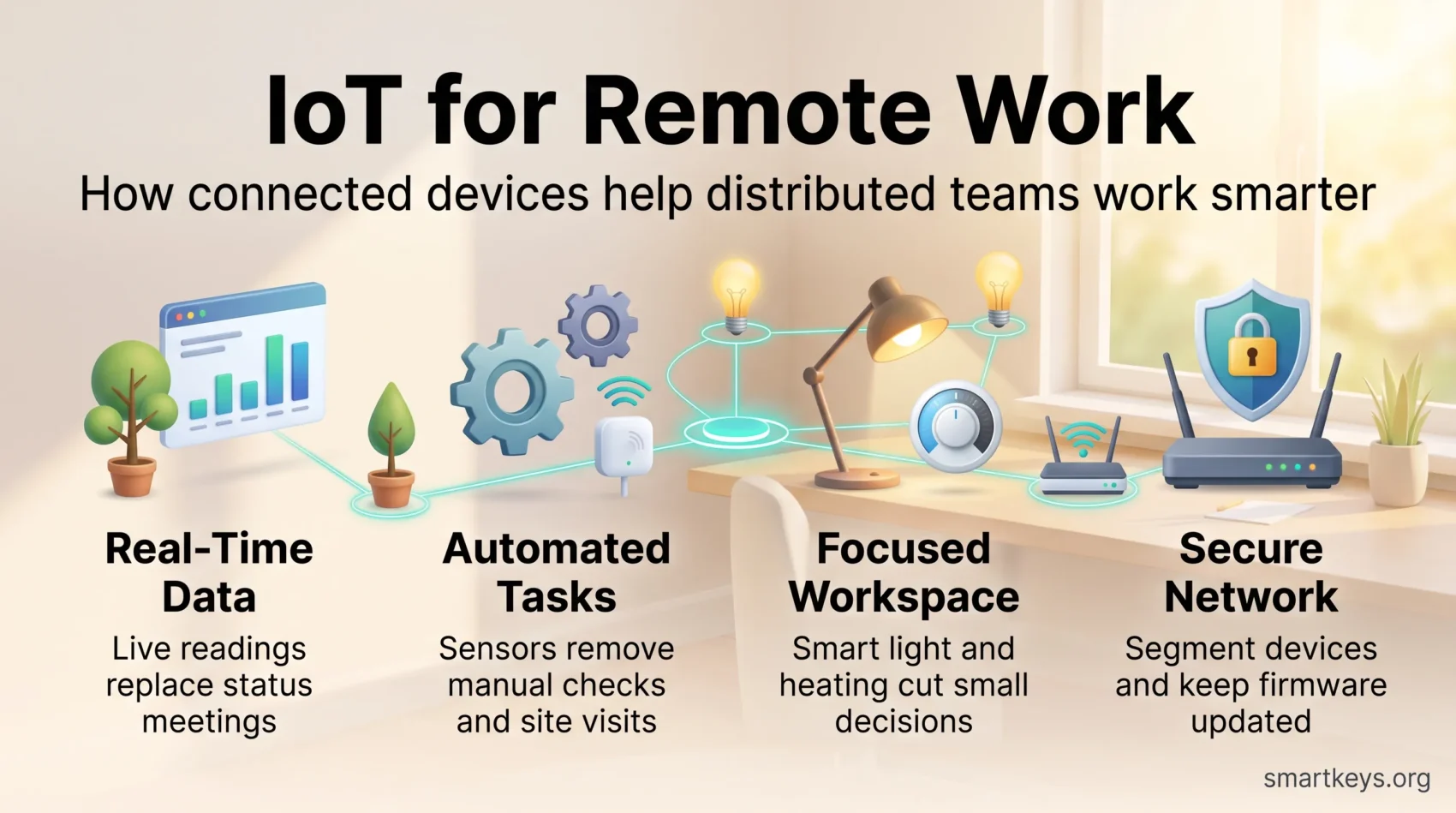
When sensors report continuously, everyone works from the same current picture instead of a status update written yesterday. A field team, an operations manager and a remote analyst can all see the same equipment reading at the same moment. That removes a whole category of meeting whose only purpose was to synchronise facts.
The benefit is real but conditional. It depends on someone deciding which readings matter, and on dashboards that answer a question rather than display everything available. Poorly scoped telemetry produces the remote-work equivalent of noise.
IoT Devices Facilitating Team Interactions
Meeting-room hardware has absorbed a lot of this. Cameras that frame whoever is speaking, microphone arrays that suppress room noise and sensors that release an unused booking all reduce the penalty of being the person on the screen. Biometric readers and hardware keys handle access to shared systems without another password prompt; our guide to biometric authentication for remote work covers the trade-offs.
None of this replaces good meeting practice. It removes friction from meetings that were already going to work. AI layers are now being added on top of the same hardware, a shift we examine in AI and remote collaboration.

Automating Tasks with IoT Technology
The clearest returns from IoT come from work that disappears rather than work that speeds up.
Reducing Redundant Work Processes
A sensor that reports a stock level removes the count. A tracker that reports a location removes the phone call asking where something is. A meter that reports a reading removes the site visit. In each case the saving is not a faster task but a task nobody has to do, which is why these projects survive budget scrutiny better than dashboard-led ones.
Streamlining Workflow Management
Connected equipment also changes how maintenance is scheduled. Instead of servicing on a calendar, teams service on condition, using vibration, temperature or current draw to flag a machine before it fails. It is one of the most established industrial uses of the technology, and we look at the evidence and the failure modes in our guide to predictive maintenance. The related practice of modelling an asset or process as a live virtual copy is covered in digital twin technology.

Boosting Productivity through IoT Connectivity
For an individual working from home, the honest promise of connected devices is a smaller one than the vendor pitch: fewer interruptions and fewer small decisions.
Smart Devices for a Focused Work Environment
Lighting that follows the time of day, heating that warms the room before the first meeting and a plug that switches off the equipment you are not using all remove micro-decisions from the day. A presence indicator on the door reduces the interruptions that are hardest to recover from. These are marginal gains, and they compound only when the environment stops demanding attention. Our guides to focus tools and remote work habits cover the behavioural side, which usually matters more than the hardware.
IoT Applications in Task Management
Where connected devices genuinely help task management is in triggering work automatically: a threshold is crossed, a ticket is created, the right person is notified. That is more reliable than a human noticing. What it does not do is decide priorities for you. If you want the fundamentals of managing your own output remotely, start with remote work productivity.
Implementing Remote Work Solutions Powered by IoT
A workable rollout for a distributed team looks less like buying devices and more like agreeing rules before anyone buys anything.
- Decide which questions the data has to answer before choosing hardware. Devices bought without a question attached become orphaned.
- Put connected devices on a separate network segment or guest VLAN, away from work machines.
- Insist on devices that receive firmware updates, and check how long the manufacturer commits to providing them.
- Keep an inventory. You cannot patch or retire a device nobody recorded.
- Write down who owns the data, where it is stored and how long it is kept, before collection starts.

The last two points are the ones organisations skip. Employees buying their own connected devices for a work-from-home setup is a textbook case of the problem described in shadow IT in remote work, and the retention question belongs in a wider data governance strategy rather than in a device manual. Where the data is processed and stored is a cloud architecture decision as much as a device one; our cloud computing trends guide sets out the current options.
Benefits of IoT in Remote Work
Set against realistic expectations, the advantages are concrete rather than transformative.
Flexibility and Freedom for Employees
Remote monitoring means physical work no longer requires physical presence at every step. An engineer can check a machine from another country; a facilities manager can confirm a building is safe without driving to it. That widens who can do a job and from where, and it is one reason technology consistently shows up in research on how people rate their work; we look at that evidence in technology and job satisfaction.
Cost Reduction and Resource Optimization
The savings that hold up are the measurable ones: energy use tied to actual occupancy, maintenance done before a failure rather than after, and floor space sized to observed attendance. Vendor claims of a fixed percentage productivity gain are not something any buyer should plan around. Measure your own baseline first, and treat anything beyond energy and maintenance as unproven until you have your own numbers.

Challenges of IoT in the Remote Working Environment
The difficulties have not changed much in five years, which is itself informative.
Security and Privacy on Home Networks
A home network is the weakest link in most remote setups. Kaspersky’s Q2 2026 threat reporting shows Mirai variants still dominating the IoT threat landscape, years after the original botnet appeared, because the underlying weaknesses persist: default credentials, exposed management interfaces and devices that stop receiving updates.
Regulation is now moving to close that gap at the manufacturer rather than the buyer. The EU Cyber Resilience Act entered into force on 10 December 2024; manufacturers must report actively exploited vulnerabilities from 11 September 2026, and the full set of obligations applies from 11 December 2027. In the United States the FCC’s voluntary Cyber Trust Mark label has been slower: UL Solutions stepped down as lead administrator at the end of 2025, and the FCC reopened applications for the role in January 2026, so buyers cannot yet rely on the label at the shelf.
Until then the defensive work sits with you. Segment the network, change default credentials, disable features you do not use and retire devices that no longer receive firmware. Our guide to cybersecurity in remote work covers the basics; for the architectural response, see zero-trust models and cybersecurity mesh.
Interoperability Among IoT Devices
The second problem is that devices from different manufacturers still struggle to work together. Matter, the standard developed by the Connectivity Standards Alliance, exists to fix this. Version 1.5, released on 20 November 2025, added cameras, closures such as shades and garage doors, soil sensors, and the ability for devices to exchange energy pricing and grid carbon intensity data.
That is real progress, but adoption follows certification and firmware, not announcements. If interoperability matters to you, buy on the certification a product actually holds today rather than on a roadmap.

Future Trends in IoT Remote Work
Three developments are worth watching rather than acting on immediately.
Expanding Use Cases Across Industries
Sectors that combine expensive equipment with dispersed staff adopt fastest, because remote monitoring pays for itself in avoided travel and downtime. Healthcare is a clear example, and one where the regulatory constraints are unusually strict; we cover it separately in IoT in healthcare.
Impact of AI Integration with IoT
The more consequential shift is analysis moving onto the device itself. Running a model at the edge means a sensor can classify an event locally and send a conclusion rather than a raw stream, which reduces bandwidth, latency and the amount of personal data leaving a home. Energy is the third thread: with Matter 1.5 carrying tariff and grid-carbon data, connected equipment can start shifting load to cheaper or cleaner hours without anyone intervening.
Conclusion
IoT will not transform remote work on its own, and the version of that promise sold in 2020 has not aged well. What connected devices reliably deliver is narrower and still worth having: work that disappears rather than speeds up, environments that stop demanding attention, and equipment that reports its own condition before it fails.
The cost is a larger attack surface in places your IT team does not control. That is why the practical agenda for 2026 is unglamorous: keep an inventory, segment the network, buy devices with a stated update lifetime, and be clear about what data is collected and why. Regulation is beginning to help, with the Cyber Resilience Act’s first deadline arriving in September 2026, but it does not remove the work.
Judge any IoT proposal by one test. If it removes a task, it is probably worth doing. If it only adds a screen, it probably is not.
Found this useful?
Make SmartKeys a preferred source on Google, and our articles will surface more often in your Top Stories, AI Overviews, and AI Mode.
Add as Preferred Source