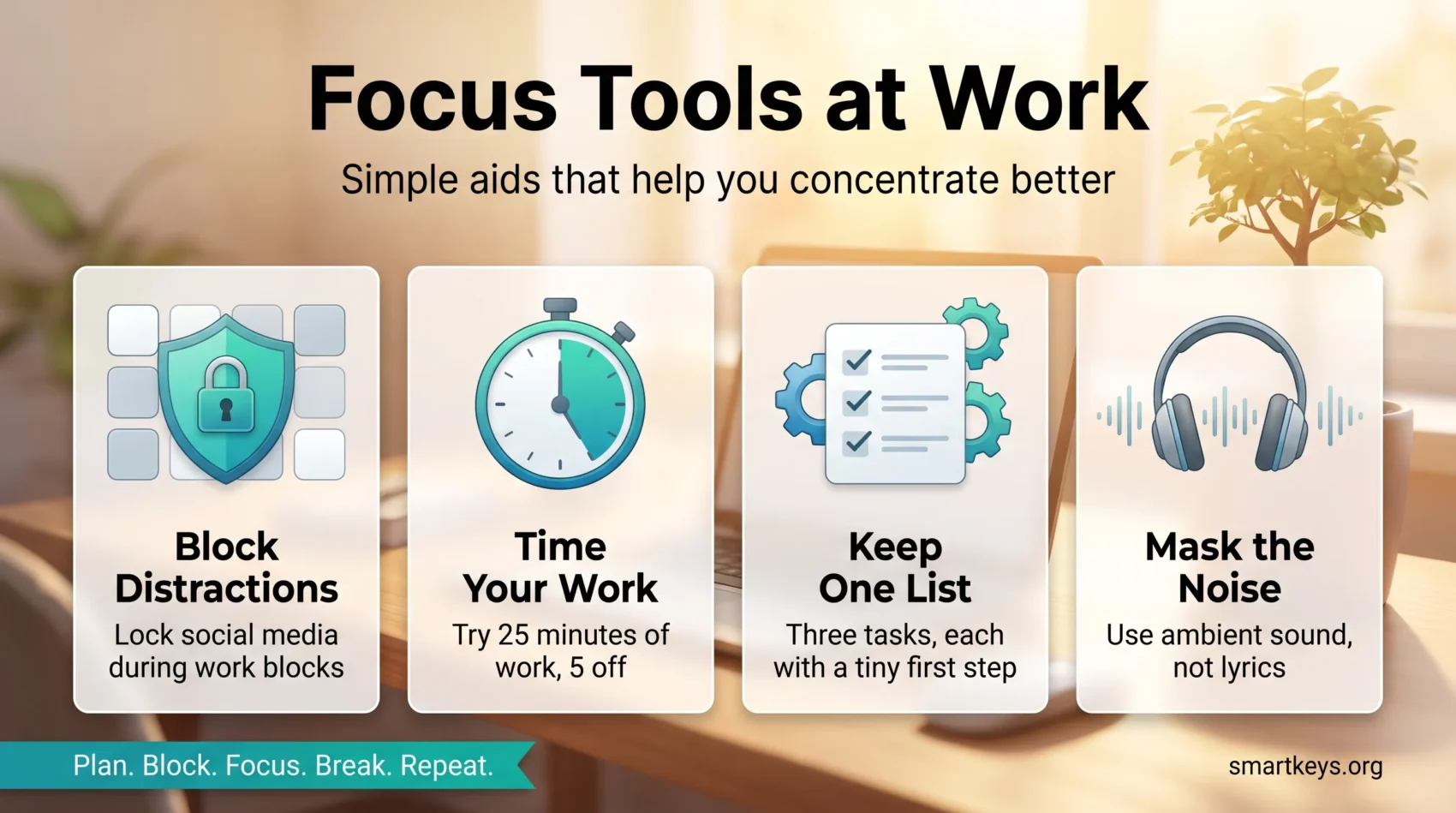
Focus tools are the small aids that make concentrating easier: an app that blocks distracting sites, a timer that marks out a work block, and a short list that tells you what to start. None of them are complicated. Used together, they remove the friction that stops you beginning a task.
The pressure is real. Microsoft’s Work Trend Index report on the “infinite workday” found that employees are interrupted roughly every two minutes by a meeting, email or notification, and that the average worker receives 117 emails a day. You cannot out-discipline a workday shaped like that. A simple setup absorbs a good part of it for you.
This guide explains which tool does which job, so you don’t lose a week testing everything. You’ll get a short, list-driven routine that helps you start a task, stay on track and finish it with less tab switching, plus plain guidance on matching features to goals: blocking distractions, structuring time and organizing tasks.
Small changes compound. Pairing a timer with a website blocker is one example that makes every minute pull more weight.
Key Takeaways
- A simple system plus one focused app lifts your productivity faster than a big new setup.
- Use a short list to start tasks and avoid constant context switching.
- Combine a timer with blocking to build momentum.
- Pick the right tool for the job: scheduling and hard lockdown modes solve different problems.
- Small, repeatable changes add up to steady work flow.
Why focus tools matter today and how they help you get things done
Between video calls and phone pings, solid work is harder to protect than it used to be. The noise is not just annoying. Every switch costs you the time it takes to reload what you were doing, and those seconds add up across a day.
The right setup gives your attention structure. Simple systems act like guardrails. They cut the number of decisions you make each hour, and they reduce the chance that a small distraction turns into a lost afternoon.
Short, intentional work sprints let you make progress without burning out. Time-boxing, which means giving a task a fixed slot rather than working until it is finished, shrinks big projects into steps you can complete in minutes.
- You don’t need perfect conditions. Small wins stack up.
- Basics matter: sleep, water and a short walk do more for concentration than any app.
- Spot your own distraction pattern first, then pick the tool that fits it.
The point is practical. Choose one simple method now. With a few clear habits, interruptions become manageable moments instead of full derailments.
Focus tools you can start using right now
Begin with a quick reset that clears distractions and primes you to start. A short routine saves you time later and makes beginning much easier.

Quick wins let you reduce noise, set clear time blocks and protect your attention without rebuilding your whole system.
- Start the day with a two-minute technology time out: silence non-essential apps, close extra tabs and open only the one you need next. Our guide to managing work notifications shows how to make that stick.
- Write a simple plan the night before: three tasks, each broken into a tiny first action so you can start immediately. If you’re not sure how to phrase them, see our goal setting guide.
- Set a short time block (25 minutes of work, 5 minutes off, or similar) with a lightweight timer to build momentum without committing your whole morning.
- Pair noise control, such as headphones or white noise, with a single task. One task at a time is the point.
- Keep the setup minimal: one app to work in, one to track time and one list. Juggling five tools is its own distraction.
Repeat the cycle: plan, work, short break, review. Small habits like these make it easier to stick to your daily plan and finish priority tasks.
Distraction-blocking apps to keep you off social media and on task
If a quick check turns into a long detour, a blocker puts that gap back under your control. A blocker sits between you and a site or app, either refusing access outright or making you pause first.
Pick by three things: whether it syncs across your phone and computer, whether it can run on a schedule, and how hard the strictest mode is to switch off. For a wider comparison, see our overview of website blockers.
Freedom
Freedom blocks websites and apps on Windows, macOS, iOS, Android and Chromebook at the same time. It supports multiple blocklists, adds focus audio and offers a locked mode you cannot cancel mid-session. The free plan covers basic blocking. Premium costs $8.99 a month, or $3.33 a month billed annually, with a one-off lifetime option listed at $99.50 (freedom.to, September 2026).
Cold Turkey Blocker
Cold Turkey offers deep scheduling and system-wide blocking on Windows and macOS. Its “Frozen Turkey” lockout is the firm option: once a session starts, it is genuinely hard to bypass. Blocker Pro is a one-time purchase with lifetime updates rather than a subscription, and one key covers all the computers you personally use. There is a free version and a seven-day trial of the Pro features.
LeechBlock NG, SelfControl, one sec and PawBlock
LeechBlock NG is a free browser extension with flexible schedules and lockdowns, and it is a sensible first test because it costs nothing. SelfControl is a free Mac app that blocks until the timer ends, with no easy off switch.
one sec takes a different approach: it adds a short enforced pause and a breath before a distracting app opens, so the habit loop is interrupted rather than blocked. The method has been studied in a peer-reviewed paper in PNAS (Grüning, Riedel and Lorenz-Spreen, 2023), which found the friction reduced how much people used the apps they had chosen to limit. PawBlock uses playful animal nudges for the same purpose.
Tip: combine one app with one rule, such as two blocker-protected hours every morning, and you protect your most important task without thinking about it.
Explore more related productivity apps to find the best match for your workflow.
Timers and time-blocking methods: Pomodoro and beyond
A timer turns vague effort into a short, clear mission. The Pomodoro Technique, developed by Francesco Cirillo, uses 25 minutes of work followed by a 5-minute break. Many people adapt that to 30/7 or 48/12 cycles to match the task and their own energy.
Session is one example of an app that pairs a timer with automatic site and app blocking. It can mute Slack, trigger Shortcuts and read your calendar so each start is clean. Session has a free tier, and Pro costs $4.99 a month or $39.99 a year (stayinsession.com, September 2026).
How to pick and use blocks
Use a timer to convert a big project into short blocks that feel doable. Before you start, write the next tiny step so your hands know what to do the second the countdown begins. This is the same principle behind time blocking, applied at a smaller scale.
- Try 25/5, 30/7 and 48/12 for a week each, and note which keeps you engaged longest.
- Keep breaks real: stand, stretch or drink water. Avoid feeds during short breaks so you come back with something left in the tank.
- Commit to two to four blocks before a longer break.
When you’re tired, shorten the work interval and lengthen the break. In flow, extend gently but keep the reset. If you want protected stretches for demanding work, a team-wide focus time policy does more than any personal timer, and our guide to deep work explains what to do with the time once you have it.
Task managers, lists, and visual tools to plan your day
A simple visual plan helps you move from big ideas to real, doable tasks. Pick one central place so nothing lives only in your head. Our guide to task management covers the wider system; here are three tools that suit different jobs.
Trello: fast, friendly Kanban for simple boards
Trello is a lightweight Kanban app. Kanban simply means cards moving left to right across columns such as To do, Doing and Done, so you can see the state of your work at a glance. It suits simple workflows and small teams where speed matters more than detailed reporting. Our guide to building a personal Kanban board shows the setup.
Asana: list and board views with clear prioritization
Asana pairs list and board views and sorts your work into sections such as Today, Upcoming and Later. Use it when a team needs shared priorities and visible deadlines rather than a personal to-do list. Our Asana review goes through the plans in detail.
Coggle: mind mapping before you commit to tasks
Coggle helps you sketch the scope of a project and link ideas before any of it becomes a task. Treat it as a planning layer that feeds your task manager with crisp, actionable items. See mind mapping for problem solving for the method itself.
- Keep one source of truth: one list where every task lives.
- Scan that list each morning and pick three must-do items for today.
- Break each one down until you can start within two minutes.
Sound aids and binaural beats: what the evidence supports
Ambient noise gives your ears a job so your hands can get on with theirs. Used deliberately, sound makes starting easier and masks the interruptions you cannot remove.
What binaural beats are, and what they do not do
Binaural beats are two slightly different tones, one in each ear, which the brain perceives as a third, slower pulse. The claim is that this pulse nudges brain activity toward a state linked with alertness. The honest summary of the research is that the effect is modest and inconsistent. A 2025 study in Scientific Reports found that binaural beats did not stop the normal decline in performance over a long, monotonous task, though some frequency combinations improved general attention scores compared with a plain tone.
Treat them as a pleasant cue to start, not a cognitive upgrade. If you try them, use headphones, since the effect depends on each ear receiving a different tone.
Ambient options: cafe noise, nature sounds and instrumental tracks
Cafe chatter, steady rain or pink noise all work well to mask an open office. If lyrics pull you away, choose instrumental tracks with simple, repetitive rhythms that fade into the background. Our piece on music and productivity looks at what the research actually supports.
- Keep a short list of go-to tracks so you can start in seconds.
- Switch textures when you feel mental fatigue: nature, low-fi or plain silence.
- Pair audio with a timer so the sound becomes the signal for work and the silence for break.
Give your ears a rest between sessions. Volume and track type often matter more than genre.
Build a simple workflow: plan, block, focus, break, repeat
Set a clear sequence: prepare, protect, do, rest, repeat. Keeping the decisions small is what makes the routine survive a busy week.
Technology time out
Begin with a technology time out: silence non-essential apps, turn off phone alerts and close every window except the one you need. A single minute at the start prevents a string of interruptions later. Many devices now have a built-in focus mode that does most of this in one tap.
A short list the night before
Write three specific items before bed so you wake up knowing the first task. Make each one measurable and time-bound so you don’t spend the morning deciding. Picking the single most important item first is the idea behind the daily highlight technique.
Structured breaks
Use timed cycles such as 25/5, 30/7 or 48/12, and stay off screens during the break. Short, intentional breaks reward your brain and keep you task-focused through the next block. Our guide to short breaks covers the timing.
- Batch email into scheduled windows instead of checking all day.
- Protect the first hour for your top task, then take a reset break.
- Record two small wins at the end of the day to reinforce the routine.
Repeat the cycle: plan, block, work, break, adjust. Keep it simple enough to run on a bad day.
Manage real-life distractions without derailing your day
When life interrupts your workday, simple habits help you recover fast. Plan for the interruptions you can predict so they don’t turn into long derailments.
Anticipate escape behaviors: snacks, sudden fatigue and email checking
List your top escape behaviors and give each a small countermeasure. Portion snacks in advance, keep water within reach, or stand up for a minute when fatigue hits.
Batch email checks into two or three set times. One ping answered immediately can swallow an hour of context switching.
Plan for external needs: pets, doorbells and household interruptions
Meet predictable needs before they interrupt you. Walk and feed pets early, leave a note by the door, or set a short buffer before a block so a knock doesn’t spill into the rest of the day.
- Quick resume: write the next task on a sticky note before you step away.
- Build a buffer: a one-minute reset at the top of each block absorbs surprises.
- Train your space: clear the desk, put your phone out of reach and remove the obvious triggers.
Small practices add up. If you get interrupted, take one breath, restart the timer and move on. Noting two distractions you handled well each day builds the habit faster than scolding yourself for the ones you didn’t.
Pick the right tool for the job: features, downsides and budget
Matching an app’s features to your actual habits means less time testing and more time working. Start with a short list of must-have features so you choose with purpose.
Key options to compare
Look for cross-device blocking, flexible schedules, a strong lockdown mode and integrations with your calendar or chat tool. Check how many blocklists an app supports, and whether a browser extension alone would be enough for you.
- Cross-device: if your phone is the weak point, a computer-only blocker will not help.
- Mode strength: test a strict lockout (Cold Turkey) against a soft nudge (one sec) and see which one you actually respect.
- Integrations: Session links timers with blocking and your calendar, so sessions start without setup.
Free versus paid: when to upgrade
Free options like LeechBlock NG, SelfControl and PawBlock are enough to find out whether blocking works for you at all. Upgrade when you hit a specific limit: you need your phone covered too, you want recurring schedules, or you want a lockdown you cannot talk yourself out of.
The useful rule is to pick the simplest tool that removes friction, then stop shopping. Weigh the downsides up front: platform limits, fiddly setup or missing schedules. Try two options back to back this week and keep the one that makes starting easiest.
Conclusion
A light, repeatable routine is what moves you from stalled to productive.
Start small: one blocker, one timer, one list. That trio protects your attention and gets things done even on chaotic days.
Test and adjust until the routine feels natural. Review what worked each week and drop whatever slows you down. When you drift, restart the timer and take the next small step.
With a lean setup and steady habits, your most important tasks finish sooner and your time goes further.
Found this useful?
Make SmartKeys a preferred source on Google, and our articles will surface more often in your Top Stories, AI Overviews, and AI Mode.
Add as Preferred Source