

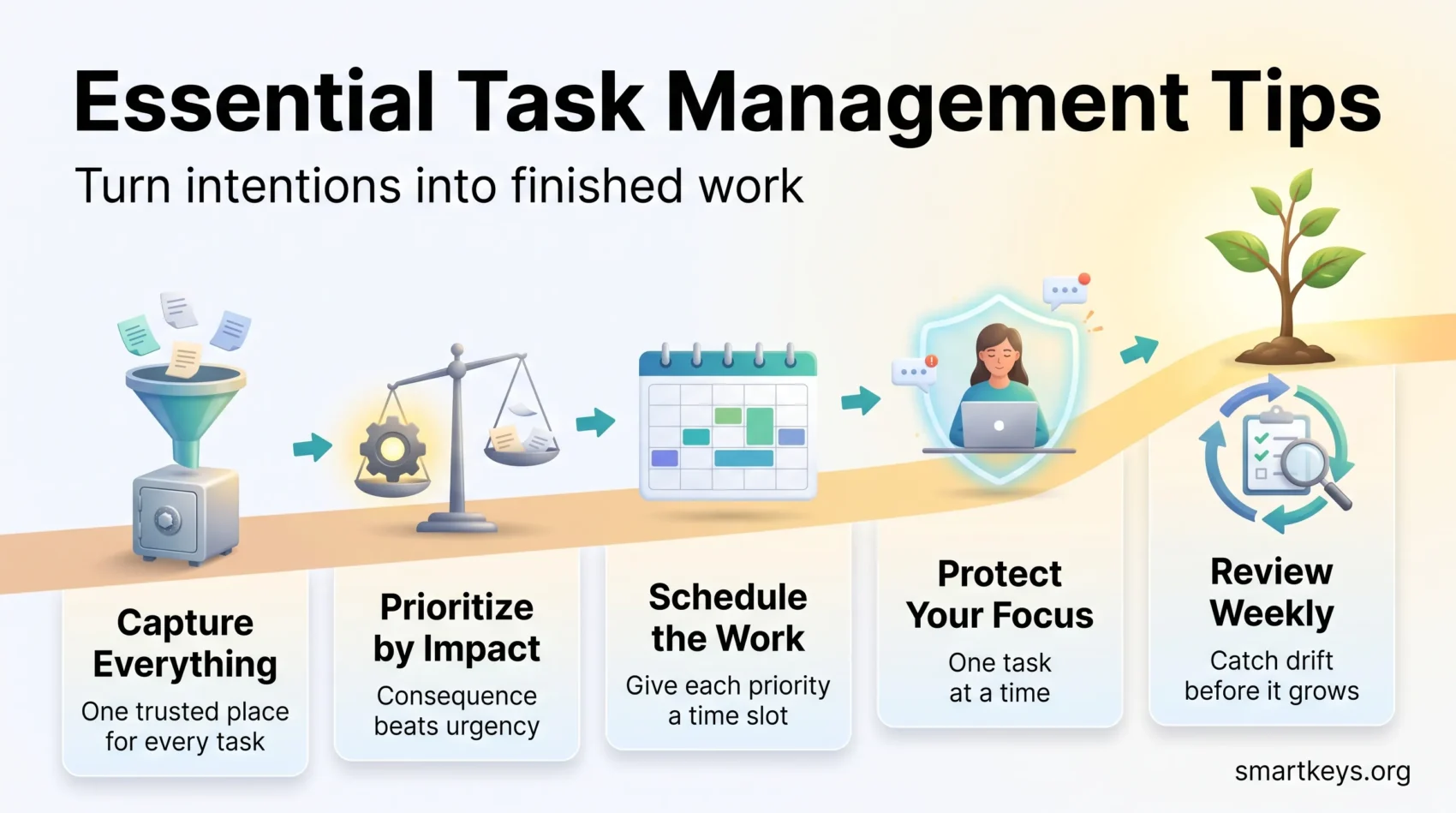
Task management is the discipline that turns intentions into finished work. It is the layer between your plans and your day: capturing what needs doing, deciding what matters, scheduling it, and closing the loop. Get it right and the work feels manageable. Get it wrong and you spend your energy remembering, chasing and apologizing instead of producing.
The pressure on that layer has grown. Microsoft’s 2025 Work Trend Index found that employees are interrupted roughly every two minutes during core working hours, receive around 117 emails and 153 chat messages on an average weekday, and that 48% describe their work as chaotic and fragmented. No app fixes that on its own. A deliberate system does help, and this guide walks through one: the skills that underpin it, the tips that make the biggest difference, the tools worth using, and the pitfalls that quietly undo good intentions.
Key Insights
- Task management connects planning to execution; without it, priorities drift.
- Capturing every commitment in one trusted place matters more than the tool you choose.
- Prioritizing by impact beats working through a list in the order it arrived.
- Interruptions are the dominant tax on knowledge work, so protect blocks of focus.
- Realistic deadlines reduce rework; optimistic ones create it.
- A system you review weekly stays useful; one you never revisit becomes noise.
Understanding the Importance of Task Management
Task management shapes both individual output and team dynamics. It bridges the gap between planning and action so effort actually lands on the goals you care about. With a systematic approach, commitments stop falling through the cracks and you spend less mental energy simply keeping track.
How Task Management Connects Plans to Actions
Good task management prevents the two most common failure modes: forgetting and drifting. Forgetting is solved by capture. Drifting is solved by prioritization and review. When responsibilities are assigned explicitly rather than implied in a chat thread, accountability improves and fewer items stall waiting for someone to notice them.
It also changes how your day feels. Working from a clear list is a form of proactive rather than reactive work — you decide what deserves your attention instead of letting the loudest message decide for you.
Benefits of Mastering Your Task Management Skills
The practical payoff is consistency. You meet deadlines more often, you hand over work in a predictable state, and you spend less time reconstructing where a project stood. Breaking large pieces of work into concrete next actions is the single habit that makes this possible, because vague items (“sort out the budget”) are the ones that get postponed indefinitely.
There is a personal benefit too. A reliable self-management framework removes the low-level anxiety of half-remembered obligations, which is a meaningful part of what makes busy periods feel unmanageable.
What Are Task Management Skills?
Task management skills are the abilities that let you organize, prioritize and complete work reliably. They are learnable, and most people are stronger in some than others — which is worth knowing, because your weakest one usually determines how well your system holds up under pressure.
The Fundamentals of Task Management Skills
- Capture: Getting every commitment out of your head and into one place you actually trust.
- Planning: Allocating time and resources realistically and setting milestones you can check against.
- Prioritization: Deciding what earns your attention today, and what genuinely can wait.
- Flexibility: Adjusting when priorities shift without abandoning the system entirely.
- Communication: Making ownership, scope and deadlines explicit so work does not need renegotiating later.
Capture is the foundation. If you only fix one thing, get every task out of your head and into a trusted system — everything else builds on that.
Key Skills for Different Roles in Task Management
Individual contributors benefit most from estimation, focus and follow-through. Managers need a different emphasis:
- Prioritization across people: Ensuring the team’s critical work gets attention before its comfortable work.
- Delegation: Handing over outcomes with clear success criteria, then monitoring lightly rather than constantly.
- Decision-making: Choosing quickly on reversible decisions so the queue keeps moving.
The 4 D’s — do, defer, delegate or delete — give managers a fast triage rule for anything arriving in the inbox.
Essential Task Management Tips for Productivity
A handful of tips do most of the work. The rest is refinement.
Start with Smaller Tasks for Quick Wins
Opening the day with a couple of short, concrete tasks builds momentum and clears the mental clutter of small obligations. The caveat is that quick wins are seductive: a morning of tidy two-minute tasks can look productive while the important work stays untouched. Use them to warm up, not to hide. If your hardest task keeps slipping, the case for tackling it first is strong.
Prioritize Tasks Effectively to Maximize Impact
Prioritization means sorting by consequence, not by urgency or by whoever asked most recently. A simple test: if only one item on today’s list gets finished, which one would you want it to be? Frameworks such as the Eisenhower Matrix separate urgent from important, and kanban boards make work-in-progress visible so you notice when you have taken on too much at once.
Estimation is the part people underrate. Most of us are systematically optimistic about how long work takes — a pattern well documented as the planning fallacy — which is why plans that look reasonable on Monday collapse by Thursday.
Strategies for Scheduling Your Work
A prioritized list still needs a home in your calendar. Deciding what matters and deciding when it happens are two different acts, and skipping the second is why good lists go stale.
The Importance of Scheduling Your Tasks
Assigning work to specific time slots forces a reality check: your list may contain twelve hours of intentions for a six-hour day. Scheduling exposes that gap before the deadline does. Leaving deliberate gaps helps too — time buffering keeps one overrunning meeting from cascading through the rest of the week, and disciplined calendar management protects the blocks that matter.
Time Blocking Techniques to Enhance Focus
Time blocking means dividing the day into segments dedicated to specific work rather than reacting to whatever arrives. It pairs well with a short weekly planning routine, where you map the week’s priorities before it starts rather than rebuilding the plan each morning.
The reason blocks matter is the cost of switching. Research by Gloria Mark at UC Irvine found it takes over 23 minutes on average to return to the original task after an interruption, which is why three protected hours produce more than eight fragmented ones. For a broader treatment of the scheduling side, see our guide to time management techniques for busy professionals.
Tools and Software for Effective Task Tracking
The right tool reduces friction; it does not create discipline. Choose for how you actually work, then stop shopping. Feature lists and free-plan limits change frequently, so treat any comparison — including this one — as a starting point and check the current terms before committing a team.
Task Management Software Worth Considering
- Todoist: A fast personal task manager with natural-language input, projects, labels and recurring tasks. Strong for individuals and small teams.
- Microsoft To Do and Planner: Sensible defaults if your organization already runs on Microsoft 365, with tasks surfacing inside Outlook and Teams.
- Trello: Kanban-first and easy to learn, which makes it a good entry point for teams new to shared boards. Our guide to Trello’s Power-Ups covers extending it.
- Asana: Built around projects, dependencies and workload views; suited to teams coordinating work across several people. See our Asana review for detail.
- ClickUp: Highly configurable with multiple task views. Powerful, but the configuration effort is real — a plus for teams with a clear process, a burden for those without.
- Notion: A workspace rather than a dedicated task app. Best when tasks need to live beside documents and databases.
Where AI Fits into Task Management
Most task tools now ship AI features: drafting subtasks from a brief, summarizing project status, or turning meeting notes into assigned actions. Adoption is real but not universal — Gallup’s Q4 2025 survey of US employees found 26% use AI at work at least a few times a week, rising to 44% among leaders and falling to 23% among individual contributors.
Treat these features as drafting assistance rather than delegation. AI is good at converting a messy transcript into a candidate task list; it is not good at knowing which of those tasks actually matters to your quarter. Our overview of AI-powered project management tools looks at where the gains are real.
Integrating Productivity Tools into Your Workflow
The main benefit of a shared tool is that status becomes visible without anyone asking. Automation helps here: automated reminders and calendar alerts remove the need to hold deadlines in your head, and notifications on shared boards keep distributed teams aligned without another status meeting.
One caution: every tool you add is another place to check. Consolidating into fewer systems usually beats adopting a better one, and it avoids the trap of spending more time organizing than doing.
Task Management Techniques to Enhance Focus
Techniques matter less than consistency, but a few are reliably useful.
Single-Tasking vs. Multitasking
What we call multitasking is usually rapid task switching, and it carries a measurable cost: each switch requires reloading context, and accuracy drops as the switching rate rises. Single-tasking — one task, one window, until a natural stopping point — produces better work in less time for anything cognitively demanding. Our look at the science behind multitasking covers the evidence in more depth, and these focus management techniques help you hold a single thread when the environment is noisy.
The Pomodoro Technique
Developed by Francesco Cirillo, the Pomodoro Technique divides work into 25-minute intervals separated by short breaks, with a longer break after four rounds. The intervals are less important than the two habits they enforce: committing to one task for a defined stretch, and stopping before fatigue degrades the work.
Adjust the length to the task. Deep analytical work often justifies longer blocks; administrative catch-up rarely needs them. If you routinely run several workstreams at once, our guide to juggling multiple projects covers how to switch deliberately rather than constantly.
Creating an Efficient Task Organizer
A task organizer is simply the place your system lives. What makes it work is structure and review, not features.
The Benefits of Using a Digital Task Planner
A digital planner gives you one place to look, which is the whole point. It makes deadlines visible, keeps related material attached to the task rather than scattered across threads, and lets you see the shape of a week before you commit to it.
It also reduces the pull of communication tools. When your next action is written down, the temptation to open the inbox “just to check” weakens, and given how frequently the average workday is interrupted, that is not a small gain. A moderate sense of deadline pressure tends to sharpen performance while excessive pressure degrades it — the relationship described by the Yerkes-Dodson law — and a planner helps you see which side of that line you are on.
How to Set Up Your Task Organizer for Success
- Categorization: Group tasks by project, priority or context so the right list is easy to find.
- Due dates: Assign real deadlines, not aspirational ones, and reserve them for tasks that genuinely have them.
- Prioritization: Pick a small daily shortlist. The Ivy Lee method — six tasks, ranked, worked in order — is a durable version of this.
- Review: Reassess weekly. Anything carried forward three weeks running is either not important or not defined well enough to start.
Identifying and Avoiding Common Task Management Pitfalls
Most systems fail for predictable reasons: too many capture points, no review, and a workload nobody has acknowledged is unrealistic. Spotting the warning signs early is easier than rebuilding after a burnout.
Recognizing Signs of Burnout and Stress
Burnout presents as physical, emotional and mental exhaustion. Common signals include:
- Chronic fatigue: Feeling drained even after rest.
- Decreased performance: Familiar tasks taking noticeably longer.
- Increased irritability: Becoming easily annoyed or anxious.
- Withdrawal: Pulling away from colleagues and team activities.
These are workload signals, not character flaws. Practical approaches to managing stress before it compounds are worth building into the routine rather than saving for a crisis.
Strategies to Balance Workload Effectively
- Define outcomes, not activities, so “done” is unambiguous.
- Prioritize by consequence and accept that some items will never be reached.
- Delegate whole outcomes rather than fragments, with clear success criteria.
- Schedule breaks deliberately; they are part of the work, not a reward for it.
- Make overload visible early. A workload nobody has flagged cannot be rebalanced.
Conclusion
Effective task management is less about apps than about a few habits held consistently: capture everything, prioritize by impact, schedule the work rather than hoping it fits, and review often enough to catch drift.
Start with the weakest link. If things fall through the cracks, fix capture. If you are busy but the important work stalls, fix prioritization. If your plans are always optimistic, fix estimation. Change one thing, run it for a few weeks, and keep what survives contact with a real workload.
Found this useful?
Make SmartKeys a preferred source on Google, and our articles will surface more often in your Top Stories, AI Overviews, and AI Mode.
Add as Preferred Source




