Most workdays are decided before you open your laptop. Either you arrive with a short list of things that matter, or the first message you read sets the agenda.
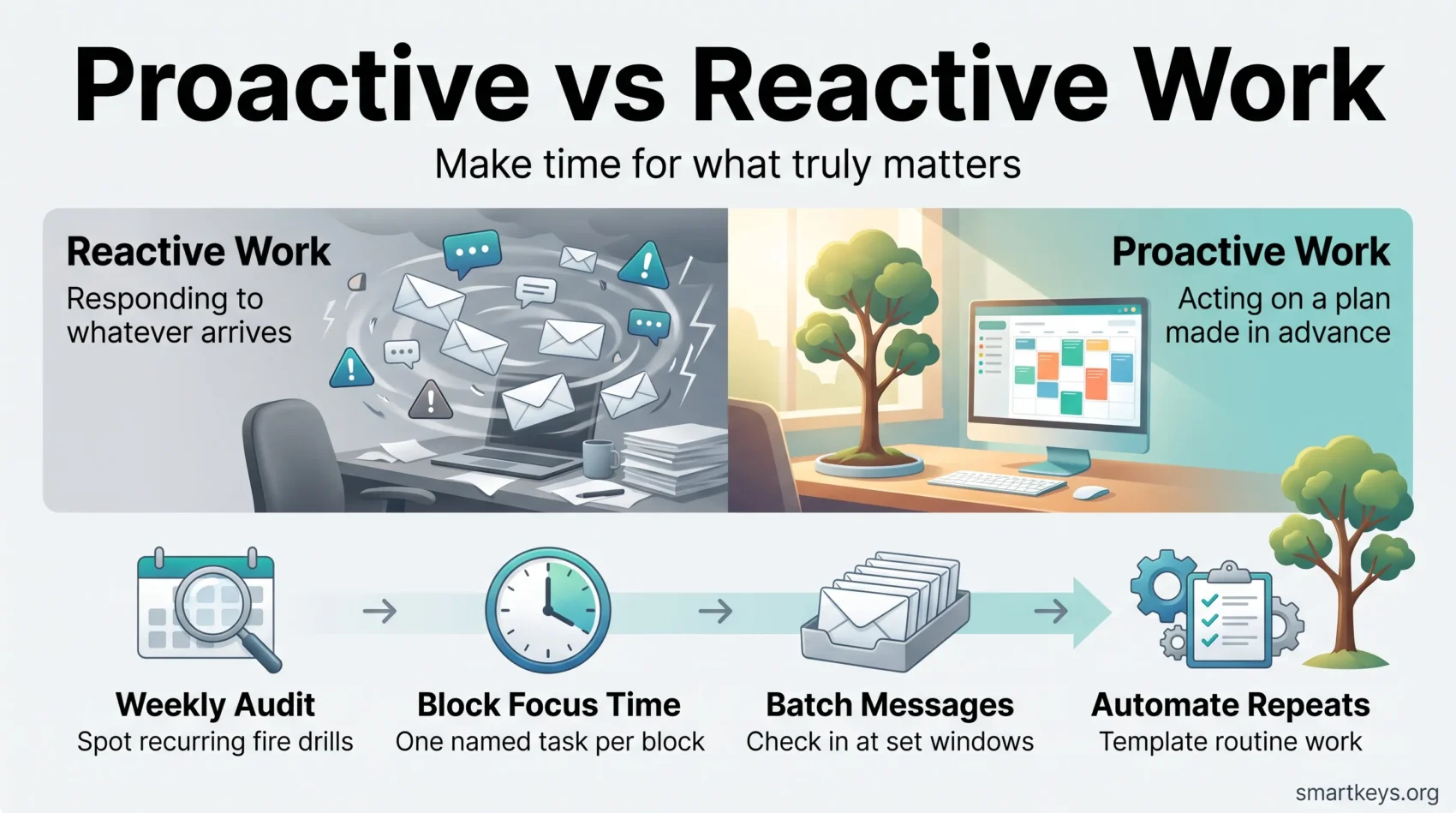
Proactive work means acting on a plan you made in advance. Reactive work means responding to whatever arrives: an urgent email, a ping, a problem that has just become visible. Both belong in any real job. The trouble is that reactive work expands to fill every gap you leave for it, while proactive work disappears unless you protect it.
This guide covers why the balance keeps tipping and the habits that shift hours back toward planned progress. For the wider picture, see our work-life balance tips.
Key Takeaways
- Proactive work follows a plan you made earlier; reactive work follows whatever lands in front of you.
- You cannot remove reactive work, but you can stop it from taking the hours when your attention is best.
- A weekly audit shows which interruptions are genuinely urgent and which are just loud.
- Time blocking, batched communication, and automation move the ratio fastest.
- Track how many planned blocks you actually finish, not how busy the week felt.
Proactive vs reactive work: the difference in practice
The distinction is not about personality. It is about who chose the task: you, earlier, with context and calm, or something external, just now, with none.
Definitions and examples
Reactive work is triggered from outside. You answer a client question the moment it arrives, fix the report someone flagged at 4pm, or join a call because the invitation appeared. The work may be necessary; you simply did not decide when to do it.
Proactive work is triggered by your own plan. You write the strategy document in the slot you reserved for it. You fix the process that generates the same complaint every month, instead of handling the complaint again.
A quick test: if a task only reached your list in the last hour because someone else put it there, it is reactive. That is not automatically bad, since support engineers and duty managers are paid to respond. The question is whether responsiveness has crowded out everything else.
Why the balance keeps tipping
Reactive work feels productive. It is visible, it has a clear finish, and someone thanks you for it. Nobody notices the crisis that never happened. The environment pushes the same way: Gloria Mark’s team at UC Irvine found that the average time office workers spend on one screen before switching fell from about two and a half minutes in 2004 to roughly 47 seconds by the late 2010s (Gloria Mark, Attention Span). At that pace, planning time never appears on its own.
The cost is not only slower output. It is the drift toward burnout that comes from ending every day busy and unable to name what you moved forward.
How to prioritize proactive work in your daily routine
You do not need a new system. You need four habits, added one at a time, and a way to tell whether they are working.
Step 1: Audit your week
Spend 20 minutes at the end of the week looking back through your calendar and sent messages. Tag each significant block as planned or reactive. Then ask one question of every reactive item: was this genuinely unpredictable, or does it happen every month?
Recurring fire drills are the valuable finding. A report that is always late, an approval that always arrives at the last minute. Each is a process problem wearing an emergency costume, and each can be scheduled, templated or fixed at the source. A structured weekly review makes this a habit, and a weekly planning session turns the findings into next week’s calendar. It only works if everything is written down, so capturing tasks in one trusted system comes first.
Step 2: Block time for your most important work
Time blocking means giving a task an appointment rather than a place on a list. Reserve the part of the day when your concentration is best and put your most demanding task there. Three rules make the block survive a real week. Give it one objective: a block labelled “project work” will lose to a specific request, a block labelled “draft the Q4 pricing proposal” will not. Give it a definition of done. And make your unavailability visible, because people respect a reserved hour when they know what it protects.
If a two-hour block feels unrealistic, start smaller. The daily highlight technique asks for one protected task a day; the Ivy Lee method caps tomorrow’s list at six items chosen tonight. Both are deliberate prioritization, and both are what make deep work and single-tasking possible.
Step 3: Batch communication instead of monitoring it
Constant monitoring is what converts a planned day into a reactive one. Batching means checking messages at set times and telling people what those times are. Pick two or three windows, then publish a simple expectation: email within one working day, chat within a few hours, a phone call for anything that truly cannot wait. Real exceptions then have an obvious route to you. See email batching for the inbox and managing work notifications for everything that buzzes. Teams that adopt asynchronous working remove a large share of interruptions at the source.
The same applies to your calendar. A meeting audit usually finds recurring invitations nobody would accept if they were proposed fresh today, and better calendar management keeps the reclaimed hours from filling up again.
Step 4: Automate, template, and hand off what repeats
Anything you have done identically three times is a candidate for removal from your week. Turn the onboarding checklist into a template. Start with automating repetitive work where the steps are rule-based. Where judgement is needed but it does not have to be yours, delegation does the same job. A not-to-do list handles the third category: work that should simply stop.
Step 5: Measure the shift, not the effort
Feeling busy tells you nothing about the ratio. Track two or three indicators instead: how many scheduled focus blocks finished with the intended result, whether the same emergency still appears every month, and whether you finish commitments the day before the deadline or the hour before. Reviewing these monthly is enough, tied to the goals you set for the quarter.
When reactive work is the right answer
Being proactive is not the same as being unavailable. A customer outage, a safety issue, or a decision blocking three other people has to be answered now, and batching those turns a plan into a liability. The useful version of this shift is not a rigid schedule. It is knowing which hours are yours, which belong to other people, and telling the two apart in the moment.
Conclusion
Pick one protected block this week: one hour, one named task, one visible status message. That single change tells you more about your ratio than any amount of planning, because you discover what pushes back. Then add the audit, the batching windows, and one automation. The goal is not a perfectly controlled calendar. It is ending most days able to say what you moved forward, rather than only what you survived.
Found this useful?
Make SmartKeys a preferred source on Google, and our articles will surface more often in your Top Stories, AI Overviews, and AI Mode.
Add as Preferred Source