

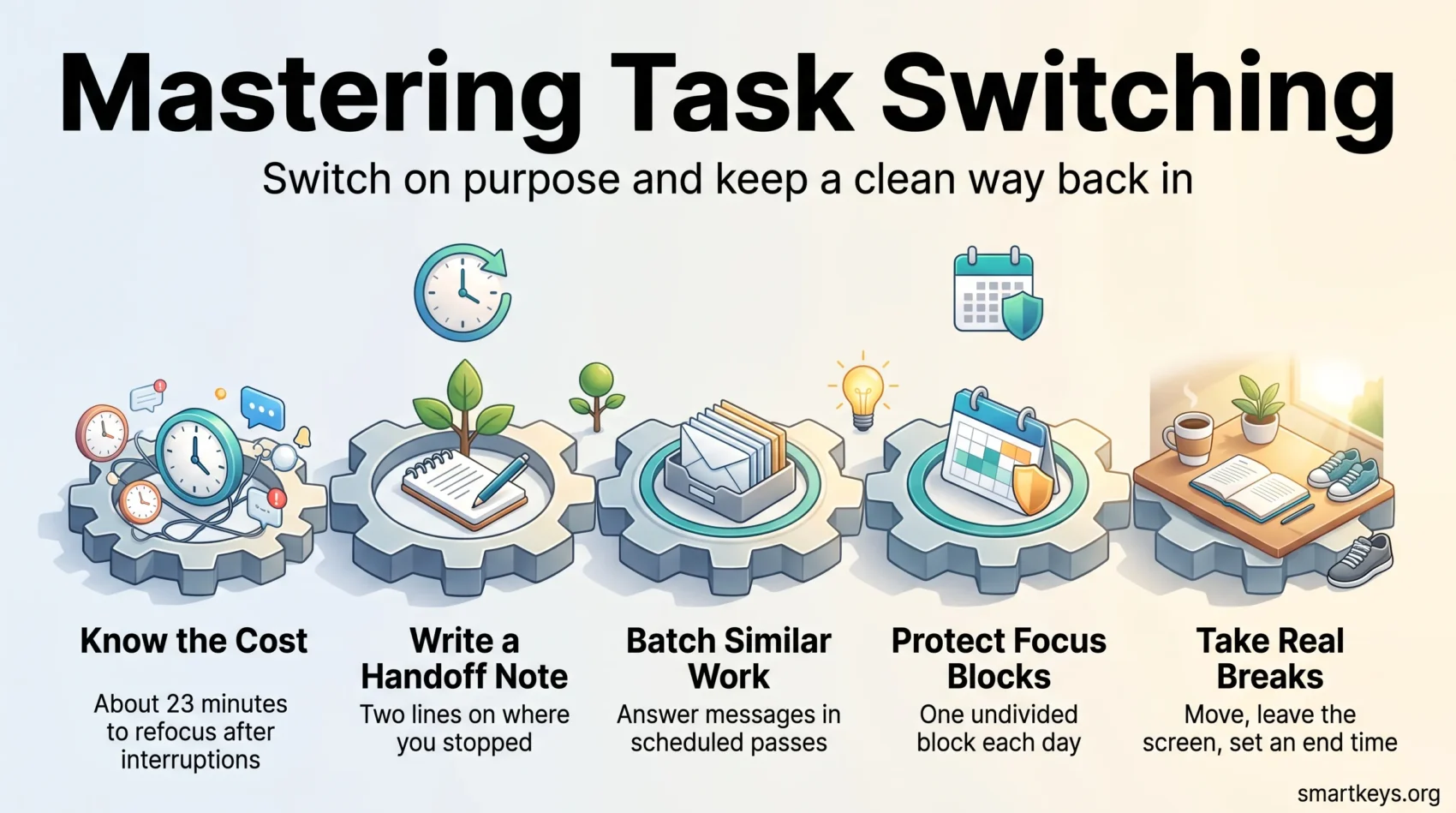
Task switching is the tax you pay every time you leave one job unfinished and pick up another. Most knowledge workers pay it hundreds of times a day without noticing, and the bill arrives as slower work, more mistakes and a vague sense that the day disappeared.
You have probably seen the claim that switching costs 40% of your productive time. The figure is real, but it is quoted far more often than it is understood. This guide explains where it comes from, what the research genuinely supports, and which habits lower the cost.
The goal is not to stop switching. In a job built around meetings and shared deadlines, that is not on offer. The goal is to switch on purpose and to leave yourself a clean way back in.
Key Takeaways
- The widely quoted 40% figure comes from the American Psychological Association’s summary of laboratory task switching experiments, not from measured workday output.
- Microsoft’s 2025 Work Trend Index telemetry puts interruptions at roughly one every two minutes during core hours, about 275 a day.
- Every switch leaves attention residue: part of your mind stays on the task you just left.
- Protected single-tasking blocks produce better quality work than rapid switching.
- A short written handoff note before you switch is the cheapest recovery tool available.
- Breaks reliably improve how you feel; the performance gains are clearest for longer breaks.
Understanding Task Switching and Its Impact on Productivity
Task switching is not a character flaw. It is what happens when several open commitments compete for one attention system, and understanding the mechanics makes the cost visible enough to manage it.
What Is Task Switching?
Task switching means leaving one activity before it is finished and starting another. It differs from true multitasking, where two things happen at the same instant. With demanding work your brain almost never does the second: it alternates fast enough to feel simultaneous. That distinction explains why the science behind multitasking keeps producing the same unwelcome result.
Switches also come in different sizes. Glancing at a notification is a small one. Moving from a spreadsheet to a client call and back is a large one, because the second task loads an entirely different set of rules, files and mental context.
The Cost of Task Switching on Efficiency
Psychologists call the penalty a switch cost: the time and accuracy you lose in the moments after a change of task. Rubinstein, Meyer and Evans measured it in a 2001 study in the Journal of Experimental Psychology: Human Perception and Performance, and found the cost grows with how complex and unfamiliar the new task is.
The famous 40% comes from the APA’s own summary of that line of work, which states that brief mental blocks from shifting between tasks can consume up to 40% of someone’s productive time. Two caveats belong with it: it describes lab tasks measured in seconds, not a full workday, and it is an upper bound rather than an average. Read it as evidence that switching is expensive, not as a measurement of your own week.
The other half of the cost is psychological. Sophie Leroy’s research on attention residue found that when people move to a new task with the previous one unresolved, part of their attention stays behind and performance suffers. Gloria Mark’s team at UC Irvine put a number on recovery: after an interruption, workers took roughly 23 minutes to get back to the original task, often because they visited two other tasks first.

The Science Behind Cognitive Flexibility
Cognitive flexibility is the ability to shift between rules, goals and mental frames on demand. It is what makes a switch possible, and what determines its price.
Cognitive Load and Its Implications
Cognitive load is the mental effort a task demands while you are doing it. Working memory is small, so a task that fills it leaves nothing spare for the overhead of switching. Interruptions therefore hurt most during the hardest part of a job and barely register during routine work.
Two levers follow. Break a large job into self-contained steps, so each can be finished before anything interrupts it. Then keep the current task’s materials open and everything else closed, so returning does not mean rebuilding your workspace.
What the Research Supports
Set-shifting experiments consistently show two things: response times lengthen and accuracy drops on the first trial after a switch, and the gap narrows as the task becomes familiar. Both effects replicate reliably.
Be more careful with the broader claims. Cognitive flexibility is associated with creativity, stress resilience and healthy ageing, but association is not proof that training it improves your output. Brain-training products have repeatedly failed to show transfer to real tasks. The reliable gains come from changing the conditions you work in, not from exercising the switch itself.
The same caution applies to a popular claim about heavy media multitaskers. A 2009 Stanford study by Ophir, Nass and Wagner in PNAS found that people who juggled many media streams at once did worse on switching and filtering tests. Later work was less clear. In 2017, Wiradhany and Nieuwenstein ran two replications and a meta-analysis of 39 effect sizes, and the link to distractibility faded once small-study bias was accounted for. The safe reading: habitual multitasking has not been shown to damage your brain, but it has not been shown to train it either.
Why Multitasking Doesn’t Work
Multitasking feels productive because activity is easy to mistake for progress. Measured against output, it holds up badly.
The Myth of Multitasking Efficiency
The often repeated statistic that only 2.5% of people can multitask effectively comes from Watson and Strayer’s 2010 supertasker study in Psychonomic Bulletin and Review. Of 200 participants, five showed no measurable decline when driving in a simulator while performing a demanding memory task. Everyone else got worse at both.
Quote it accurately: it describes a driving simulator, not a desk job. The odds you are the exception are poor, so plan as though you are not.
Effects of Multitasking on Wellbeing
Beyond output, constant switching changes how work feels. Studies of interrupted work report higher stress, frustration and time pressure, because people compensate for lost time by working faster rather than longer.
The reverse also holds. Field experiments that cut off a major interruption source, most famously by switching off email for several days, found lower stress markers and longer stretches of continuous attention. If a scattered week leaves you tired with little to show for it, the pattern is the likelier cause than a lack of willpower.
Task Switching Focus: Key Strategies for Improvement
Improving how you switch is mostly design. A few deliberate rules remove more switches than any effort applied in the moment, and they spare you from fighting your attention all day.
Single-Tasking vs Constant Switching
Single-tasking means one job holds your screen and your attention until it reaches a natural stopping point. It is not a personality type; it is a scheduling decision. The practical test is whether you can name the one thing you are doing right now. If you cannot, you are switching.
This does not require heroic four-hour blocks. Ninety minutes of protected work each morning changes more than an ambitious schedule you abandon by Wednesday.
When Deliberate Switching Helps
There is one situation where switching works in your favour: being stuck on a creative problem. In a 2017 paper in Organizational Behavior and Human Decision Processes, Columbia Business School researchers Jackson Lu, Modupe Akinola and Malia Mason gave people two idea-generation tasks. One group alternated between the tasks at set intervals. That group produced more creative ideas than people who finished one task first or switched whenever they chose.
The explanation is cognitive fixation, the habit of circling the same few ideas. Stepping away loosens it, so you return with a fresher angle. The researchers also found that people rarely choose this strategy on their own. The practical lesson is narrow: when you are blocked on a creative problem, park it for a planned stretch of other work and come back. For analytical work, emails and anything with a deadline this afternoon, the costs described above still apply.
Developing Effective Task Switching Strategies
- Write a handoff note before you leave a task. Two lines on what you were doing and what comes next turn a long reconstruction into a 30 second read. This is the highest-return habit here.
- Group similar work together. Answering all your messages in two scheduled passes rather than continuously is batch processing applied to attention, and it removes most small switches outright.
- Give the switch a warning. When a meeting or handover is due, set a five-minute alert so you reach a stopping point and write your note, instead of being cut off mid-thought.
- Close the task you are leaving. Shut its files, tabs and threads before you open the next job. The physical action marks the end of one task and removes the visual prompts that would pull you back.
- Do a brain dump first. Emptying every open loop onto one list stops your mind raising them mid-task.
- Match the switch to the energy. Put demanding work where your attention is strongest and leave the flatter hours for admin, which tolerates interruption.
Planning Your Day for Improved Task Switching
Most unplanned switches are planning failures arriving late. A day with a clear shape absorbs interruptions; a day without one follows them.
The Importance of Prioritization
Deciding what matters before the day starts is what lets you decline everything else. A short ranked list beats a long unranked one, because the value of prioritization lies in what it excludes. If ranking by instinct keeps failing, use a structure: the common prioritization frameworks force urgency and importance apart, so urgent work stops crowding out important work.
Using a Task List for Organization
A list works when it is short enough to believe. Three to five committed items, with everything else parked in a backlog, keeps the plan honest and gives you something concrete to return to after an interruption. Leave slack between items, because a packed list turns the first delay into a cascade. Good habits around effective to-do lists and broader task management point the same way: capture everything, commit to little.
Time Management Techniques for Enhanced Focus
Two methods do most of the work here, and both work by making the switch a scheduled event rather than an impulse.
Applying the Pomodoro Technique
The Pomodoro Technique runs focused work in fixed intervals, classically 25 minutes, each followed by a short break. Its real contribution is not the timer but the rule attached to it: interruptions arriving mid-interval get written down and handled at the break. Adjust the interval to the work. Twenty-five minutes suits admin and study; deep analytical work usually needs 45 to 90 minutes.
Benefits of Time Blocking
Time blocking gives each piece of work a place in the calendar instead of a place on a list. The block is visible to colleagues, which is what actually protects it, and scheduling forces you to confront how much you have committed to. Used consistently, it is the entry point to deep work: long, undivided stretches on demanding tasks. One or two blocks a day is realistic for most roles.
The Role of Breaks in Task Switching
A break is a switch you control. Done well it resets attention; done badly it becomes another distraction that never quite ends.
How Breaks Enhance Cognitive Performance
The best available evidence is the 2022 meta-analysis by Albulescu and colleagues in PLOS ONE, which pooled 22 studies on micro-breaks of up to 10 minutes. Short breaks reliably increased vigour and reduced fatigue. Their effect on task performance was smaller and reached significance mainly for longer breaks and less demanding tasks.
Read that carefully: breaks are well supported for sustaining energy across a day and only weakly supported as a direct performance booster. That is still reason enough, because sustained energy is what keeps the last two hours of the day worth anything.
Recommended Break Strategies
- Move. Standing, stretching or a short walk breaks the physical posture with the mental one.
- Leave the screen. A break spent scrolling supplies novelty, not recovery.
- Keep it bounded. Set an end time first, or the break becomes the switch you were avoiding.
- Use longer options when they fit. The case for power naps at work is stronger than most managers assume.
Reducing Cognitive Load During Task Switching
You cannot remove every interruption, but you can decide which reach you and which wait. Most of the load is environmental, which makes it easier to fix than it feels.
Identifying Major Distractions
External sources are the obvious ones: notifications, ad hoc calls and conversation carrying across a room. Microsoft’s 2025 report found that 57% of meetings now start as unscheduled calls, which is why a protected calendar block still gets interrupted. Shared offices add their own layer, and the fixes for distractions in an open office are mostly signalling and acoustics rather than willpower.
Internal sources matter as much. Boredom, anxiety about an unstarted task and plain curiosity all generate self-interruptions, and they rise as the day goes on. Reading the pull as a signal about the task, rather than a message you must act on, is what makes digital overload manageable.
Effective Techniques for Cognitive Load Management
- Break the task into finishable pieces. A step you complete in one sitting never carries a resumption cost.
- Externalise state. Notes, checklists and a visible next action mean working memory is not the only place the plan exists.
- Set notification tiers. Decide in advance which channels may interrupt a block and mute the rest.
- Delegate or defer. Work that does not need you is the cheapest kind to remove.

Attention Control and Focus Techniques
Attention control means keeping your focus where you put it and noticing quickly when it has moved. Some of it is trainable; most of it is removing the things that keep moving it.
Mindfulness Practices to Improve Focus
Mindfulness training has reasonable evidence behind it for sustained attention and reduced mind-wandering, with modest effect sizes. It is no cure for a fragmented calendar, but it helps with the internal half of the problem: noticing the urge to switch before you act on it. Start small and keep it regular. A few minutes daily does more than an occasional long session, and activities that promote mindfulness such as walking without a phone count as well as formal meditation.
Using Technology to Control Attention
Software is the main source of switches and one of the better remedies. Researchers at Qatalog and Cornell’s Idea Lab, writing in Harvard Business Review, described a toggling tax: workers moved between applications around 1,200 times a day, close to four hours a week reorienting.
Three settings do most of the work. Turn off everything that pings and re-enable only what earns it. Use a website or app blocker during focus blocks. Keep the number of tools small, because every extra place work can live is another place you have to check. The right productivity apps and focus tools reduce switching; the wrong ones just add a destination. Our guide to time management techniques covers how these choices fit into a full week.
Task Switching in a Real Workday
Advice that assumes an empty calendar is useless. These are the three patterns most people work in, and what changes in each.
Three Common Patterns
The meeting-heavy day leaves fragments rather than blocks. Stop trying to do deep work in the gaps. Use them for prepared, low-context tasks and defend one genuine block elsewhere in the week.
The maker day has long stretches and few obligations. The threat is self-interruption, so the leverage is environmental: notifications off, one task visible, a written plan for the session.
The reactive day requires you to be interruptible by design. Accept it and choose work that survives interruption: reviews, admin, documentation. Working between locations belongs in the same category, and the practical points about staying productive while travelling apply to any day you cannot control.
Common Pitfalls and Solutions
- Overloading the plan. A schedule with no slack turns every interruption into a failure.
- Skipping breaks to catch up. Fatigue makes switching more expensive, not less.
- Saying yes by reflex. Every accepted request is a future switch, so learning when to say no removes work before it reaches your calendar.
- Confusing responsiveness with reliability. Answering within minutes is a choice, and an expensive one.
- Leaving it all to individuals. If you lead a team, shared rules remove switches for everyone at once: agreed response times, meeting-free blocks and one channel for requests.
Building the Habit Over Time
None of this survives as a resolution. It survives as a default, and defaults are built one change at a time.
Start With One Switch
Pick the switch that costs you most, usually checking messages during focused work, and change only that one for two weeks. Anchoring the new behaviour to something you already do makes it stick, which is the idea behind micro-habits. Once it holds without effort, add the next.
Measuring Your Improvement Over Time
Track something simple enough that you will actually record it. Two candidates work well: how many protected blocks you completed this week, and how often you interrupted yourself during them.
Review it weekly, not daily. Daily numbers are noisy; a weekly pattern tells you whether the change is real. Expect setbacks in busy periods, and judge the habit on the month, not one bad Tuesday.
Conclusion
Task switching is expensive, and the size of the bill matters less than the direction it points. The lab evidence for switch costs is solid, the attention residue research explains why the cost lingers, and workplace telemetry confirms that the average day delivers interruptions faster than anyone can absorb them.
What helps is unglamorous. Write a handoff note before you leave a task. Group similar work into scheduled passes. Protect one real block a day and let the calendar defend it. Turn off notifications that have not earned the right to interrupt you, and take breaks before you need them.
You will still switch dozens of times tomorrow. The difference is whether you chose those switches or something on your screen chose for you.
Found this useful?
Make SmartKeys a preferred source on Google, and our articles will surface more often in your Top Stories, AI Overviews, and AI Mode.
Add as Preferred Source




