

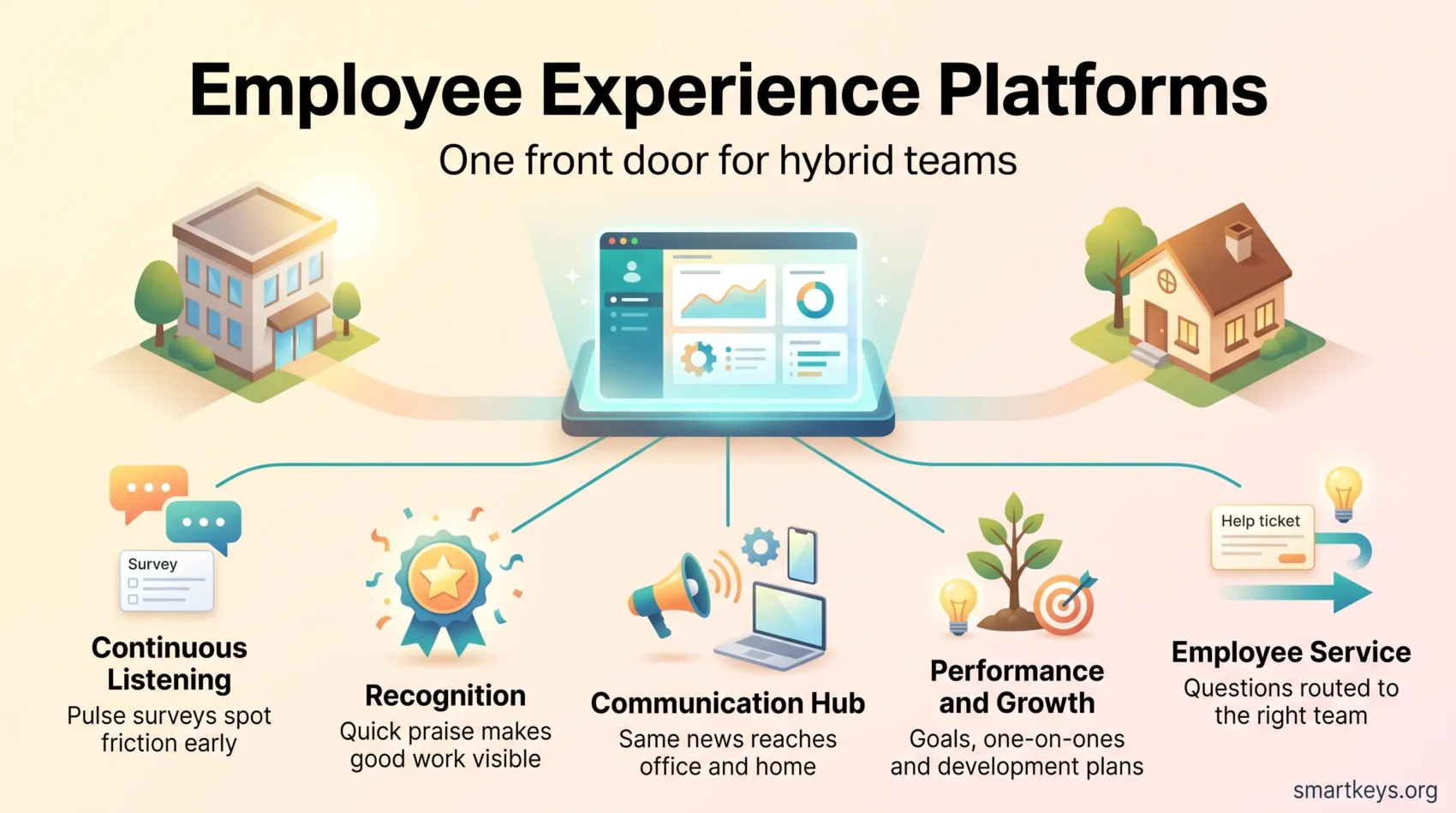
An employee experience platform brings the tools your people touch every day into one place: surveys, recognition, internal news, goals and reviews, and help requests. Instead of five logins and five separate data sets, employees get one front door, and HR and managers get one view of what is working and what is not.
That matters most in hybrid work. When some people sit in the office and others work from home, the informal signals that used to tell a manager “something is off” disappear. A platform that collects quick feedback, makes praise visible, and routes questions to the right team puts some of those signals back.
This guide explains what these platforms do and which vendors lead each category in 2026. It also covers pricing models, the EU rules that now apply, and how to run a pilot before you commit.
Key Takeaways
- An employee experience platform (EXP) unifies listening, recognition, communication, growth and service tools so hybrid teams stop hopping between apps.
- Global engagement fell to 20% in 2025, according to Gallup, and falling manager engagement explains most of the drop.
- Pricing is mixed: per user for HR tools, per agent for service desks, flat or per hub for frontline apps, and quote-only for most enterprise suites.
- Start with a 60 to 90 day pilot on two use cases, such as pulse surveys and recognition, and set baselines before go-live.
- In the EU, emotion recognition at work is banned, and AI transparency duties have applied since 2 August 2026.
Why employee experience matters in hybrid work
Hybrid setups break old routines. When people split their week between office and home, gaps in communication and recognition open up quickly. A new hire may not know whom to ask. A strong performer may go months without public praise because nobody saw the work.
The engagement numbers show the cost. Gallup’s State of the Global Workplace 2026 reports that only 20% of employees worldwide were engaged in 2025, the lowest level since 2020. Manager engagement fell to 22%, and Gallup says lower engagement among managers accounts for most of the recent decline. It estimates that low engagement cost the world economy about $10 trillion in lost productivity. For the wider picture, see our overview of employee engagement trends in 2026.
An EXP does not fix engagement on its own. What it can do is make three things easier:
- Hearing problems early: short, regular surveys spot friction by team, role or location before it turns into resignations.
- Making recognition effortless: a thank-you that takes ten seconds in Slack or Teams actually gets sent.
- Keeping culture consistent: the same news, rituals and values reach people in the office and at home.
If your teams are mostly remote, our guide to remote employee engagement covers the evidence on isolation and connection in more depth.
What is an employee experience platform?
An EXP is a layer of connected tools that turns scattered feedback, recognition and learning into one source of insight and action. It covers the full employee lifecycle, from onboarding to exit, so you can see where moments break and fix them upstream.
A simple example: a pulse survey shows that new hires in one region feel lost in week three. The platform flags it, the manager gets a suggested action, the intranet publishes a clearer onboarding checklist, and the next survey shows whether it helped. Without a shared system, those steps live in four different tools and rarely connect.
How EX differs from HR software and engagement
Human resources systems (the HRIS, or human resources information system) run payroll, policies and compliance. An EXP sits on top and focuses on how people feel about their daily work.
Engagement is the outcome: how motivated and committed people are, measured over time. The platform shapes the conditions that move that outcome.
- Actionable signals: survey data and comments become a short list of prioritized initiatives.
- Manager enablement: workflows and permissions let the right people act without flooding everyone with dashboards.
- Global reach: multilingual surveys and anonymity controls encourage honest feedback across countries.
How to evaluate and buy an employee experience platform
Start with the outcomes you want, then look for the features that deliver them. Typical goals are better manager coaching, earlier warning of attrition, faster answers to IT and HR questions, or skills goals such as cross-training programs.
Match business goals to capabilities
Map each outcome to a capability. If you need analytics and coaching, shortlist listening suites with predictive reporting. If frontline support is the pain point, focus on service tools with strong routing and ready-made replies.
Pricing models differ by category, which makes side-by-side comparison harder than it looks. Service desks usually charge per agent, HR tools per employee, and many enterprise vendors only give quotes after a sales call. Define your value metrics up front so you can judge a quote against expected results, not just the list price.
Suite or specialists: when to bundle
Suites give you one data model, one admin console and one contract. Specialists usually move faster in narrow areas such as recognition or performance reviews. Compare total cost of ownership, meaning licenses plus implementation, change management and internal admin time, so a low sticker price does not hide poor adoption.
- Validate integrations early with Microsoft Teams, Slack and your HRIS.
- Check support quality by asking for reference customers of your size and industry.
- Pilot two or three vendors with comparable groups and measure real impact before a wider rollout.
Core features to expect in an employee experience platform
Good platforms collect quick signals, reward helpful behavior and support growth. Here is what each feature group does in practice.
Continuous listening: pulse surveys, eNPS and real-time feedback
Pulse surveys are short questionnaires, often five to ten questions, sent every few weeks. eNPS (employee Net Promoter Score) asks one question: how likely are you to recommend this company as a place to work? Our guide to employee NPS explains how to calculate and read it.
Delivering surveys through email, chat and mobile keeps response rates up. Many vendors now use AI to summarize open comments into themes, which saves hours of reading. See how that works in our article on AI-powered engagement surveys.
Recognition and rewards: points, gift cards and social feeds
Recognition programs combine public shout-outs, points and redeemable rewards such as gift cards. The public feed is the part that builds belonging: others see what good work looks like. Add moderation controls and value tags so praise lines up with company values.
Performance and development: 1:1s, OKRs and reviews
Look for flexible performance tools: OKRs, regular one-on-ones, and reviews that feed into development plans. OKRs (objectives and key results) are a goal-setting method that pairs an ambitious goal with measurable checkpoints. Our framework for continuous performance management shows how these pieces fit together, and our one-on-one meeting template gives managers a ready agenda.
Communication and collaboration: intranet, chat and integrations
Centralized news with targeted updates and live streams helps you meet people where they work. Integrations with Teams and Slack cut app switching and increase reach.
Analytics and AI: insights, predictions and action planning
Driver analysis shows which factors, such as workload or recognition, move engagement most. Heatmaps show where scores differ by team. Prediction models estimate which groups are at risk of leaving. The key test is whether insights turn into tracked tasks for managers, not just charts.
Accessibility matters too. Mobile apps, multilingual content and anonymity controls raise honest participation and reach employees without a desk.
Top employee listening and analytics solutions
Listening suites combine confidential surveys, AI summaries, predictive models and manager nudges. They suit organizations that want continuous feedback, fine-grained segmentation and coaching at scale.
Workday Peakon, Culture Amp, Microsoft Viva Glint, Qualtrics EmployeeXM
Workday Peakon Employee Voice offers confidential surveys, AI-generated themes and summaries, and attrition risk insights. It fits best if you already run Workday for HR, because survey data and employee records share the same system.
Culture Amp provides a library of research-backed survey templates, AI comment summaries and pulse surveys. Suggested actions help managers move from results to next steps, and its performance module links feedback to reviews.
Microsoft Viva Glint fits Microsoft 365 organizations. It supports lifecycle, recurring and ad hoc surveys, with admin controls to schedule and segment them at scale. Note that Microsoft retired Viva Goals, its OKR tool, on 31 December 2025, so goal tracking now needs a separate product.
Qualtrics EmployeeXM adds predictive analytics, dashboards and workflows that link employee feedback to business metrics. It is the heaviest option here and usually suits large enterprises with a dedicated people analytics team.
- When to pick these: continuous listening, segmentation and coaching across many teams.
- Delivery: surveys via Teams, Slack, email and SMS boost response rates.
- Commercials: all four sell mainly through quotes, so ask for a pilot price and renewal terms in writing.
Tip: turn on anonymity thresholds and comment routing from day one. Measure employee satisfaction and manager action rates over the first two quarters to confirm impact.
Recognition and rewards platforms that strengthen culture
A well-run rewards program turns small wins into visible signals that reinforce the behavior you want. That visibility supports company culture and gives distributed teams a steady rhythm of appreciation. Our guide on how to build a strong remote company culture shows where recognition fits alongside rituals and communication.
Leading vendors and what they do well
Bonusly keeps peer-to-peer praise simple and ties points to gift cards and company swag.
Reward Gateway, part of Edenred, focuses on branded experiences with instant e-gift redemption and automated awards.
Nectar offers a broad rewards catalog, custom swag and automated celebrations for birthdays and anniversaries.
Empuls combines a social intranet, surveys, recognition and an AI assistant for insights.
Specialists for service awards, perks and ROI
Mo builds belonging through a “Moments” news feed and nudges. Fond handles service awards and perks. Awardco adds lifestyle spending accounts and an ROI calculator that finance teams can check.
- Catalog depth: compare global gift cards, merchandise and local redemption options.
- Budget controls: monthly allowances, manager budgets and clear program rules.
- Values tagging: the ability to tag a company value on each award.
- Fees: ask about catalog markups and redemption fees, not just the platform license.
Governance tip: set monthly budgets and clear nomination rules so recognition feels fair. Tie rewards to goals so the program supports both morale and results.
Performance and growth platforms that align people and outcomes
When goals, feedback and learning are linked, teams hit targets more often and with less friction.
Lattice is modular. You can switch on performance reviews, OKRs, 1:1s, engagement surveys, growth plans and compensation as needed, which lets you roll features out in phases.
15Five emphasizes coaching. It pairs weekly check-ins and objectives with manager training, so leaders learn to turn signals into action.
PerformYard is built for flexible review processes, including 360-degree reviews (feedback from peers, reports and managers), continuous feedback and AI-assisted summaries.
Workleap blends pulse surveys, recognition, reviews, AI summaries and onboarding tools in one lighter-weight package.
Development plans turn review insights into concrete steps with due dates, mentors and learning resources. Weekly 1:1s and monthly check-ins also reduce recency bias, the habit of judging a whole year by the last few weeks.
- Calibration: use analytics to align ratings across teams.
- Pricing: some vendors list a price per person per month; others quote. Match cost to your adoption plan.
- Outcomes: link objectives and coaching so good practices spread across roles.
Frontline and deskless teams: mobile-first experience software
Frontline teams need schedules, training and secure chat on their phones. Retail staff, drivers and warehouse crews rarely sit at a desk, so a desktop intranet simply does not reach them.
Connecteam takes an all-in-one route: scheduling, time tracking, tasks, training, surveys and chat in one app. It prices per “hub” (Operations, Communications, HR and Skills). Each hub’s Basic plan costs $29 a month for the first 30 users, with a small charge per extra user. A free plan covers businesses with up to 10 employees (Connecteam pricing).
Blink focuses on a mobile intranet with a news feed, chat and AI help for writing posts. It does not publish a simple per-user price, so request a quote based on headcount and modules.
Why cross-device and targeted comms matter
Targeted feeds, group chats and pinned announcements cut noise so the right crew sees the right update. That improves safety and customer service. Support for shared devices, QR code sign-ups, SMS invites and local languages speeds adoption.
Operational wins and governance
- Less admin: automated shift swaps, reminders and read confirmations save managers time.
- Micro-learning: short lessons and quizzes let staff learn between shifts.
- Feedback loops: quick polls capture on-the-ground insight for safety and process fixes.
Enforce clear rules for messaging and data on shared or personal devices so you protect both people and business data.
Intranet and communication hubs that unify your work environment
A modern intranet can become the central place where news, people and culture come together for hybrid teams.
Workvivo vs. Unily: features that matter
Workvivo, owned by Zoom since 2023, centralizes news feeds, live streams, recognition, events and measurement so leaders can share strategy and celebrate wins publicly.
Unily focuses on targeted communication, multilingual content, personalization and strong publishing controls for large global workforces.
Design for inclusion and findability
Targeted posts and multilingual content keep messages relevant for different roles and locations. Clean navigation, strong search and a mobile app that matches the desktop version help people find answers fast.
Integration, governance and community
Integrations with Microsoft Teams and Microsoft 365 surface content where people already work. Set editorial owners, posting guidelines and moderation paths to prevent intranet sprawl.
- Community features: groups, reactions and value-based posts build cross-team connection.
- Metrics: track reach, engagement, sentiment and search success as leading indicators.
IT and HR service experience: omnichannel support for employees
An omnichannel service desk lets people ask for help in whatever channel they already use: a portal, email, chat or Teams. Treat IT and HR support as internal customer service, because every hour an employee waits for a password reset or a payroll answer is an hour of lost work.
Zendesk offers ticketing, AI self-service, intelligent routing and custom workflows. In 2026, Support Team starts at $19 per agent per month and Suite Team at $55 (annual billing). AI agents are billed per automated resolution on top. Our Zendesk review breaks down the add-ons.
Zoho Desk offers ticketing, chatbots, knowledge bases, time-based reports and agent scorecards at lower per-agent prices, plus a small free tier. Learn more in this Zoho Desk review.
Ticketing, bots, knowledge bases and routing
Knowledge bases and chatbots answer routine questions, which cuts ticket volume and keeps answers consistent. Tesco is a useful example: according to its Zendesk customer story, the share of colleague issues solved through self-service grew from 30% to 73% over three years. Its technology instance handles around 200,000 tickets a month. For HR questions specifically, see our guide to HR chatbots.
Intelligent routing plus service-level targets send urgent issues to the right team first.
- Design a service catalog and a library of automated replies early so responses scale.
- Track metrics such as time to resolution and agent quality scores.
- Integrate broadly with your HRIS, Slack and Teams so people can file and follow tickets without switching apps.
Decide whether you buy per agent or per user, and model total cost for seasonal peaks. Feed recurring ticket themes back to HR and IT so you fix root causes, not just symptoms.
Event-led engagement: curated team experiences
Always-on tools work best alongside memorable shared moments. Live and virtual events create stories that keep morale up between survey cycles.
Marketplaces such as Confetti offer curated hosts and activities with booking, payment and coordination in one dashboard, which saves planning time across time zones. For ideas, see our guide to remote team building activities.
- Mix wellness, learning and team-building themes across the year.
- Measure participation and post-event sentiment to link events to cultural outcomes.
- Add captions and schedule inclusively so remote colleagues can join fully.
Rising platforms worth a look
Several newer vendors focus on turning comments into action plans rather than charts.
CultureMonkey blends AI insights, anonymous two-way conversations and manager coaching templates, so managers can respond to honest feedback quickly.
ThriveSparrow offers a clean interface, multilingual surveys, eNPS, OKRs and a global gift card catalog. Its simplicity helps smaller global teams deploy fast.
WorkTango scales listening with unlimited surveys, role-based dashboards, a rewards marketplace and deep HRIS integrations.
- Action-centered dashboards that show drivers, segments and initiative progress.
- Playbooks, not just charts: tools that turn comments into themes and suggested steps.
- Integration depth so you avoid splitting employee data across systems.
Employee experience platform pricing: models, tiers and TCO
What looks cheap per seat can become expensive once integrations and growth add up. Advertised base rates rarely include rollout, training or catalog fees.
Per user vs. per agent: what you really pay for
Service desks usually charge per agent, meaning only the staff who answer tickets, not everyone who submits them. HR and engagement tools usually charge per employee, and modular vendors such as Lattice or 15Five add cost per module. Frontline apps like Connecteam may use flat tiers. Always ask whether analytics, AI features, learning or recognition are extra.
Building a practical TCO
- License fees: base subscriptions, module upgrades and AI add-ons.
- Implementation: integrations, data mapping and reporting connectors.
- Operations: admin time, change management, manager training and reward markups.
- Growth: extra locations, languages and advanced analytics over 12 to 36 months.
Tip: when a vendor quotes, negotiate customer success time, manager training workshops, clear renewal terms and an exit clause in case adoption stalls.
Integrations that matter: Microsoft Teams, Slack, HRIS and beyond
Integrations put your tools where people already work. Surveys, recognition and tickets inside the chat app your teams use raise participation and cut context switching. If you are still choosing a chat platform, our Slack vs Microsoft Teams comparison covers what each costs in 2026.
- Surveys in chat: nudges and short forms inside Teams or Slack get answered without inbox overload.
- Recognition in channels: shout-outs posted to team channels spread values and wins.
- Tickets in chat: Zendesk and Zoho Desk updates in chat mean fewer dropped threads.
- HRIS sync: imported rosters and org charts power segmentation and automated triggers.
- Identity: SSO (single sign-on) and SCIM (automatic user provisioning) keep access accurate as people join, move or leave.
Plan HR-triggered workflows for onboarding, promotions and anniversaries, then measure gains in response times and recognition coverage.
Implementation roadmap: from pilot to company-wide rollout
Begin with a 60 to 90 day pilot built around two high-impact workflows, such as pulse surveys and recognition. A pilot validates adoption and produces early wins before a larger spend.
Data migration, change management and manager enablement
Migrate legacy survey results, recognition history and org data so your benchmarks stay intact. Clean imports preserve trends like eNPS over time.
Build a change plan with an executive sponsor, clear communication and weekly adoption reviews. Our change management strategy guide walks through the steps. Show employees what changed because of their feedback, or participation will drop.
Setting baselines and success metrics
Lock in baselines before go-live: eNPS, top engagement drivers and time to resolution. Train managers to read dashboards, run 1:1s and track development plans.
- Use weekly adoption checks to tune reminders and channels.
- Publish early wins and before/after metrics to justify scaling.
- Scale only when adoption and outcomes both hold up.
Security, compliance and governance
Security and governance are the guardrails that let you collect candid feedback without creating risk. People only answer honestly if they trust that a comment will not come back to hurt them.
Set role-based access so sensitive reports are visible only to those who need them. Use minimum response thresholds, for example no results shown for groups smaller than five, so answers cannot be traced to individuals. Define data residency, retention rules and an incident response plan, and keep audit logs of who accessed what. Our guide to data privacy at work summarizes the 2026 rules for employee data.
What the EU AI Act means for EXP features
Many platforms now use AI to summarize comments, predict attrition or suggest actions. In the EU, three dates matter:
- Since February 2025: AI systems that infer employees’ emotions in the workplace are prohibited, apart from narrow medical or safety uses. Be careful with any feature marketed as emotion AI that reads mood from voice, video or facial expressions.
- Since 2 August 2026: transparency duties apply, so people must be told when they are dealing with an AI system such as a chatbot.
- From 2 December 2027: the stricter “high-risk” rules for AI used in employment decisions, such as promotion or termination, are due to apply. The EU postponed them from August 2026.
Attrition prediction that feeds into decisions about individuals deserves extra scrutiny even before 2027. Keep a human in the loop and document how scores are used. Our article on AI in employee monitoring covers where listening ends and surveillance begins.
Vendor due diligence
- Contracts: document vendor responsibilities in a data processing agreement (DPA).
- Certifications: verify SOC 2 or ISO 27001 reports before you sign.
- Approvals: require sign-off for launching surveys, publishing company-wide posts and granting admin rights.
- Service desk privacy: restrict and mask sensitive HR tickets and case notes.
Review policies every quarter as the rollout grows and new data types enter the system.
Proving ROI: engagement, retention, productivity and cost savings
Make the business case with numbers, stories and clear next steps. Map each initiative to a measurable outcome so leaders see value in money and time.
Start with retention, because it is the easiest to price. Estimate what one resignation costs you in hiring, onboarding and lost output, then compare turnover in at-risk groups before and after your interventions. Our guide to talent retention strategies and our look at workforce analytics tools help you set up that comparison.
- Service wins: convert higher self-service rates and faster resolution into hours saved.
- Recognition: compare program cost per employee with changes in retention in recognized groups.
- Onboarding: track time to productivity for new hires before and after the rollout.
Bring the numbers to life with short stories: quoted comments, team wins and before/after cycle times. Present initiatives as a portfolio by cost and impact so you can shift budget toward what works. Validate your assumptions with HR and finance before you ask for expansion funding.
Conclusion
Choose tools that turn feedback into steady action and measurable gains across listening, recognition, growth and service. A focused shortlist tied to outcomes, integrations and adoption will serve you better than the longest feature list.
Favor platforms that are simple to use and fast to deploy. Balance suites and specialists based on what you will actually use this year, and prove value with a targeted pilot. Enable managers, connect the platform to your chat and HR systems, respect the new EU AI rules, and review your roadmap once a year.
Turn insights into consistent, meaningful actions that help your teams do their best work.
Found this useful?
Make SmartKeys a preferred source on Google, and our articles will surface more often in your Top Stories, AI Overviews, and AI Mode.
Add as Preferred Source




