Zoho Desk is the customer support side of the Zoho suite, and in 2026 it is one of the cheapest ways to run a real, multichannel help desk. This review covers what the platform actually does, what the plans cost this year, where Zia AI genuinely helps, and which teams are better served by something else.
The short version: Zoho Desk gives you more functionality per dollar than almost any competitor, and the trade-off is a busier interface and an AI story that only fully arrives on the top tier.
Key Insights
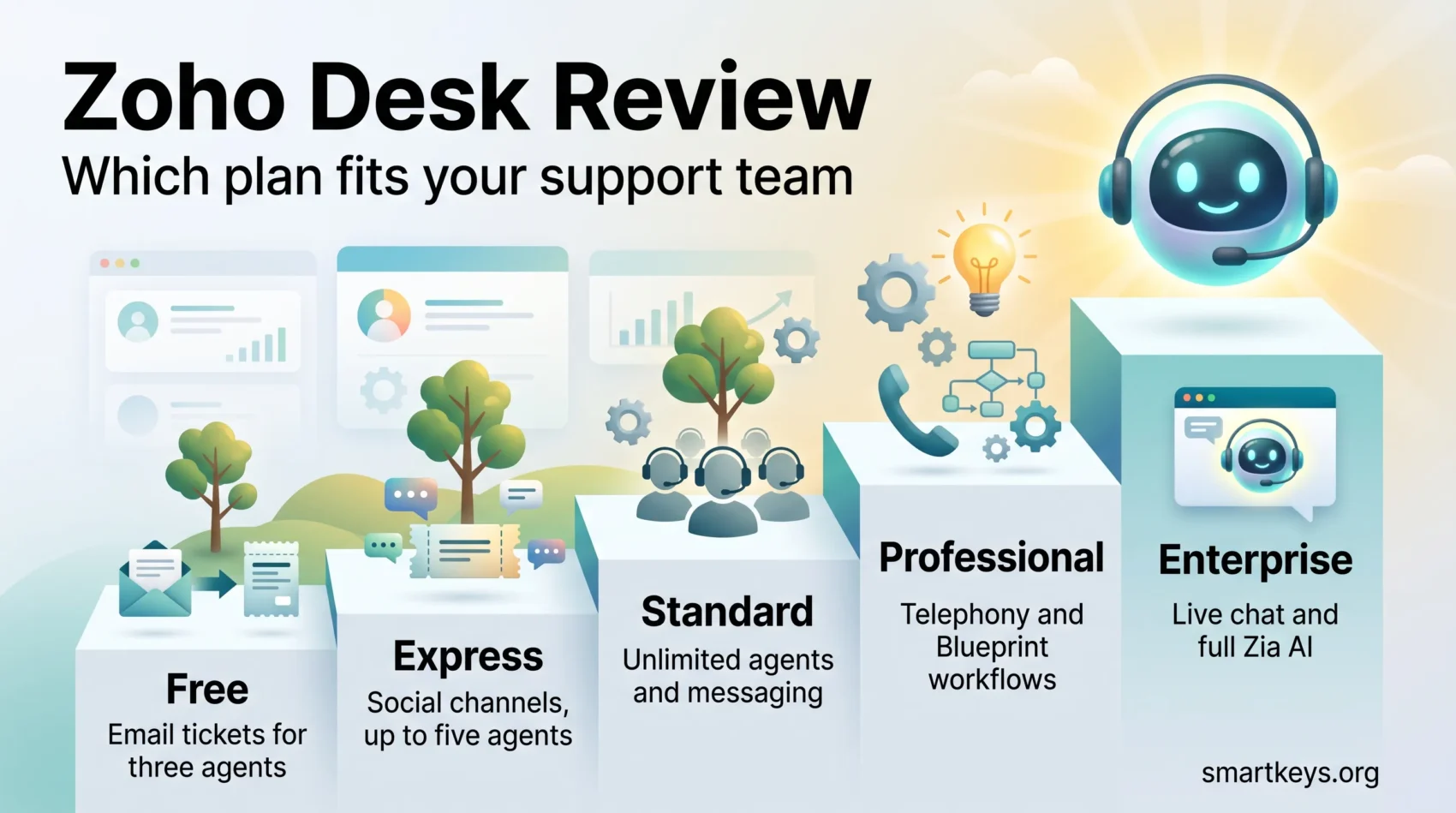
- Five tiers: Free for up to three agents, then Express, Standard, Professional and Enterprise.
- US list prices billed annually run $7, $14, $23 and $40 per agent per month; paying monthly costs meaningfully more.
- Express caps you at five agents, so Standard is the realistic starting point for a growing team.
- The full Zia AI suite – Answer Bot, sentiment analysis, anomaly detection, field prediction – is an Enterprise feature.
- A 15-day free trial is available without a credit card, which is long enough to test a real ticket queue.
What Zoho Desk is
Zoho Desk is cloud-based help desk software. Customer conversations from email, web forms, social media, messaging apps, phone and live chat land in one ticket queue, and agents work that queue with shared context rather than digging through inboxes. Around it sit the parts that make a support operation repeatable: a knowledge base, a customer self-service portal, automation rules, and reporting on what the team is actually clearing.
It is built to sit inside the wider Zoho ecosystem. If you already run Zoho One or a comparable all-in-one suite, Desk is the piece that handles post-sale conversations, and the shared data model is the main reason teams pick it over a standalone tool.
Who it is aimed at
Zoho Desk fits small and mid-sized support teams that need more than a shared mailbox but cannot justify enterprise help desk pricing. It also suits companies already invested in Zoho, because the CRM, projects and analytics integrations are native rather than bolted on. Very small teams with a handful of tickets a week will find the free plan sufficient for longer than they expect; large enterprises with heavy compliance requirements will want to check the Enterprise tier carefully against their own checklist.
Ticket management and channels
The ticket system is the core of the product, and it is solid. Tickets can be grouped by department, agent, status or due date, with saved views per person. Work Modes reorder the queue by urgency, status or customer type, which is more useful day to day than it sounds – it is the difference between a queue you triage and a queue you scroll.
Multichannel support
Customers can start a conversation through email, a web form, social media, instant messaging, the help centre or the phone, and everything resolves into the same ticket record. That consolidation is the point: it is what stops the same question being answered twice by two people who cannot see each other’s replies. If you are still deciding how many channels to open at all, our overview of current customer service trends is a useful sanity check before you switch them all on.
Channel availability is tiered. Email and web forms are available from the free plan; instant messaging and the community forum arrive with Standard; telephony comes with Professional; live chat via Zoho SalesIQ is an Enterprise feature. That last one catches teams out, because live chat is often assumed to be a mid-tier capability.
Automation and Blueprint
Zoho Desk ships with the automation you would expect – assignment rules, escalations, notification triggers, time-based actions – plus Blueprint, a visual process builder that enforces a defined sequence of steps on a ticket. Blueprint is the feature worth learning. It turns “how we usually handle refunds” into something the system actually requires, which is how support quality survives staff turnover.
The usual warning applies. Automations accumulate, and an undocumented stack of overlapping rules is expensive to unpick later. Treat workflow design as something you write down, in the same way you would treat internal knowledge management.

Zia AI in 2026
Zia is Zoho’s AI layer, and it appears in Zoho Desk in two quite different forms: assistance for agents, and automation that faces the customer directly. The distinction matters more than the marketing suggests, because they sit on different plans.
What Zia does for agents
On the agent side, Zia summarises long ticket threads, drafts replies grounded in your knowledge base, checks tone and readability before sending, and turns resolved tickets into knowledge base articles. None of this is exotic in 2026, but it is well integrated, and thread summarisation in particular saves real time on escalated tickets that have been passed between three people.
Zia also handles classification work in the background: auto-tagging incoming requests, predicting field values so the right workflow fires, and flagging anomalies in ticket volume before a spike becomes a backlog. Sentiment analysis reads the emotional temperature of a conversation and can route an unhappy customer to a human faster.
Answer Bot, Guided Conversations and Zia Agents
The customer-facing side is where Zoho has invested most recently. Answer Bot deflects questions using your knowledge base across the help centre and messaging channels. Guided Conversations is a low-code flow builder for structured self-service. Zia Agents package these into named roles – support specialist, resolution expert, quality manager, sentiment analyst – that operate on the queue rather than waiting to be prompted.
This is a credible offering, and it lines up with how AI agent workflows are being designed elsewhere. The catch is placement: the deflection features that actually reduce ticket volume are Enterprise-tier. Below that you get generative assistance for your agents, which is helpful but does not change the shape of the queue. If ticket deflection is the reason you are buying, price the Enterprise plan, not the Standard one – or compare against a dedicated tool such as a knowledge-base chatbot before committing.
Zoho Desk pricing in 2026
Zoho publishes list prices per agent per month, and the currency you see depends on your region – older reviews quoting rupee figures are showing Zoho’s India price list, not the US one.
The plans
- Free: $0 for up to three agents. Email ticketing, a basic help centre and private knowledge base.
- Express: $7 per agent per month, billed annually, capped at five agents. Adds social channels, web forms and workflows.
- Standard: $14 per agent per month, billed annually. Unlimited agents, instant messaging, community forum, public knowledge base.
- Professional: $23 per agent per month, billed annually. Adds telephony, Blueprint, multi-department support and webhooks.
- Enterprise: $40 per agent per month, billed annually. Adds live chat, Guided Conversations, the full Zia suite, custom modules, skill-based assignment and a sandbox.
Paying monthly rather than annually costs noticeably more on every paid tier, so the headline figures above assume the annual commitment. Light agents – read-only users who need visibility but do not resolve tickets – are billed at a few dollars each on the higher plans, with an allowance included on Enterprise. Local taxes sit on top.
What the tiers actually mean
Express looks like the cheap way in, and for a five-person team that will never grow it is. For anyone else the five-agent ceiling makes it a false economy, because migrating plans mid-year is friction you do not need. Standard is the honest entry point.
The bigger decision is Professional versus Enterprise. Professional gives you telephony and Blueprint, which covers most mid-sized support operations. Enterprise nearly doubles the per-agent cost and earns it only if live chat, guided self-service or AI deflection are genuinely part of the plan. Work out which of those you will have running within six months, and buy for that rather than for the feature list.
Even at Enterprise, Zoho Desk sits below what comparable tiers cost at Zendesk or Freshdesk, and the gap widens once AI is priced in – our Zendesk review covers how that platform’s automated-resolution billing works, and Zendesk versus Freshdesk compares the two directly.
Setting up Zoho Desk
Setup is straightforward if you sequence it properly. The 15-day trial needs no credit card, which is enough time to run a real week of tickets through it.
- Start the trial and define departments. Departments drive routing, permissions and reporting later, so get this right before you invite anyone.
- Connect one channel first. Usually email. Resist the urge to switch everything on at once – you will not be able to tell what is working.
- Seed the knowledge base. Ten good articles beat a hundred stubs, and every AI feature in the product depends on this content being accurate.
- Add assignment rules, then Blueprint. Automate routing before you automate process, and document each rule as you create it.
- Review after two weeks. Check first response time, reopen rate and where tickets are stalling, then adjust. Do this before you add the next channel.
The teams that get value quickly are the ones that treat setup as a small project with an owner. The ones that struggle are the ones that switch on every channel on day one and then cannot explain why response times got worse.
Integrations
Zoho Desk connects natively to the rest of the Zoho stack. Linking it to Zoho CRM surfaces account and deal context inside the ticket, which is the single most useful integration for teams that sell and support the same customers – the same pattern our overview of CRM trends describes. Zoho Projects handles escalations that turn into engineering work, and Zoho Analytics takes over when the built-in reporting runs out.
Outside the Zoho ecosystem there is a marketplace of third-party extensions covering the usual categories: telephony, e-commerce, billing, collaboration tools and survey platforms for closing the voice-of-customer loop. Anything without a native connector can be wired up through an integration platform – see our comparison of Workato and Zapier for how those differ.
Zoho Desk also offers a full-featured omnichannel experience, so support conversations remain consistent regardless of which channel a customer chooses.
Strengths
- Price for capability. No competitor at this price offers this much ticketing, automation and reporting.
- Blueprint. Process enforcement that most mid-market help desks either lack or charge enterprise money for.
- Native Zoho integrations. If you already run Zoho, the context sharing is genuinely seamless rather than nominally supported.
- Customisation. Layouts, statuses, templates, custom fields, domain mapping and rebranding are all available without developer time.
- A free tier that is actually usable for three agents, not a demo with a timer on it.
Weaknesses
- Interface density. The volume of settings is the flip side of the customisation, and new agents need real onboarding rather than a walkthrough.
- Support responsiveness. Slow replies and thin follow-up on reported bugs are the most consistent complaint in user reviews – an awkward look for a customer service vendor.
- Feature gating. Live chat and the full Zia suite sitting on Enterprise pushes the effective price well above the headline.
- Ecosystem gravity. The product is at its best inside Zoho and merely competent outside it.
How Zoho Desk compares
Against Zendesk, Zoho Desk is substantially cheaper and covers most of the same ground; Zendesk wins on ecosystem maturity, reporting depth and enterprise-grade AI. Against Freshdesk, the two are closest competitors on price and positioning, and the decision usually comes down to which suite you are already in – the Freshworks stack is the relevant comparison there, not the help desk alone.
Against conversation-first tools the difference is philosophical. Intercom and Help Scout are built around ongoing customer conversations; Zoho Desk is built around tickets that open and close. If your support model is chat-led, look at Tidio or Drift and LiveChat before committing to a ticket-shaped tool. And if support is only one part of a much larger commercial platform requirement, the comparison is really against something like Salesforce, with the cost difference that implies.
On user ratings, Zoho Desk holds 4.5 out of 5 on Capterra across more than 2,000 verified reviews, with ease of use and customer service scoring slightly lower than the overall figure – which matches the strengths and weaknesses above rather closely.
Verdict
Zoho Desk remains one of the best value propositions in help desk software. For a small or mid-sized team that wants proper multichannel ticketing, enforceable process and usable reporting without an enterprise budget, Standard or Professional is an easy recommendation, and the free tier is a legitimate starting point rather than a trap.
The honest caveats are the interface and the tiering. Budget for onboarding time, and be clear-eyed about which plan you actually need: if AI-driven deflection or live chat is central to your plan, you are buying Enterprise, and the comparison against competitors gets closer. Run the 15-day trial with a real ticket queue rather than test data, and you will know within a week.
Found this useful?
Make SmartKeys a preferred source on Google, and our articles will surface more often in your Top Stories, AI Overviews, and AI Mode.
Add as Preferred Source