Knowledge management is simply how a company keeps and reuses what its people know. Knowledge Management 2.0 is that job rebuilt for teams who no longer share a room.
The old model treated knowledge as files to be stored. The new one treats it as something people create together, inside the tools they already work in. This guide explains what changed and how to roll out a system colleagues will use.
Key Takeaways
- KM 2.0 helps distributed teams reuse what the company already knows.
- Participation beats storage: people must contribute, not just read.
- One main platform plus a few specialist tools beats a dozen half-used ones.
- Capture works best inside daily work, not as a separate chore.
- AI assistants answer only as well as your written record allows.
From KM 1.0 to Knowledge Management 2.0
In the intranet era, companies tried to turn human experience into searchable corporate assets. Thomas Davenport, an early researcher in the field, described the aim as capturing, distributing and using what people know. The ambition was right. The method aged badly.
What KM 1.0 got wrong
KM 1.0 relied on static intranets and top-down curation. A small team decided what was worth publishing, everyone else read, and updates always lagged behind the actual work.
What changed
Wikis, shared docs, chat threads and short video turned every colleague into a possible contributor. Wikipedia proved the point at scale: people create and improve content when the tools make it easy. KM 2.0 applies that lesson inside a company. Instead of a publishing pipeline, you get a shared space that grows as work happens.
Why distributed teams feel this first
In an office, a lot of knowledge moves by accident: someone overhears a question and answers it in ten seconds. Remote work removes those accidents. The same question now costs a message, a wait and a context switch for whoever replies. In cross-border remote teams, time zones stretch it into a full day of delay.
The failure patterns worth avoiding
- Abandoned repositories nobody owns.
- Five places to search, no rule about which is authoritative.
- Tag systems so detailed that people stop tagging at all.
- Treating storage as the goal instead of retrieval.
The Building Blocks: Social Tools Plus a System of Record
KM 2.0 works when everyday work becomes visible and reusable without extra effort. That means pairing lightweight social tools with a system of record: the slow-moving platform where decisions, policies and finished documents live under clear ownership. The social layer includes wikis, internal blogs, chat channels, shared boards and short video notes, which suit quick updates and explanations that would take too long to write out.
Turning conversations into reusable assets
Most useful knowledge starts as unstructured content, meaning material with no fixed fields or template: a chat reply, a ticket comment, a paragraph in a meeting recap. The job is to connect it to something structured. A tag, a one-line summary, a link from the task to the write-up. That is what turns a good answer into an answer the next person can find.
In practice: a support engineer explains a workaround in a chat thread. Someone pastes it into a wiki stub, tags it with the product area and links it from the ticket. The next engineer finds it by searching the error message rather than asking again.
A shared meeting notes template does the same job for decisions.
Governance and taxonomy without bureaucracy
Taxonomy means the agreed set of labels your content uses. Keep it small enough that people remember it. Consolidate where it matters: pick one primary platform for roughly four fifths of daily needs and reserve specialist tools for the rest.
- Write down which tool is for what, and who owns each space.
- Use a handful of templates so pages look predictable and search works.
- Review spaces on a schedule; archive what nobody opened in a year.
Comparisons help when choosing: Airtable against Notion, Notion against Superhuman Docs and Slack against Microsoft Teams. If you already run Google Workspace, check what it covers before adding anything new. On the process side, a written set of standard operating procedures is often the highest-value thing a team can document, and formal rules about ownership belong in a data governance strategy.
Why AI Raised the Stakes
Most collaboration suites now ship an assistant that answers questions from your own documents. An assistant cannot invent your refund policy. It can only summarise what someone wrote down, and if three conflicting versions exist it may surface the wrong one with complete confidence.
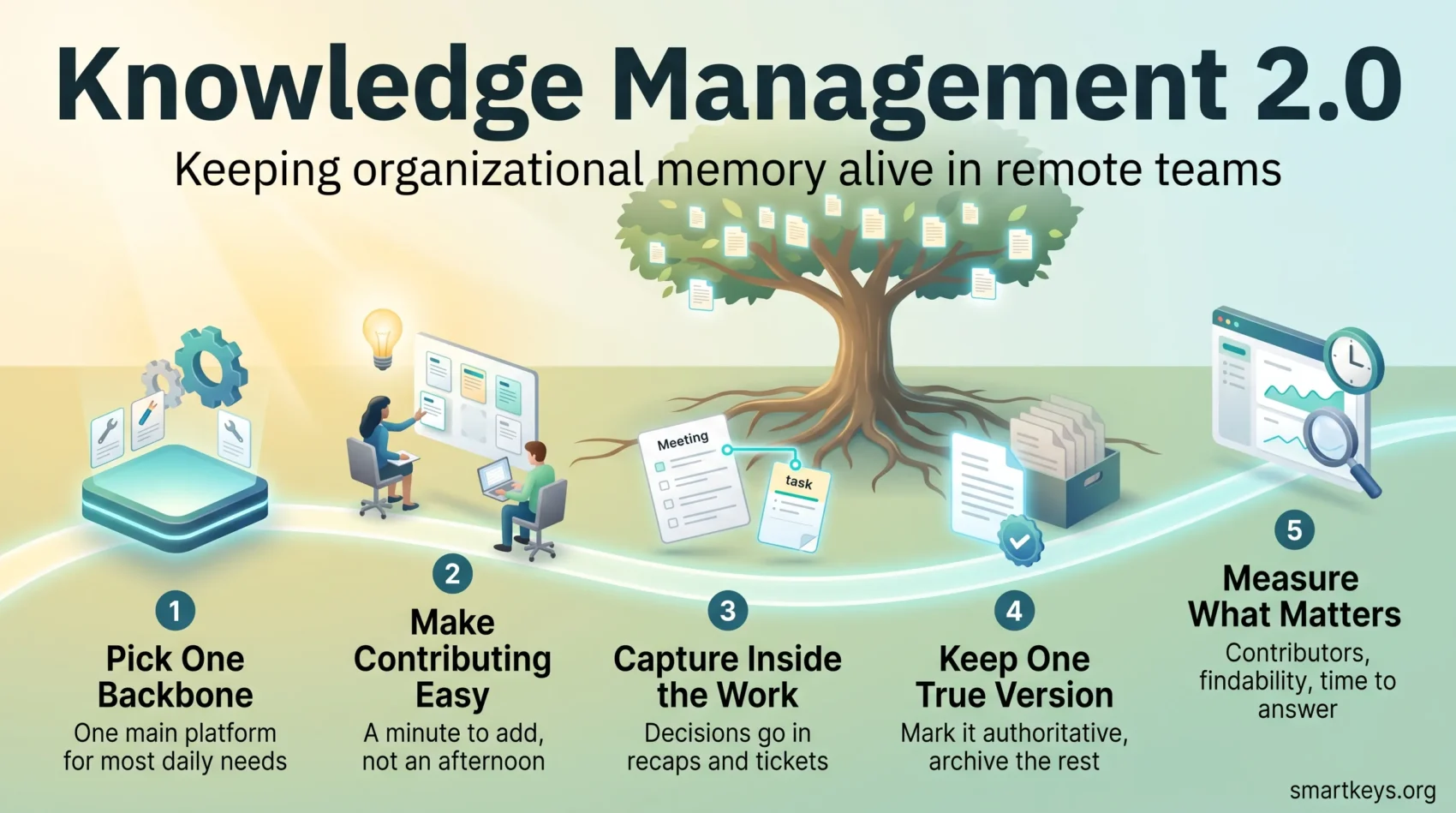
So the question has shifted. It is no longer whether people can find the page, but whether the page they find, or the page an assistant quotes, is the current one. Two habits matter more than any tool: mark one version of each important document as authoritative, and archive the rest. The same discipline decides whether AI collaboration tools save time or add noise.
Your Remote-Ready Rollout Playbook
Tie tools to tasks rather than buying technology and hoping for adoption.
1. Pick one backbone
Choose a main platform that covers most daily needs. Broad suites with strong permission controls and integrated search suit organisations with heavy compliance requirements. Skip them when your team mostly needs fast, lightweight interaction: a smaller, focused tool gets more use than a powerful one nobody opens. A clear digital HQ setup makes that choice easier to explain.
2. Design for participation
Make contributing take a minute, not an afternoon. Short templates, an obvious edit button and plain labels do more than any policy document. Default to small, linked pieces: a wiki stub, a ticket comment, a two-paragraph how-to next to the work it describes.
3. Reward contribution
Recognition works better than mandates. Name helpful contributors in team channels and let people see that their page saved someone else an hour. This is culture work as much as tooling, and it sits alongside everything else that holds a remote company culture together.
4. Capture inside the work
The best moment to write something down is while you are doing it: record decisions in the meeting recap, link the wiki stub from the task, note the fix in the ticket thread.
Silent meetings and asynchronous communication tools help, because both produce a written trail as a by-product. Mapped digital workflows do the same for repeatable processes.
Documentation pays back fastest during remote onboarding, when a new colleague needs answers you have already given a dozen times.
5. Measure what matters
- Adoption: how many people contributed last month, not the page count.
- Findability: the share of searches that end in an opened result.
- Time to answer: how long locating a known fact takes.
- Freshness: the share of key pages reviewed in the last six months.
Pair the numbers with a short team conversation each quarter. Metrics tell you what happened. People tell you why.
6. Security and continuity
Give each space an owner and grant the narrowest access that still lets people work. Set retention rules once and apply them consistently. Departures are the real test: when someone leaves, does their work survive them? That is as much a handover issue as a technical one, and it connects directly to employee retention.
Conclusion
The shift is from storing files to maintaining a living record of how the work is done. Start narrow. Pick one team, define its core spaces, agree a handful of templates and set light governance. Give it a quarter, then check adoption, findability and time to answer. Small, steady habits beat elaborate systems: clear ownership, a short taxonomy and regular pruning carry you further than a platform migration. Done well, it makes organizational memory easier to find, faster to use and more resilient when people move on.
Found this useful?
Make SmartKeys a preferred source on Google, and our articles will surface more often in your Top Stories, AI Overviews, and AI Mode.
Add as Preferred Source