A second brain is a trusted digital place where you keep the notes, ideas and references you want to use again. Instead of holding facts in your head or digging through old folders, you save useful material once and find it in seconds when a project needs it.
The idea belongs to a wider practice called personal knowledge management (PKM): the habits and tools you use to collect, sort and reuse what you learn. This guide walks through the most widely used second brain method, step by step, and works with any notes app.
One thing has changed since the method went mainstream. In 2026, your notes have a second reader. AI assistants can now search, summarize and connect the notes you store, which raises the payoff of a well-kept system and changes how you should write notes. You will find both the timeless workflow and the new parts below.
Key Takeaways
- Keep one system for notes and references, so you always know where to look.
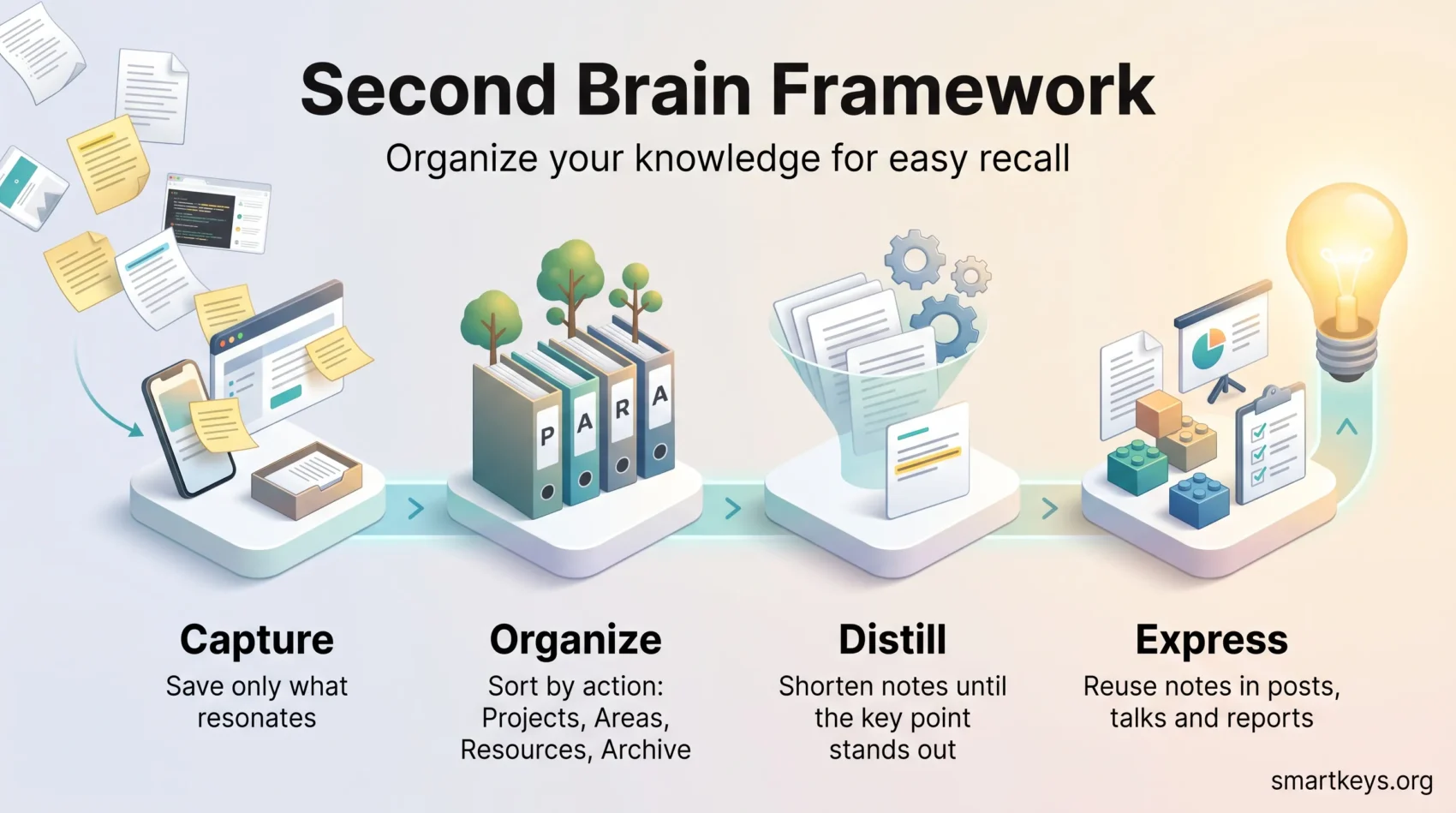
- Use CODE (Capture, Organize, Distill, Express) to turn what you read into finished work.
- Sort by action with PARA: Projects, Areas, Resources, Archive.
- Write for two readers. Notes that state their context work better for you and for AI search.
- Start small. One notes app, four folders and a weekly review beat an elaborate setup.
What a second brain is and why it helps
Think of a second brain as an external library for your working life. Articles, highlights, meeting notes, screenshots, PDFs and quick ideas all land in one searchable place that syncs across your phone and computer.
The benefit is practical. Your memory is good at thinking and bad at storage. When a reliable system holds the details, you spend less time hunting for that quote from last month and more time on the work itself.
A concrete example
Picture a team lead who has to prepare a new onboarding deck. Without a system, she searches email, browser bookmarks and three chat tools for material she knows she saw. With a second brain, she opens her “Onboarding” project note and finds the article she saved in spring, two meeting notes and a checklist from last year’s rollout. The first draft takes an hour instead of an afternoon.
Less mental clutter, clearer next steps
Unfinished ideas that live only in your head keep pulling at your attention. Writing them down in a place you trust lets your mind let go. A regular brain dump is a quick way to start, and our guide to open loops explains why unfinished tasks nag at you until they have a plan.
A second brain also works best when each project note ends with a clear next action, so nothing stalls waiting for a decision. If constant inputs are your core problem, the knowledge worker focus framework pairs well with this system by protecting attention at the source.
The 2026 shift: your notes now have two readers
The original method assumed one reader: you, months later, skimming your own highlights. That assumption no longer holds, because AI assistants can read your notes too. A few examples:
- Notion AI answers questions across a Notion workspace.
- Smart Connections, a plugin for the Obsidian notes app, surfaces related notes even when they share no keywords.
- NotebookLM gives answers with citations from a set of sources you choose. Google renamed it Gemini Notebook in July 2026; the old address still works.
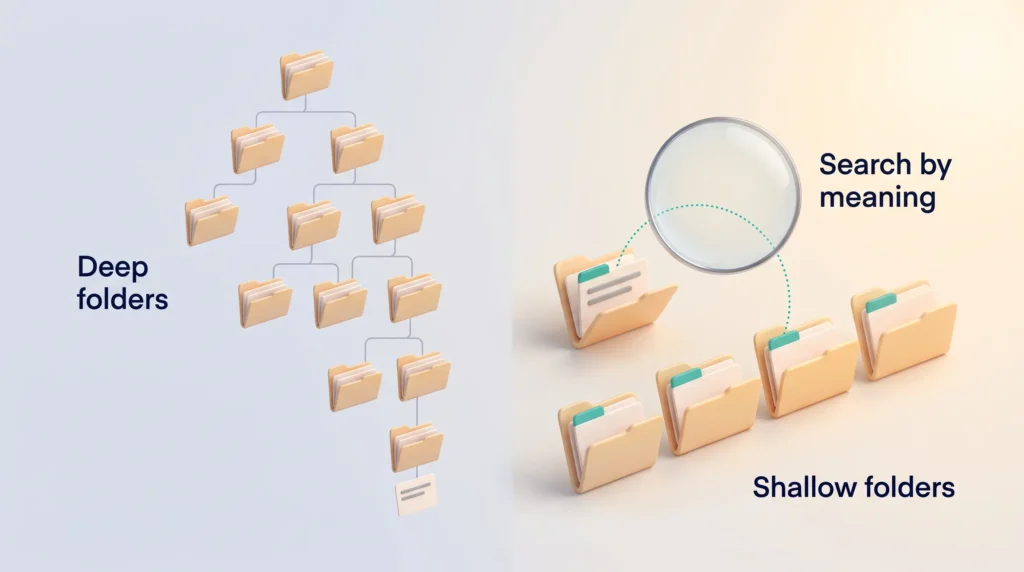
These tools use semantic search, which means they match notes by meaning rather than by exact words. That brings two consequences for how you work.
First, write down the “why.” A three-word fragment works for a human who remembers the context. An AI model cannot guess what you never wrote. Notes that state the source, why you saved it and which question it answers are easier to find for both readers.
Second, keep your structure shallow. Because search now understands meaning, a few well-labeled folders beat a deep folder tree by a wider margin than before.
The CODE framework at a glance
CODE is a four-step routine that moves raw input into useful output. It was popularized by productivity author Tiago Forte in his book Building a Second Brain, and it works in any app.
| Step | What you do | Time it takes |
|---|---|---|
| Capture | Save only what resonates: highlights, quotes, links | Seconds, in the moment |
| Organize | File by PARA so items sit where you will act on them | 10 minutes weekly |
| Distill | Shorten notes so the key point stands out | About a minute per note, when you reopen it |
| Express | Reuse stored notes in posts, talks, checklists and reports | When a project starts |
The next four sections cover each step in turn.
Step 1: Capture what matters without friction
Capturing should take seconds. If saving something feels like work, you will stop doing it.
Save only what resonates
Think like a curator, not a collector. Save the quote, the key paragraph or the screenshot that surprised or helped you, not the whole internet. A lean collection stays useful.
Four quick questions help when you are unsure. Is it useful for something you are working on? Is it personal, meaning it connects to your own experience or interests? Is it surprising, because it challenges what you thought? Is it inspiring enough to spark a next step? If the answer to all four is no, let it go. The same principle applies to tasks: a simple habit to capture tasks the moment they appear keeps to-dos out of your notes library.
Save now, read later
A read-later app is a temporary inbox for articles you want to read with attention. It moves you from reactive scrolling to deliberate saving. Add a tag or a short note on why you saved each item.
Pocket, for years the default recommendation here, is gone. Mozilla shut the service down on July 8, 2025 and ended the data export window on November 6, 2025. The two mature replacements are Readwise Reader, which combines read-later with highlight sync from ebooks and articles, and Instapaper, which is leaner and simpler.
Use fast capture tools
A web clipper (a browser extension that saves a page or selection to your notes app) removes most friction. Ebook highlight exports and voice notes fill the gaps. Transcription is now reliable enough that audio notes work as a real capture channel. An AI meeting notes workflow can feed summaries and action items into the same place.
If you write by hand or read on an e-ink tablet, our guide to digital note-taking covers how to get those notes into the same system.
Step 2: Organize for action with the PARA method
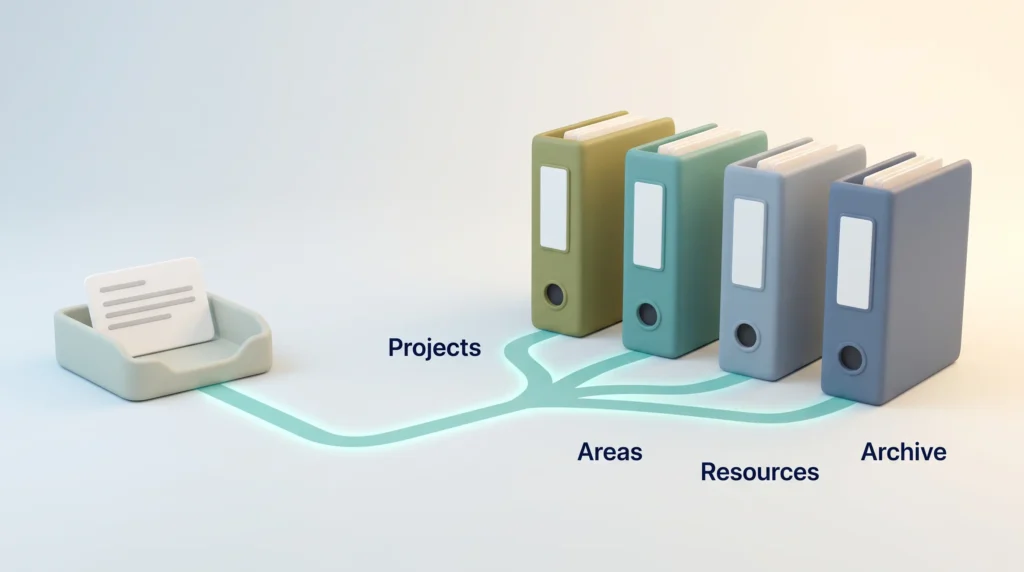
PARA replaces a messy folder list with four containers. The key idea: you sort information by when you will use it, not by topic.
| Container | What belongs there | Example |
|---|---|---|
| Projects | Short-term efforts with a deadline and an end state | Launch the Q3 report |
| Areas | Ongoing responsibilities with no finish line | Team hiring, health, finances |
| Resources | Reference topics you may reuse later | Pricing research, design inspiration |
| Archive | Anything inactive, kept but out of sight | Finished projects, dormant areas |
The distinction that does the real work is Projects versus Areas. Projects end; Areas do not. Mixing the two is the most common reason a PARA setup quietly stops being useful.
Start with a clean slate
Create an Archive folder labeled with today’s date and move all your old files into it. You keep everything, but your active workspace is empty and calm. This step makes the switch take an afternoon rather than a month. If your computer needs the same treatment, a digital declutter or a lean 5S pass over your digital workspace clears the files around your notes.
File new notes with three questions
When a note arrives, ask: Which project is this for? If none, which area? If none, which resource? If it fits nowhere, archive it or delete it.
Rely on search, not deep folders
Keep the structure shallow and let search do the finding. Process your inbox in batches once a week.
Not every container needs the same attention. Active projects deserve a look at least weekly, because they have deadlines. Areas change more slowly, so a monthly check is usually enough. Resources work best as a discovery pool: skim them now and then, and move anything that suddenly fits a project into that project. A short weekly review is the natural home for this sweep and keeps the system from filling up with clutter.
Step 3: Distill ideas your future self will use
Distilling means shortening a note until its main point is visible at a glance. The goal is simple: when you reopen the note in six months, you should understand in ten seconds why it matters.
Add one line of context
Start each note with a sentence on why you saved it, plus the source link. This is the habit that pays double in 2026. A note reading “strong framing, use for onboarding deck” tells you what you meant and gives semantic search something to match. A bare highlight with no surrounding sentence gives neither of you anything to work with.
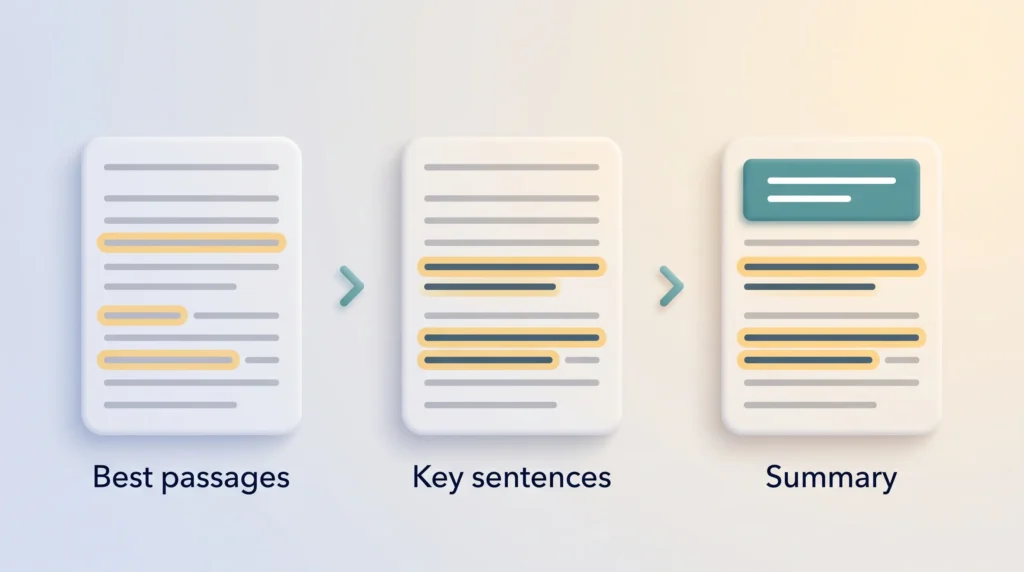
Use progressive summarization
Progressive summarization means summarizing in layers over time. First, save the best passages. The next time you open the note, bold the most important sentences. Later, add a short summary at the top in your own words. You skim the top layer for the gist and read the full text only when detail matters.
You can let AI draft the first summary. Still, write your own short take underneath. Putting an idea into your own words is what makes it stick. If you outsource that step entirely, you end up with a tidy archive you do not really know.
Improve notes a little each time
Do not polish everything at once. Give a note a better title today, bold a key line next time and add related links later. Small passes keep the effort proportional to how often you actually use the note.
Step 4: Express your work with reusable building blocks
Expressing is where the system pays off. You draft new work from notes you already have, so you rarely start with an empty page.
Here is how that looks in practice. A freelancer preparing a client workshop pulls a checklist from last year’s workshop note, two quotes from a book summary and a slide outline from her Resources folder. She has a solid draft in minutes. Reusable templates for recurring documents speed this up further.
Close the loop after each project
When a project ends, add a short note on what worked and what did not. Then move the project to the Archive. A monthly review is a good moment to read these lessons back before you plan the next cycle.
For a different way to turn captured material into a plan, mind mapping for problem solving helps you see how the pieces connect.
Build your tool stack
The method does not depend on any app, so treat the table below as options, not requirements. Pick a small set and let each tool do one job.
| Layer | Solid choices in 2026 | Pick it if |
|---|---|---|
| Notes app | Obsidian, Notion, Apple Notes, Evernote, OneNote, Logseq | Obsidian for local files and privacy; Notion for teams and databases |
| Read-later | Readwise Reader, Instapaper | Reader if you want highlight sync; Instapaper if you want simple |
| AI search | NotebookLM (Gemini Notebook), Notion AI, Obsidian Smart Connections | NotebookLM for cited answers from a fixed set of sources |
| Tasks | Things 3, Todoist or your existing task app | Any tool you already open daily beats a better one you do not |
Notes apps
Choose one notes app you will actually use. Obsidian and Logseq store everything as plain files on your own device. Notion and Evernote trade some of that control for easier sharing and built-in AI. Apple Notes is free, fast and can record and transcribe audio, which makes it an underrated default if you use Apple devices.
Comparing options? Our Evernote vs OneNote comparison, the Evernote vs Google Keep comparison and Notion AI vs Coda break down the trade-offs.
Check the export path first
Before you commit years of notes to any service, confirm you can export them in a standard format. Pocket’s shutdown showed that a service holding your saves is a dependency, not a neutral convenience.
The AI search layer is optional
This layer sits on top of your notes and answers questions across them, so you do not have to remember file names. Two cautions: keep NotebookLM notebooks focused on one project instead of loading your whole archive, and check the cited sources before you act on an answer. The tools are good, not infallible. If you reuse the same instructions with AI tools, a personal prompt library can live in the same system.
Teams that want to share a second brain face extra questions about permissions and ownership. Our article on knowledge management covers the organizational side.
Your first week: a five-step start
Most second brains fail at setup, not at the concept. Keep the first week deliberately small.
- Day 1: Archive. Create one folder named with today’s date and move every existing file into it. Nothing is lost; your workspace is clear.
- Day 2: Pick your apps. One notes app, one read-later app. Resist adding a third.
- Day 3: Build four folders. Projects, Areas, Resources, Archive. Add only your current projects.
- Days 4 to 6: Capture only. Save what resonates and write one line of context with each item. Do not organize yet.
- Day 7: First review. Spend 20 minutes filing your inbox with the three questions and distilling three notes.
Repeat step 5 every week. That single habit separates a working second brain from a folder of good intentions.
Mistakes that stall a second brain
Most setups fail in predictable ways. Watch for these four:
- Saving everything. A bloated inbox buries the few notes that matter and makes every review feel like a chore.
- Building a tagging scheme first. Dozens of tags look organized but slow down every save. Start with PARA and add tags only when search keeps failing you.
- Skipping the weekly review. Without it, the inbox turns into a second junk drawer and you stop trusting the system.
- Switching apps every few months. Each migration costs more time than the new features save. Settle on one tool and improve your habits instead.
Conclusion
A second brain is less about software and more about a few steady habits. Capture selectively, organize by action with PARA, distill notes so their point is obvious, and reuse them in real work.
AI makes finding your notes easier than ever. It rewards the same discipline the method always asked for: save less, and write down why something mattered. Start today with a dated Archive folder, four PARA folders and the next useful idea you come across.
Found this useful?
Make SmartKeys a preferred source on Google, and our articles will surface more often in your Top Stories, AI Overviews, and AI Mode.
Add as Preferred Source