A weekly review is a short, recurring session where you look back at the week that just ended and decide what the next one should contain. You do not work through your tasks during it. You update the system that tells you what to work on.
Its job is simple. It makes your calendar, your task list and your project notes match reality again, so you can trust them for the next five days. Most people need about an hour, and a rushed version still works when the week has been busy.
The payoff is a shorter, more honest plan. When every project has one clear next step, you stop rereading the same list and wondering where to start. This guide covers when to schedule the session, what to have open, the three passes that make it up, a short look back at wins and lessons, and a copy-and-paste template you can run this Friday.
Key Takeaways
- A weekly review updates your system. It is not a session for finishing tasks.
- Empty your inboxes, scan three weeks of calendar, and give every project one clear next step.
- One hour is normal. A 15-minute version is better than skipping the week entirely.
- Finish by blocking real working time, not just deadlines, in next week’s calendar.
- Name three wins and one lesson before you plan, so each week improves on the last.
- Pick one or two high-impact tasks for Monday so the week starts with momentum.
What a Weekly Review Actually Is
Think of it as a tune-up for your system, not a work session. Once a week you open your calendar, task list, project files and notes, and bring all four back in line with reality.
The routine comes from Getting Things Done, the productivity method David Allen published in 2001. GTD splits the review into three passes: Get Clear, Get Current, Get Creative. Those are still the cleanest way to structure the hour, and they are the headings used below.
Two GTD terms appear throughout this guide. A next action is the single physical step that moves a project forward, written concretely enough to start without thinking. “Email Sara the venue options” is a next action. “Plan offsite” is not. A Someday/Maybe list is the parking lot for things you might do one day but have not committed to, kept separate so it does not clutter the work you agreed to.
Why it is a date with your system, not your tasks
The temptation is to start doing the work you find. Resist it. Answer three emails mid-review and the session becomes a normal working hour, while the list stays out of date. Keep a scrap list instead and clear it afterwards.
Why the Habit Is Worth an Hour
The first benefit is trust. An unreviewed task list quietly fills with items that are finished, cancelled or no longer relevant. You stop believing it, so you start working from memory and from whoever emailed most recently. A weekly pass keeps the list honest, and an honest list is one you will open.
The second is fewer decisions. Choosing what to do next, over and over, all day, wears you down. That effect is known as decision fatigue, and the cure is to decide once, in advance, when you are calm.
The third is a quieter head. Unfinished work with no agreed next step keeps resurfacing in your attention. Those are the open loops that make an evening feel unsettled even when nothing is urgent. Writing down a specific next step usually closes the loop mentally, even though the work is still outstanding.
The fourth arrives slowly. Week after week you notice which estimates were wrong and which projects have not moved in a month.
When to Do It and How Long It Takes
Pick a predictable slot and defend it. The habit survives on consistency, not on finding a free hour. Put it in the calendar as a recurring appointment and silence notifications.
Friday afternoon or Sunday morning
Friday late afternoon has one clear advantage: the week is fresh in your memory, and you finish with a plan already in place, so Monday starts with work instead of triage. The drawback is that Friday energy is usually low.
Sunday morning gives you distance and a quieter head, which suits people who plan better when rested. The cost is work in your weekend. Try both for a month and keep the one you actually show up for.
Whichever slot you choose, use the same place each time and end with something you enjoy, such as a good coffee or an early finish. A fixed cue and a small reward make the routine easier to repeat. If you keep forgetting it, tie it to something you already do every week. That technique is called habit stacking: “After my last Friday meeting, I open my review checklist.”
From 15 minutes to a full hour
A normal week needs about an hour. A heavy week with many moving parts can take closer to two.
When the week has run away from you, run a short version instead of skipping it. Fifteen minutes covers the essentials: empty the inbox, check the next seven days for anything you are unprepared for, and set one next action per project that matters this week. A partial review keeps the system usable. A skipped one starts the slow drift back to working from memory.
What to Have Open Before You Start
Gather everything first. Hunting for a file halfway through turns a tight session into a wandering one.
The four things you always need
- Your calendar, so you can look back three weeks and forward three weeks.
- Your inboxes: email, chat, the notes app, the photo roll, the tray on your desk.
- Your task app with the project list and the Waiting For list, meaning everything you have delegated and are still owed.
- Somewhere to write freely, on paper or in a note, for the brain dump.
Optional helpers
If you plan visually, open your personal Kanban board, a simple board with columns such as To Do, Doing and Done that shows how much you have in progress. If you schedule by blocks, have your calendar management setup ready so you can place next week’s working time as you go. Some planning apps build the routine in. Sunsama, for example, offers guided weekly planning and weekly review flows. They are a convenience, not a requirement.
Then set a timer and note the constraints on the coming week: travel, a deadline, a day of back-to-back meetings.
Step One: Get Clear
The first pass collects everything floating around and puts it somewhere findable. Nothing is decided yet.
Start with the surfaces. Loose paper into one tray. Downloads folder into one place. Close the browser tabs you kept open as reminders, after writing down what they were reminding you of.
Then do a brain dump. Spend five minutes writing down everything on your mind, work and personal, with no filtering. If you go blank, walk through a trigger list: people you owe something, meetings you have not followed up on, bills, repairs, promises made at home. A structured brain dump catches the commitments that live only in your head.
Now process every inbox to zero. That does not mean answering everything. Each item leaves the inbox in one of five directions: do it if it takes under two minutes, delegate it, turn it into a next action, file it as reference, or delete it. The inbox zero method is about deciding once per item rather than rereading the same message six times.
One habit shortens this pass a lot: capture tasks the moment they appear during the week, into one trusted place. Then the review is sorting, not archaeology.
Step Two: Get Current
The second pass turns that pile into an accurate picture of your commitments.
Sweep the task list first. Tick off what is done. Delete what no longer matters. Move anything you will not touch in the next few weeks to Someday/Maybe. Be decisive; a list you half-trust is worse than a short one.
Then scan the calendar three times. Look back three weeks for loose ends: a meeting with no follow-up, a promise made in passing, an expense not filed. Look at the coming week and ask what each entry needs from you in advance. Look three weeks out for anything that needs preparation now, such as a flight, a report or a review cycle.
Check your Waiting For list and nudge anything that has gone quiet. Delegated work stalls silently, and this is usually the only moment you notice.
Visit each active project and confirm two things: the outcome still makes sense, and there is exactly one next action written concretely enough to start. A project without a next action is where weeks quietly disappear.
Finally, tag tasks by the energy they need, so you can match work to the moment later in the week.
Step Three: Get Creative
The third pass is short and open-ended. It stops the system becoming a machine that only processes obligations.
Prune the Someday/Maybe list. Delete anything you would feel relieved to never see again. A shorter list carries less guilt and gets read more often.
Promote exactly one idea. Pick something you are genuinely interested in and give it a first step small enough to finish in one sitting. If you use a Kanban board, pull that card into the active column so it competes for real attention.
Then freewrite for five minutes. No editing, no judging. Half of it will be useless, and that is fine; the point is to leave room for ideas that never arrive during a busy Tuesday.
Reflect on Wins and Lessons
Before you plan, spend ten minutes on what the week taught you. The three GTD passes tidy your commitments. This short reflection shows whether the way you work is paying off, and it is what makes next week better instead of just better organized.
Start with wins. Write down three things that went well, including small ones: a difficult conversation handled, a draft finally sent, a quiet morning used well. Naming progress on purpose balances the habit of remembering only what went wrong, and it gives you a reason to come back next week.
Then ask three plain questions. What worked? What did not? What will I change next week? Keep each answer to a line or two. One specific change, such as “no calls before 10am on Tuesdays”, is worth more than a page of good intentions.
Compare the plan with where your time really went. Your calendar shows what you intended. It does not show the hour lost to chat or the report that took twice as long. For real numbers, run a free time tracker such as Toggl Track or Clockify for one week. Then ask: how much time went to my actual goals, did I confuse being busy with making progress, and when was I sharpest? Pick one or two personal productivity metrics that fit your work instead of tracking everything.
Keep a running log. Paste your wins and answers into one note or spreadsheet, one row per week. After a couple of months, patterns appear that a single review never shows, such as the weekday that always collapses or the kind of task you keep underestimating.
Plan the Coming Week
The review is only worth the hour if it ends in a schedule. This is the part people skip, and the part that decides whether the plan survives Monday.
Put deadlines in the calendar, then block the work itself. A due date is not a plan. If a report is due Thursday, the three hours of writing need their own place in the week. Scheduling the work rather than the deadline is the core idea behind time blocking.
Add a generous margin to every estimate. Most people underestimate how long their own work takes, a pattern researchers call the planning fallacy. Adding a quarter to each estimate is a crude fix that works better than trying to estimate more accurately.
Group similar work together. Calls in one afternoon, admin in one slot, writing in the mornings. Every switch between kinds of work costs attention, and batching similar tasks removes most of those switches for free.
Leave gaps on purpose. A calendar with no space cannot absorb a single surprise, and there is always a surprise. Deliberate buffers between meetings stop one delay from cascading through the day.
Decide the order, not just the contents. When more work fits the week than there are hours, sort it by urgency and importance. The Eisenhower Matrix is a quick way to separate what is genuinely urgent from what is merely loud.
Check the week against your longer-term goals. If nothing in the next five days moves a goal you care about, the plan is all maintenance. That is worth noticing while you can still change it, and it is where a weekly plan connects to goal setting rather than floating free of it.
Plan the non-work parts too: meals, exercise, one free evening. These get squeezed out silently, and the calendar is the only reliable protection.
A Weekly Review Template You Can Copy
Paste this into your notes app and run it in order. The timings assume a full hour; halve them for a short version.
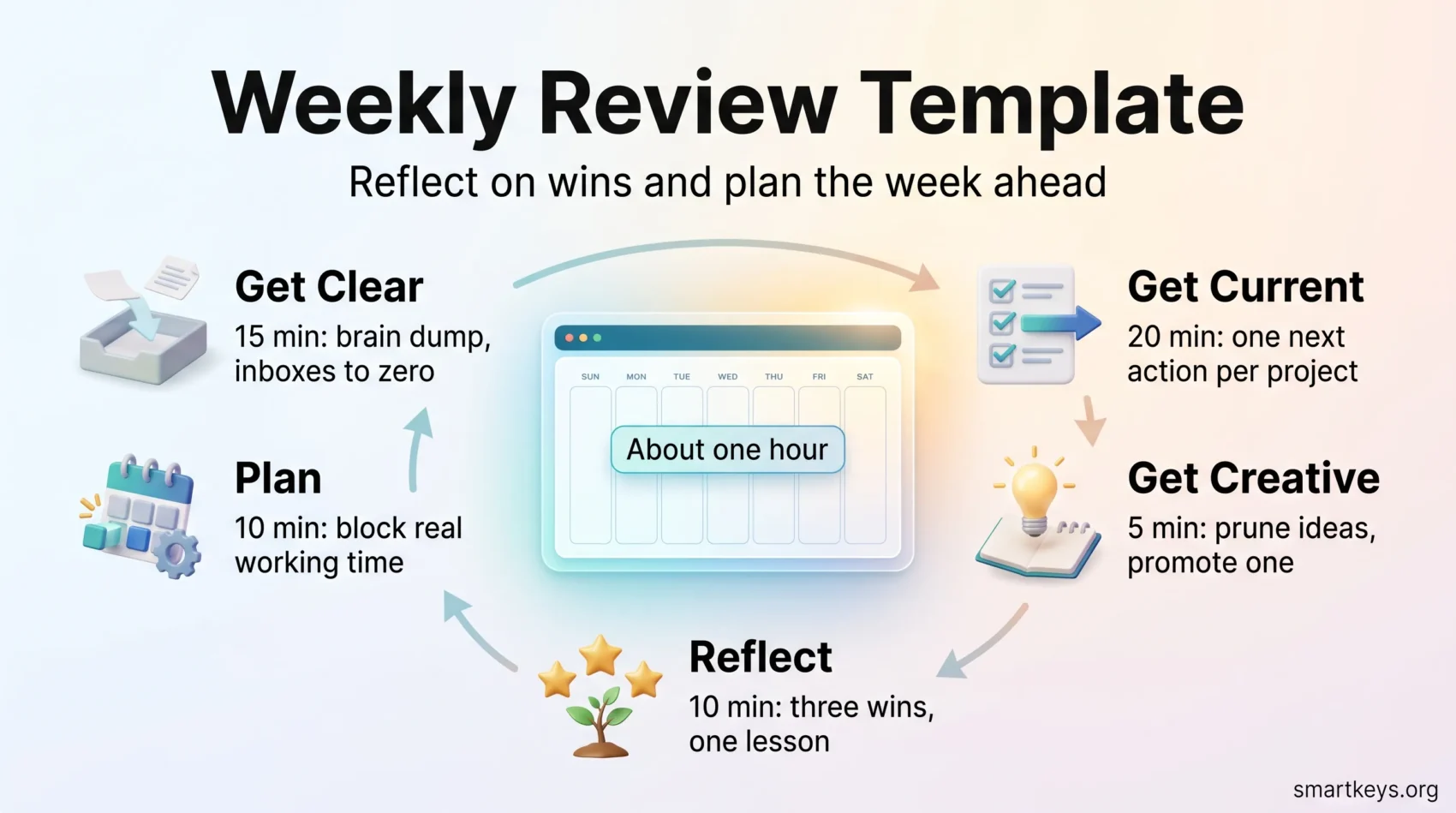
Get Clear (15 minutes)
- Clear the desk and close reminder tabs.
- Five-minute brain dump using a trigger list.
- Process every inbox to zero: do, delegate, defer, file or delete.
Get Current (20 minutes)
- Sweep the task list: complete, delete or move to Someday/Maybe.
- Calendar back three weeks, forward one week, forward three weeks.
- Nudge everything on the Waiting For list that has gone quiet.
- One concrete next action for every active project.
Get Creative (5 minutes)
- Prune Someday/Maybe.
- Promote one idea and give it a first step.
- Freewrite for five minutes.
Reflect (10 minutes)
- Write down three wins, however small.
- Answer: what worked, what did not, what changes next week.
- Compare planned time with where the hours really went.
- Add one row to your weekly log.
Plan (10 minutes)
- Block working time for each deadline, plus a quarter extra.
- Batch similar work into shared slots.
- Leave at least one open block for overflow.
- Name the one or two tasks that matter most on Monday.
- Schedule next week’s review before you close the notebook.
Finish with one written line on what you are deliberately not doing next week. Saying no on paper makes it easier to say no on Monday.
Where Weekly Reviews Usually Fail
Most abandoned reviews fail for one of four reasons.
It turns into a working session. You open the inbox, see something urgent, and the hour disappears. Fix: write it down, keep going, do it afterwards.
It has no end point. Without a timer the review expands until you start dreading it. Fix: set a 60-minute timer and stop when it rings, even if the list is not perfect.
It produces a list but no schedule. You finish with a tidy task list and no idea when any of it happens. Fix: the session is not over until working time is in the calendar.
The plan is fiction. Everything fits on paper because the paper does not know about your meetings. Fix: run a time audit for one week and plan against the hours you really have.
One more thing: a weekly review handles the next five days well and the next five months badly. Pair it with a monthly review for questions about direction. For a lighter routine that only plans forward, weekly planning covers the shorter version.
Conclusion
A weekly review is a small, unglamorous habit with a large effect. One hour spent updating your system buys five days of not wondering what you should be doing.
Keep it simple enough to sustain: a timer, four things open, three passes, and a schedule at the end. The version you run every week beats the elaborate one you run twice. Block the first slot now, before the week fills up around it.
Found this useful?
Make SmartKeys a preferred source on Google, and our articles will surface more often in your Top Stories, AI Overviews, and AI Mode.
Add as Preferred Source