The Eisenhower Matrix is a simple task prioritization tool. You sort every task on your list by two questions: is it urgent, and is it important? The answers put each task in one of four boxes, and each box comes with a different instruction: do it, schedule it, delegate it, or drop it.
The method is named after US President Dwight D. Eisenhower and was turned into a four-box grid by Stephen Covey in “The 7 Habits of Highly Effective People”. Its appeal is that it needs no app, no training and no buy-in from anyone else. You can draw it on the back of an envelope in ten seconds. This guide explains what the matrix actually does, what the research says about why we get prioritization wrong, how to build your own in about 15 minutes, and where the method stops helping.
Key Takeaways
- Urgent means a task demands attention now. Important means it moves a goal forward. The two overlap far less often than they feel like they do.
- Research published in the Journal of Consumer Research found people choose lower-payoff tasks simply because those tasks carry a deadline.
- The four quadrants map to four decisions: do, schedule, delegate, delete.
- Quadrant 2 (important, not urgent) is where planning, learning and prevention live. It is also the first thing a busy week eats.
- Cap each quadrant at roughly eight to ten tasks so the grid stays readable.
- The matrix sorts work you have already captured. It does not tell you what your goals are.
What the Eisenhower Matrix Is
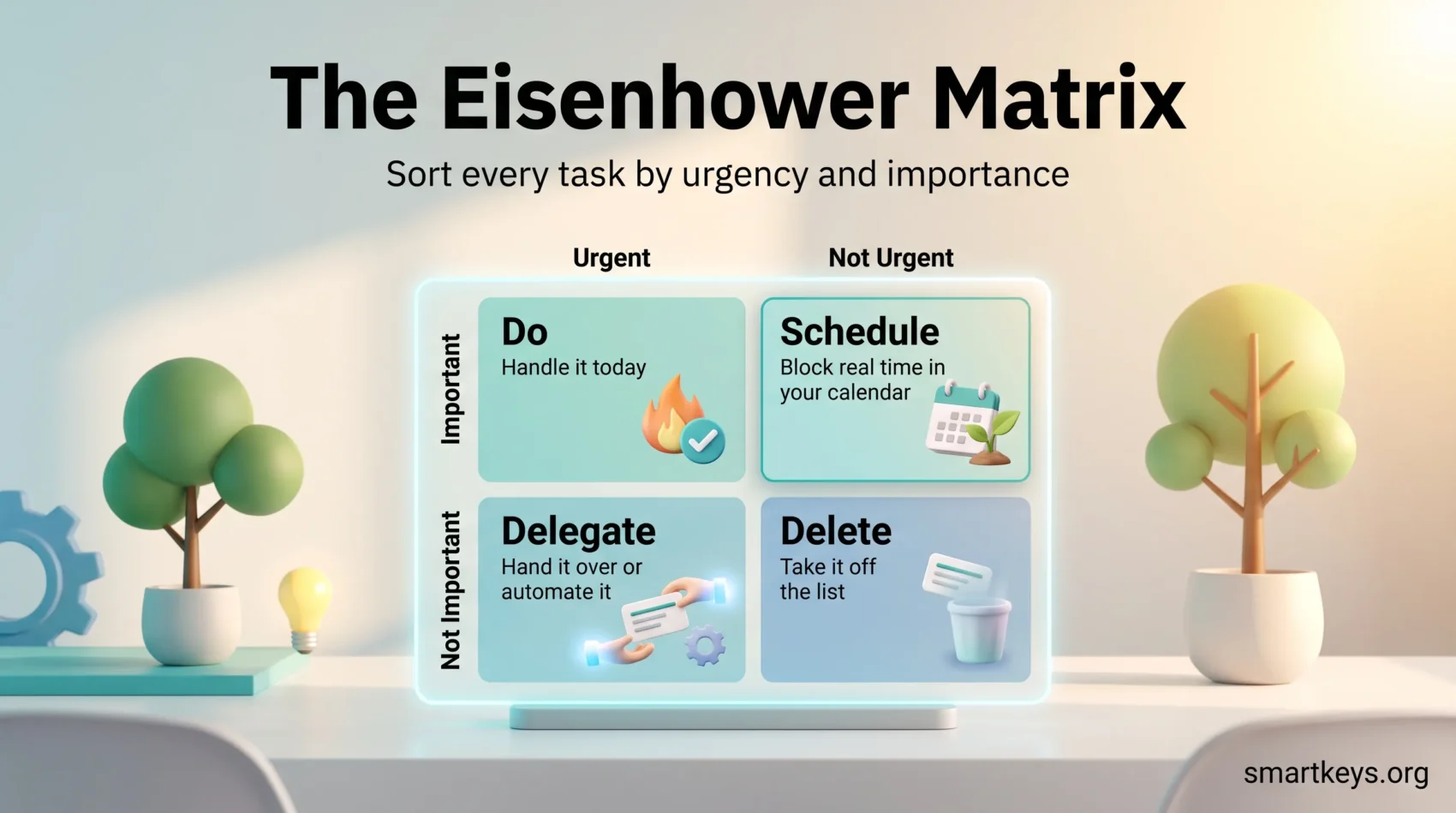
Picture a square divided into four smaller squares. The horizontal axis is urgency, the vertical axis is importance. Every task you are carrying goes into one of the four boxes:
- Urgent and important: do it now.
- Important but not urgent: put it in the calendar.
- Urgent but not important: hand it to someone else or automate it.
- Neither urgent nor important: take it off the list.
The grid is often linked to a remark Eisenhower made in a 1954 address at Northwestern University: “I have two kinds of problems, the urgent and the important. The urgent are not important, and the important are never urgent.” Worth knowing: he was quoting an unnamed former college president, not coining the line himself, and the polished version you usually see quoted (“what is important is seldom urgent”) is a later rewording. The idea is still useful. The attribution just deserves a footnote.
What makes the matrix worth your time is not the grid. It is the forced pause. Sorting a task means naming why it is on your list at all, which is a question most to-do lists never ask. If you want a wider view of how this fits alongside other methods, our guide to task prioritization frameworks compares it with MoSCoW, RICE and others.
Urgent Is Not the Same as Important
Almost every failure of the matrix traces back to blurring these two words. So it is worth being precise.
What Makes a Task Urgent
A task is urgent when the cost of delay is immediate and visible: a deadline today, a client waiting on a reply, a system that is down. Urgency is about the clock, not the value. A colleague pinging you about a meeting room booking is urgent. It is rarely important.
Urgency also announces itself. It arrives as a notification, a red badge, a manager standing at your desk. That is exactly why it wins so often, and why it needs a counterweight.
What Makes a Task Important
A task is important when finishing it moves you toward a goal you actually care about: the quarterly plan, the skill you need next year, the process that stops the same fire restarting every month. Importance is about consequences, not timing.
Important work is usually quiet. Nobody chases you for the strategy document you promised yourself. That is why it needs to be scheduled rather than merely intended. A written objective helps here: our guide to goal setting covers how to define one you can actually act on, and our guide to SMART goals walks through the criteria in detail.
Why Urgency Wins When You Are Not Watching
This is not a discipline problem. It is a documented bias.
In a 2018 paper in the Journal of Consumer Research, Meng Zhu, Yang Yang and Christopher Hsee described what they called the mere urgency effect. Across five experiments, people picked tasks that carried an artificial deadline even when a competing task paid more and there was plenty of time to do both. In one study, 31.3% of participants chose a task worth three chocolates that “expired” in ten minutes over one worth five chocolates that ran for 24 hours. Over repeated rounds, 58.8% made the lower-payoff choice at least once.
Two findings from that research are directly useful. First, the effect shrank when participants were reminded of the payoffs before choosing. Making the value of the work visible pulls attention back off the clock. Second, the effect was stronger in people who saw themselves as busy. If your days feel packed, you are more exposed to the trap, not less.
That is the whole case for the matrix in one sentence: it forces the payoff question in front of the deadline question. If you find yourself losing entire days to reactive work, our piece on improving task prioritization goes further into the habits that help.
Source: Zhu, Yang and Hsee, “The Mere Urgency Effect”, Journal of Consumer Research, 2018.
The Four Quadrants Explained
Quadrant 1: Do
Urgent and important. A production outage, a bid that closes at 5pm, a client escalation. These get handled today, ideally first.
A permanently crowded Quadrant 1 is a warning sign, not a badge. It usually means Quadrant 2 work has been skipped for so long that prevention has turned into firefighting. If your hardest task keeps sliding to the afternoon, the eat the frog method is a simple fix.
Quadrant 2: Schedule
Important but not urgent. Planning, training, documentation, relationship building, the process improvement that removes next quarter’s emergencies.
This is the quadrant that pays, and the one that disappears first. “Schedule” is meant literally: give the task a start time in your calendar, not a place on a wish list. Blocking protected time is the practical mechanism, and a team-wide no-meeting focus policy makes it stick better than individual willpower does. For work that needs long uninterrupted stretches, our guide to deep work covers how to structure those blocks.
Quadrant 3: Delegate
Urgent but not important, at least not to you. Routine approvals, status requests, scheduling, the recurring report someone else could produce.
Delegation is the point here, and it is a skill rather than an instruction: our guide to delegating effectively covers how to hand work over without creating more work. Where there is nobody to delegate to, two other routes apply. Group similar small tasks and clear them in one pass, which our guide to batch processing explains, or automate the repetitive ones out of existence.
Quadrant 4: Delete
Neither urgent nor important. The report nobody reads, the meeting you attend out of habit, the tool you keep meaning to evaluate. On a personal list, this box often holds habits rather than tasks, such as an hour of scrolling that nobody planned.
Deleting feels uncomfortable, so most people quietly demote these tasks instead and carry them for months. Writing them down as things you have decided not to do makes the choice explicit. A not-to-do list is one way to hold that line, and a meeting audit is usually the fastest way to find Quadrant 4 items hiding in your calendar.
Build Your First Matrix in 15 Minutes
- Empty your head first. Write down every open task, from the contract renewal to the light bulb in the hallway. Sorting a partial list just produces a confident wrong answer. Our guide on capturing tasks covers how to do this properly.
- Draw the grid. Paper, a whiteboard or four columns in a document. Label the boxes Do, Schedule, Delegate, Delete.
- Sort by asking two questions per task. Does something bad happen today if I skip this? That is urgency. Does finishing it move a goal I care about? That is importance.
- Give Quadrant 2 real calendar time. Before you start Quadrant 1, book the important-not-urgent work. Otherwise it will not survive the day.
- Act on Quadrants 3 and 4 immediately. Send the delegation message and delete the dead items while you are still looking at the list.
Fifteen minutes is enough for a first pass. Redo it as part of a weekly planning session rather than daily, and it stays a decision tool instead of becoming another chore.
A Worked Example: One Manager’s Monday
A marketing manager starts the week with eleven open items. Sorted, they land like this.
Do: a client presentation due Wednesday and a campaign that is overspending its budget today. Both have a deadline and both matter.
Schedule: the next quarter’s channel plan and a half-finished onboarding document for the new hire. Neither has a deadline this week. Both will become Quadrant 1 emergencies in three weeks if they stay unscheduled, so they get two blocked hours on Thursday.
Delegate: pulling the weekly performance numbers and answering a supplier’s invoice query. Urgent, routine, and better handled by someone closer to the data.
Delete: a webinar invitation, a newsletter tool she keeps meaning to trial, and a recurring status meeting that duplicates a written update.
The useful part is not the sorting. It is that two hours on Thursday now exist for work that would otherwise have been squeezed out, and three items left the list entirely.
Habits That Keep the Matrix Useful
Cap Each Quadrant
Keep roughly eight to ten tasks per box. This is a practical limit rather than a researched one, but it works for a simple reason: a quadrant holding thirty items is a to-do list again, and you are back where you started. If everything cannot fit, the surplus is telling you something about your workload.
Color-Code by Quadrant
Assign one color per quadrant and use it everywhere: red for do, blue for schedule, yellow for delegate, grey for delete. The value is speed. You can read your priorities at a glance instead of re-reading each task. Pick a scheme and keep it consistent, because a color code that changes meaning is worse than none.
Keep Work and Personal Lists Separate
Two matrices usually beat one. Work and personal tasks compete for the same hours but not for the same judgment, and mixing them makes both harder to read. The exception is if your week genuinely blends the two, in which case one grid with clear labels is fine.
Review It Weekly
Priorities move. A Quadrant 2 item becomes Quadrant 1 as its deadline approaches, and a Quadrant 1 crisis often turns out to have been Quadrant 3 all along. A short weekly pass keeps the grid honest. Anchoring it to a fixed slot in your week makes it far more likely to happen.
Between reviews, a two-minute look each morning is enough. Check what sits in Do, and confirm that today’s Schedule blocks are still in your calendar. You are not re-sorting, just making sure the plan survived the night.
Running the Matrix in Tools You Already Have
You do not need dedicated Eisenhower software. Most task managers already have the pieces.
Todoist offers four fixed priority levels, P1 to P4, colored red, orange, blue and white, which map onto the four quadrants directly. In Trello, four lists or four labels do the same job on a board you can share. Notion and ClickUp both let you add a priority field and filter or group by it, which turns any existing task database into a matrix view without rebuilding anything.
The tool matters less than the discipline of assigning every task to exactly one box. A grid where half the items are unsorted gives you the reassurance of a system without any of the benefit. If you are still choosing a task manager, our overview of task management covers what to look for.
If you would rather see the grid itself on screen, dedicated apps exist. Priority Matrix by Appfluence, for example, is built entirely around the four quadrants and runs on phone, desktop and web.
Using the Matrix as a Team
The matrix also works as a group exercise, for example in a project kickoff or a sprint planning session. Draw the four boxes on a digital whiteboard such as Miro or Mural, put each task on a sticky note, and sort the notes together.
The most useful moments are the disagreements. If a product owner puts a task in Do and a developer puts it in Delete, the team does not share the same picture of its goals. Settle that before anyone starts working. One rule keeps team grids from stalling: every task in Delegate needs a named owner, or it simply bounces back. Our guide to visual thinking for task management covers board-based methods like this in more depth.
Where the Matrix Falls Short
Being honest about the limits makes the method more useful, not less.
- It cannot define importance for you. Without a clear goal, “important” collapses into “feels significant”. The matrix sorts against your priorities; it does not supply them.
- Everything drifts into important. If Quadrant 4 is empty week after week, you are not being ruthless, you are being generous with yourself.
- It ignores effort and dependencies. Two equally important tasks may take twenty minutes and three weeks. For project work with sequencing, a framework that scores effort alongside value fits better.
- Sorting is not doing. Rebuilding the grid can become its own form of procrastination. If the matrix takes longer than the first task in it, stop and start working.
- It says nothing about how many tasks fit in a day. Pair it with a volume rule such as the 1-3-5 rule, or with the time-blocking approaches in our guide to time management.
Conclusion
The Eisenhower Matrix earns its place because it makes one question unavoidable: is this task worth doing, or does it just feel loud? The research on the mere urgency effect suggests that question does not get asked by default, particularly by people who already feel busy.
Used well, the matrix is a five-minute weekly habit that protects a few hours of important work from a calendar that would otherwise fill itself. Used badly, it becomes a decorated to-do list. The difference is whether Quadrant 2 gets real calendar time and Quadrant 4 actually gets emptied. Start with those two, and the rest follows. If motivation rather than prioritization is the sticking point, our guide to staying motivated may be the better next read, and our piece on using to-do lists effectively covers what to do with the tasks once they are sorted.
Found this useful?
Make SmartKeys a preferred source on Google, and our articles will surface more often in your Top Stories, AI Overviews, and AI Mode.
Add as Preferred Source