

Mastering time management is essential if you lead a hectic working life and want to protect both your output and your evenings. This guide walks through the time management techniques that still hold up in 2026, from setting clear goals to choosing the right tools, so you can build a schedule around the work that actually matters.
The pressure is measurable. Microsoft’s June 2025 Work Trend Index special report Breaking down the infinite workday found that employees are interrupted every two minutes during core working hours – roughly 275 times a day – by meetings, emails and chats, and that 57% of meetings are ad hoc calls with no calendar invite. Against that backdrop, effective time management is less about cramming more into a day and more about defending the hours in which real work gets done.
Key Takeaways
- Match demanding work to your peak-energy hours and push admin into the low-energy stretch of the day.
- Specific goals make prioritization possible. Vague goals make everything feel equally urgent.
- A written schedule beats a mental one, because it forces you to decide what will not get done.
- Frameworks such as the Eisenhower Matrix or ABCDE work because they make trade-offs explicit.
- Handing off low-value, repeatable work buys back time that no technique can create.
- Tools help only once the decisions are made; apps add noise to an unclear system.
- Breaks are part of the method, not a reward for finishing.
Understanding the Importance of Time Management
Mastering time management matters because attention, not hours, is the scarce resource. Strong time management skills let you spend that attention on work tied to your goals instead of whatever arrived most recently in your inbox. The payoff is a steadier week and a clearer line between work and everything else.
Why Time Management Matters for Professionals
Effective time management pays off in several ways:
- Protects deep work: Concentrated blocks are what move difficult projects forward.
- Reduces procrastination: A structured plan removes the daily negotiation about where to start.
- Supports work-life balance: Deciding in advance when work ends makes the boundary real.
- Builds self-discipline: Repeatable routines require less willpower than ad hoc decisions.
- Lowers stress: Knowing what is planned and what is deferred removes a persistent low-level worry.
Consequences of Poor Time Management
When the schedule slips, the damage compounds. Deadlines are missed, work spills into evenings, and the backlog itself becomes a source of stress. Unfinished tasks are particularly costly: open loops keep pulling at your attention long after you have moved on to something else. Avoidance then dresses itself up as productivity, and you end up reorganizing a task list instead of working through it – a pattern worth recognizing as productive procrastination. If delay is your main obstacle, our guide to overcoming procrastination covers the triggers and the countermeasures in detail.

Setting Clear Goals for Effective Time Management
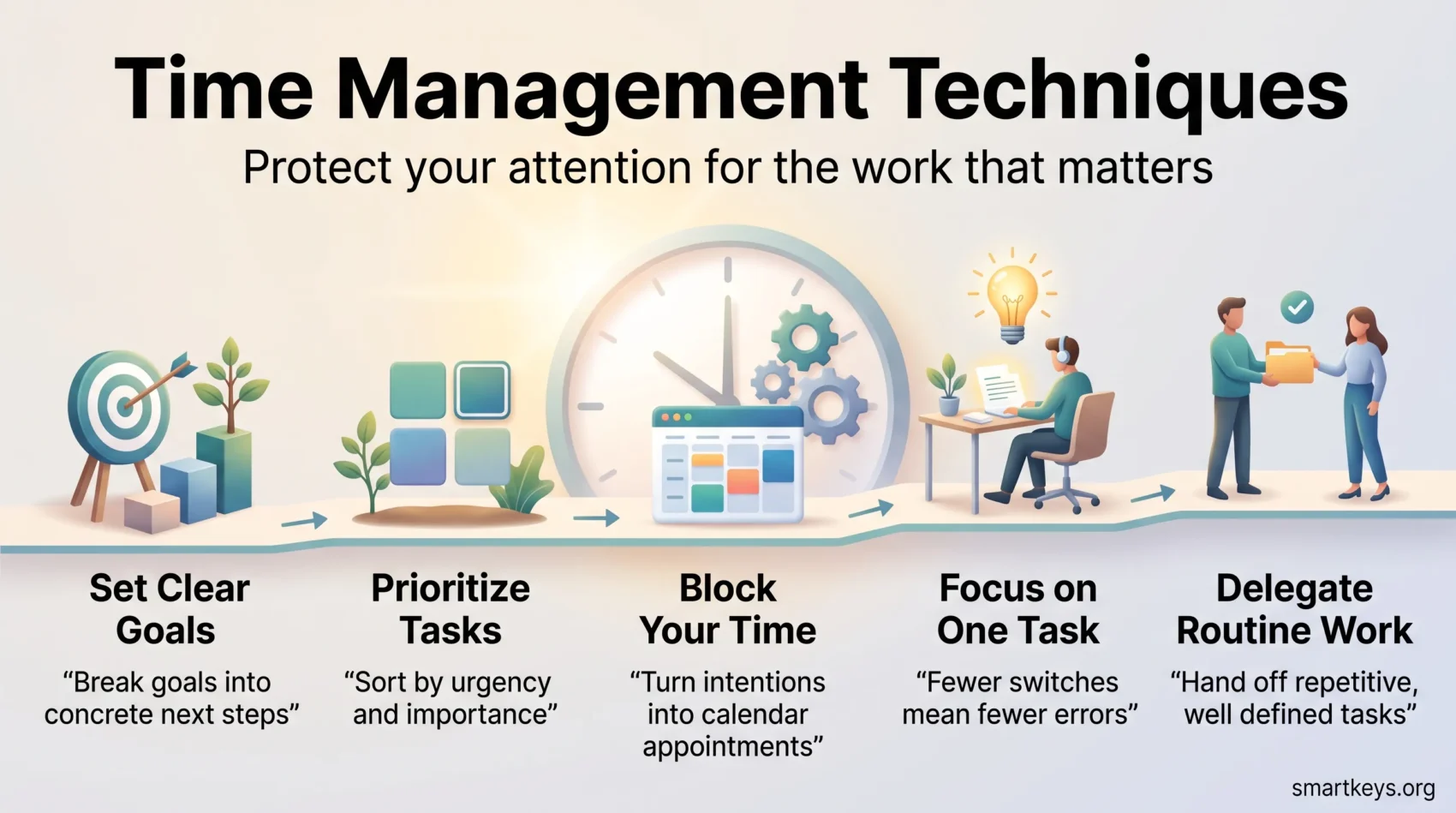
Setting clear goals is what makes prioritization possible. Without them, every request looks equally deserving of your morning. Separating short-term from long-term goals tells you which work earns a place in this week’s calendar and which belongs in a longer plan.
Short-term vs. Long-term Goals
Short-term goals are the ones you expect to finish within a year, and they shape your daily and weekly priorities directly. Long-term goals stretch beyond that and progress only through repeated, deliberate effort. Holding both in view stops you from either drifting through busywork or planning so far ahead that nothing gets done this month.
Breaking Goals into Actionable Steps
Large goals stall because they are not yet anything you can start. Break each one down until the next step is a concrete action you could begin in the next ten minutes – the core of the next action mindset. The SMART criteria (Specific, Measurable, Achievable, Relevant, Time-bound) is a useful check on whether a goal is defined well enough to be scheduled at all. Build in a regular review so plans stay honest; a short monthly review is usually enough to catch goals that have quietly stopped mattering.
Prioritize Tasks to Maximize Productivity
Prioritization is the part of time management people most often skip, and it is the part that decides whether the rest works. A schedule built without it simply spreads the same overload across neater blocks. The goal is to spend more of the week on chosen work and less on whatever arrives – the distinction between proactive and reactive work.
The Eisenhower Matrix Explained
The Eisenhower Matrix, named after President Dwight D. Eisenhower and popularized by Stephen Covey, sorts tasks into four quadrants along two axes: urgent or not, important or not. Its value is not the grid itself but what the grid forces you to admit. Most calendars fill with work that is urgent and unimportant, while the important-but-not-urgent quadrant – planning, skill-building, relationships – gets whatever is left. Sorting your week this way makes that imbalance visible and gives you a defensible reason to delegate or drop items.
Methods for Effective Task Prioritization
Several methods can guide your task prioritization. Pick one and use it consistently rather than sampling all of them:
- MITs (Most Important Tasks): Name up to three tasks that must be finished today, and treat everything else as optional.
- The ABCDE method: Rate each task from A (must do) to E (eliminate), then work strictly in order.
- The 2-Minute Rule: Anything that takes under two minutes gets done immediately rather than captured, tracked and revisited.
- Eisenhower Matrix: Split tasks by urgency and importance, then defend the important-but-not-urgent quadrant.
- Eat the Frog: Start with the hardest task while your attention is freshest.
Whichever you choose, it needs somewhere to live. A single trusted task management system keeps commitments out of your head and out of scattered notes, which is what makes daily prioritization take minutes rather than half an hour.
Creating a Detailed Schedule
A schedule turns priorities into commitments. Assigning work to specific hours exposes over-commitment early; an open-ended list hides it until the day is lost.
Daily Scheduling Techniques
Planning tomorrow before you finish today is the single habit most worth adopting: you start the morning with decisions already made. From there, time blocking assigns real hours to real tasks instead of leaving them to compete for whatever gaps appear.
A few rules keep a schedule realistic:
- Separate urgent from important before anything reaches the calendar.
- Give each block a defined end, and schedule breaks as deliberately as work.
- Leave unassigned buffer time. A calendar with no slack breaks on the first surprise.
- Set a deliberate deadline for open-ended work, since Parkinson’s Law means tasks expand to fill whatever time you allow.
Using Digital Tools for Scheduling
Calendar and project tools make the plan visible and shareable. Google Workspace and Microsoft 365 cover scheduling and shared availability, while board-style planners such as those compared in our Monday.com and Trello breakdown, or an all-in-one workspace such as ClickUp, handle multi-step projects. Used well, they let you:
- Set reminders so deadlines do not depend on memory.
- See a week at a glance and spot the days that are already full.
- Share availability and task status so colleagues stop asking for updates.
The tool matters less than the habit of keeping it accurate. A calendar you no longer trust is worse than none at all.
Adopting Time Management Techniques
Two techniques do most of the work for most people: time blocking to decide when something happens, and the Pomodoro Technique to hold attention once it starts.
Understanding Time Blocking
Time blocking means dividing the day into periods dedicated to a single task or category. You might reserve two hours for project planning, mute notifications and mark yourself unavailable. The technique works because it converts a vague intention into an appointment, and appointments are much harder to trade away. Batch similar work – all your calls, all your email – into the same block, so you pay the cost of switching context once instead of a dozen times.
The Pomodoro Technique for Focused Work
Francesco Cirillo developed the Pomodoro Technique in the late 1980s, naming it after the tomato-shaped kitchen timer he used as a student. You work in 25-minute intervals, take a five-minute break after each, and a longer break of 15 to 30 minutes after four. The interval is short enough that starting feels easy, and the timer gives you a legitimate reason to postpone an interruption rather than absorb it. If 25 minutes feels too short for the work you do, lengthen the interval – the mechanism, not the number, is what matters.
The Benefits of Monotasking Over Multitasking
Monotasking – working on one thing at a time – consistently outperforms multitasking for anything demanding. What feels like parallel work is really rapid switching, and each switch has a cost.
How Monotasking Increases Efficiency
Research by Gloria Mark and colleagues at UC Irvine, published at the CHI conference in 2008, found that after an interruption people took an average of roughly 23 minutes to return to the original task, and worked faster but under greater stress to compensate. That is the hidden bill behind a “quick question”. Monotasking removes it: fewer switches mean fewer errors, better recall of what you were doing, and a shorter path from starting a task to finishing it. Our overview of focus management techniques goes deeper on building that habit.
Strategies to Minimize Distractions
A distraction-free setup is mostly a matter of removing defaults you never chose:
- Work in a dedicated space, physical or virtual, that signals focus time.
- Turn off non-essential notifications rather than promising yourself you will ignore them. Simple focus tools such as timers and site blockers help here.
- Agree response-time expectations with your team so silence is not read as absence.
- Audit your stack occasionally. Work tech overload – too many apps each demanding attention – is a distraction problem disguised as a tooling problem.
Leveraging Technology for Time Management
Technology helps once the decisions are made. In 2026 the useful shift is that assistants built into mainstream suites can draft, summarize and triage, which removes routine work rather than adding another destination to check. What has not changed is the failure mode: adding tools to an unclear system creates more places to look, not more time.
Useful Productivity Apps and Tools
A few categories cover almost every need:
- Task managers such as Todoist or Things, for capturing and ordering commitments.
- Project boards such as Trello, Asana or ClickUp, for work with several steps and several people.
- Team communication such as Slack or Microsoft Teams, which reduce meetings when channel and notification rules are set deliberately.
- Time tracking such as Toggl, to find out where the week actually goes before you try to redesign it.
- Calendars such as Google Calendar or Outlook, as the single place where committed time lives.
Our roundup of productivity apps compares current plans and limits in more detail.
Integrating Technology into Your Workflow
- Keep one calendar. Two calendars guarantee a double booking.
- Keep one task list. Anything captured elsewhere should be moved into it the same day.
- Track your time for a week before optimizing, so you are fixing a measured problem.
- Use blockers and focus modes during scheduled deep-work blocks.
- Automate the repetitive handoffs between tools rather than doing them by hand.
Resist the urge to keep refining the system itself. Spending more time organizing than doing is a common trap.
The Role of Delegation and Outsourcing
Delegation is the only technique that adds hours rather than rearranging them. Everything else redistributes the time you already have.
Identifying Tasks Suitable for Delegation
Look for work that is repetitive, well-defined and does not require your specific judgment:
- Administrative work such as scheduling, expense filing and inbox triage.
- Routine reporting that follows a fixed template.
- First-line customer questions that a documented process already answers.
Delegation fails when the handover is vague. Define the outcome, the deadline and the level of autonomy, then check in at a scheduled one-on-one rather than interrupting mid-task.
Benefits of Outsourcing for Busy Professionals
For solo professionals and small teams, outsourcing bookkeeping, design or research to a specialist usually costs less than the alternative of doing it slowly yourself. The gains show up as recovered calendar time and faster turnaround outside your expertise. The trade-off is real: outsourcing adds coordination overhead and works only where you can specify the result clearly.
Developing Effective Time Management Skills
Time management is a skill set, which means it improves with deliberate practice rather than good intentions.
Tips to Improve Time Management Skills
- Keep a work journal: A short daily note on what you planned versus what happened surfaces patterns quickly. Productivity journaling covers formats that take under five minutes.
- Start the day with intent: Naming one outcome before you open your inbox anchors the whole day.
- Seek feedback: Colleagues notice your bottlenecks – usually late replies or over-committed weeks – before you do.
- Practice one new technique at a time: Give it two weeks before judging it.
- Prioritize deliberately: Use the Eat the Frog technique to take on the hardest task first.
- Set SMART goals: Specific, time-bound goals are far easier to schedule than open-ended ambitions.
The Importance of Continuous Learning
Your system should change as your role does. A method that worked when you managed only your own tasks will strain once you coordinate others, and a routine built for a quiet office may not survive a remote or hybrid week. Review what is working every few months, keep the parts that survive contact with a busy period, and drop the rest without ceremony.
Taking Breaks to Maintain Productivity
Breaks are not lost time. Attention degrades over a long stretch of concentration, and a short pause restores more capacity than pushing through preserves.
How Regular Breaks Enhance Focus
Stepping away resets attention and lets your mind process what you have just done, which is why solutions often arrive on a walk rather than at the desk. Our guide to short breaks and focus explains the mechanism. Movement helps more than a change of screen: a few minutes of walking does more for alertness than scrolling a feed, which keeps you in the same posture and the same attentional mode.
Setting Break Schedules to Recharge
Structure makes breaks happen. Some approaches that work:
- Tie breaks to a timer or a work interval so they are not left to willpower.
- Leave the desk. A break in front of the same screen is not much of a break.
- Use some breaks for conversation and some for quiet, depending on what drained you.
- Take a genuine lunch away from work. Sustained recovery matters more than micro-pauses.
- Add a short reset when pressure is high. A few minutes of breathing or quiet, and the wider stress management habits around it, keep a heavy week from turning into burnout.

Conclusion
Time management is not a system you install once. It is a set of decisions you keep making: what matters this week, what gets a block on the calendar, what gets handed off, and what gets dropped.
Start narrow. Choose one prioritization method, put tomorrow’s three most important tasks on the calendar tonight, and protect one uninterrupted block a day. That combination handles most of the pressure a busy schedule creates.
Everything else – the apps, the frameworks, the tracking – is support. The work is deciding what deserves your attention, and then defending it.
Found this useful?
Make SmartKeys a preferred source on Google, and our articles will surface more often in your Top Stories, AI Overviews, and AI Mode.
Add as Preferred Source




