Most workdays feel full. Far fewer end with the work that actually mattered finished. A time audit closes that gap. It replaces your impression of the week with a record of it.
A time audit is a log of what you really did, block by block, across a normal working week. Once the log exists, the hard decisions get easier: what to keep, what to batch, what to hand over, and what to stop doing.
Microsoft’s 2025 Work Trend Index report shows why the record so often surprises people. Employees are interrupted every two minutes during core hours, around 275 times a day, by a meeting, an email or a chat. Half of all meetings fall between 9 and 11 in the morning and 1 and 3 in the afternoon, the same hours when most people think best. A day chopped that finely is very hard to remember accurately at 6 pm.
This guide covers the whole process: choosing a cadence, picking a tool, logging honestly for five days, reading the results, and turning them into a schedule you can hold.
Key Takeaways
- A time audit records how you spend your hours so you can stop guessing.
- Five consecutive, ordinary working days is usually enough data.
- Pick the lightest tool you will genuinely use: notebook, spreadsheet or tracking app.
- The value comes from what you change afterwards, not from the log itself.
- Start with one or two changes so the gains are visible and easy to keep.
Why a time audit belongs in your workweek right now
Nobody plans to spend a Tuesday on low-value work. It happens because the day is made of small pieces that never get counted: a quick reply here, a meeting that could have been a message there, twenty minutes lost getting back into a document after an interruption.
Memory is a poor accountant for this. Ask most people how long they spent on email yesterday and you get a guess, usually a low one. Five days of honest entries surface patterns you would never have named on your own, which is why a tendency to lose track of time is so hard to fix without measurement. Fragmentation is now the normal condition of office work, not the exception, and a pattern can be redesigned once you can see it.
What a time audit is and the results you can expect
A clear definition
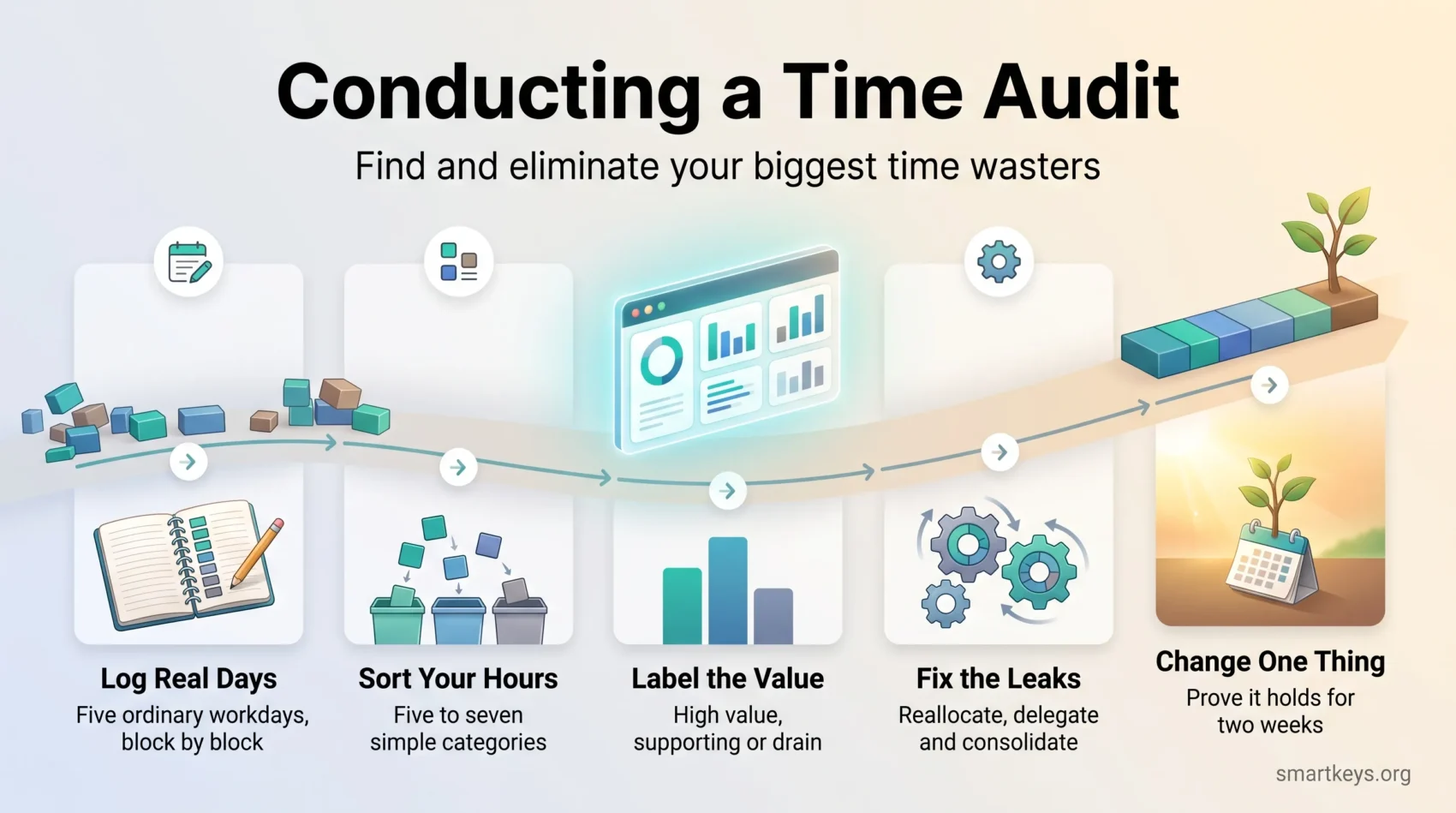
A time audit is a candid log of your activities, tasks and meetings that shows how your hours were actually used. You record each block as it happens, then sort the entries into a few plain categories: work that clearly moves a goal forward, work that supports it, and work that does neither.
That last group is the point of the exercise. It rarely looks dramatic. It looks like a status meeting nobody prepared for, or a report three people read.
What you can realistically expect
A time audit does not save time by itself. It tells you where the time went. The saving comes from what you decide next: cutting a recurring meeting, batching email into two windows instead of forty interruptions, handing a routine task to someone who should own it. Expect two outcomes: a clearer sense of which hours are worth protecting for demanding work, and less low-grade anxiety, because you can point to where the week went instead of wondering.
That is also what separates an audit from general time management advice: it starts from your own numbers rather than from someone else’s system.
Signals you need one
Consider a short audit when your days are busy but results lag, when deadlines slip without an obvious cause, or when you cannot account for a Thursday afternoon. Frequent context switching, creeping meeting load and work that expands to fill the space it is given are all warning signs. The last one is close to the planning fallacy: we consistently underestimate how long our own work will take.
- Define your categories before you start so entries are quick to sort later.
- Use a small, honest sample rather than a long, half-completed one.
- Turn the findings into two or three specific changes, not a general resolution to focus more.
Daily or weekly tracking: choosing your audit cadence
How often you log changes what you can see. Short intervals catch interruptions and context switches. Longer blocks are easier to sustain but blur the detail. Pick the cadence that matches the question you are trying to answer.
When to use daily versus weekly checks
Use daily logging when your workday shifts constantly or you have many short meetings. Fifteen or thirty minute intervals reveal handoffs and interruptions that a coarser log hides completely.
Choose a weekly roll-up when your work runs across several days and you want the shape of the week rather than the texture of one day. A structured weekly review is a natural home for it. Many people do both: detailed logging for one audit week, then a light weekly check to see whether the changes held.
How to pick a typical week and avoid skewed data
Track five consecutive business days. Skip weeks with holidays, a launch or a conference. An unusual week produces an unusual log, and you end up redesigning a schedule you do not actually have. Checking your calendar for the coming week first tells you quickly whether it is a fair sample.
Choose an interval you can live with: 15, 30 or 60 minutes. If your days are very consistent, tracking every other day cuts the effort without losing much insight.
How to conduct a time audit step by step
Keep the process light enough that you never skip an entry. Every skipped block is a hole in the data, and the holes appear exactly where the interesting problems are.
Step 1: Decide what you want to find out
Write down one or two questions before you log anything. “Why does my focused work never happen before lunch?” leads to a different audit than “How many hours do I really bill each week?” The question decides your categories and your interval.
It also decides whether evenings belong in the log. If work-life balance is the concern, track personal time too. The leak is often the late email check, not the workday itself.
Step 2: Select your tool
Pick the tool you will actually use. A paper notebook works. So does a spreadsheet with four columns: start, end, activity, category. Apps such as Toggl Track, Clockify or RescueTime add timers, automatic capture and reports, which helps if you dislike manual logging or need billable totals. The best tool is the one that costs you five seconds per entry rather than fifty.
Automatic trackers record app and website use in the background, so they catch switches you would forget. They cannot tell a useful browser tab from a distracting one, though, so plan to label those entries yourself. If you choose an app, check three things: whether reports group time by category or project, whether it connects to the calendar and task tools you already use, and, for a team, whether each person sees their own data first.
Step 3: Plan useful categories
Define five to seven categories that mirror your day: email, meetings, focused work, admin, breaks, plus client or project labels if you bill by the hour. Too many categories turn every entry into a small decision, which is how audits quietly die on day two. If you already capture tasks in one trusted system, borrow its labels.
Step 4: Set intervals and track in real time
Choose your interval, set a quiet reminder, and log as you go in under twenty seconds per entry. Reconstructing the day from memory at 6 pm defeats the purpose: the small interruptions you most want to see are the ones you will not remember.
Step 5: Be honest and consistent
Record the tab switches, the quick scroll through social media, the three minute chat that ran to fifteen. These are not moral failings, they are data. An audit that logs only the respectable parts of the day confirms what you already believed.
Analyze your data to eliminate time wasters
Now turn the log into decisions, in three passes rather than all at once.
Pass 1: Classify each entry
Mark each entry as high value, supporting, or drain. High value moved a goal forward. Supporting had to happen for that work to be possible. Drain did neither. Total the hours per category. The result is usually uncomfortable and usually useful.
Pass 2: Prioritize with the Eisenhower Matrix
Sort the tasks into four boxes by urgency and importance. The Eisenhower Matrix earns its place here because an audit tends to expose one specific imbalance: urgent but unimportant tasks crowding out important work with no deadline attached yet. Handle important and urgent first, then schedule the important work that is not yet urgent, because that is what a busy week silently eats.
Pass 3: Reallocate, delegate and consolidate
Reallocate: move demanding work into the hours the log shows are your best, and move shallow tasks out of them.
Delegate: routine work that recurs every week is a candidate for delegation or, in a solo business, outsourcing. Training someone costs a few hours once and returns them every week after.
Consolidate: group similar small tasks so you pay the switching cost once. Batching email into fixed windows is the clearest example, and often the single highest-return change an audit produces.
- Write a not-to-do list. Deciding what you will stop doing is easier when a log proves it costs you three hours a week. A not-to-do list makes those decisions explicit.
- Break projects into milestones with rough hour estimates so progress stays visible.
- Change one or two things first and prove the value before redesigning everything.
Turn insights into a better schedule and workflow
Sketch the week you want, then compare it with the week you logged. Give your top three to five priorities a rough share of the available hours, then put your actual figures next to them. The gaps tell you what to change and roughly how much.
Build your action plan
Start with the commitments you cannot move, such as school pickup or a standing client call, and plan around them. Then pick three to five goals and assign blocks to each. Protect your best hours, batch admin into short windows, and cut the meetings the audit shows produced nothing. Time blocking is the usual way to hold that plan in place, and a shared no-meeting focus window does the same job at team level.
Leave slack. A plan with every hour allocated breaks on the first unexpected call, which is the argument for deliberate buffer time. If the log shows your calendar is the main problem, a meeting audit is the natural follow-up, and whatever survives it should at least be run properly.
Use tracking software and reports to refine your workday
If you tracked with software, read its reports rather than the raw entries. Category and utilization reports show where planned time and actual time diverge, which is the figure worth watching in the following weeks. Repeat a light version of the audit after a month, looking only for evidence that your change survived a normal week. A full five-day audit once a quarter, or whenever your role or workload changes, keeps the picture current.
“A small, data-driven plan beats a perfect plan you never use.”
Real-world examples and team applications
Individual wins: fewer non-billable hours, fewer distractions
Consider a freelancer who logs a normal week and finds email and unpaid research filling more of it than client work does. The fix is not willpower. It is two fixed email windows, a cap on unpaid scoping calls, and protected mornings for billable work, which is why that pattern shapes most freelance productivity advice.
Or take a log showing twenty separate visits to social media in a day, none longer than four minutes. The total is smaller than expected. The cost is the re-entry time after each one, which is the case for a deliberate reduction or a site blocker during focus blocks. Working on one thing at a time gets easier once the log shows how often you were not.
Team improvements: meeting balance and shared priorities
Teams can run the same exercise on one condition: the data changes the work, never the ranking of people. Aggregate by category, not by individual. A team log usually shows the same three problems: too many recurring meetings, unclear ownership causing duplicated effort, and no protected time anywhere in the week.
The numbers show where the hours went, not why. Pair the log with a short conversation or a two-question survey: which task took longer than it should have, and what got in the way? The answers often point to a missing template, an unclear handoff or an approval step nobody needs.
Then fix the three problems in the order listed. Cutting or shortening recurring meetings is the change everyone feels immediately. It matters most for distributed teams, where a badly scheduled call lands unevenly across time zones and quietly shapes how productive remote work actually is.
Conclusion
A time audit trades five days of slightly annoying record keeping for an accurate picture of your week. That is almost always worth it, but only if you act on what you find.
Start with one change: batch your email, cut one meeting, or move your hardest work into the hours the log says are your best. Give it two weeks, then check whether it held. If you want a number to watch, pick one personal productivity metric rather than five, and keep your priority list short enough to survive a busy week, which is the idea behind the two-list method.
Small, consistent checks beat one heroic reorganization you abandon by Friday.
Found this useful?
Make SmartKeys a preferred source on Google, and our articles will surface more often in your Top Stories, AI Overviews, and AI Mode.
Add as Preferred Source