You do not need a new system to get more done. You need a handful of moves small enough that you actually make them. That is what this guide is about: habits that take ten minutes or less, plus a few one-hour fixes, all of which hold up on a normal, interrupted workday.
And workdays are interrupted. Microsoft analysed anonymised Microsoft 365 activity for its June 2025 report “Breaking Down the Infinite Workday”. It found that employees are pulled away every two minutes during core hours, roughly 275 times a day, by meetings, emails and chat messages. Asana’s Anatomy of Work Index points at the same problem from a different angle. It estimates that around 60% of time at work goes on “work about work”: coordination, status updates, hunting for information and switching between apps, rather than the skilled work you were hired for.
You cannot fix that with willpower. You can fix a surprising amount of it with three or four small routines that decide what you work on, protect the hours when you are sharpest, and stop your attention leaking into your inbox.
One honest warning before you start. Habits take longer to settle than most advice admits. Phillippa Lally and colleagues tracked this in a study published in the European Journal of Social Psychology in 2010. Participants needed a median of 66 days before a new behaviour felt automatic. Individual times ranged from 18 to 254 days. Pick one or two habits, not ten.
Key Takeaways
- Small routines beat big systems, because you keep doing them.
- Choose three priorities each morning so the day has a shape.
- Put your hardest task in your highest-energy hour, before email.
- Check email in two fixed windows instead of continuously.
- Use a spare hour to fix one recurring annoyance for good.
- Expect a new habit to take weeks, not days, to stick.
Start strong: ten minutes that point the day somewhere
A short plan at the start of the day turns scattered activity into visible progress. Ten minutes is enough. The goal is not a perfect schedule; it is to decide, once, what today is actually for, so you are not renegotiating it every hour.
Define today’s three most important tasks
Pick three priorities that move a real goal forward, and write them somewhere you will see them: the top of your calendar, a sticky note, your phone lock screen. Three is deliberately few. A list of twelve tells you nothing about what to drop when the day goes sideways.
If you cannot choose, ask which task reduces future stress, which one unblocks other people, and which one you will regret not doing. That usually settles it. The Ivy Lee method uses the same logic with six items and a strict order, and the 1-3-5 rule adds room for medium and small work underneath.
Sort what is important from what is merely urgent
The Eisenhower Matrix is a four-box grid that separates two things we usually confuse. Importance asks whether a task moves a goal forward. Urgency asks only whether a deadline is pressing on it. Work that is important but not urgent, like planning, learning or fixing a broken process, is exactly the work that never happens unless you schedule it.
Sort your list into the four boxes, then act on each box differently: do the important and urgent, book time for the important but not urgent, hand off or shrink the urgent but unimportant, and delete the rest. The full method, including how to handle the fourth box without guilt, is covered in this guide to the Eisenhower Matrix.
Keep a separate capture list for anything that arrives mid-morning. Writing an incoming request down takes five seconds and stops it from quietly replacing your plan. A brain dump at the start of the week does the same job on a larger scale.
Plan smarter: put the work on the calendar, not just on a list
A to-do list tells you what exists. A calendar tells you when it happens. That difference is why plans built only on lists tend to collapse by Wednesday.
Schedule tasks, do not just list them
Move your three priorities into actual calendar blocks with realistic durations. This does two useful things. It forces you to admit how much time you really have, and it removes the small decision (“what now?”) that you would otherwise make twenty times a day.
Be generous with estimates. Most of us are not. The planning fallacy is the well-documented tendency to underestimate how long our own tasks will take, even when experience says otherwise. If you want to see how badly your estimates drift, this guide to the planning fallacy explains the pattern and how to correct for it.
Time-block deep work and email windows
Time blocking means assigning every part of your day to a named block rather than working from an open list. Give deep work, meaning uninterrupted work on something cognitively demanding, a block of 25 to 90 minutes. Give email its own separate block. The point is that neither one bleeds into the other.
A few rules keep it workable:
- Add ten minutes of buffer before meetings so you are not sprinting between calls.
- Treat blocks as a living plan. When something changes, move the block; do not abandon the whole day.
- Schedule breaks explicitly, or they will not happen.
For a fuller walkthrough, see the benefits of time blocking and how to get started, and for the broader picture, these time management techniques for busy professionals. If colleagues keep booking over your focus blocks, agree team-wide no-meeting hours instead of defending them alone.
Preview tomorrow before you finish today
Spend the last five minutes of the working day scanning tomorrow’s fixed commitments. David Allen, in Getting Things Done, calls this the “hard landscape”: the meetings and deadlines that cannot move. Once you can see them, you can place your most demanding task in whatever good hours remain, instead of discovering at 09:00 that there are none.
An end-of-day routine that closes with this two-minute scan is one of the cheapest habits on this list, and one of the few that improves the next morning before it has started.
Beat procrastination with micro-starts
When you are stuck, the problem is almost never the whole task. It is the first move. Micro-starts work by making that first move too small to argue with.
The five-minute promise
Tell yourself you will work for five minutes and may stop afterwards. The permission to stop is the part that works, because it removes the dread of committing to three hours. Most of the time you will keep going, because starting was the expensive bit.
Pair it with a ridiculously small first step: open the file, write the title, sketch the first bullet. You are not trying to do the task. You are trying to be someone who has begun it.
The two-minute rule for small tasks
If a task takes two minutes or less, do it now rather than filing it. This rule also comes from Getting Things Done, and the reasoning is practical: tracking a tiny task costs more than finishing it. Applied inside your email window, it clears a surprising amount of clutter. Applied all day, it becomes an excuse to avoid your real work, so keep it inside a block. The two-minute rule explained covers where it helps and where it backfires.
- Use a visible timer so five minutes feels finite.
- Keep a short list of standard first steps for the tasks you avoid most.
- When everything feels heavy, do the one task that makes other tasks easier.
If avoidance is a pattern rather than a bad morning, overcoming procrastination goes into the triggers behind it.
Do the hardest thing when your energy is highest
Your sharpest hours are a resource, and most people spend them on email. Reserve them for the task that matters most instead.
“Eat the frog”, popularised by Brian Tracy in his book of the same name, is the habit of doing your most important and least appealing task first. It works for a simple reason: that task is the one most likely to be displaced by everything else if you leave it until later.
How to make it stick:
- Find your peak slot. For many people it is mid-morning, but check your own pattern rather than assuming.
- Choose the frog the night before, so waking up involves no decision.
- Protect the block: no meetings, phone face down, a clear note to teammates about when you are back.
- Break a big job into a 10 to 30 minute first step so you can start immediately.
- On a bad day, do ten minutes on the frog anyway. Ten minutes keeps the streak and the momentum.
More on the method, including what to do when your “frog” is genuinely a multi-day project, in this guide to eating the frog.
Email: two windows instead of all day
A few clear rules about when you read email protect more of your day than any inbox tool. Set two windows, for example late morning and late afternoon, and leave the long stretches between them for real work.
This is not about being unreachable. It is about deciding when you are reachable, and telling people, so that nobody is waiting on you without knowing it.
Set fixed times to check and reply
Inside each window, scan for anything blocking someone else first, then clear the quick replies, then stop. Keep messages short and decisive. A reply that ends with a clear next step and an owner prevents the three follow-up emails that a vague one guarantees.
Move work out of the inbox
An inbox is a delivery channel, not a task list. Anything that needs more than one exchange belongs in a task manager or a shared document, with a named owner and a date. Cal Newport has argued at length that constant unstructured messaging is what makes knowledge work feel frantic, and moving recurring workflows out of email is the practical response. Two related habits help here: batching your replies into set windows, and keeping one place where every commitment gets written down.
Write templates once, reuse them forever
Draft standard replies for status updates, introductions, scheduling and the questions you answer every week. Saved replies in Gmail, Quick Parts in Outlook or a text expander will do the job. Ten minutes of setup can save several minutes a day, every day. See email response templates for a set you can adapt, and the inbox zero method if you want a full processing routine.
- Use filters and labels so your window starts with what matters.
- Turn off mail notifications outside your windows.
- End each window by writing any follow-ups into your task system, not leaving them in the thread.
Protect your attention from interruptions
Given how often the average workday is interrupted, the useful question is not how to concentrate harder. It is how to reduce the number of interruptions that reach you at all.
Tell people when you are available
Announce your response times. Publish focus blocks in your shared calendar, offer a window when you are easy to reach, and say roughly how fast you normally reply. Most interruptions are not urgent; they are people checking whether you are available. Answer that question in advance and most of them disappear. If saying no still feels awkward, phrase it as information rather than refusal: give the time you can offer instead of the one you cannot.
Mute, block, batch
Turn off everything except genuine emergencies, use a site blocker during your best hours, and group similar work together so your brain stays in one mode. Practical starting points: managing work notifications and using website blockers during focus time.
- Share your focus blocks so colleagues know when to expect a reply.
- Batch calls, admin and reviews into single sessions instead of scattering them.
- After an unavoidable interruption, close the extra tabs and name your next action out loud before returning. It shortens the recovery.
Working on one thing at a time is the habit underneath all of this. This guide to monotasking for deep focus makes the case in more detail.
Cues that restart you in under a minute
Some days the problem is not the plan, it is inertia. A physical or auditory cue can break it faster than another attempt at self-talk.
Keep a short restart playlist of two or three songs you associate with getting moving, and press play when you catch yourself scrolling. Use the length of a track as an informal timer for small chores: reply to two messages, file the downloads folder, clear one notification badge.
Mel Robbins’ 5 Second Rule works on the same principle. Count backwards from five and move on one, before the part of your brain that negotiates has time to open the conversation. It is a starting device, not a discipline system, and that is exactly what makes it useful.
Physical resets work too. Stand up, walk to the window, stretch, refill your water. Choose one and use the same one every time, so it becomes a signal rather than a decision. A visible timer helps here too, especially if you tend to lose track of time once you are moving.
Systems that save hours: batching, automation, capture
Grouping similar work and automating repeat steps frees time you cannot get back any other way.
Batch similar tasks
Batching means doing the same kind of work in one sitting: all your calls, then all your writing, then all your reviews. Each switch between different kinds of work carries a start-up cost, and batching pays that cost once instead of six times. It is the cheapest change on this list because it needs no tools at all.
Automate the steps you repeat
Look for anything you do the same way every week: email triage rules, recurring reports, document templates, calendar invitations. Write the process down first, then automate it. Automating a broken process just makes it fail faster.
Start with your calendar. Automated scheduling removes one of the most common back-and-forth exchanges in a working week.
Capture every task the moment it appears
One and done: when a new task turns up, it goes into your system immediately, not into your memory. Unfinished commitments you are holding in your head keep competing for attention until they are written down somewhere you trust. That is the mechanism behind open loops, and closing them is why capture habits feel disproportionately calming.
A well-kept capture list also makes the short gaps between meetings useful. If each entry names a concrete next step, a spare ten minutes is enough to finish one. This guide to making the most of small time gaps with micro-productivity shows how to build that queue.
Got an hour? Quick wins that remove friction for good
Ten-minute habits change how you spend a day. A one-hour quick win changes a process, so the same friction does not come back next week. A real quick win is small, cheap, reversible and easy to measure. If it needs a budget request or someone else’s sign-off, it is a project, not a quick win.
Pick the annoyance that costs you most often: the question you answer five times a week, the task where a step always gets forgotten, the meeting that ends without anyone knowing what was decided. Then fix one of them in a single sitting.
Turn a recurring task into a checklist
Write down the steps of one task you repeat, such as onboarding a client, preparing a monthly report or closing out a project. A short checklist catches the steps you usually forget, and it lets a colleague take the task over without a briefing. If the task matters to a whole team, turn it into a proper standard operating procedure your team will actually use.
Answer the same question once
If people keep asking where a file lives or how a process works, write the answer on one page and share the link. Every time you send that link instead of typing the explanation again, the hour pays back a little more.
Give meetings a parking lot and a decision log
Add two short sections to your agenda. The parking lot holds topics that come up but do not belong in this meeting, so they get recorded instead of derailing it. The decision log records what was decided, who owns it and by when. A reusable meeting notes template turns both into a habit rather than an afterthought.
Measure before and after
Before you change anything, note one number: how often the question arrives, how long the task takes, or how many follow-up emails a meeting produces. Check the same number two weeks later. If it moved, keep the change and pick the next annoyance. If it did not, undo it. A reversible fix costs you nothing to drop.
The 10-minute weekly review
A short weekly audit shows you where your time actually went, which is usually not where you assumed.
Set a ten-minute timer, open last week’s calendar, and answer three questions about each significant block:
- Did it achieve what I intended?
- Did I personally need to be there?
- Could the same outcome have taken less time?
Then record decisions, not observations. Decline the recurring meeting, shorten it to 25 minutes, hand it to someone else, or move it into a batch. A review that produces no changes is just a report on your own week.
Finish by previewing the week ahead, placing your most demanding work in your best hours, and picking one small experiment to test. A fuller framework is in Weekly Planning 101 and how to run a weekly review.
Body first: sleep, water, movement
Your body sets the ceiling for what your attention can do. Every habit above assumes you have some cognitive capacity to spend. These three protect it.
Sleep
Short sleep degrades attention, working memory and judgement, which is a direct tax on everything else in this guide. A consistent bedtime is worth more than an extra hour of evening work, most of the time. More on the trade-off in sleep and productivity.
Water
Keep a glass on the desk and refill it when you stand up. This is not a productivity hack so much as removing a small, avoidable drag on concentration, and it costs nothing to test for a week.
Movement
Stand and move for a few minutes between blocks. Short, regular breaks sustain attention across a long day better than one long break at lunch. Five minutes an hour is a reasonable starting point, and it does not need to be exercise.
Your workspace and your standards
Set the scene once and it keeps paying out. Work in the same place when you can, keep only what the current task needs within reach, and get as much daylight as your room allows. A consistent spot becomes a cue in itself: sitting down there means work starts.
Two specifics are worth the ten minutes. Lighting, because a badly lit desk is tiring in a way people rarely blame on the light. And surface clutter, because every visible object is a small candidate for your attention. See optimizing workspace lighting for the practical version.
The mindset half matters as much. Do one thing at a time, accept “good enough” on work that does not need to be excellent, and notice when something is finished. Perfectionism is not high standards. It is an inability to stop, and on most weeks it costs more hours than distraction does.
Three habits to try this week
Pick one planning habit, one focus habit and one recovery habit. Not more. Run them for a week and keep whichever one you did not have to force.
- Planning: ten minutes each evening to put tomorrow’s three priorities into calendar blocks.
- Focus: one protected block for your hardest task, before email, with notifications off. If a long block feels like too much, start with a 25 minute Pomodoro.
- Recovery: ten minutes of walking, stretching or simply standing away from the screen between blocks.
Set a calendar reminder for one week out to review how it went. Ask what you actually did, not what you intended to do, and adjust one thing. Given that habits take a median of two months to settle, a single week is a test, not a verdict. Keep the ones worth continuing, and give them time.
Conclusion
One habit, practised daily, will outperform five habits you abandon in a fortnight.
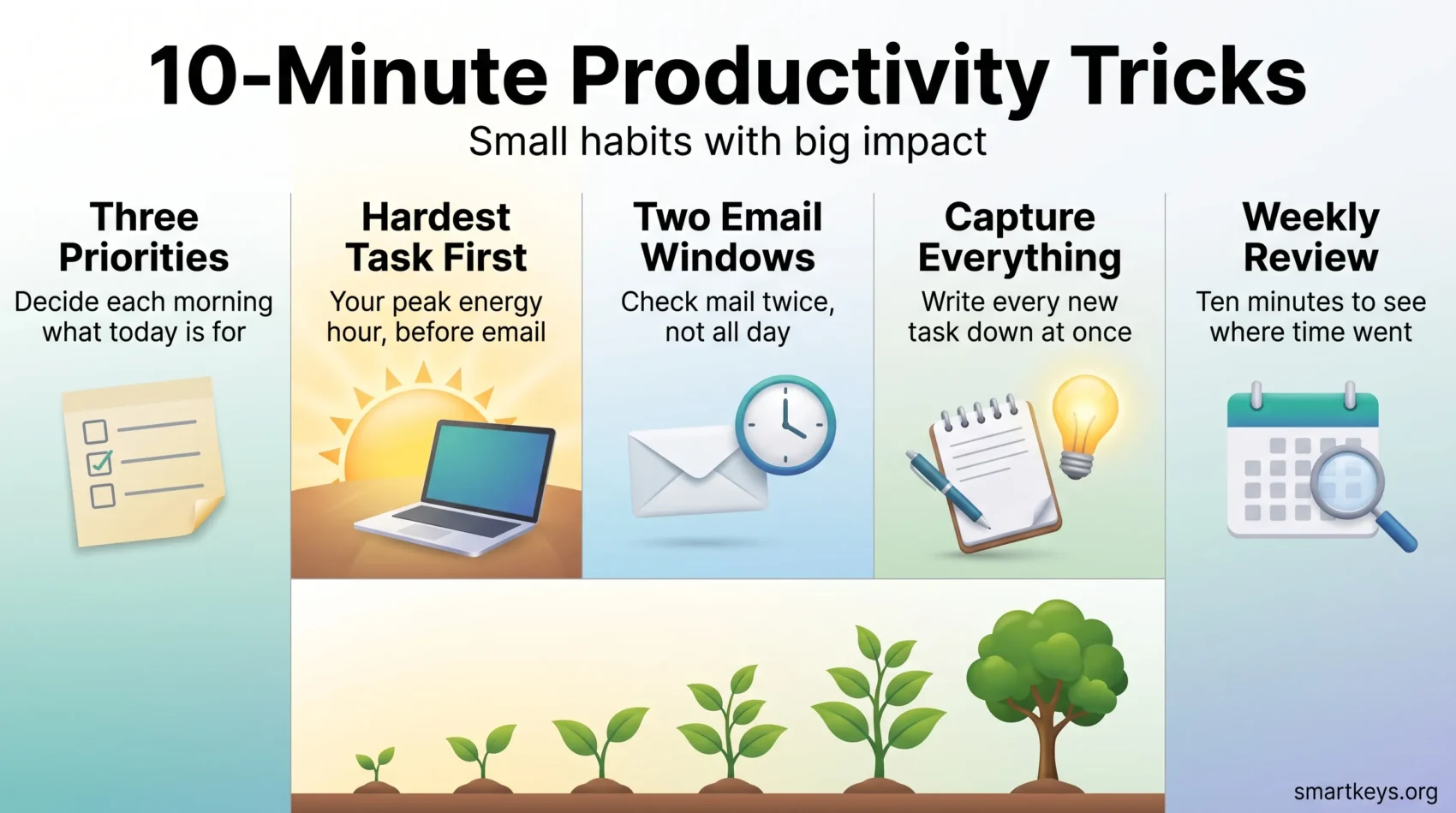
The core of it is short: decide your three priorities in the morning, do the hardest one when your energy is highest, keep email in two windows, capture everything the moment it arrives, and review once a week. Nothing here takes more than ten minutes at a time.
Treat sleep, water and movement as part of the system rather than what is left over after it. And be patient with yourself in the first few weeks, when a new routine still feels like an extra task. That phase ends. The habit is what remains.
Found this useful?
Make SmartKeys a preferred source on Google, and our articles will surface more often in your Top Stories, AI Overviews, and AI Mode.
Add as Preferred Source