

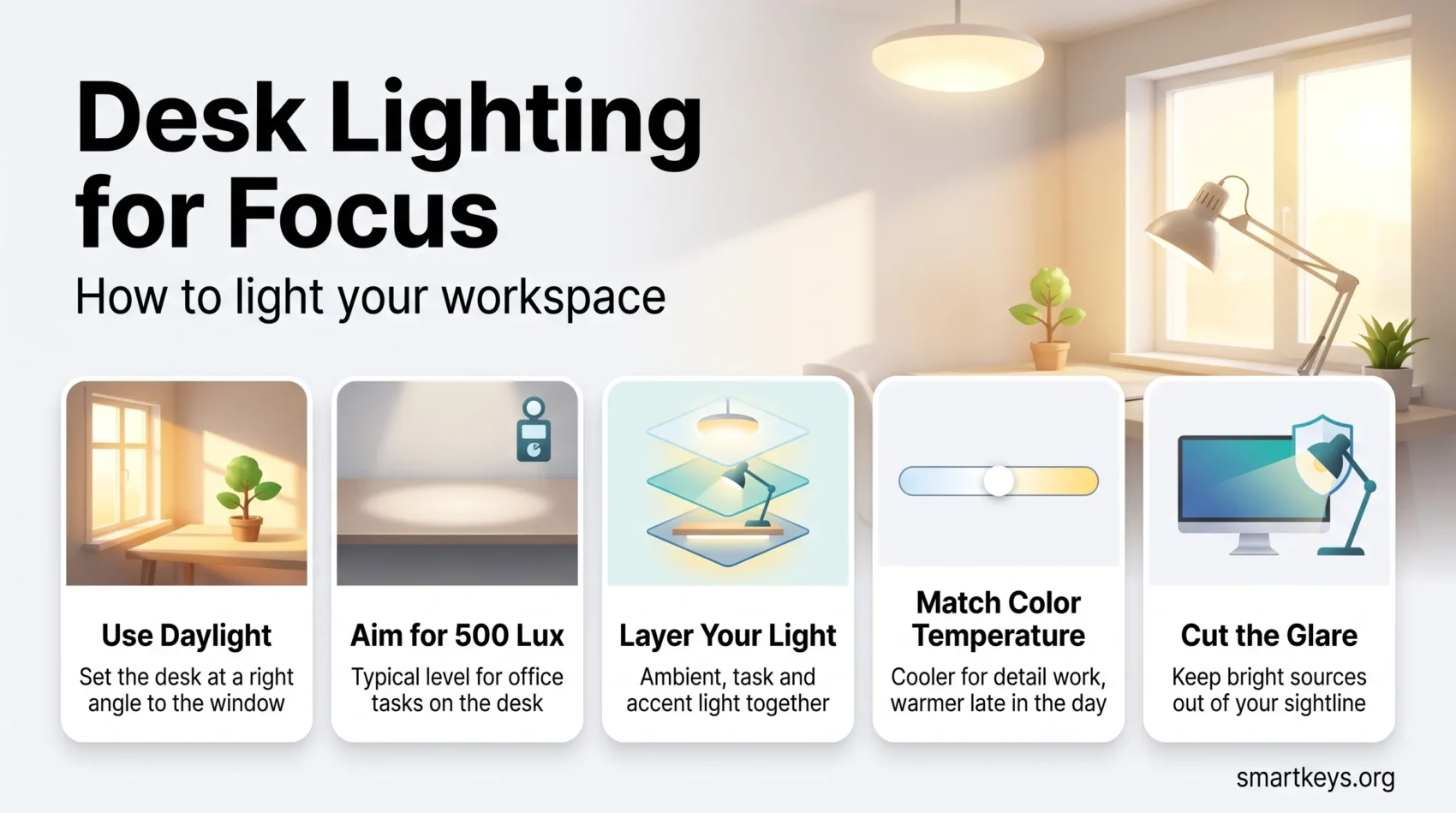
Lighting is the part of a workspace people notice only when it is wrong: the glare that makes you squint by mid-afternoon, the dim corner that leaves you yawning at 3pm. Get it right and the effect is quiet but real. You see detail without effort, you stay alert through the hours that usually drag, and your eyes still feel fine when you shut the laptop.
Light is one piece of the broader workspace optimization picture, and this guide focuses on getting desk lighting for focus right. It covers what the evidence supports: how much light task standards call for, which color temperatures suit which work, why daylight outperforms everything else, and how to layer fixtures so one room handles a spreadsheet at 9am and a slow read at 5pm. Every figure below names its standard or study.
Key Takeaways
- European standard EN 12464-1 sets 500 lux as the maintained level for typical office tasks such as writing, typing and reading.
- Daylight is the strongest lever, and the cheapest quality light you will ever get.
- Cooler light supports alertness, warmer light suits winding down. Adjustability beats any single setting.
- Layer three things: ambient light for the room, task light for the surface, accent light for the rest.
- Glare and contrast cause more discomfort than low brightness. Fix position before buying more lumens.
Why Workspace Lighting Affects Focus
Light does two jobs at once. The obvious one is visual: enough illuminance on the page or keyboard, with low enough glare, so your eyes resolve detail without strain. The less obvious one is biological. Specialised retinal cells containing the pigment melanopsin respond mainly to bright, blue-rich light and feed directly into the brain’s circadian clock, influencing alertness and sleep timing largely independently of how bright a room subjectively looks.

That second job explains why a technically compliant office can still feel sleepy: standards were written for seeing, not for circadian support. A 2022 consensus paper in PLOS Biology recommends at least 250 lux melanopic equivalent daylight illuminance during the day, measured vertically at eye level, dropping below 10 lux in the three hours before bed. Office lighting aimed at the desk often misses that daytime figure, because what reaches your eyes vertically is a fraction of what lands on the desk.
The visual side has clearer rules. EN 12464-1, the European standard for indoor workplaces, sets 500 lux as the maintained illuminance for writing, typing, reading and data processing. OSHA’s US construction standard requires at least 30 foot-candles (roughly 320 lux) in offices, a floor rather than a target. Detailed inspection or drafting work sits higher still.
Numbers are only half of it. Uneven light forces your pupils to keep readjusting as your gaze moves between a bright screen and a dark wall, and that is a common source of end-of-day eye fatigue. A room where ceiling, walls and desk sit within a reasonable brightness range beats a bright pool of light in a dark room, even at the same desk lux.
Natural Light: What the Evidence Shows
Daylight is the highest quality light available, it is free, and it carries the strongest research support of anything in this article.

Cornell University research reported by Harvard Business Review in 2018 found workers in offices with optimised daylight reported 51% less eyestrain, 63% fewer headaches and 56% less drowsiness than those under conventional lighting. The same article cited a poll of 1,614 North American employees in which natural light and outdoor views outranked cafeterias, fitness centres and childcare as the most wanted workplace feature.
A 2020 study in the International Journal of Environmental Research and Public Health compared two offices differing mainly in their glazing. Participants in the daylight-optimised space received roughly 316 equivalent melanopic lux at the eye against 40.6 with blinds down, slept about 37 minutes longer and scored 42% higher on decision-making simulations. It was small and industry-funded, so treat the exact percentages with care, but the direction matches the wider daylight literature.
Getting more of it is mostly a positioning problem. Put the desk perpendicular to the window rather than facing it or backing onto it, which cuts both screen glare and the silhouette effect on video calls. Adjust blinds through the day instead of leaving them shut, and keep tall furniture off the window wall. Treat daylight as your morning anchor: the light you get in the first hours does the most for alertness. Our guide to setting up a productive home office covers the layout decisions that go with it.
The Three Layers of Workspace Lighting
Almost every lighting problem in a small workspace comes down to relying on one source. Three layers solve most of it.
Ambient lighting is the base level that fills the room: ceiling fixtures, pendants, or light bounced off a pale ceiling. It sets how bright the space feels and keeps contrast around your screen manageable.
Task lighting puts light where the work is: a desk lamp, an under-shelf strip, a clamp light on a monitor arm. Sitting close to the surface, it delivers useful illuminance at low wattage, and it belongs on the opposite side from your writing hand so you are not working in your own shadow.
Accent lighting is everything else: a shelf strip, a floor lamp behind a plant, a picture light. Decorative, yes, but it also lifts the dark corners that create the contrast your eyes keep fighting.

LED is the default now: far less power for the same output, years of daily use, and dimming and tuning older sources could not manage. Two specifications are worth checking before you buy. A colour rendering index of 90 or above, so colours on screen and paper look right, and a flicker-free rating, since visible flicker is linked to headaches and eye discomfort.
Overhead Lighting That Works
Overhead light is the layer people most often get wrong, usually by leaving whatever the landlord installed and working around it.
The goal is even coverage without hotspots. A single central fixture throws light down the middle of the room and leaves the edges dim, which is the contrast problem again. Several smaller sources, or fixtures that push light onto ceiling and walls, spread it far better than one bright panel.
Direction matters as much as quantity. A bare bulb in your line of sight is a glare source no matter how efficient it is. Diffusers, deep-set fixtures and indirect uplighting put the same lumens into the room without the bright spot. If your ceiling light reflects visibly in your monitor, move the desk or the fixture first.
Dimmable overheads are worth the small extra cost: one room can then run bright and cool in the morning and softer in the late afternoon, which is the most useful thing a fixed installation can do.

Matching Light to the Task
Different work has different lighting needs, and the cheapest way to meet them is one adjustable lamp rather than four fixed ones.
Choosing the Right Color Temperature
Colour temperature, measured in kelvin, describes how warm or cool a light source looks. Cooler light in the 4000K to 6500K range appears bluish-white and is the closest common approximation of daylight, which is why it suits detail work and the first half of the day. Warmer light between 2700K and 3000K looks yellow and reads as evening light.
The practical rules are simple:
- Detail and screen work: neutral to cool, around 4000K to 5000K, with enough light on the desk to read comfortably without leaning in.
- Reading print: more light than you think, aimed at the page rather than across it, and positioned so the lamp does not shine into your eyes.
- Late-day and reflective work: warmer and dimmer. This is not about performance so much as not pushing bright blue-rich light into your evening.
The claim that warm light makes people more creative and cool light more analytical circulates widely but rests on thin, mixed evidence. Treat colour temperature as a comfort and circadian control, not a productivity switch. A tunable lamp costs little more than a fixed one and lets you find what suits your own eyes.

Balancing Ambient and Task Lighting
Task light alone creates a bright island in a dark room, which is tiring. Ambient light alone leaves your desk under-lit for detailed work. What you want is a room that reads as evenly lit, with a modest lift on the work surface. The desk should be brighter than its surroundings, but not dramatically so: if switching your gaze from screen to wall makes you blink, the gap is too wide, and raising the ambient level fixes that faster than dimming the task light.
Creating a Comfortable Atmosphere
Comfort is largely about what you can and cannot see directly. Keep bright sources out of your field of view, above your sightline or shielded. Give walls and ceiling some light so the room does not feel like a cave. And leave yourself one control: a dimmer, a smart bulb, or a second lamp you switch on when the light outside goes.

Lighting also does not work in isolation. Chair height, monitor distance and desk depth all change where light lands and where glare appears, which is why workplace ergonomics and lighting are usually worth sorting out together. The same goes for desk organization: a cluttered surface scatters light and adds visual noise, and a well-planned workspace makes every other adjustment easier. If you alternate between sitting and standing, check the light at both heights, since a lamp aimed for a seated position often glares once you raise a standing desk.
Lighting Tips for Home Offices
Home offices offer less control over the base installation and more over everything else, which is a decent trade.
Incorporating Reflective Surfaces
Pale walls, a light desk surface and a mirror opposite a window all spread the light you already have. Matte finishes beat gloss on work surfaces, because a glossy desk reflects the ceiling fixture straight back at you. In a dark room, repainting the ceiling alone makes a noticeable difference.
Utilizing Adjustable Lighting Fixtures
An adjustable lamp with a movable arm and a dimmer covers more situations than any fixed fixture. Look for a wide head that spreads light across the desk rather than a narrow spot, a stable base or clamp, and tunable white for morning and evening settings from one device.

Position screens at right angles to windows, use matte finishes where glare is unavoidable, and keep the area behind your monitor lit rather than dark. That last one costs nothing and removes a lot of contrast strain during long screen sessions and deep work blocks. Shared spaces have their own version of the problem, covered in our guide to managing distractions in an open office.
Adjusting Light Through the Day
The most useful thing you can do with lighting costs nothing: change it as the day changes.
Start bright. Morning light, ideally daylight, anchors your body clock and supports alertness for the rest of the day. Taking the first coffee near a window, or stepping outside briefly, does more than any lamp, which is why light belongs in any serious morning routine.
Hold that level through the middle of the day. If the post-lunch dip hits, more light and a short walk beat another coffee. Our guide to beating the afternoon slump covers the rest, and short breaks or movement breaks pair naturally with a change of light.
Then wind down. Dropping brightness and warming the colour in the last working hours eases the transition out of work and keeps bright evening light from pushing your sleep later. That connects to your evening routine and to how well you sleep, which sits upstream of most focus problems. If you work in 90-minute cycles, a light change makes a useful boundary between blocks.
Circadian and Human-Centric Lighting Systems
Circadian or human-centric lighting systems automate that daily curve. They shift intensity and colour temperature on a schedule, bright and cool through the morning, warmer and dimmer towards evening, mimicking what daylight would do if the building let it in.
The underlying principle is well established: light timing shapes the circadian system, and the 2022 PLOS Biology recommendations are built on exactly that. What is less settled is how much a tuned electric system adds once you have decent daylight and sensible controls. Most published workplace evaluations are small, and the strongest effects appear where there is little daylight to begin with, such as night shifts and windowless interiors.
Given that people in industrialised countries spend most of their time indoors, the EPA’s often-quoted figure being around 90%, designing light around human rhythms rather than visibility alone is an easy case to make. You do not need a commissioned system to act on it. A tunable bulb on a schedule, or two lamps and the discipline to switch between them, covers most of the benefit.
Conclusion
Good workspace lighting is not a shopping list. It is a few decisions about position, layering and control: daylight where you can get it, roughly 500 lux on the work surface, a room bright enough that your screen is not an island, and the ability to change all of it as the day moves on.
Start with what is free. Turn the desk, open the blinds, move the lamp to the other side. Then add one adjustable, tunable light and see how much of the afternoon slump was a lighting problem. Once the light is right, the other pieces of a focused workspace, from protected focus time to single-tasking, have a better chance of holding.
Found this useful?
Make SmartKeys a preferred source on Google, and our articles will surface more often in your Top Stories, AI Overviews, and AI Mode.
Add as Preferred Source




