Ergonomics means fitting the job to the person rather than the person to the job: a chair you can adjust, a screen at the right height, and work that does not lock you into one awkward position all day. That is how the Occupational Safety and Health Administration (OSHA) defines it, and the injuries it prevents remain a leading cause of lost work time.
The scale is easy to underestimate. Across 2023 and 2024, US employers reported 946,290 cases caused by overexertion and bodily reaction, the largest injury category in the Bureau of Labor Statistics survey. Musculoskeletal disorders (MSDs) are injuries to muscles, nerves, tendons and joints: carpal tunnel syndrome, tendinitis and low back strain are typical.
This guide covers the real benefits of workplace ergonomics, which claims hold up, how to set up a desk that fits you, and what employers owe staff working from home. Our guide to building a productive home office covers the room.
Key Takeaways
- Ergonomics fits equipment and tasks to people. It is not about expensive furniture.
- The strongest evidence is for comfort and pain, not headline productivity numbers.
- Overexertion is the costliest cause of serious US workplace injury, at $13.7 billion a year.
- A cheap chair set up correctly beats an expensive one set up badly.
- UK and EU employers owe home workers the same screen work duties as office staff.
Understanding Ergonomics
Ergonomics is the study of how people interact with their tools, tasks and surroundings, and how to change those things so work causes less strain. The word comes from the Greek for the science of work.
Definition and Origin of Ergonomics
The field grew out of industrial and military research in the early 20th century, when engineers noticed that badly designed controls caused accidents no amount of training could fix. The insight still applies: if a task reliably injures people, change the task, not the person.
That makes ergonomics a design discipline, not a set of stretches. A packing station that forces a worker to twist 400 times a shift is an ergonomics problem. So is a laptop on a kitchen table for eight hours.
Why It Matters in the Modern Workplace
Most office jobs no longer involve heavy lifting, so the risk has shifted to static postures and repeated small movements. Neither feels dangerous at the time, which is the problem: the discomfort arrives weeks later as a stiff neck or a sore wrist.
OSHA names four risk factors: awkward posture, repetition, force, and holding one position for long periods. Reduce those and you have done most of the work, which is why optimizing your workspace layout and ergonomics are the same project.
The Role of Ergonomics in Work Efficiency
Ergonomics is often sold with dramatic productivity percentages. Those deserve scrutiny, because the honest case is strong enough without them.
What the Evidence Actually Supports
The reliable finding is about discomfort. When workstations are adjusted properly and staff are trained to use them, reported pain goes down, which reduces the injuries that cost employers real money.
Productivity claims are shakier. The most cited study is a six month trial at a Texas A&M call centre, where staff with stand-capable desks completed about 46% more successful calls per hour than colleagues at seated desks. That is a genuine result, but from one call centre doing unusually measurable work. It does not transfer to a marketing team.
Physical Comfort and Its Impact on Performance
The link between comfort and output is real but indirect. Pain is a distraction: if your wrist aches, part of your attention goes there instead of the task.
Equipment quality is also one of the few things employees rate poorly even where job satisfaction is high. Fixing a chair or supplying a second monitor signals that someone noticed, which is cheap goodwill compared with most engagement initiatives.
Benefits of Workplace Ergonomics
The benefits fall into three groups: fewer injuries, better daily comfort, and staff who feel looked after.
Improved Employee Health and Wellness
Good ergonomics reduces the load that turns into an MSD, so fewer people work through pain or go off sick. An assessment is the most concrete part of a workplace wellness programme, because the fix is an object rather than a behaviour change.
It is also an accessibility question. Adjustable equipment, quiet spaces and flexible layouts help staff with chronic pain or sensory sensitivities, which overlaps with building a neuroinclusive workplace.
Reduced Workplace Injuries
OSHA has no ergonomics standard for general industry, so it enforces through the General Duty Clause, which requires a workplace free of recognised hazards. Some states go further: a 2023 Washington State law lets its Department of Labor and Industries write ergonomics rules for one high risk industry per year, with the earliest taking effect no sooner than 1 July 2026. Fulfilment centres, nursing homes and grocery wholesalers are on the priority list.
Where physical load cannot be designed out, equipment such as industrial exoskeletons is one route for lifting-heavy roles, though it complements good task design rather than replacing it. Less strain also means fewer lost workdays, a different lever on the same problem as compressed working weeks.
Increased Job Satisfaction
Asked what would improve their day, most people name something small and physical: a better chair, less noise, a readable screen. Acting on that is cheap. Ignoring it for years feeds burnout, because it signals that discomfort is expected.
Ergonomic Solutions for Your Workspace
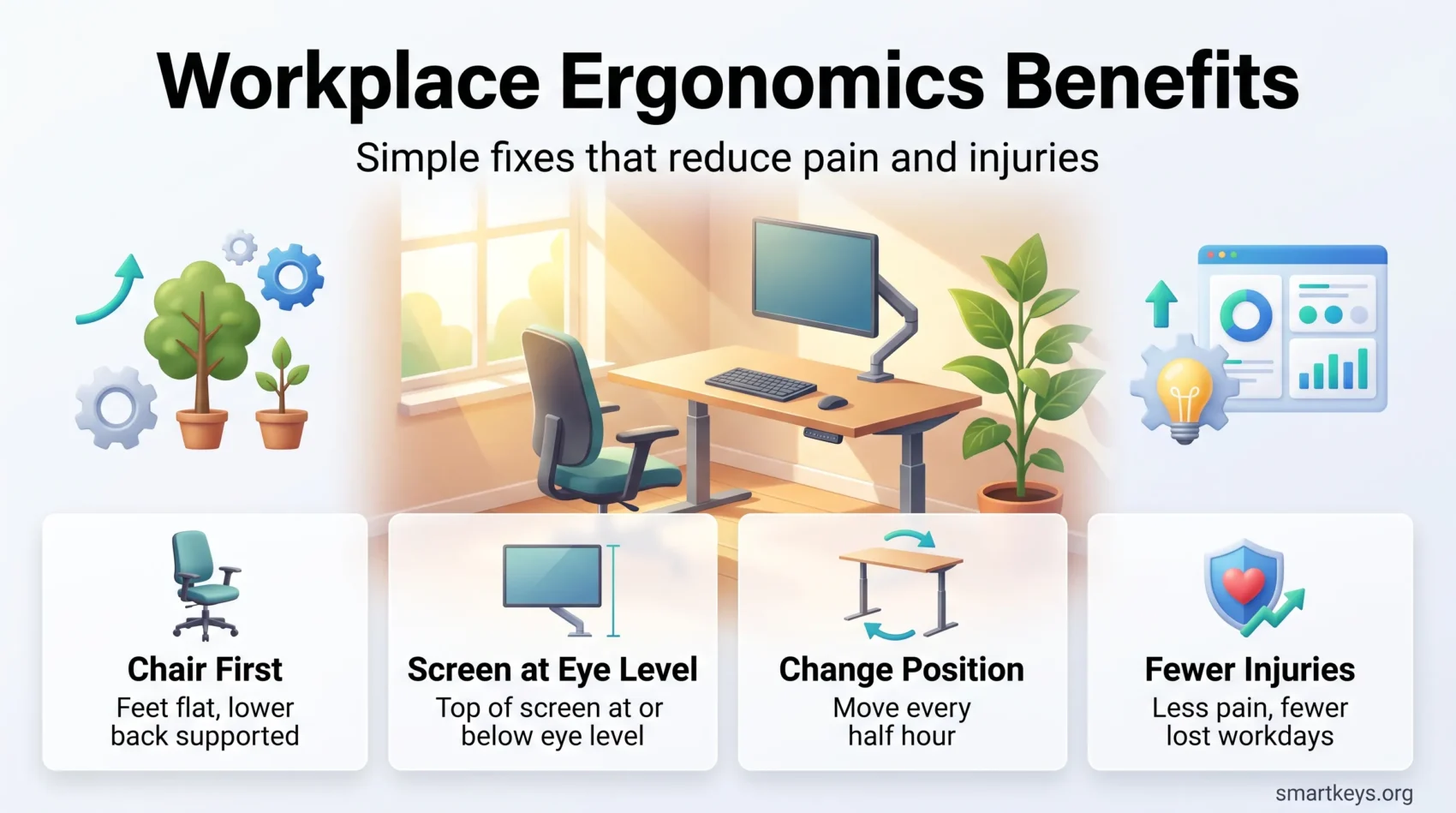
Most of the benefit comes from three things: a chair that fits, a screen at the right height, and the freedom to change position.
Adjustable Desks and Chairs
Start with the chair, because you spend more time in it than anything else. Set the height so your feet rest flat and your thighs sit roughly parallel to the floor, adjust the backrest to support your lower back, and set armrests so your shoulders stay relaxed.
Then set the desk to the chair, not the other way round: forearms roughly level with the surface. If the desk is fixed and too high, raise the chair and add a footrest.
Proper Monitor Placement
Put the top of the screen at or just below eye level, an arm’s length away, directly in front of you. With two monitors, put the one you use most in the centre.
Laptops fail this test by design: screen and keyboard are attached, so both cannot be in the right place. If you use one for more than an hour or two, add an external keyboard and mouse and raise the laptop. This fixes more neck complaints than anything else.
Essential Ergonomic Tools
A few accessories earn their keep: an external keyboard and mouse, a footrest if your feet do not reach the floor, and a document holder to stop the head turn between paper and screen.
Be sceptical of anything sold as a cure. Wrist rests are for resting between bursts of typing, not for leaning on. Posture-tracking workplace wearables can nudge usefully, but they raise monitoring questions worth settling first.

The ROI of Office Ergonomics
For a manager, the question is whether the spend is justified. Here the numbers are clearer than the productivity claims.
The Business Case in Plain Numbers
Liberty Mutual’s 2025 Workplace Safety Index puts the direct cost of serious, disabling workplace injuries in the US at $58.78 billion a year. Overexertion involving outside sources, essentially lifting, pushing and pulling, is the largest single cause at $13.7 billion. The index lags, since it reflects claims data from three years earlier, but the ranking has been stable. Against that, a chair, a monitor arm and an hour of training cost far less than one claim with time off work.
Cost Savings from Reduced Injuries
Savings show up as fewer claims, fewer days lost, and less cover for absent colleagues. Where premiums are priced on claims history, a lower claim rate also cuts next year’s bill. One caveat: injuries are rare events, so a programme rarely produces a clean before and after number. Track reported discomfort alongside claims, since it moves first.
Long-Term Benefits for Employee Retention
People who are comfortable stay longer, all else being equal. Ergonomics is not the main driver of retention, but it is one of the few levers a manager can pull this month.

Implementing Ergonomics Best Practices
OSHA describes an ergonomics process rather than a one-off purchase: management support, worker involvement, training, hazard identification, early symptom reporting, practical controls, and review of whether any of it worked.
Assessing Your Current Workspace
Start by asking people where it hurts and what annoys them. That question finds most problems faster than a checklist. Then look at the four risk factors. The people doing the work know which movement is the awkward one, and a solution they helped choose is one they will use.
Training Employees on Ergonomics
Equipment without training is wasted money: plenty of people sit in an expensive chair for years without touching the levers. A fifteen minute walkthrough at the desk beats a slide deck. Cover symptom reporting too: a niggle is cheap to fix, a chronic injury is not.
Creating a Culture of Ergonomics
Culture here means two things: people can ask for an adjustment without being seen as difficult, and managers act on it. Otherwise people stop asking and work in pain instead.
Ergonomics for Hybrid and Home Working
Hybrid work moved a large share of screen work into homes, and the legal duties followed. This is the part most employers get wrong.
What Employers Owe Home Workers
In the UK, the Health and Safety Executive is explicit: employers should assess display screen equipment for permanent, long-term and hybrid home workers who use screens for an hour or more at a stretch. If the assessment shows equipment is needed, workers cannot be charged for it. Employers must also train staff and plan work so there are breaks or changes of activity.
In the EU, Directive 90/270/EEC sets the same pattern: analyse the workstation, meet minimum requirements for screen, keyboard, desk and chair, break up screen work, provide eye tests and train workers. National rules vary, so check yours.
Making a Home Setup Work
A self-assessment checklist is usually enough, provided staff are trained to use it. The common gaps: a laptop with no external keyboard, a dining chair with no back support, a screen lit from behind by a window. Each has a cheap fix.
Light deserves attention at home, where few rooms were designed for screen work; our guide to workspace lighting for focus covers colour temperature and layering. If the household is noisy, the principles that help in an open plan office apply. See also hybrid workspaces and wellbeing.
Ergonomic Tips for Improved Productivity
Once the equipment is right, habits do the rest of the work.
Regular Breaks and Movement
The best posture is the next one: changing position regularly matters more than holding one ideal pose. Scheduling movement breaks makes this reliable rather than accidental. Breaks pay off cognitively as well as physically. Our guide to short breaks and focus covers the timing, and for the mid-afternoon dip, a short nap is better supported than most desk hacks. Plenty of productivity apps will nudge you on a schedule.
Standing Desks: What They Do and Do Not Do
Sit-stand desks are the most oversold item in the category, so it is worth being precise. A Cochrane review found people with them sat between 30 minutes and two hours less per working day than colleagues at conventional desks, but rated the evidence low to very low quality because the studies were small. Standing more caused no harm and did not reduce output.
What it does not do is burn meaningful calories or guarantee less back pain. Treat it as a way to make changing position easy, not a health intervention. Our full look at standing desks and the evidence covers the trials.
Creating an Ergonomic Workspace Design
At the level of a whole office, ergonomics becomes a layout question.
Elements of an Ideal Office Layout
- Adjustable desks and chairs that fit a range of body sizes, not an average one.
- Monitors at eye level, with arms or risers where desks are fixed height.
- Frequently used equipment within reach, so nobody twists repeatedly.
- Routes that get people up: printers and kitchens deliberately not adjacent.
Natural Light and Flexible Layouts
Daylight is worth designing around, both for mood and because screens are easier to read in balanced light than in a dim room with one bright rectangle. Put windows to the side of a desk rather than behind or in front of the screen, which causes glare.
Flexible layouts let people move through the day: a focus desk, a standing bench, a quiet room. That is the core of modern office design, and more useful than any single piece of furniture.
Using Technology Sensibly
Monitor arms, keyboard trays and adjustable desk frames solve real problems. Posture-tracking software and sensor chairs can help, but they collect data about individual bodies, so agree the purpose and retention rules first.
Conclusion
Ergonomics is unglamorous and it works. The evidence for fewer aches and injuries is solid, the injuries it prevents cost tens of billions of dollars a year in the US alone, and the fixes are cheap: adjust the chair, raise the screen, add a keyboard, move every half hour.
Be sceptical of the big productivity percentages. The better argument is that pain distracts and absence is expensive. Ask your team where it hurts, then fix that.
Found this useful?
Make SmartKeys a preferred source on Google, and our articles will surface more often in your Top Stories, AI Overviews, and AI Mode.
Add as Preferred Source