

Augmented reality (AR) and virtual reality (VR) have moved past the hype cycle into a narrower, more honest role at work. The vendor landscape reshuffled in 2025 and early 2026, and the use cases that survived have a measurable payback: training, guided physical work, remote support and design review. AR VR workspaces today are less about replacing the office than about putting the right information in front of the right person at the moment they need it.
Key Takeaways
- The market consolidated fast: Microsoft dropped HoloLens 2 and Mesh, and Meta closed Horizon Workrooms and stopped selling business editions of Quest in February 2026.
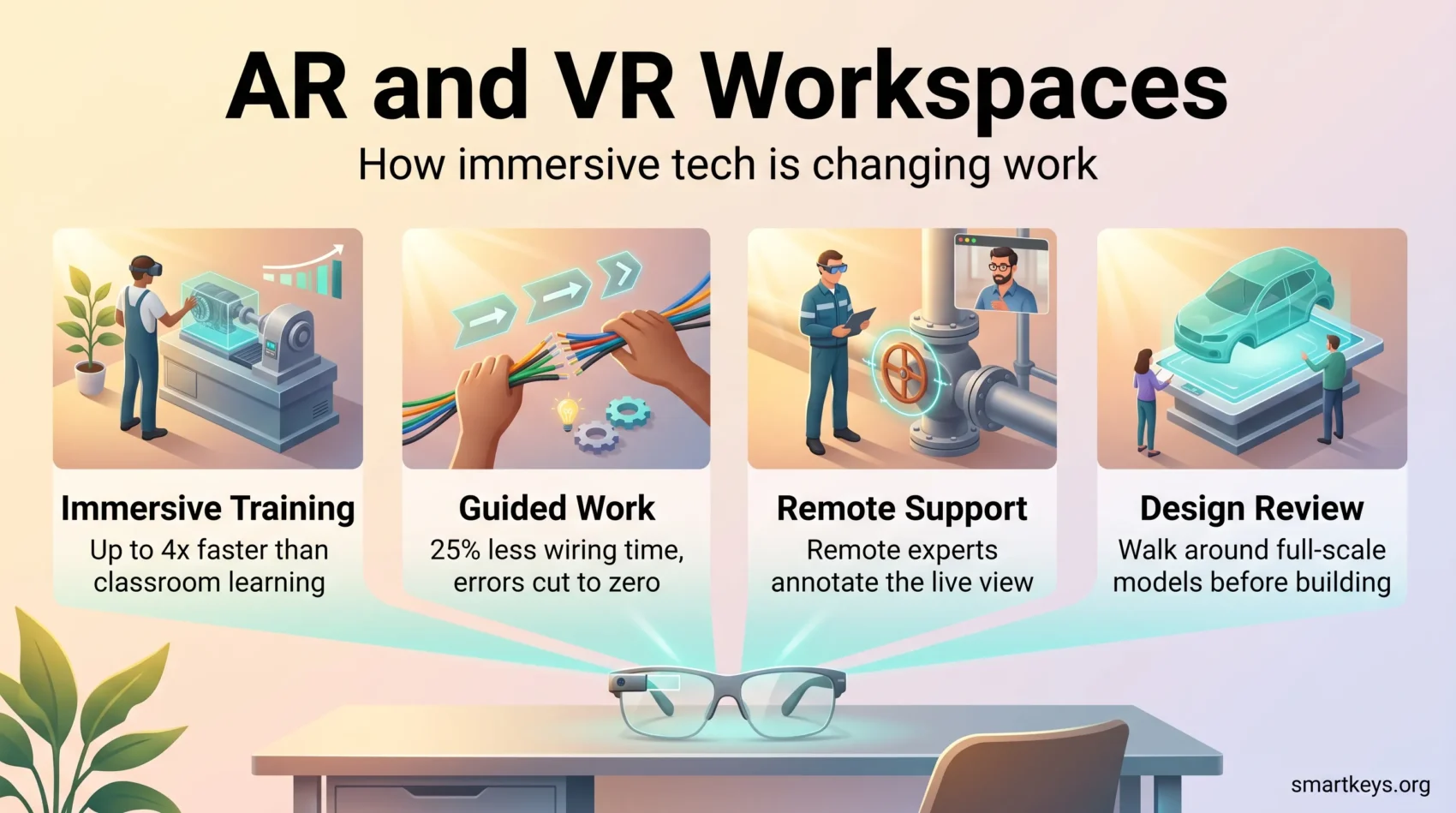
- Training has the strongest evidence base. PwC found VR learners finished soft skills courses up to four times faster than classroom learners.
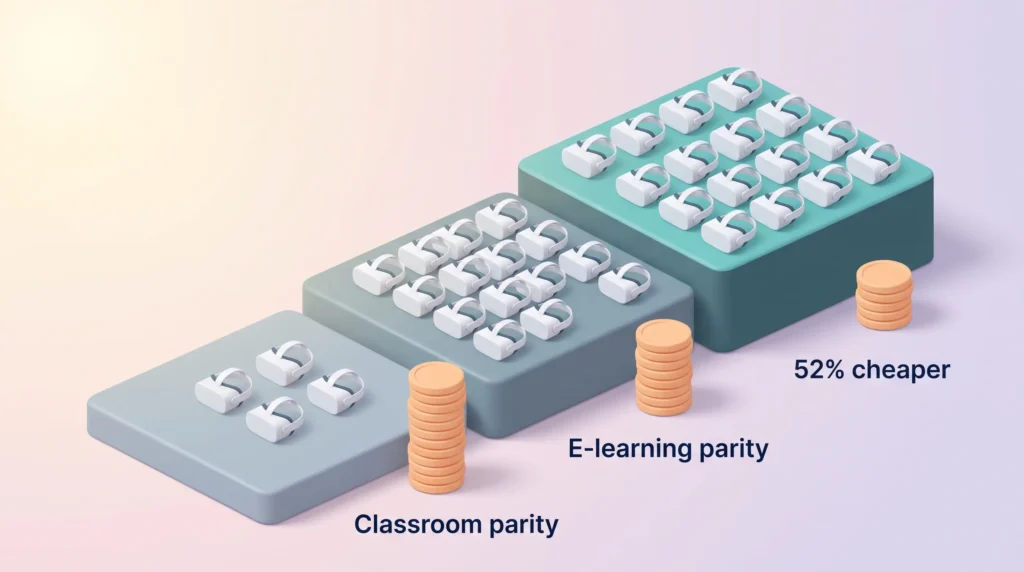
- The economics only work at scale. PwC put cost parity with classroom training at roughly 375 learners.
- AR guided instructions and remote assistance deliver value today. General purpose virtual offices remain a niche.
- Plan for the limits: vendor exits, setup time and headset comfort decide whether a pilot survives.
Where AR and VR Stand in 2026
Start with what actually shipped, and what was switched off. Microsoft ended HoloLens 2 production in 2024 and, on 2 December 2025, retired the Mesh app entirely: Mesh meetings on PCs and Meta Quest headsets stopped working and the site was shut down. Microsoft replaced it with immersive events inside Teams, which run on PC, Mac and Meta Quest and need a Teams Premium or equivalent commercial licence to host (Computerworld).
Meta followed. It shut down Horizon Workrooms, its virtual meeting app, on 16 February 2026. Four days later it stopped selling commercial Quest editions and made Horizon Managed Services, its device management service for business headsets, free until the service closes on 4 January 2030 (UploadVR). Consumer Quest headsets are still sold, but fleets now need third-party management tools.
The Hardware Picture
Apple refreshed Vision Pro with the M5 chip in October 2025 and kept the price at $3,499, which puts it in the pilot-project bracket rather than general rollout. Samsung’s Galaxy XR arrived the same month at $1,799 on Google’s Android XR, opening a mid-tier option. Meta’s Quest line still has the largest library of training content, but with the business program gone, check who will manage and support your devices before you buy in bulk.
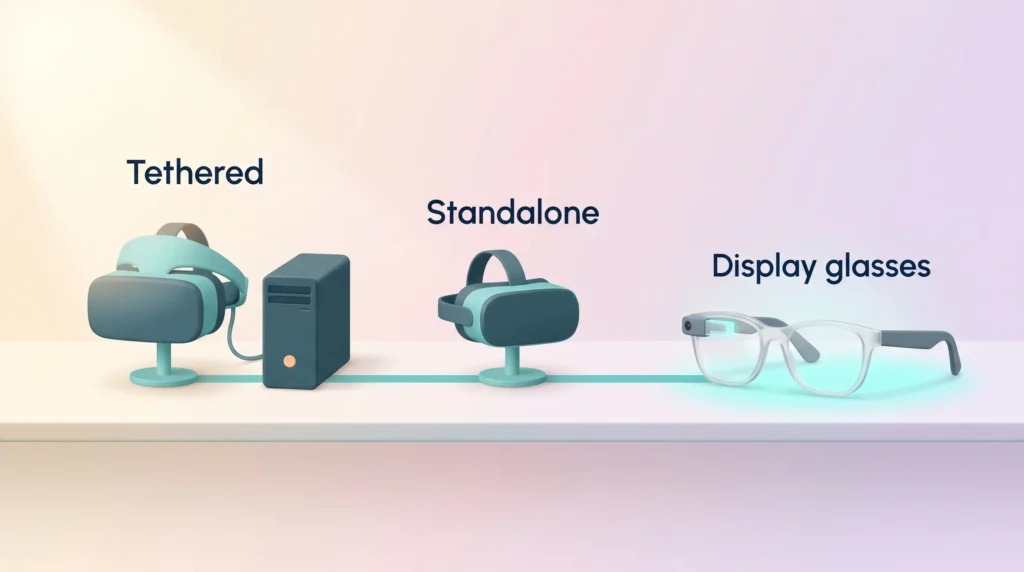
Headsets come in two basic set-ups. Standalone headsets have the computer built in, so staff can pick one up and start. PC-tethered headsets connect to a workstation and deliver sharper graphics for detailed engineering or simulation work, at the cost of a cable and a fixed desk. The old smartphone-in-a-visor format has disappeared from business use.
The more interesting shift is away from headsets. Lightweight display glasses, including Meta’s Ray-Ban Display and the Android XR glasses lined up for 2026, are an easier sell for a technician who needs both hands free all day. Our guide to smart glasses for frontline work covers the measured results so far. If AR becomes routine at work, it will most likely arrive as eyewear rather than a visor.
Defining Augmented Reality and Virtual Reality
Augmented reality layers digital information onto the physical world you can still see: a wiring diagram pinned to the panel in front of you, or a picking route on a warehouse floor. Virtual reality replaces your view with a simulated environment, which suits rehearsing situations you cannot safely stage in real life. Mixed reality sits between them, anchoring digital objects in a scan of your actual room. Most headsets now do all three through camera passthrough, so the question is not which technology you buy but which problem you point it at. That framing helps when you weigh immersive tools against simpler options in your collaboration toolkit.
Enhanced Collaboration Through AR and VR
Distributed teams were supposed to be the killer application. Reality has been mixed.
Virtual Meeting Rooms for Distributed Teams
Virtual meeting rooms create a sense of shared space that video calls flatten out. People take positions around a model, gesture at it, and talk over each other the way they would in a room. For workshops, design critiques and onboarding, that spatial quality genuinely helps. Occasional team events in a virtual lounge can also break up a week of back-to-back video calls.
What has not happened is the daily standup in VR. Headsets are heavier and hotter than a laptop, and text work inside them is slower. The retirement of both Microsoft Mesh and Meta Horizon Workrooms is a fair signal of where demand landed. Most teams get further by improving their digital headquarters and reserving immersive sessions for meetings where a shared 3D object is the point.
Virtual Monitors for Focused Solo Work
A quieter use case has outlasted the meeting apps: using a headset as a set of extra screens. Apps such as Immersed mirror your laptop into several large virtual monitors, which appeals to people working from a small flat, a hotel room or a train. It works best for short, focused blocks. After an hour or two, weight on the face and eye strain usually send people back to a physical display.
AR-Assisted Communication and Remote Support
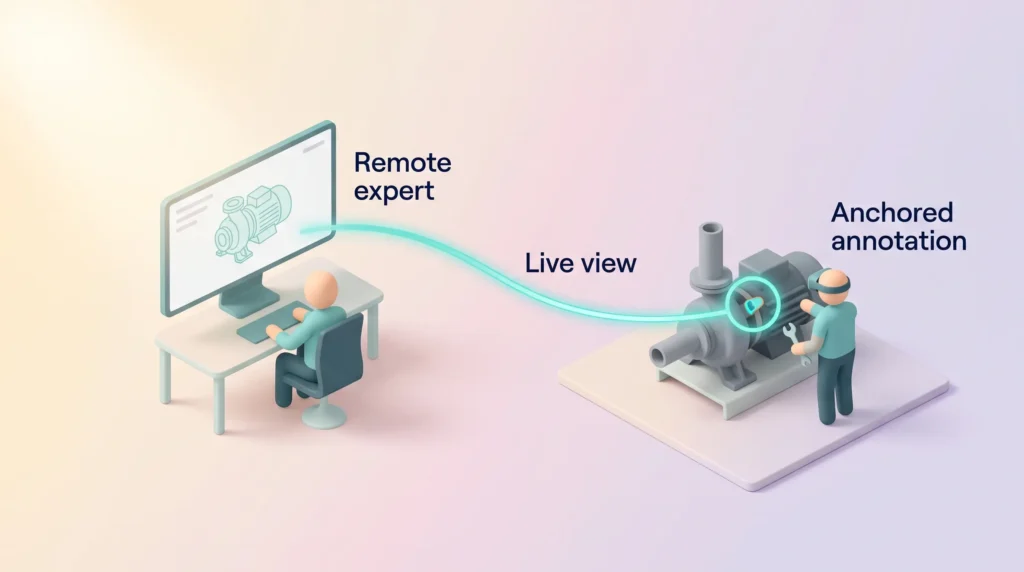
AR communication tools have a clearer track record. A field technician streams their view to a remote expert, who annotates the live image: circle this valve, unscrew that bracket. The expert never travels, the technician never puts down their tools, and the annotation stays anchored to the object rather than floating in a chat window.
This pattern shows up across field service, manufacturing maintenance, medical device support and construction inspection. It works because it solves a specific, expensive problem, the standard any immersive project should meet. Related approaches, including holographic collaboration systems, chase the same goal of presence without travel.
Immersive Training and Skill Development
Training is where AR and VR have the most credible business case and the strongest published research. VR training programs let employees practise in a safe, repeatable environment and fail without consequences.
What the Research Actually Shows
PwC compared VR against classroom and e-learning delivery of the same soft skills content. VR learners finished up to four times faster than classroom learners, or about three times faster once headset setup was counted. They reported being up to 275% more confident applying what they learned, felt 3.75 times more emotionally connected to the material than classroom learners, and were up to four times more focused than e-learners (PwC).
The cost picture from the same study is the part most teams skip. VR reached cost parity with classroom training at 375 learners and with e-learning at 1,950 learners, and became 52% cheaper than classroom instruction at 3,000 learners. Below those thresholds, formats such as microlearning or a well-run corporate training platform are usually the better buy.
Safe Learning Environments for High-Risk Work
Where the stakes are physical, immersive practice earns its place. Surgical teams rehearse before touching a patient. Aviation has trained in simulators for decades, and headset-based simulation extends that logic to ground crew and maintenance staff. Utilities run switching and confined-space drills that are dangerous to stage repeatedly.
The common thread is repetition at low marginal cost: once the scenario is built, the hundredth run costs almost nothing. That is why the technology suits structured programs better than ad hoc knowledge sharing. If you are planning one, our guide on how to build a VR training program with a real business case walks through the pilot, rollout and KPIs.
Onboarding and Candidate Assessment
HR teams use the same tools at both ends of the hiring funnel. A virtual site tour or a rehearsed first shift can help new hires in distributed teams, alongside a solid remote onboarding process. Earlier in the funnel, a few employers test candidates in simulated work situations instead of a standard interview. That is still rare and raises its own fairness questions, which our article on using VR job interviews to assess candidates covers in detail.
Productivity Gains: Where the Evidence Is Strongest
Broad claims about immersive technology lifting company-wide productivity are hard to substantiate. Task-level results in specific workflows are easier to verify.
Guided Work Instructions
Boeing’s AR pilot on wiring harness assembly is the most cited example for good reason. Technicians followed line-of-sight instructions on smart glasses instead of paper manuals. Boeing reported a 25% cut in wiring production time and an error rate driven to zero, because workers no longer looked away from the aircraft to re-read a diagram (AR Insider).
The mechanism generalises to any job that means following a long, order-dependent procedure on a physical object: assembly, inspection, cabling, warehouse picking, equipment servicing. The same overlays double as a teaching tool, which is the idea behind AR on-the-job training for field technicians. It is also the logic driving digital twins in manufacturing, where the digital model becomes the working reference.
Real-Time Data Where the Work Happens
Hands-free live data removes a lookup that repeats hundreds of times a day: the next pick location, or the pressure reading of the unit in front of you. Check first whether the data even exists in real time: most failed AR pilots fail on integration, not optics, which is why immersive projects sit downstream of a broader digital transformation programme.
Current Applications of AR and VR in Workplaces
Organisations that kept immersive tools in production use them in a few well-defined places rather than everywhere.
Training Scenarios and Simulations
Retail shows how scale makes the numbers work. Walmart runs VR modules through Strivr across its store network, and at that headcount the per-learner cost of building a scenario drops to almost nothing. The pattern is consistent: high headcount, repeatable scenario, real consequences for getting it wrong. It also feeds into wider upskilling programmes.
Remote Assistance and Troubleshooting
AR lets an on-site technician get real-time guidance from a specialist on another continent. Downtime falls because the expert does not fly out, and first-time fix rates improve because the annotation sits on the equipment rather than in a phone call. For organisations committed to a work-from-anywhere model, this is one of the few immersive tools that pays for itself quickly.
Transforming Product Design and Prototyping
Design review remains one of the most durable immersive use cases: a full-scale model you can walk around answers questions a screen render cannot.
Using AR and VR for 3D Visualisation
AR places a digital model in the physical space it will occupy, so teams can check clearance, reach and sightlines before anything is built. VR puts the reviewer inside the model instead, which suits vehicle interiors, plant layouts and architectural walkthroughs. Automotive and aerospace firms have done this for years, because a full-size physical mock-up is slow and expensive to produce.
Shortening the Prototyping Loop
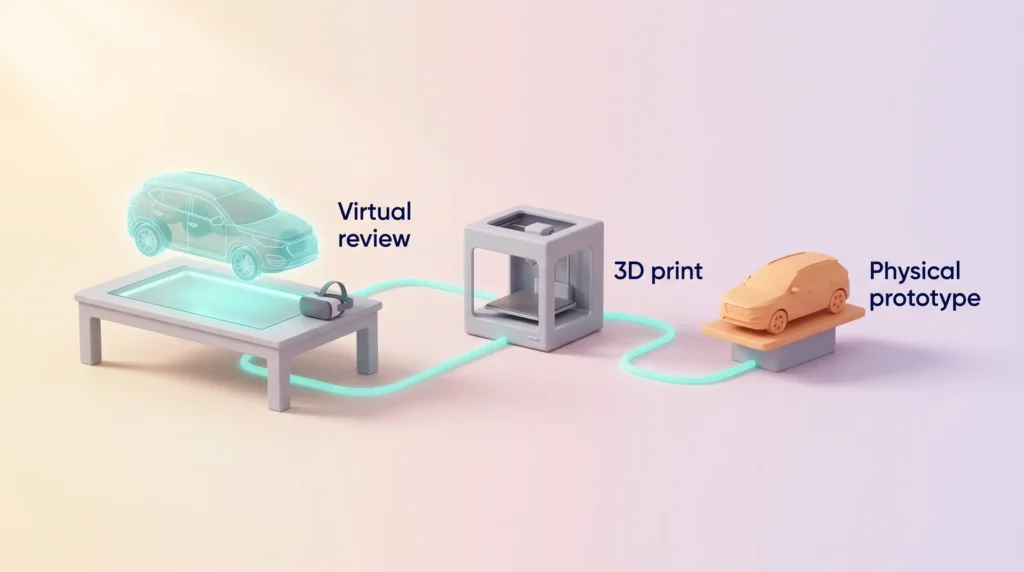
AR prototyping shifts the first iterations from physical to virtual mock-ups. Teams review geometry, ergonomics and assembly sequence in a shared session, agree changes, and commit to a physical build once the obvious problems are gone. That does not eliminate physical prototypes; it reduces how many you need.
Paired with on-demand 3D printing, the loop tightens further: validate in the headset, print the one version worth touching. Our guide to AR and VR in product prototyping covers tools, costs and when a physical model is still the better answer.
AR VR Workspaces and Remote Work
Immersive tools have not made distributed work feel like the same room, but they improve specific moments in it.
Creating Engaging Virtual Environments
In a virtual room, participants appear as avatars and share a 3D model everyone can point at. That beats a screen share when the subject is spatial: a building, a machine, a store layout. It is weaker when the subject is a spreadsheet. Schedule immersive sessions deliberately, like a workshop, rather than making them a default meeting mode. Teams that get value from them usually have strong remote work habits already.
Facilitating Access to Shared Resources
AR delivers guidance where the work is, so expertise stops being tied to location. VR gives training and review sessions a shared reference everyone experienced the same way.
Set expectations accordingly: immersive tools help with a handful of high-value moments, and the rest of your week still runs on documents, chat and video. Our overviews of remote work trends and hybrid workspaces and wellbeing cover the wider picture.
Challenges to Plan For Before You Roll Out
Most immersive projects that stall do so for practical reasons, not because the technology fails in a demo.
Vendor Risk and Total Cost
The headset is the cheap part. Scenario development, device management, cleaning, replacements and support add up. The past year added vendor risk: two of the biggest players withdrew their workplace products within three months, so favour content and device management tools that run on more than one headset brand.
Setup Time and Learning Curve
First sessions take longer than expected: staff learn the controls and fit, and someone must keep devices charged and updated. PwC’s own figures show the effect: counted with setup, VR training was about three times faster than the classroom rather than four. Budget time for a guided first session and a named person who owns the devices.
Comfort, Health and Privacy
Some people feel dizzy or nauseous in VR, a reaction known as cybersickness. Research on workplace use also points to eye strain, neck and shoulder fatigue and mental overload during long sessions (Virtual Reality journal review). Keep sessions short, offer a non-VR alternative, and never make headset use a condition of doing the job. Headsets also carry cameras and motion sensors that capture rooms, faces and movement, so agree with IT, the works council or employee representatives what is recorded and stored before the pilot starts.
Found this useful?
Make SmartKeys a preferred source on Google, and our articles will surface more often in your Top Stories, AI Overviews, and AI Mode.
Add as Preferred Source




