

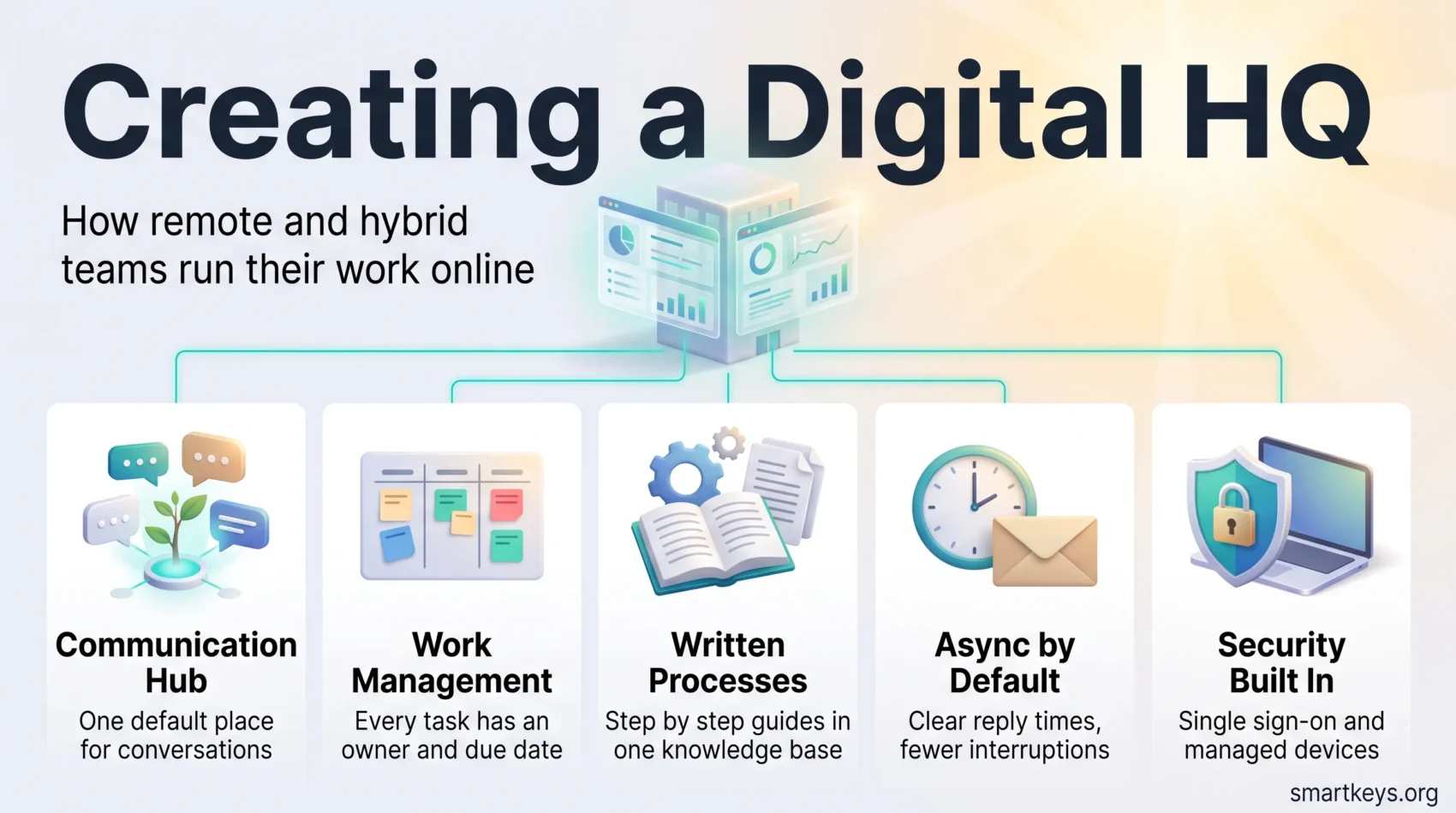
A digital HQ is the online place where a team actually runs its work: the chat hub, the task boards, the shared documents and the rules for using them. For most companies it is no longer a backup to the physical office. It is the primary workplace, and the office building is where people go to meet.
That change has settled rather than reversed. Stanford’s Survey of Working Arrangements and Attitudes (SWAA) put roughly a quarter of paid full days in the US as worked from home in May 2026. Gallup’s May 2026 reading found that 52% of remote-capable US employees work hybrid, 26% fully remote and only 22% fully on site. If your team is spread across home desks, coworking spaces and an office on some days, you already have a digital HQ. The question is whether it was designed or just accumulated.
This guide explains what a digital HQ is, why it matters in 2026, which building blocks it needs and how to set one up without adding noise to an already interrupted workday.
Key Takeaways
- A digital HQ is a deliberate setup of a communication hub, a work management layer, written rules and security controls. It is not a single app.
- Hybrid work has settled: about a quarter of US paid days are worked from home, and half of remote-capable employees work hybrid (SWAA and Gallup, May 2026).
- The biggest risk is noise, not distance. Microsoft’s telemetry shows employees interrupted every two minutes during core hours, so the rules matter as much as the tools.
- Async communication by default, written processes and a documented onboarding path do more for remote teams than another video tool.
- Security needs to be built into the hub (single sign-on, multifactor authentication, managed devices) rather than added later.
- Culture still has to be built on purpose: recognition, one-to-ones and informal contact do not happen by accident online.
What a Digital HQ Is (and What It Is Not)
The term was popularised by Slack, which describes a digital HQ as “a single, virtual space to connect your people, tools, customers and partners for faster and more flexible work.” The idea is simple. In an office, people knew where to find a colleague and how decisions got made. A digital HQ recreates those functions online, on purpose.
In practice it has four parts. First, a communication hub where conversations happen and stay findable. Second, a work management layer where tasks, owners and deadlines live. Third, a knowledge base with written processes. Fourth, a set of working agreements: when to expect a reply, which channel is for what, and how meetings are run.
What a digital HQ is not: a virtual office app with avatars, or a folder of unread Slack channels. Tools such as Gather or Kumospace can be part of the setup, and we look at them in our guide to virtual offices in a hybrid workforce. But the app is the room, not the way of working. Most teams that struggle remotely have plenty of tools. What they lack is agreement on how to use them.
Why the Digital HQ Matters in 2026
Two things changed since the pandemic experiment. First, the numbers stopped moving. SWAA’s data for June 2025 to May 2026 shows 62% of full-time US employees fully on site, 26% hybrid and 12% fully remote. That mix has been stable for a while, so remote work is a permanent feature of how companies operate, not a phase to wait out.
Second, employees treat flexibility as part of the deal. Gallup reports that six in ten exclusively remote, remote-capable employees say they are extremely likely to look for a new job if that flexibility is taken away. Companies pushing people back to the office have a harder case to make than they did in 2023. Our article on whether the office is dead covers that debate.
The digital HQ also decides whether remote work is productive or exhausting. Microsoft’s Work Trend Index special report from June 2025 found that employees are interrupted roughly every two minutes during core hours by a meeting, email or notification. It also found that 57% of meetings are ad hoc calls without a calendar invite, and that the average employee sends or receives more than 50 messages outside business hours. A well-designed hub with clear rules reduces that load. A badly designed one produces it.
The Building Blocks of a Digital HQ
Reliable Connectivity and Devices
Everything else depends on people getting online without friction: a stable home connection with a backup, a company-managed laptop and a decent headset. Our guide to 5G and remote work explains where mobile networks now serve as a serious backup line.
One Communication Hub
Pick one hub and make it the default. For most teams that is Slack or Microsoft Teams, and our Slack vs Microsoft Teams comparison covers pricing and limits for 2026. The important design decision is channel structure. A few well-named channels (one per project, one per team, one for announcements) beat dozens of overlapping ones. Agree on what belongs in a direct message, what belongs in a channel and what belongs in a document. Conversations that decide something should end with the decision written down where the team can find it later.
A Shared Work Management Layer
Chat is where work is discussed. It is a poor place to track it. A digital HQ needs a place where every task has an owner, a due date and a status that anyone can check without asking. Asana, Trello, monday.com and Notion all do this; our Asana vs Trello and monday.com vs Notion comparisons show which model suits which team. Connect the task tool to the hub so updates appear where people already look. Asana, for example, offers hundreds of integrations with chat, calendar and file tools.
Written Processes and a Knowledge Base
In an office, new people learn how things work by watching. Online, that knowledge has to be written down or it disappears. Standard operating procedures (SOPs, short step-by-step instructions for recurring tasks) are the backbone of a working digital HQ. Our guide to how SOPs boost team productivity explains how to write ones people will actually use. Keep them in one searchable place, name an owner for each, and review them when a process changes.
Async Communication by Default
Async communication means writing a message that the recipient can answer later, instead of expecting an immediate reply or a meeting. It is the single habit that most reduces the interruption load described above. Teams that use it well set clear response-time expectations, for example same day for channel messages and one hour for anything marked urgent. Live meetings are reserved for decisions and difficult conversations. Our overview of asynchronous communication tools shows what this looks like in practice.
Security Built In
A digital HQ concentrates company data in a handful of cloud tools, which makes access control the main security job. The basics are single sign-on so accounts can be switched off in one place, multifactor authentication on every tool, and managed devices with disk encryption. Beyond that, many companies move to a zero trust model, which means every login is verified regardless of whether it comes from the office network. Our guides to cybersecurity in remote work and zero trust security cover the details. Short usage rules matter too: most people in the hub are not technical and need to know what they may share where.
How to Set Up a Digital HQ Step by Step
1. Map How Work Flows Today
Before choosing anything, write down how a typical piece of work moves through the team. Where is it requested, discussed, tracked and stored? Most teams find work scattered across email, chat, spreadsheets and personal notes. That map shows what the digital HQ has to replace.
2. Choose the Hub and Consolidate
Decide which tool is the front door and which tools plug into it. Then archive what overlaps. Two chat tools or three task trackers guarantee that information gets lost. Consolidation is unpopular for a week and a relief afterwards.
3. Write the Working Agreements
This is the step most teams skip. Agree in writing on response times, channel naming, which decisions need a meeting, how meetings are documented, and what “done” means for a task. Our guide to hybrid meeting etiquette covers the rules that stop remote participants being sidelined.
4. Onboard People Into It
A new hire should find the rules, the tools and their first tasks without asking. That requires a written onboarding path inside the digital HQ itself. Our article on remote onboarding and training explains what works and where programmes break down after week one.
5. Review It Every Quarter
Tools change, teams grow and channels multiply. A short quarterly review (which channels are dead, which rules are ignored, which tool nobody opens) keeps the setup lean.
Building Culture Inside a Digital HQ
Culture in an office is partly accidental: the corridor chat, the shared lunch, the overheard problem someone helps with. Online, none of that happens unless someone makes room for it. Our analysis of remote employee engagement looks at the 2026 data, including the isolation that comes with it.
A few practices carry most of the weight. Managers should hold regular one-to-ones that are about the person, not just the task list. Recognition should be public and specific, in the channel where the team will see it. Informal contact needs a home, such as an off-topic channel or a short optional social call. And decisions should be explained, not just announced, because remote staff cannot pick up the reasoning from the room.
Belonging also depends on fairness. Hybrid teams drift into two classes when people in the office get information first. The fix is a simple rule: if it matters, it goes in the digital HQ, not the corridor. Our guide to building a remote company culture goes deeper.
Common Problems and How to Fix Them
Notification Overload
The most common complaint about a digital HQ is that it never stops. The fix is structural: fewer channels, muted by default outside core hours, and a norm that nobody answers in the evening. Encourage focus blocks with chat closed. Our guide to remote work productivity has practical routines for protecting attention.
Isolation
Some team members go days without a real conversation. Regular one-to-ones, a buddy for new hires and small optional social rituals help. So does noticing who has gone quiet.
Time Zones
Once a team spans several time zones, live meetings become the exception. The standard answers are async habits, a written record of every decision and a small overlap window for the calls that need everyone. Our guide to managing cross-border remote teams covers the tools and the legal side.
Tool Sprawl and Shadow Tools
When the official tools are clumsy, people build their own in spreadsheets and private group chats. That is a signal, not a discipline problem. Fix what the official tool fails to do, then retire the workaround.
Where the Digital HQ Is Heading
Three trends are shaping the next few years. The first is AI inside the hub. Slack, Teams and the major task tools now ship assistants that summarise threads, draft updates and search documents. Used well, they cut the time spent catching up after a day away. Our guide to AI collaboration tools for global teams looks at what actually helps and what each vendor charges.
The second is the changing role of the office. With hybrid the norm, the physical office increasingly serves as a meeting and onboarding space rather than the place where daily work happens.
The third is location-independent work spreading beyond tech, which raises the bar for written processes and security. Our pieces on digital nomads in the workforce and broader remote work trends cover that shift.
Conclusion
A digital HQ is not a product you buy. It is the combination of a communication hub, a work management layer, written processes, clear working agreements and solid security, maintained on purpose. In 2026, with hybrid work settled and employees treating flexibility as part of the job, that setup is the workplace for most knowledge teams.
The teams that get it right treat the digital HQ as something to design and review, not something that happens to them. Map how work flows, consolidate the tools, write down the rules and revisit them every quarter. The tools will keep changing. The discipline is what lasts.
Found this useful?
Make SmartKeys a preferred source on Google, and our articles will surface more often in your Top Stories, AI Overviews, and AI Mode.
Add as Preferred Source




