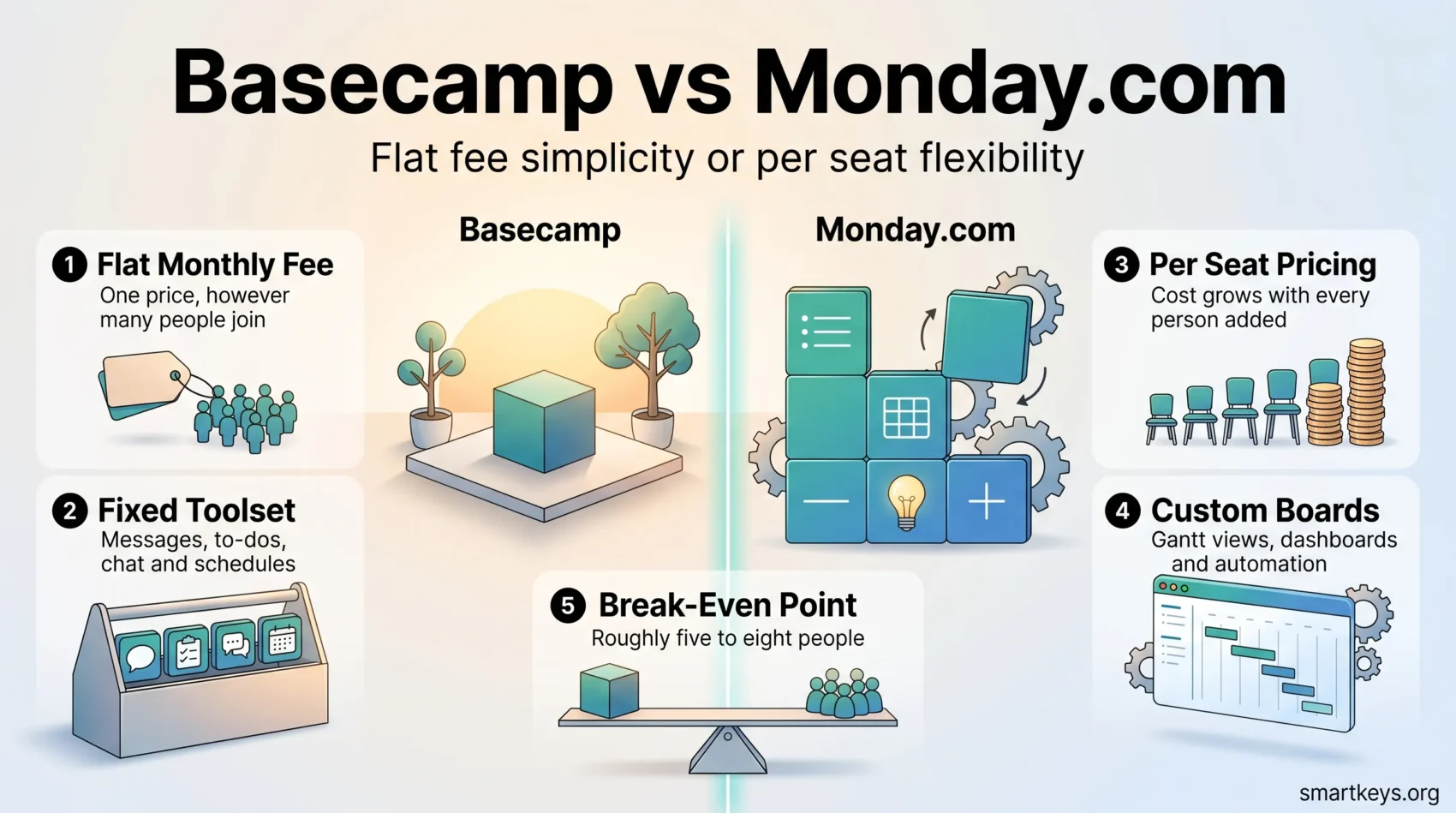
Basecamp and Monday.com both promise to keep a team’s work in one place, but they solve the problem in opposite ways. Basecamp charges one flat monthly fee for a small, fixed set of tools. Monday.com charges per person and lets you build almost any workflow you can describe.
That difference decides most of the outcome: what you pay, how long onboarding takes, and whether the tool still fits when your team doubles. This comparison covers what each offers in 2026, what both cost, and which team each one suits.
Key Takeaways
- Basecamp charges a flat fee with no per-user cost: $25 a month for Freelancer, $59 for Studio, $99 for Pro and $299 for the Unlimited Edition.
- Monday.com charges per seat: $9 for Basic, $12 for Standard and $19 for Pro, per seat per month on annual billing, with a three-seat minimum.
- The break-even point sits at roughly five to eight people. Below it Monday.com is usually cheaper, above it Basecamp usually is.
- Monday.com has Gantt charts, dashboards and automation; Basecamp has none of them by design, though it did add time tracking through Timesheets.
The Short Answer
If your team communicates more than it plans and wants to be productive on day one, Basecamp is the safer pick. It is opinionated software: it decides how projects should be organised so you do not have to.
If you need to model a specific process, a hiring pipeline or a client onboarding sequence, and you want dashboards and automated handoffs, Monday.com fits better. It is a construction kit rather than a finished product, which is both its strength and its cost.
What Basecamp Is in 2026
Basecamp, made by 37signals, organises work into projects. Each project holds the same fixed set of tools: a message board for announcements, to-do lists, a chat room called Campfire, a schedule, and a place for documents and files. Nothing is configurable the way a database tool is, and that is deliberate.
Basecamp 5, released for 2026, is the largest update in years. It added subtasks under individual to-dos, “loose” to-dos that do not need to sit in a list, a full-screen calendar with recurring events, voicenotes, and a rebuilt editor with tables and Markdown. Search was reworked, and the API now ships with a command-line interface.
What Basecamp Does Well
- Flat pricing. Adding a person costs nothing. A team of 40 pays what a team of 10 pays on the same plan.
- Fast onboarding. There is little to configure, so most people are productive within an hour, not a week.
- Communication built in. Message boards, chat and automatic check-ins sit alongside the work, so less context ends up scattered across email and separate chat platforms like Slack and Teams.
- Honest progress tracking. Hill Charts show whether work is still being figured out or is being finished, which a percentage bar cannot express.
Where Basecamp Falls Short
- No Gantt charts. The Lineup shows whole projects on a timeline, but there is no dependency-linked task chart. If a client expects a Gantt view, this is a hard blocker.
- Project caps. The flat fee is not unlimited on every plan. Studio allows 10 active projects and Pro allows 25. Only the $299 Unlimited Edition removes the cap.
- Thin reporting and little automation. You get activity logs, to-do completion and Timesheets, but no custom dashboards, formula fields or automated handoffs.
For a closer look on its own, see our full Basecamp review.
What Monday.com Is in 2026
Monday.com is built on boards. A board is a table where each row is an item, a task, a candidate, a deal, and each column holds data about it: an owner, a status, a date, a number, a formula. Because you define the columns, you can model almost any process rather than adapting your process to the software.
The same data can then be shown several ways. Kanban shows items as cards in status columns. Timeline and Gantt views show them against dates. Workload shows how many items each person carries, which is the fastest way to spot someone quietly overloaded.
What Monday.com Does Well
- Genuine flexibility. One workspace can run a marketing calendar, a sales pipeline and a support queue without stretching the tool.
- Automation that removes admin. Rules such as “when status changes to Approved, assign to the designer and set the due date five days out” replace a whole class of manual steps. Our guide to AI in project management covers which ones are worth building.
- Reporting for people who never open the tool. Dashboards roll several boards into one view, which is what most managers actually want.
- Templates and integrations. More than 200 prebuilt templates, plus connectors to Slack, Gmail, Google Calendar, Microsoft Teams and Dropbox.
Where Monday.com Falls Short
- Cost grows with headcount. Every extra person adds to the bill, every month, indefinitely.
- Seats are sold in blocks. Paid plans start at three seats, and above that seats are bought in groups of five. A team of six pays for ten.
- Features are spread across tiers. Gantt and calendar views need Standard. Time tracking and private boards need Pro. It is easy to price the wrong plan.
- Setup is real work. A board that fits your process has to be designed, and a bad one is worse than a spreadsheet.
See also Monday.com vs Trello and Monday.com vs Notion.
Feature Comparison
The two platforms overlap on the basics and diverge sharply above them.
Tasks. Both handle assignees, due dates and comments. Basecamp uses nested to-do lists with subtasks. Monday.com uses board items with custom columns, which supports priority scores and effort estimates Basecamp cannot represent. Our guide to task prioritization frameworks explains which methods need that kind of field.
Views. Basecamp gives you lists, a card table for Kanban, a calendar and the Lineup. Monday.com adds Timeline, Gantt, Workload, Chart and Form views, though the useful ones need Standard.
Communication. This is Basecamp’s strongest area. Message boards keep decisions attached to the project instead of buried in an inbox, and automatic check-ins ask a recurring question such as “what did you work on today?” without anyone scheduling a meeting. That pairs well with our piece on silent meetings for remote teams. Monday.com has item-level updates, but it is a work tracker with discussion attached rather than a communication tool.
Reporting and automation. Basecamp reports on activity, to-do completion and tracked time, and automates almost nothing by design. Monday.com builds custom dashboards from formula columns and chart widgets, and automates handoffs between stages. If someone above you asks for a weekly status roll-up, Monday.com produces it and Basecamp does not.
Time tracking. Both have it now. Basecamp’s Timesheets shows time spent per project. Monday.com’s time tracking column sits on the Pro tier.
Pricing: The Part That Usually Decides It
Basecamp Pricing
Basecamp charges one flat fee per account, with no per-user cost on any plan. Figures come from Basecamp’s own pricing page.
- Free: $0, one active project, up to five people, 1 GB storage.
- Freelancer: $25 a month, three active projects, up to 20 people, 5 GB.
- Studio: $59 a month, 10 active projects, unlimited people, 25 GB.
- Pro: $99 a month, 25 active projects, unlimited people, 100 GB.
- Unlimited Edition: $299 a month billed annually, unlimited projects, 1 TB, priority support and onboarding.
Paid plans come with a 30-day free trial. The Unlimited Edition trial runs 45 days.
Monday.com Pricing
Monday.com charges per seat, per month. These are the annual-billing rates from Monday.com’s pricing page; monthly billing costs more, because the annual rate carries an 18% discount.
- Free: $0, up to two seats, three boards, three docs.
- Basic: $9 per seat, unlimited items, unlimited free viewers.
- Standard: $12 per seat, adds Timeline and Gantt views, calendar view, guest access and 250 automation runs a month.
- Pro: $19 per seat, adds time tracking, private boards, advanced views and 25,000 automation runs a month.
- Enterprise: quoted by sales.
Paid plans start at three seats and scale in blocks of five. The free trial runs 14 days on Pro.
What This Costs in Practice
Standard is the realistic Monday.com tier for most teams, since a calendar and a timeline are not optional. Against the matching Basecamp plan:
- Three people: Monday.com Standard is $36 a month. Basecamp Freelancer is $25.
- Five people: Monday.com is $60. Basecamp Studio is $59. Effectively a tie.
- Fifteen people: Monday.com is $180. Basecamp Pro is $99.
- Thirty people: Monday.com is $360. Basecamp Pro is still $99.
The gap widens every time you hire. One caveat keeps this honest: Basecamp’s flat fee is capped by active projects, not by people. A ten-person agency running 40 client projects at once needs the $299 Unlimited Edition, not the $99 Pro plan, and the arithmetic changes.
Usability and Learning Curve
Basecamp is designed so a new joiner needs no training. There is one way to lay out a project and everyone sees the same one. The cost of that clarity is that you cannot reshape it when your process differs.
Monday.com is approachable to look at and harder to master. Anyone can read a board, but building one that models your workflow properly takes deliberate effort, and teams that skip that step end up with a colourful list nobody trusts. Writing the process down first helps, which is the argument in our guide to standard operating procedures.
On G2, Basecamp holds about 4.1 out of 5 across roughly 5,500 reviews, while Monday.com holds about 4.7 across roughly 17,000. Read that as a signal about polish and breadth, not proof that one tool suits your team.
Support and Learning Resources
Both vendors support customers by email and in-app messaging rather than by phone. Basecamp’s reputation rests on fast, direct replies from a small team, and the Unlimited Edition adds priority support and personalised onboarding.
Monday.com leans on scale instead: a large knowledge base, tutorials, live webinars and a community forum, with dedicated support reserved for Enterprise accounts. Its template gallery matters here, since starting from a prebuilt board beats designing one from scratch. Basecamp has project templates on Studio and above, but a smaller library. Either way, sequencing the rollout matters more than the documentation, and our guide to remote onboarding and training covers how to introduce a new system without losing two weeks.
Which One Should You Choose?
Choose Basecamp if your team is larger than about eight people, your projects are similar in shape, and your real problem is information scattered across email and chat. Choose it also if you want a bill that does not move when you hire.
Choose Monday.com if you need to model a specific process, report on it to people who never open the tool, or automate handoffs. Choose it also if your team is small enough that per-seat pricing stays cheap, and someone will own the setup.
If neither feels obvious, ask this: do you want software that tells you how to work, or software you have to teach? Basecamp is the former, Monday.com the latter. For the nearest alternatives, see ClickUp vs Asana, Asana vs Trello, Trello vs Jira, Smartsheet vs Airtable, Teamwork vs Wrike and Airtable vs Notion, or our roundup of productivity apps. For calls alongside either tool, see Zoom vs Microsoft Teams.
Found this useful?
Make SmartKeys a preferred source on Google, and our articles will surface more often in your Top Stories, AI Overviews, and AI Mode.
Add as Preferred Source