Picking between two project management tools usually comes down to one question: what kind of work does your team actually run? Project management software is simply a shared place to hold tasks, deadlines, files and conversations so nobody has to reconstruct a project from memory or email. Teamwork.com and Wrike both do that well, but they were built for different customers, and in 2026 their pricing pages make that difference obvious.
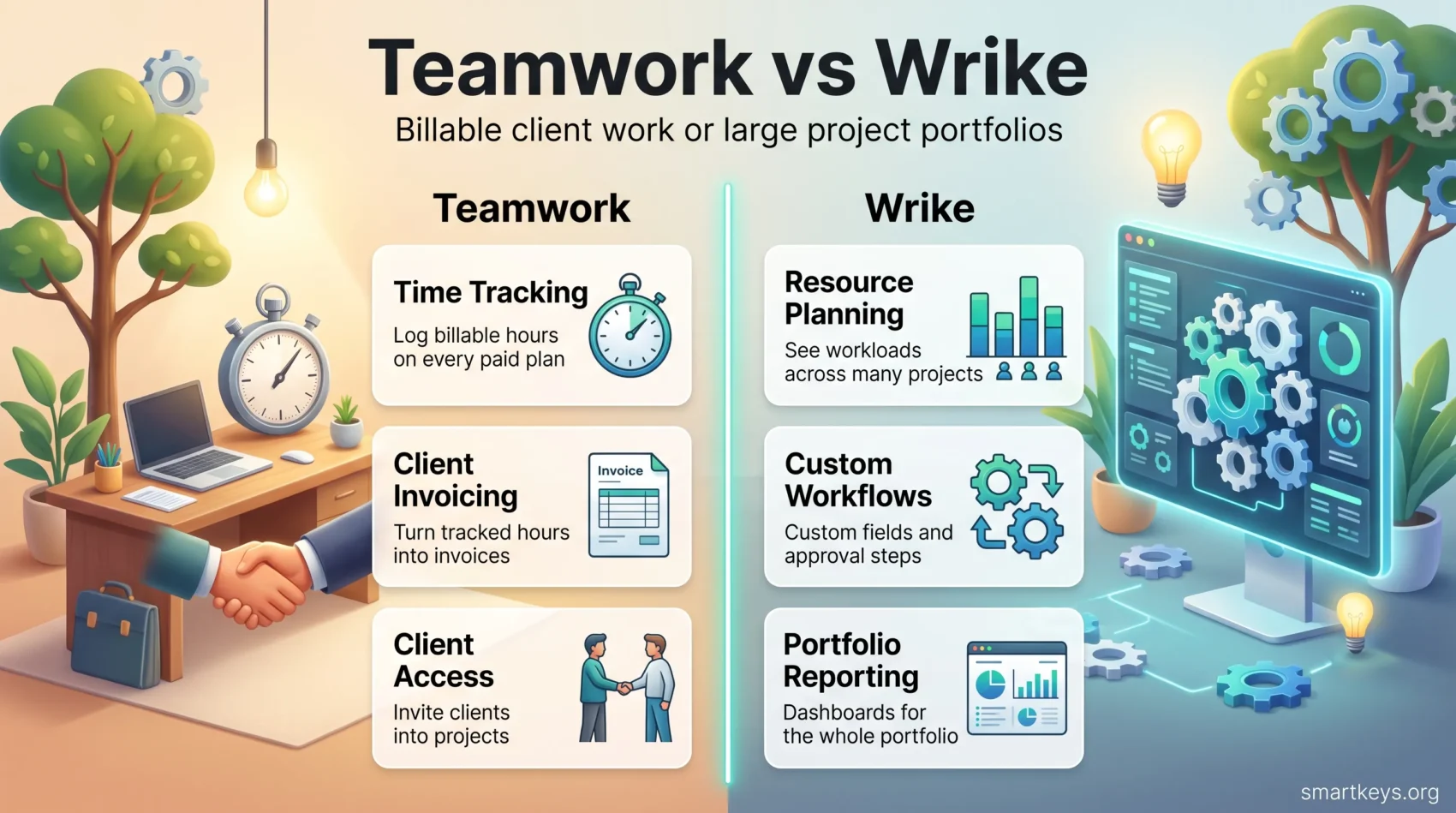
Teamwork.com (the product long known as Teamwork Projects) is built around billable client work. It tracks time against projects, turns those hours into invoices and lets you bring clients into the workspace. Wrike is built around scale: many projects running at once, resources shared across them, and reporting that management can read. Understanding which problem each one solves is more useful than comparing feature lists, so this guide focuses on that, then puts current prices next to each other. For broader context on how tooling fits your workflow, see our team productivity playbook.
Key Takeaways
- Teamwork.com suits agencies and service teams that bill clients for hours. Time tracking and invoicing start on its cheapest paid plan.
- Wrike suits larger organizations juggling many projects at once, with resource planning and reporting at the top tiers.
- Both offer a free plan, and both free plans are tight enough that most teams will outgrow them quickly.
- Paid entry prices are close ($9.99 versus $10 per user per month), but the second tier is where the two diverge.
- Both provide collaboration features, though Teamwork.com leans toward client communication and Wrike toward internal coordination.
What These Tools Are For
Before comparing features, it helps to be clear about what this category of software does. A project management tool holds four things in one place: the tasks and who owns them, the schedule, the files and comments attached to each piece of work, and a view that shows whether the project is on track.
That last part is where tools differ most. A five-person studio needs to know whether this month’s retainer hours are running over. A 300-person marketing department needs to know which of forty campaigns is short of designers next quarter. Same category of software, very different questions.
When you evaluate any option in this space, four things matter more than the feature count:
- Task tracking: can you see, at a glance, who owes what and by when?
- Collaboration: can people discuss the work where the work lives, instead of in a separate chat thread?
- Reporting: can you answer a manager’s question without exporting to a spreadsheet?
- Ease of adoption: will the team still be using it in three months?
If you are still shortlisting, our comparisons of Monday.com and Trello, ClickUp and Asana and Asana and Trello cover the other common finalists.
Teamwork.com in 2026
Teamwork.com positions itself as project management for teams that deliver work to clients. That focus shows up everywhere in the product: hours are tied to rates, projects can be marked billable, and clients can be invited into a project without paying for a full seat’s worth of features.
Key Features of Teamwork.com
- Project templates: reusable setups so a new client onboarding does not start from a blank screen.
- Task management: create, assign and track tasks with owners and due dates.
- Time tracking: log hours against tasks, then report on billable versus non-billable time.
- Multiple project views: list, board, table and Gantt style timelines for the same work.
- Invoicing: turn tracked time into a client invoice inside the same tool.
- Client access: invite third party users into specific projects.
Teamwork.com Pricing
Teamwork.com publishes five tiers. Prices below are the annual billing rates listed on its pricing page in 2026.
- Free: $0, capped at 5 users, 5 projects, 100MB of storage and 100 automated actions.
- Basics: $9.99 per user per month, minimum 3 users, 300 projects, 100GB storage and 5,000 automations. Billable time tracking and basic client invoices start here.
- Accelerate: $24.99 per user per month, minimum 5 users, 600 projects, 250GB storage and 20,000 automations. Adds time budgets and retainer management.
- Optimize: quoted by sales. Unlimited projects, 500GB storage, and revenue, cost and profitability reporting.
- Enterprise: quoted by sales, with 1TB of storage.
Teamwork.com offers a 14 day free trial on its paid plans, so you can test the invoicing workflow with real project data before committing.
Wrike in 2026
Wrike is aimed at organizations running a portfolio of work rather than a handful of projects. Its strength is structure: custom fields, custom workflows, cross project resource views and reporting that rolls many projects into one picture. That capability is real, but much of it sits behind the higher tiers. Our standalone Wrike review goes deeper on the platform itself.
Key Features of Wrike
- Resource management: see who is over or under allocated across several projects at once.
- Gantt charts: visualize timelines and the dependencies between tasks.
- Real time co-editing: several people working in the same document or task description.
- Custom fields and workflows: shape the tool around how your organization actually approves work.
- Advanced reporting: dashboards and analytics for time, workload and delivery.
- Integrations: connections to common business systems, including CRM platforms such as Salesforce.
Wrike Pricing
Wrike lists five tiers, with per user monthly prices for the two mid tiers and quotes for the rest.
- Free: $0 for unlimited users, but limited to 200 active tasks and 2GB of storage per account. It has no Gantt charts, dashboards or time tracking.
- Team: $10 per user per month for 2 to 15 users, 2GB of storage per user, one shared space, plus interactive Gantt charts and shareable dashboards.
- Business: $25 per user per month for up to 200 users, 5GB per user. This is the tier that adds custom fields, time tracking and approval workflows.
- Pinnacle: quoted by sales. Unlimited users, 15GB per user, advanced resource planning, budgeting and Wrike Analyze reporting.
- Apex: quoted by sales, 50GB per user, and the largest allocation of AI actions.
Two details catch teams out. First, the Team plan stops at 15 users, so growth forces an upgrade rather than a gradual price increase. Second, Wrike’s collaborative whiteboard is sold as a separate add-on at $15 per user per month.
Teamwork.com vs Wrike: Feature Comparison
On the surface the two overlap heavily. Both give you boards, lists, Gantt timelines, task dependencies, workload views and templates. The difference is which capability arrives at which price, and that decides the real cost.
Teamwork.com puts its money on the client relationship. Billable time tracking and invoicing appear on the $9.99 plan, and retainer management on the $24.99 plan. If you sell hours, the tool already speaks your language.
Wrike puts its money on structure. Custom fields, time tracking and approval workflows only appear on the $25 Business plan, and genuine portfolio reporting sits above that in Pinnacle. For a large department, that is money well spent. For a ten person agency, it is a lot to pay for capabilities you may not use.
Neither tool is a finance system. Both can tell you how many hours went into a project, and Teamwork.com will invoice for them, but full profitability reporting sits on Teamwork.com’s quoted Optimize tier and on Wrike’s upper tiers. If margin analysis is the reason you are shopping, budget for the higher plan or expect to keep a spreadsheet. Spreadsheet-style tools are their own category, which we cover in Smartsheet versus Airtable and in our Smartsheet review.

Collaboration and Communication
Both tools try to keep discussion attached to the work instead of scattered across inboxes. They approach it from opposite ends.
Communication in Teamwork.com
Teamwork.com is built for conversations that include people outside your company. Comments and messages live on the task or project, and client users can be invited into specific projects so approvals and feedback happen in one place rather than in a long email chain. For an agency, that alone can justify the switch, because it creates a record of what the client asked for and when.
Collaboration in Wrike
Wrike leans internal. Real time co-editing lets several colleagues work on the same brief at once, and the platform connects to the chat tools most companies already run, including Slack and Microsoft Teams. If your team lives in a messaging app, that integration matters more than any feature inside the project tool itself. Our Slack versus Microsoft Teams comparison covers how those two differ.
Cost in Practice
List prices are easy to compare, but the bill depends on team size and on which tier holds the feature you actually need.
Take a ten person agency that bills clients. On Teamwork.com Basics, that is roughly $100 a month and includes time tracking and invoicing. On Wrike, ten users on the Team plan cost about the same, but time tracking is not included at that tier, so the realistic comparison is Wrike Business at roughly $250 a month.
Now take a 60 person marketing department that does not bill hours. Teamwork.com’s client billing features are irrelevant, while Wrike Business gives every one of those users custom fields, approvals and shared reporting. Here Wrike’s price buys something the cheaper option cannot match.
The lesson is simple: work out which single feature you cannot do without, find the cheapest tier that includes it in each tool, and compare those two numbers rather than the headline prices.
Ease of Use and Learning Curve
Teamwork.com is generally quick to pick up. The layout is conventional, setup is short, and people who have used any task tool before tend to find their way without training. That matters when non-technical colleagues or clients need to log in occasionally.
Wrike is more capable and correspondingly heavier. Custom fields, custom item types and folder structures give you a lot of control, but a new team can find the interface dense at first. Organizations that assign someone to configure Wrike properly get a great deal from it. Teams that roll it out without that effort often end up using a small fraction of what they pay for.
If your main worry is that nobody will adopt the tool, lighter options are worth a look: see our Basecamp review or Basecamp versus Monday.com.
Integrations and Customization
Both platforms connect to the tools around them, and both support Zapier, which bridges to a long list of other apps when a native integration is missing.
Teamwork.com Integrations
Teamwork.com connects to the everyday stack most service businesses run: chat, file storage, calendars and accounting. Combined with templates and automated actions, it removes a good deal of repeat setup work. The automation allowance is tied to your plan, from 100 actions a month on Free up to 100,000 on the top tiers, which is worth checking if you plan to automate repetitive steps heavily.
Wrike Integrations
Wrike supports a broad set of third party applications, and higher tiers unlock deeper options, including two-way syncing sold as separate add-ons. Its customization runs deeper than Teamwork.com’s: you can reshape workflows, request forms and item types to match how your organization approves work. If your integration needs go beyond what either tool offers natively, a dedicated automation platform may be the better answer, which we compare in Workato versus Zapier.
Which One Should You Choose?
Choose Teamwork.com if you sell your team’s time. Agencies, consultancies, studios and internal teams that charge other departments get the most value here, because tracking hours and turning them into invoices is the core of the product rather than an add-on.
Choose Wrike if you coordinate many projects across a large group. Departments that need shared custom fields, formal approval steps and reporting across a portfolio will find the structure worth the higher tier.
If neither fits, the wider field is worth a look. Asana and ClickUp sit between the two on flexibility, Jira and Zoho Projects serve software teams, and Toggl Plan covers simple visual planning. For a direct comparison of two developer-oriented options, see Trello versus Jira.
Conclusion
Teamwork.com and Wrike are both solid tools that answer different questions. Teamwork.com asks how profitable this client is. Wrike asks how the whole portfolio is progressing. Pick the one whose question matches yours, then check that the tier you can afford actually includes the feature that made you choose it, because in both products the important capabilities sit a tier or two above the advertised entry price.
Whichever you pick, the project tool is only half the picture. Day to day communication usually happens somewhere else, and getting that layer right matters just as much: our Slack review is a good place to start.
Found this useful?
Make SmartKeys a preferred source on Google, and our articles will surface more often in your Top Stories, AI Overviews, and AI Mode.
Add as Preferred Source