

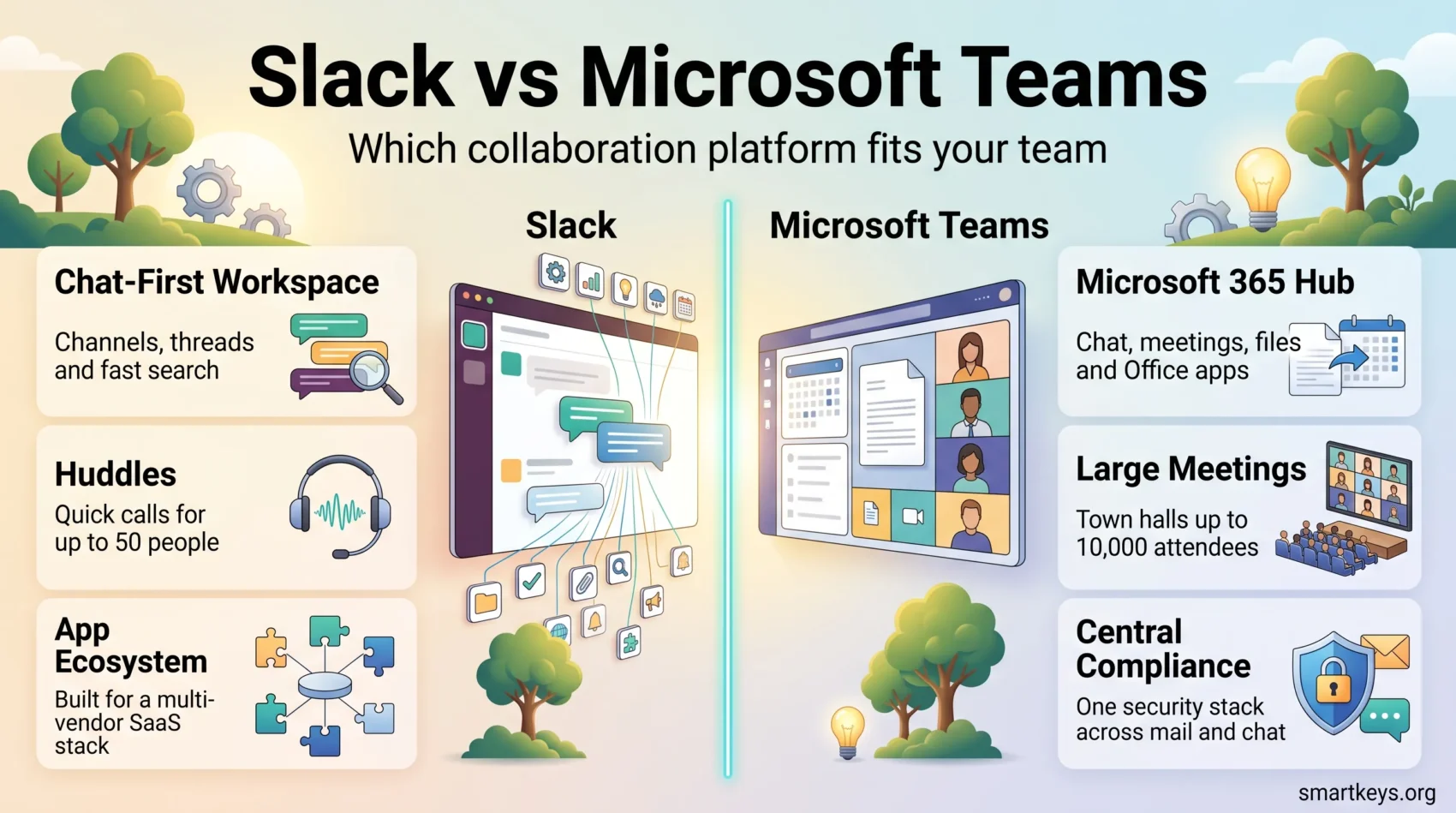
Choosing between Slack and Microsoft Teams in 2026 is rarely a feature contest. Both handle channels, calls, file sharing and AI assistance competently. The real differences are what each costs at your headcount, how deep it reaches into the tools you already pay for, and how much governance you need. This Slack vs Microsoft Teams comparison uses current published pricing and documented platform limits.
Key Takeaways
- Slack Pro costs $8.75 per user per month billed monthly or $7.25 billed annually; Business+ is $18 monthly or $15 annually.
- Microsoft Teams Essentials starts at $4.00 per user per month paid yearly, and Microsoft 365 Business Basic at $7.00.
- Teams supports up to 25,000 members per team; meetings hold 300 participants on business plans and 1,000 on enterprise plans.
- Slack’s free plan keeps 90 days of message history and up to 10 apps. Paid plans remove both limits.
- Slack huddles hold up to 50 people on paid plans (25 with video), so large meetings are Teams territory.
- Slackbot, Slack’s personal AI agent, reached general availability on 13 January 2026 for Business+ and Enterprise+.
- Since September 2025 Microsoft must sell Microsoft 365 suites without Teams at an appreciably lower price in Europe.
Why the Choice Still Matters in 2026
Two forces reshaped this market recently. The first is AI: both vendors now ship assistants that read your message history, so the platform you pick decides what your assistant can see. The second is regulation. In September 2025 the European Commission accepted binding commitments from Microsoft to sell Microsoft 365 and Office 365 without Teams at a noticeably lower price. That removed the “it comes free with Office anyway” argument for European buyers.
Whatever you choose, the tool only pays off if the habits around it are sound. Clear instant messaging boundaries and disciplined notification management matter more than any feature on either roadmap.
How Slack and Microsoft Teams Differ at the Core
Slack is a chat product that grew outwards. Conversation lives in channels, threads keep topics tidy, and almost everything else arrives through apps and workflow automation. That design suits teams whose stack is spread across many vendors and who want one place to route it all.
Microsoft Teams is a suite component that grew inwards. It bundles chat with meetings, telephony, SharePoint-backed files and the Office apps, so you edit a document, run a webinar and take a customer call without leaving the window. If your company already licenses Microsoft 365, most of that is paid for.
The practical test is simple: ask where your documents live and where your identity provider sits. If the answer is Microsoft, Teams removes friction you would otherwise pay to bridge. If your team runs on Google Workspace, Notion, Figma and a dozen other SaaS tools, Slack’s app layer is the shorter path. For a video-first view of the same question, see our comparison of Zoom and Microsoft Teams.
Key Features of Slack
Slack’s strength is a workspace you can shape around how your team communicates, plus an ecosystem that pulls work into the conversation instead of across tabs. Our standalone Slack review goes deeper.
A Customisable, Chat-First Workspace
Channels can be organised by project, client, function or topic, and opened to external partners through Slack Connect. Canvases and lists keep reference material next to the discussion that produced it, which reduces the “where was that decision” problem.
The flip side is channel sprawl. Without a naming convention and an archiving habit, a Slack workspace becomes as hard to search as the inbox it replaced. Treat channel hygiene as part of your knowledge management practice, not an afterthought.
Huddles for Quick Calls
Slack has no full meeting product. Its answer is huddles: lightweight audio calls you start from any channel or direct message, with optional video and screen sharing. On the free plan a huddle is limited to two people. Paid plans allow up to 50 participants, but only 25 of them can turn on video at the same time.
Huddles suit a quick “let’s talk this through” moment. For webinars or town halls, Slack teams usually connect Zoom, Google Meet or Teams through an app, which often means a second bill.
Integrations, Automation and Slackbot
The free plan is capped at 10 apps. Every paid tier removes that cap, which is the main reason small teams upgrade. Workflow Builder handles routine requests such as time-off approvals or incident intake without code. Deeper automation is easy to add with an iPaaS platform like Workato or Zapier.
The bigger change is Slackbot. Salesforce made its rebuilt, context-aware Slackbot generally available on 13 January 2026 for Business+ and Enterprise+ customers, rolling out through February. It answers questions from the conversations and files you already have access to, drafts content, schedules meetings and pulls in Salesforce account context, all within your existing permissions.
Exploring Microsoft Teams Features
Teams is a competent chat client, but its real advantage is everything attached to it.
Integration with Microsoft 365
Files live in SharePoint and OneDrive, so co-authoring a Word or Excel document inside a channel is the default rather than a plugin. Identity, device policy and data-loss prevention run through the same Microsoft admin centre your IT team already uses, which saves real administration time.
Automation follows the same pattern. Teams uses Power Automate, Microsoft’s no-code tool for flows such as approval requests. Most Microsoft 365 business and enterprise suites include it with standard connectors; premium connectors need an extra licence.
That tight coupling is also the trade-off. Teams feels natural if your company is Microsoft-first and clumsy if it is not. Non-Microsoft storage and third-party apps work, but they are guests rather than residents.
Meetings, Calling and Large Events
Meeting capacity depends on the licence. Business plans, including Teams Essentials and Microsoft 365 Business Basic, support 300 participants and meetings of up to 30 hours. Enterprise plans raise the ceiling to 1,000 participants, and town halls or live events reach up to 10,000 attendees, with temporary increases to 20,000 available. Private chats hold up to 250 people, and individual file uploads are capped at 100 MB.
Teams Phone turns the client into a full business phone system, an option Slack simply does not offer. Teams Premium, at $10 per user per month paid yearly, adds intelligent recap, live translation, watermarking and advanced meeting protection. If you record and summarise meetings heavily, compare that cost against a dedicated AI meeting notes workflow before you buy.
Slack vs Microsoft Teams: User Experience Compared
Slack is the faster of the two to learn. Search is quick, keyboard navigation is excellent, and the interface stays out of the way. Teams asks more of new users, because chat, channels, meetings, files and apps compete for the same navigation rail. Teams pulls ahead for people who live in Outlook and Word all day. Calendar, chat and documents behave like one product, with no second login or second bill.
Setup and Onboarding
Getting started also looks different. In Slack, anyone can create a workspace with an email address and invite colleagues within minutes. That is why Slack often spreads team by team before IT gets involved.
Teams for business needs a Microsoft 365 or Teams Essentials subscription, and an admin sets up the organisation (a “tenant” in Microsoft terms). That takes longer on day one. If your company already runs Microsoft 365, the work is done: employees sign in with their existing account and find Teams waiting.
Culture Beats Interface
Neither interface fixes a communication culture. Deciding when to use chat instead of email or a meeting and writing messages people can act on will improve your team’s day more than switching vendors ever will. Our guide to building a digital HQ for remote teams shows how chat fits alongside the rest of the setup.
Working with Clients and External Partners
If you work with clients or outside partners, look closely at how each tool handles people from other companies.
Slack uses one concept: Slack Connect. A channel is shared between two or more organisations, and each side keeps its own workspace, login and admin controls. For a marketing agency that runs one channel per client, that is quick to set up and easy to explain. On the free plan, external messaging is limited to one-to-one conversations.
Teams offers three separate models. That gives IT more control but takes more planning:
- External access: chat and calls with people in other Teams organisations, without adding them to your teams.
- Guest access: an outside person gets a guest account in your organisation and joins a team with access to its channels and files.
- Shared channels: a single channel is shared with a partner organisation through Microsoft Entra B2B direct connect. No guest account is needed, but admins on both sides must configure cross-tenant access first.
In practice, Slack makes external collaboration faster to start, while Teams lets security teams decide precisely what outsiders can see. If your partners also use Microsoft 365, shared channels close most of the convenience gap.
Pricing Comparison in 2026
Published list prices are the fairest way to compare, though enterprise agreements routinely differ.
Free Plans and Paid Options
Slack’s free plan keeps 90 days of message history, allows up to 10 apps, and limits huddles and external messaging to one-to-one. Microsoft’s free Teams tier covers group chat, meetings and basic file sharing but caps meeting length and storage well below the paid tiers.
On paid plans, Slack Pro is $8.75 per user per month billed monthly or $7.25 billed annually, with unlimited message history, unlimited app integrations and group huddles. Business+ is $18 monthly or $15 annually and adds the Slackbot agent, AI search and AI workflow generation. Enterprise+ is quote-only and brings unlimited workspaces, HIPAA support, audit logs and legal holds.
Microsoft Teams Essentials is $4.00 per user per month paid yearly with 10 GB of cloud storage per user. Microsoft 365 Business Basic is $7.00 and lifts storage to 1 TB per user while adding the web and mobile Office apps. Business Standard with Copilot is listed at $23.50.
Cost-Effectiveness for Large Teams
For a 100-person company the gap is stark. Teams Essentials costs roughly $400 a month, Slack Pro roughly $725 on annual billing, and that is before either AI tier. Add-ons change the math on the Microsoft side: Teams Premium and Teams Phone Standard each cost $10 per user per month, paid yearly.
Slack rarely wins on price alone. It wins when the integration layer replaces work you would otherwise do by hand, or when your remote work productivity depends on tools Microsoft does not cover.
Security and Compliance
Security is key for remote team communication tools, and both platforms clear the enterprise bar. The differences are in governance depth and how much of it you have to configure yourself.
Data Protection Measures
Both encrypt data in transit and at rest, support single sign-on and multi-factor authentication, and offer enterprise key management on their top tiers. Slack publishes independent audit reports and supports HIPAA on Enterprise+, alongside audit logs and legal holds.
Microsoft’s advantage is that Teams inherits the wider Microsoft 365 security stack: conditional access, sensitivity labels, data-loss prevention and eDiscovery are configured once and apply across mail, files and chat. For distributed teams, pair either platform with the basics covered in our guide to cybersecurity in remote work.
Compliance and Control
Regulated organisations usually find Teams the shorter path, because compliance controls are centralised rather than per-application.
There is one 2026-specific wrinkle worth knowing. The European Commission accepted Microsoft’s commitments on 12 September 2025. Under them, Microsoft must keep key Teams functionality interoperable with competing tools for ten years. Customers can also export their Teams messaging data for use elsewhere. Lock-in is now a smaller risk than it was, at least in Europe. If you are rebuilding your controls anyway, our overview of cybersecurity trends is a useful companion.

What Users Consistently Report
Review patterns are stable across both platforms and mirror the design trade-offs above. Slack users praise search, speed and the breadth of integrations, and complain about cost per seat and notification overload once the workspace grows. Teams users praise the single bill, calendar integration and meeting quality, and complain about a busier interface, slower search and confusion between chats, channels and Groups.
Neither set of complaints is a reason to switch on its own. Both are reasons to set conventions early: naming rules for channels, a shared expectation for response times, and a habit of writing decisions down where the next person will find them. A simple meeting notes template does more for continuity than either platform’s AI recap.

Conclusion
Pick Microsoft Teams if your company already runs on Microsoft 365, if you need telephony, large town halls or centralised compliance, or if cost per seat is the deciding factor. At $4.00 per user per month for Essentials it is difficult to beat, and the licence you hold probably includes it already.
Pick Slack if your stack is deliberately multi-vendor, if your workflows depend on connecting many SaaS tools, or if search and speed matter more to your team than bundled Office apps. Business+ at $15 per user per month on annual billing buys the Slackbot agent and AI search, which is where Slack’s 2026 argument now sits.
Either way, agree on where work is tracked before you roll out. Chat is not a project tracker, and a dedicated tool such as ClickUp, Asana or Trello, Jira or Monday.com will still carry the work that chat only talks about. Automation glue such as Zapier or Make can keep the two in sync.
Found this useful?
Make SmartKeys a preferred source on Google, and our articles will surface more often in your Top Stories, AI Overviews, and AI Mode.
Add as Preferred Source




