

Digital trust is the confidence your team has that information is accurate, commitments will be kept, and nobody is being watched instead of supported. In an office, that confidence builds by accident. People overhear decisions, read body language, and see who is stuck. Remote, none of that happens on its own, so you have to design it.
Remote work is no longer a temporary arrangement to survive. Roughly 25% of paid full days in the United States were worked from home in May 2026, according to the Stanford-led Survey of Working Arrangements and Attitudes. That share has been steady for over two years. The question is no longer whether distributed work lasts, but whether your team can rely on each other through a screen.
The evidence says many cannot yet. Gallup’s 2026 State of the Global Workplace report puts global employee engagement at 20%, and manager engagement at 22%, down from 31% in 2022. Managers are the people who set the tone for trust, and they are the group struggling most.
This guide gives you the policies that fix that: how to measure results instead of hours, which conversation belongs in which tool, how to share the pain of time zones fairly, and what leaders have to do personally. Each section gives you something specific you can put in place, not just a principle to agree with.
Key Takeaways
- Judge work by finished output and visible progress, not by hours logged or a green status dot.
- Write down which channel each type of message belongs in. Most remote confusion starts here.
- Rotate the inconvenient meeting times so the same region is not always awake at midnight.
- Pick tools that make work visible to everyone, not tools that report on people to their boss.
- Short, regular check-ins catch problems while they are still small and cheap to fix.
What digital trust means for your remote team
Digital trust has three parts, and it helps to name them separately because each breaks in a different way.
Reliability means commitments hold. When someone says a task will be done Thursday, it is done Thursday, or you hear about the delay before Thursday.
Transparency means the information exists where people can find it. If a decision was made in a call on Tuesday, it is written down somewhere a colleague in another country can read on Wednesday.
Psychological safety means people can admit a mistake or ask an obvious question without fear of looking incompetent. The term comes from Harvard professor Amy Edmondson, whose 1999 study in Administrative Science Quarterly found that hospital teams with higher psychological safety reported more errors, not fewer. They were not making more mistakes. They were willing to talk about them. Google’s internal Project Aristotle research later reached the same conclusion about what separates its most effective teams.
All three are harder to build remotely because the informal signals are gone. Nobody sees you stay late. Nobody notices you looking confused in a meeting. So the signals have to be made deliberate, which is what the rest of this guide is about. If you want the wider organizational view beyond your own team, our overview of digital trust as a business issue covers the customer and security side.
Why trust erodes in distributed work
Four failure patterns show up again and again. Naming them makes them fixable.
The manager cannot see the work, so they doubt it. Microsoft’s Work Trend Index found that 85% of leaders said hybrid work made it hard to feel confident their people were productive, while 87% of employees said they were productive. Microsoft called this gap productivity paranoia. It usually ends in surveillance software or a return-to-office mandate, and neither addresses the real problem, which is that progress was never made visible in the first place. We cover the dynamic in detail in our guide to productivity paranoia and how to defuse it.
Being out of sight costs people opportunities. In a 2021 SHRM survey of 817 supervisors, 67% said they considered remote workers more easily replaceable than onsite workers, and 42% admitted they sometimes forget about remote workers when assigning tasks. That is proximity bias, and it quietly teaches distributed staff that showing up in the office matters more than doing good work.
Context gets trapped. A decision made in a direct message between two people is invisible to the other eight. Weeks later someone reopens a settled question, and everyone loses an afternoon. This is why a written decision log matters more remotely than it ever did in an office.
Time zones create quiet inequity. If the weekly planning call is always at 9am in the head office, someone in Singapore is joining at 10pm every week. They will stop volunteering opinions long before they complain about the time.
Outcomes over hours: the principle everything else rests on
If you only change one thing, change what you measure.
Hours worked is easy to count and tells you almost nothing. Someone can be online for nine hours and ship nothing, or work four focused hours and unblock the whole team. Once people know that presence is the metric, they optimize for presence: wiggling the mouse, replying to messages at 11pm, staying visibly busy.
Switching to outcomes means being specific about what finished looks like. A vague task like “improve the onboarding flow” gives nobody anything to trust. A defined one, “cut the signup form from nine fields to four and publish the change by 20 March”, can be checked by anyone without asking permission.
- Define done before work starts. Write the success criterion, the deadline, and one example of an acceptable result.
- Put progress in a shared board. Asana, Jira, Linear or a simple Trello board all work. What matters is that a colleague can answer “where is this?” without messaging anyone.
- Log the decision, not just the outcome. One line on why you chose this option saves the same debate three months later.
- Give autonomy with the outcome. Assign the result to the person closest to the work, then spend your management time removing blockers rather than checking in.
Our deeper guide to outcome-based work covers how to define and review results in practice.
Your communication policy: the backbone of trust
Most remote friction is not a people problem. It is an unwritten-rules problem. New joiners guess where things belong, guess wrong, and get quietly corrected. A one-page policy removes the guessing.
Which message goes where
Assign each type of communication a home and write it down:
- Chat (Slack, Teams): quick questions, coordination, anything that expires within a day.
- Shared documents: decisions, specifications, anything a future colleague will need to read.
- Project board: status, ownership, deadlines. Never status updates in chat only, because they vanish.
- Video call: disagreement, sensitive feedback, and the first conversation about anything genuinely new.
The point is not the specific split. It is that everyone uses the same one. When too many tools compete for the same job, people give up and default to whatever is open, which is usually chat.
Asynchronous by default, live when it earns it
Asynchronous means people contribute on their own schedule rather than at the same moment. Make it the default for routine updates, and reserve live meetings for the cases where real-time back-and-forth genuinely helps. This is not just about convenience: it is what makes it possible for someone eight hours away to participate as a full member rather than reading the minutes afterwards.
The habits that make async work are unglamorous. Write the full context in the message rather than “got a minute?”. Link to the document or ticket rather than describing it. Summarize long threads at the top so a latecomer reads one paragraph instead of forty messages. Our guide to asynchronous communication tools compares the options.
Meeting hygiene
Every recurring meeting needs an owner, an agenda sent in advance, and a hard end time. End each one with written action items naming a person and a date, posted where non-attendees can read them. Add two rules that cost nothing: no all-channel pings unless something is genuinely urgent, and no expectation of replies outside someone’s working hours. Several countries now give employees a legal right to disconnect, so this is increasingly a compliance question as well as a courtesy.
When part of the team is in a room and part is on a screen, the room wins by default unless you actively prevent it. Our guide to hybrid meeting etiquette covers the practical fixes.
Apply this week: write the channel table on one page, paste it into your handbook, and walk the team through it once.
A time zone system that feels fair
Fairness here is not a nice-to-have. It is the most visible signal a distributed team gets about whose time is considered valuable.
Rotate the painful slots. If a meeting genuinely needs everyone live, move the time on a published rotation so each region takes its turn with the early start or the late call. Publish the rotation a quarter ahead so people can plan around it.
Define overlap hours, then protect the rest. Agree a window, often two to four hours, when everyone is reachable. Outside it, people work without interruption. Two protected hours of overlap beats eight hours of everyone half-watching chat.
Publish response-time expectations. Say plainly what “soon” means for each channel: chat within four working hours, email within one working day, an urgent phone call for anything that cannot wait. Without this, everyone invents their own standard and half the team feels ignored while the other half feels harassed.
Hand work off properly. Follow-the-sun means one region finishes its day by passing work to the next, so a task keeps moving around the clock. It only works with a real handoff note: what was done, what is blocked, what the next person should do first, and who owns it now. Our guide to follow-the-sun scheduling has a handoff template, and if your team spans employment jurisdictions, managing cross-border teams covers the legal side.
One more thing leaders often miss: keep a shared calendar of public holidays across every country you employ in. Nothing signals “you are an afterthought” faster than a deadline set on someone’s national holiday. A shared holiday calendar takes an hour to build and prevents a recurring insult.
A tool stack that shows work, not people
There is a line between visibility and surveillance, and which side you land on determines whether your tools build trust or destroy it.
Visibility means anyone can see the state of the work: what is in progress, who owns it, what is blocked. It is symmetrical. The team can see the manager’s priorities too.
Surveillance means the system reports on the person: keystrokes, screenshots, idle time, activity scores. It flows one way, upward. It also carries real legal weight now. In the EU, monitoring employees requires a lawful basis, a documented purpose and worker information under the GDPR, and several US states have added their own notice requirements. Our guide to AI in employee monitoring covers what is actually permitted.
A workable stack is small:
- One project tool for tasks, owners and dates. Asana, Jira, Linear or Trello. Pick one.
- One chat tool with clear channel conventions rather than dozens of ad-hoc groups.
- One documentation home where decisions and processes live and can be searched. Our piece on modern knowledge management covers how to keep it from rotting.
- One video tool, used sparingly and with agendas.
- A lightweight feedback channel, such as a short anonymous pulse survey, to catch sentiment before it becomes resignation.
For a practical walkthrough of tying these together, see our approach to building a digital headquarters. Watch for the unofficial tools people adopt when the approved stack fails them. Those choices are usually reasonable and they create real security gaps at the same time.
Leadership behaviors that create safety
Policies set the floor. Leaders set the ceiling. In a distributed team, people read their manager’s behavior through a very narrow window, so small signals carry disproportionate weight.
Say what you do not know. A manager who admits uncertainty makes it safe for everyone else to. A manager who always has an answer teaches the team to hide gaps.
Own errors publicly and specifically. “I got the timeline wrong, here is what I misjudged, here is the new plan” is worth more than a dozen posters about company values.
Defend your people outward, correct them inward. Take the criticism from stakeholders yourself. Give the feedback privately, precisely and soon.
Be predictable. Consistency is what makes trust cheap. Weekly notes that always arrive, one-on-ones that never get cancelled, and answers that do not change with your mood. Our guide to remote leadership skills goes deeper on the mechanics.
Explain the reasoning, not just the decision. People accept decisions they disagree with when they understand the trade-off. They resent decisions that arrive without explanation, and they stop offering input. A culture of workplace transparency is mostly this habit repeated.
Feedback, recognition and growth loops
Remote work removes the incidental feedback of an office: the nod after a good presentation, the raised eyebrow at a bad estimate. If you do not replace it deliberately, people work in silence and assume the worst.
Set a rhythm and keep it. A short weekly or fortnightly one-on-one covering blockers and priorities. A retrospective at the end of each project or sprint that produces owners and dates, not just a list of complaints. An open forum every month or two where anyone can ask leadership a question.
Recognition needs the same deliberateness. In an office, good work gets seen. Remote, it has to be said out loud, in a channel, with enough specificity that people learn what good looks like. “Thanks Maria” teaches nothing. “Maria rewrote the API docs and support tickets on that endpoint dropped by half” teaches everyone.
Pair public praise with private coaching. Praise in the channel, correct in the direct message. Reversing that order is one of the fastest ways to lose a team’s trust. Our guide to continuous performance management covers how to structure this beyond the annual review.
Onboarding that builds relationships, not just accounts
A new remote hire cannot learn by watching. Everything they would have absorbed by sitting near the team has to be handed over on purpose.
Give them three things in the first week. A written map of where work lives: which board, which docs, which channels, and what belongs in each. A named buddy who is explicitly responsible for answering the questions that feel too small to ask a manager. And a starter task small enough to finish in the first fortnight, so they get an early win and their first taste of how the team ships.
Then schedule the introductions rather than hoping they happen. A short call with each person the new hire will work with, in the first two weeks, does more for their confidence than any handbook. Our guide to remote onboarding and training has a full 90-day structure.
Team building that people do not resent
Forced fun is worse than no fun, and a mandatory 90-minute virtual escape room is a tax on people’s evenings. What works is small, frequent, optional and short.
Two-minute openers at the start of an existing meeting cost nothing and warm the room. Rotating coffee pairings, where two random colleagues get a 20-minute chat, build the weak connections that make asking for help easier later. Show-and-tell sessions where someone demonstrates what they built serve two purposes at once: connection and knowledge sharing.
Match the format to the group. Small teams do better with real conversation. Large groups need structure such as polls, breakouts or a shared whiteboard, or the same three people talk. Always schedule around time zones and post a summary afterwards for anyone who could not attend. Our collections of virtual watercooler formats and remote team building activities have more options.
How to tell whether any of this is working
Trust is not directly measurable, but its absence leaves fingerprints. Track a small number of signals and watch the direction, not the absolute number.
Reliability: what share of commitments land by the agreed date? A falling number usually means people are being asked to commit to things they cannot control.
Handoff quality: how often does work bounce back for rework or clarification? Frequent bouncing means context is not being written down.
Participation spread: in written discussions, how many different people contribute? If the same three voices carry every thread, the rest of the team has concluded that speaking up is not worth it.
Sentiment: a short, genuinely anonymous pulse survey, asked the same way each time. Two or three questions, monthly, beats a 40-question annual survey nobody trusts.
Two cautions. First, do not confuse availability with engagement: someone online at midnight because of a badly scheduled meeting is not engaged, they are cornered. Second, if you ask for feedback and then change nothing, you have made things worse than not asking. Report back on what you heard and what you are doing about it, even when the answer is “not this quarter, and here is why”.
Conclusion
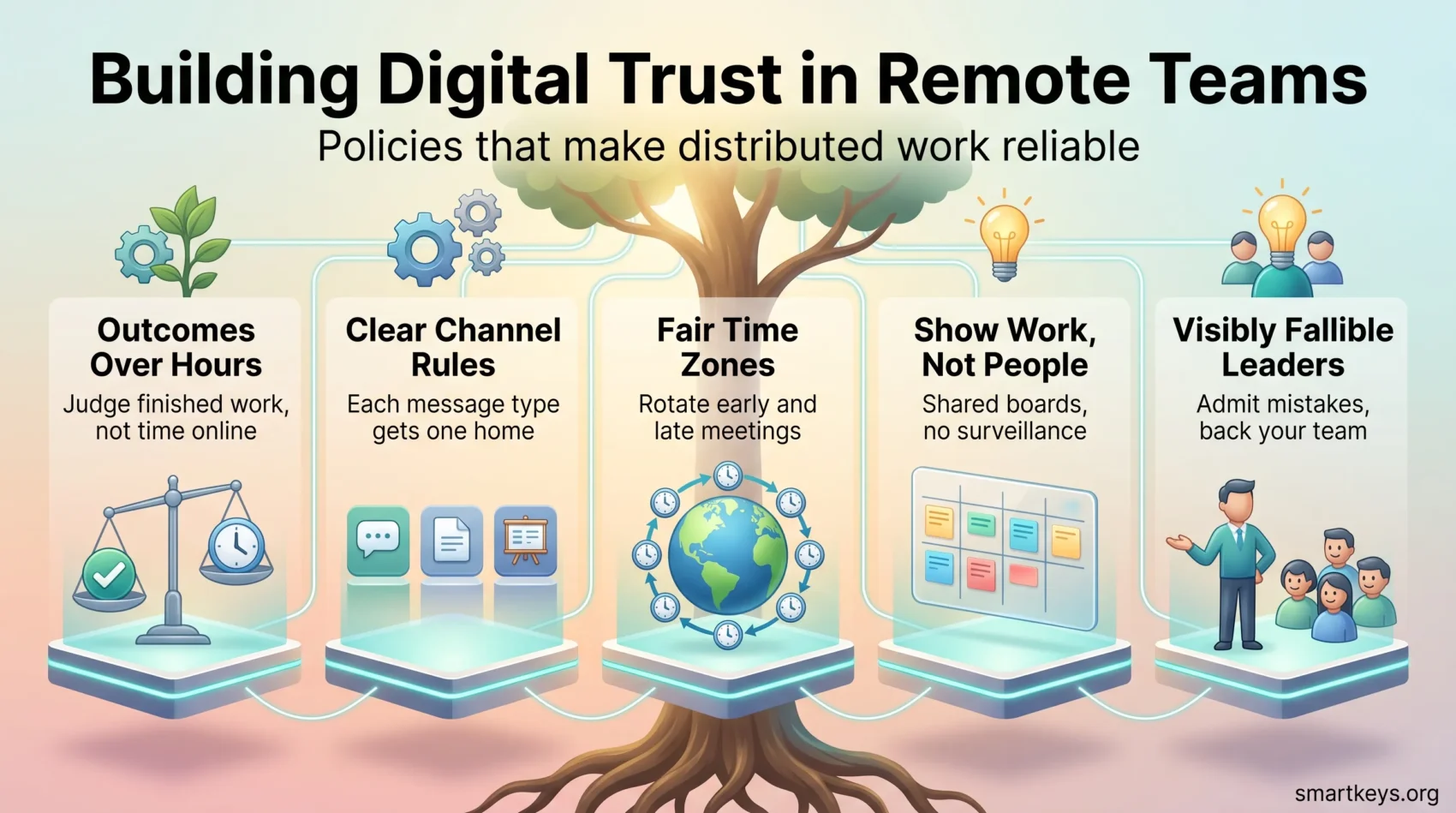
Digital trust is built by small, repeated, boring habits rather than by an offsite or a values workshop. The list is short: measure finished work instead of hours, write down where each kind of message belongs, rotate the inconvenient meeting times, keep the tool stack small and pointed at the work rather than the person, and let leaders be visibly fallible.
Pick two to start this week. Write the channel policy and publish it. Then take your next recurring meeting and give it an owner, an agenda and a written summary. Both take under an hour, and both are visible to the whole team immediately, which is the point. Trust compounds from things people can see.
Found this useful?
Make SmartKeys a preferred source on Google, and our articles will surface more often in your Top Stories, AI Overviews, and AI Mode.
Add as Preferred Source




