

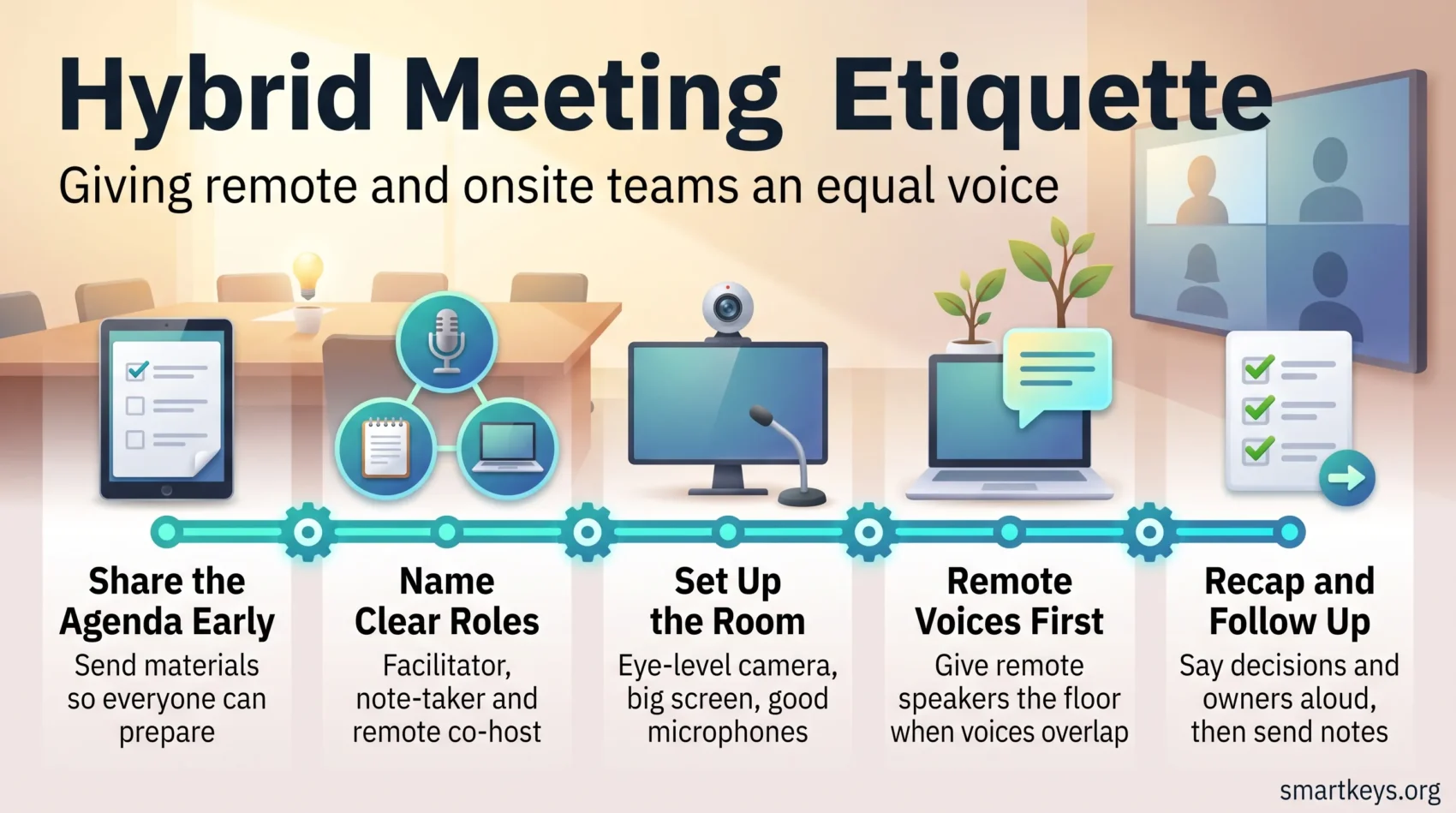
Hybrid meetings mix people sitting together in a room with people joining from somewhere else. They are now the normal case rather than the exception: Gallup’s May 2026 data shows 52% of remote-capable US employees work hybrid, 26% work exclusively remote and only 22% are fully on-site.
That split creates a quiet problem. The room has side conversations, body language and a shared whiteboard. The people on screen have a small window and a microphone they must fight for. Without simple rules, the room wins and the best idea on the call goes unheard.
This guide covers what to do before, during and after a hybrid meeting so both groups have the same chance to contribute. It builds on the practices in our guide to hybrid work productivity and to keeping in-office and remote staff in sync.
Key Takeaways
- Send the agenda and materials before the session so remote participants can prepare.
- Name a facilitator, a note-taker and a remote co-host before anyone joins.
- Give remote speakers the floor first whenever voices overlap.
- Say decisions and owners out loud instead of leaving them in the chat.
- Send notes and the recording afterwards so nobody has to guess what was agreed.
Why Hybrid Meetings Need Clear Etiquette Right Now
When people join from different places, short and fair rules protect everyone’s time and voice. Meetings have also become messier. Microsoft’s Work Trend Index special report on the “infinite workday” found that 57% of meetings are ad hoc calls with no calendar invite at all, and that nearly a third of meetings now span multiple time zones, up 35% since 2021. Meetings after 8 pm rose 16% year over year.
Those numbers describe one pressure: more meetings start unprepared, more cross time zones, and more land outside somebody’s working day. Etiquette stops that cost falling on the same people every week.
Explicit rules also shape culture: people know how to take turns and speak up. That matters most for anyone at a structural disadvantage in the room, the same reasoning behind designing accessible remote work experiences.
- Protect the time: set one goal for the session and run to it.
- Signal the roles: facilitator, note-taker and remote host, decided in advance.
- Prompt inclusively: call on quieter participants and pause for input.
- Keep updates short: share status material before the session, not during it.
- Repeat decisions: confirm the owner so the team can move.
First check whether the meeting needs to exist. A meeting audit usually removes several recurring sessions outright, and the habits in our guide to running effective meetings apply here too.
Before You Meet: Agenda, Roles and Asynchronous Prep
Give people a clear plan and pre-reads so live time goes to decisions rather than narration.
Co-create a focused agenda
Build the agenda with the participants, and reserve live time for debate and decisions. Push one-way updates into pre-reads: a short document people read before the call.
That is the idea behind asynchronous work: work that does not need everyone present at the same moment. The more status you move into writing, the less the meeting depends on who is in the room.
Collect input and questions ahead of time
Invite questions and short notes before the session using a form or a shared document. You can then prioritise topics and bring the most useful questions into the live slot. Several asynchronous communication tools handle this collection step without another calendar entry.
Assign clear roles
Appoint a facilitator, the person who guides the discussion and watches the clock, and a remote co-facilitator whose only job is to represent the people on screen. Also name a note-taker, a timekeeper to protect each block of time, and a tech host to watch audio, screen share and chat.
- Share materials early: slides and documents where people can comment inline.
- Decide how decisions get made: consent, majority or a named owner, agreed before the discussion starts.
- Plan the pauses: surface the pre-collected questions and confirm next steps as you go.
Confirm that recording is switched on and that there is a plan for sending notes and links out quickly afterwards.
Tech and Room Setup That Lets Everyone See, Hear and Be Heard
Reliable equipment and a simple layout do more for fairness than any amount of good intent. Decide how the room will be arranged and which tools you will use before the first person joins.
Test audio, video and screen sharing before people join
Run a check a few minutes early. Verify presenters can share screen and system audio, so slides and videos actually play for remote viewers.
Use eye-level cameras and large monitors
Place the camera at eye level so remote attendees see faces rather than ceilings. Put a large display in the room so the people in it can see remote faces at a readable size. If remote participants appear as small tiles behind the presenter, they will be forgotten.
Optimise microphones and room acoustics
Position microphones to pick up every seat, and add soft furnishings or acoustic panels to cut echo. A single laptop microphone at the end of a long table is the most common reason remote people stop contributing.
Integrate engagement tools into your platform
Use the polls, chat and Q&A built into your conferencing platform so the interactive features are available to everyone rather than only to the room. Our comparison of Zoom and Microsoft Teams covers what each platform includes at which price. Keep a short setup checklist in the room, plus a spare laptop, cables and adapters.
- Run a pre-join check to catch problems early.
- Camera at eye level, remote faces on a large display.
- Microphones positioned for the whole table, echo reduced.
- Polls, chat and Q&A available to both groups.
Hybrid Meeting Etiquette: On-the-Call Practices That Create Equity
Open as a host, not as a presenter. State the norms for muting, background noise and video out loud, then model them. Normalise small noises from people working at home while asking others to mute when they are not speaking.
Begin by naming the rules
Say how interruptions will be handled. Use a quick roll call or a visible participant list so everyone knows who is present, including the people who joined without video.
Address people by name and summarise often
Call on attendees by name and give a short recap after each topic. Pause deliberately for questions from remote attendees. Silence on a video call rarely means agreement; it usually means someone is waiting for a gap that never comes.
Avoid side conversations
Keep one conversation at a time. Ask people in the room to stop whispering and to speak into the main microphone, so remote participants stay included in the discussion rather than hearing a muffled murmur.
Maintain camera eye contact and watch the virtual cues
Look into the camera when you speak, and watch for people unmuting or raising a hand. Those signals are the remote equivalent of body language, and they are easy to miss if the screen is behind you.
Give remote speakers the floor
When voices overlap, hand the next turn to the person on screen. Use chat for links and clarifications, but say key decisions out loud so nothing important is buried in a sidebar that half the group never reads.
- Set clear norms: muting, background noise and video policy.
- Name and pause: summarise, then invite online input by name.
- Prioritise remote voices: no side chatter, and level the airtime.
Watch the clock, invite quieter people to speak, and change a ground rule if it is not working. Facilitation is a learnable habit, and it sits at the centre of most remote leadership skills.
Drive Engagement Across Rooms and Screens
Start with something small that everyone answers. A one-word check-in or a quick poll gets remote voices into the session in the first two minutes, which makes it far more likely they speak again later.
Open with a short icebreaker
Use a 60-second activity asking each person for a word or a quick win. It signals that everyone contributes, and it surfaces broken audio before it matters.
Use live Q&A and polls
Run short polls and a live question queue to surface opinions quickly. Both give people who dislike interrupting a way to be heard, which usually means the remote half of the group. Sustained participation like this is one of the practical levers behind remote employee engagement.
Run inclusive brainstorming
Collect ideas in writing first, then vote to prioritise them. A shared board with digital sticky notes lets the room and the screen add ideas at the same time, instead of the loudest person in the room setting the direction.
Pair remote attendees with in-room buddies
Assign an in-room buddy to each remote participant. The buddy relays quick questions, flags a raised hand and makes sure nobody quietly drops out. A shared workspace, often called a digital HQ, keeps those handovers visible afterwards.
Be mindful of language and time zones
Agree on one working language where possible and check time zones before scheduling. If your team is spread across continents, rotate the awkward slot rather than always giving it to the same region, or move the work into a handover pattern such as follow-the-sun scheduling.
Wrap-Up That Sticks: Recaps, Minutes and Next Steps
A short spoken recap at the end prevents most follow-up confusion. Say the decisions out loud, name who owns each action, and give the deadline, so everyone leaves with the same understanding.
Confirm owners and deadlines before you close
Read a short list of decisions and assign clear owners. Confirm the dates and say how progress will be reported. Check that the next steps match the time people actually have, or the list will quietly expire.
Send notes and the recording
Capture minutes in a shared document and send them immediately after the session, with action items, owners and links to the files. A consistent meeting notes template makes this a two-minute job, and an AI meeting notes workflow can produce the first draft automatically while a person checks it.
- Finish with a spoken recap: decisions, owners, deadlines.
- Share minutes and the recording link so remote participants can catch up.
- Flag dependencies and risks, and say how progress will be tracked.
- Thank people for their contributions, then close on time.
Anything needing a real discussion between two people belongs in a one-on-one check-in, not the next group session.
Conclusion
Hybrid meetings are fair by design, not by accident. The room will always have the acoustic and social advantage, so the rules have to lean the other way.
Send the agenda early, name the roles, check the equipment, give remote speakers the first turn, and close with a spoken list of decisions and owners. Each step removes a reason remote colleagues stop contributing.
Fewer, better sessions also leave room for concentrated work, which is what a focus time policy and clear instant messaging boundaries are for. If your team travels, our virtual work and travel guide ties scheduling, equipment and on-call behaviour together.
Do these small things consistently and hybrid meetings stop being a compromise for half the team.
Found this useful?
Make SmartKeys a preferred source on Google, and our articles will surface more often in your Top Stories, AI Overviews, and AI Mode.
Add as Preferred Source




