Updated September 2026 with verified Microsoft interruption data, the current Slack and Microsoft Teams settings, and the right-to-disconnect rules now in force.
Chat makes teams fast, and it also pulls your attention in every direction. You get a quick answer in seconds. You also get a steady stream of notifications that breaks your concentration a few minutes later.
Instant messaging boundaries are the shared rules that fix this: which messages deserve a reply right now, which can wait, and which do not belong in chat at all. This guide shows you how to set them for yourself and your team, so you keep the speed without losing your best working hours.
Key Takeaways
- Chat volume is now a measurable cost: Microsoft 365 users are interrupted about every two minutes.
- Response-time tiers tell people when a reply is actually expected.
- Keep real-time pings for blockers and default everything else to asynchronous messages.
- Set Do Not Disturb, scheduled send and notification schedules once, then leave them alone.
- AI recaps and summaries can replace channel-watching, but check which plan includes them.
- Right-to-disconnect laws in Australia, France, Spain and other countries now shape after-hours messaging.
- Norms beat willpower: publish them, let leaders model them, and review them every quarter.
What Constant Pings Actually Cost in 2026
The problem is no longer anecdotal. In June 2025, Microsoft published Breaking Down the Infinite Workday, a Work Trend Index report. It combines anonymized Microsoft 365 usage signals with a survey of 31,000 knowledge workers in 31 markets.
| What the data shows | The number |
|---|---|
| Interruptions by meetings, email or notifications | About one every 2 minutes, or 275 a day |
| Teams messages received per weekday | 153 on average |
| Chat messages outside core business hours | More than 50 a day |
| Emails received per day | 117, most skimmed in under 60 seconds |
| People who say work feels chaotic and fragmented | 48% of employees, 52% of leaders |
| Meetings that are ad hoc calls without a calendar invite | 57% |
| Meetings scheduled after 8 p.m. | Up 16% year over year |
One pattern matters more than any single number. Coordination has crowded out the work itself. Half of all meetings fall between 9-11 a.m. and 1-3 p.m., which are the hours many people use for focused work. Chat then fills the gaps in between.
Picture a product manager who blocks two hours to write a spec. Within ten minutes, three direct messages and a channel mention arrive. None is urgent, but each one resets her train of thought. That is the case for boundaries. Messaging is not the problem. An unmanaged default is.
Why Your Brain Struggles With Constant Pings
Every notification takes a small slice of your attention, and those slices add up. Sounds, badges and banners are designed to trigger an automatic urge to check.
Attention residue: why switching back is slow
Organizational researcher Sophie Leroy coined the term attention residue in 2009. It describes the part of your mind that stays stuck on the previous task after you switch. The more often you switch, the more residue you carry into the next piece of work.
Gloria Mark’s research at the University of California, Irvine points the same way. Her team observed office workers switching activities every few minutes, and interrupted work was often not picked up again until about 23 minutes later. If you want to understand how attention works over a whole day, our guide to attention span at work goes deeper.
- Mobile alerts follow you home and raise the background noise across devices.
- Batching low-urgency conversations protects your most productive hours.
- Single-tasking is a skill you can rebuild. Our guide to monotasking covers the practice.
For the alert layer across all your apps, see these best practices for managing work notifications.
Real-time vs. asynchronous: when speed helps and when it harms
Real-time chat means you expect an answer while both people are online. It is right for blocking issues, quick clarifications and anything where someone is stuck waiting on you.
Asynchronous communication means the reply can come later, when the other person has time. It suits updates, documentation, decisions that need context and non-urgent questions. Our guide to asynchronous work explains how teams run this way day to day.
A simple test helps: if the issue is urgent and someone is blocked, ping in real time. If not, write a message that can wait.
How Chat Became Always-On
A short history explains why explicit rules matter now.
- 1960s to 1980s: Early messaging on shared computers such as MIT’s CTSS, then bulletin boards, let people leave notes for each other.
- 1990s: Internet Relay Chat, ICQ and AOL Instant Messenger made chat a daily habit. AIM shut down in December 2017, but its idea of showing who is online still shapes today’s tools.
- 2000s: Skype and similar apps added voice, video and file sharing.
- 2014 onward: Slack, and from 2017 Microsoft Teams, moved chat into the center of the workday with channels, threads, calls and integrations.
- 2024 to 2026: AI arrived on top: automatic recaps, thread summaries, natural-language search and assistants that answer routine questions.
Each step made chat more useful and harder to ignore. The more central it becomes, the clearer your team’s rules need to be.
What Instant Messaging Does Well, and What to Watch
Used well, chat speeds up coordination. It shortens decisions, keeps context in one place and replaces long email chains.
What works
- Faster decisions: a channel puts the files, the people and the history in one place.
- Transparency: searchable conversations cut duplicate work and help new hires catch up.
- Fewer meetings: a well-run channel can replace a weekly status call. If your calendar is the bigger problem, start with the meeting reduction playbook or run a meeting audit.
What to watch for
- Volume overload: 153 messages a day is not collaboration anymore. It is triage.
- Surprise calls: 57% of meetings are ad hoc calls, and many of them start with a chat message.
- Fast-spreading errors: a wrong answer in a busy channel travels before anyone corrects it.
- Time-zone creep: distributed teams generate messages around the clock unless someone sets guardrails. Our guide to managing cross-border teams covers the time-zone side.
- Tool sprawl: every extra app adds another inbox. See how to simplify an overloaded tool stack.
How to Set Boundaries Without Hurting Teamwork
Good boundaries let a team move fast without treating every notification as an emergency. They work best when they are written down and shared, not kept as private habits. For the personal side of saying no, see our guide to setting boundaries at work.
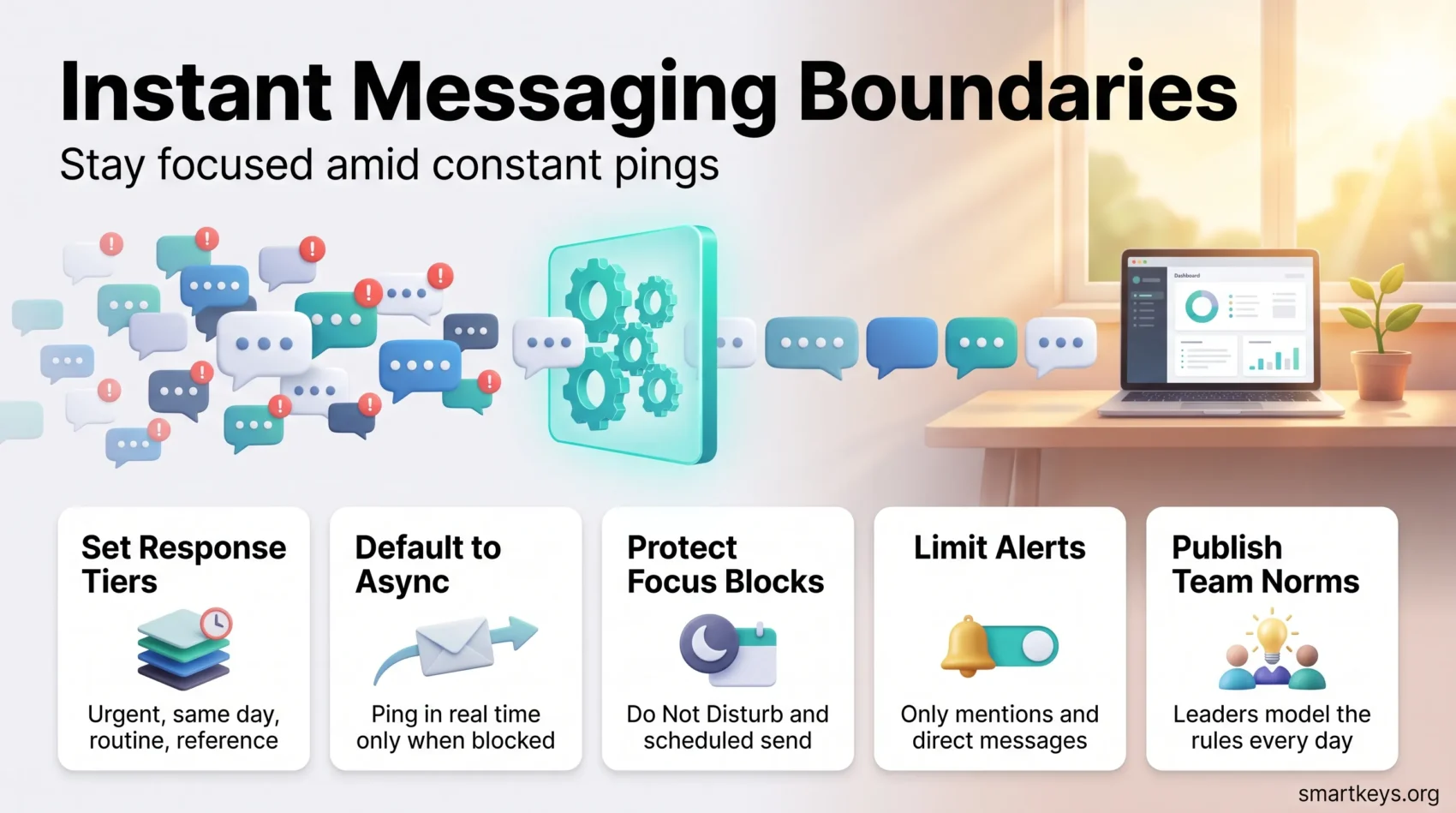
Define availability and standard status names
Pick predictable windows for replies, for example 10 a.m. to 12 p.m. and 2 to 4 p.m. Agree on status labels such as “Deep work, back at 2” or “On a call, urgent only.” Predictable availability is what stops the follow-up ping.
Limit alerts to mentions and direct messages
Turn off everything except @mentions, direct messages and one or two critical channels. You stay reachable for real issues without reacting to every post.
Default to asynchronous
Ask teammates to write messages with enough context that a reply can wait. “Can you review the Q3 budget draft by Thursday? The open question is travel costs” beats a bare “got a minute?”
Protect focus blocks with Do Not Disturb and scheduled send
Block daily focus periods and switch on Do Not Disturb during them. Schedule non-urgent messages so they arrive inside the recipient’s working hours, which matters most across time zones. A team-wide focus time policy makes these blocks the norm rather than the exception. Matching blocks to your type of work also helps: see the maker vs. manager schedule and these focus management techniques.
- Keep a short escalation ladder (chat, then a quick call, then phone) tied to real urgency.
- Join only channels you contribute to. Mute or leave noisy ones without apology.
- Use short templates for standups and status updates to cut back-and-forth.
Response-Time Tiers You Can Copy
Most chat stress comes from an unspoken expectation of instant replies. Publishing tiers removes the guesswork.
| Tier | Channel | Expected reply | Example |
|---|---|---|---|
| Urgent / blocking | Direct message or @mention, then phone | Within 15 minutes during work hours | Production outage, client waiting on the line |
| Same-day | Project channel | 2-4 hours | Review request, decision needed today |
| Routine | Team channel or thread | Next business day | Status updates, FYIs |
| Reference | Doc, canvas or wiki | No reply expected | Specs, meeting notes, policies |
The time limits above are a starting point, not a standard. Adjust them to your team. What matters most is writing down what “urgent” means at your company, with two or three examples. Without that definition, every message drifts into the top tier.
Tool Settings That Reduce Distraction
A few deliberate settings keep the noise low. Configure them once, so your schedule controls the alerts instead of the other way around. If you are still choosing a platform, our Slack vs Microsoft Teams comparison covers plans and limits.
Slack
- Notification schedule and Do Not Disturb: set your working hours once, and Slack pauses alerts outside them.
- Scheduled send: write a message whenever you like and deliver it when the recipient is working.
- Huddles: a two-minute voice call often beats a thirty-message thread.
- Keyword and channel notifications: alert only on the words and channels you are responsible for.
Microsoft Teams
- Do Not Disturb: set it manually, or let focus time booked through Outlook and Viva Insights switch it on automatically.
- Quiet hours in the mobile app: silence Teams notifications on your phone in the evening and at weekends.
- Per-channel notification settings: only the channels you own should alert you.
- Scheduled send in chat: queue a message for the start of a colleague’s day.
- Intelligent recap: AI meeting summaries, available with Microsoft 365 Copilot or Teams Premium licenses, make it easier to skip a call you do not need to attend.
Status, channel hygiene and threads
Set short custom statuses such as reviewing contracts or heads down until 2. Give channels consistent names and a one-line purpose, so people join only relevant ones. Keep side conversations in threads so the main channel stays easy to scan.
- Avoid broad @channel pings. Mention the specific people you need.
- Post decisions as short bullet summaries with owners and links.
- Pin files that people ask for twice.
The Right to Disconnect: What the Law Expects
After-hours messaging is no longer only a culture question. A right to disconnect is a legal protection that lets employees ignore work contact outside their working hours without being penalized. Several countries now have one, and the rules differ sharply. Our dedicated guide to the right to disconnect covers the legal detail.
- France was first, with a 2017 law that requires larger companies to negotiate rules on switching off.
- Australia has one of the broadest versions. Section 333M of the Fair Work Act lets employees refuse to monitor, read or respond to out-of-hours contact unless that refusal is unreasonable. It applied to employers with 15 or more staff from 26 August 2024 and to small businesses from 26 August 2025.
- Spain, Portugal, Belgium and Ireland have their own rules or codes of practice. In Canada, Ontario requires employers with 25 or more staff to have a written policy on disconnecting from work.
- The UK and the US have no general statutory right to disconnect.
- The EU began formally consulting unions and employer groups on fair telework and a right to disconnect in April 2024. As of mid-2026, no EU-wide law is in force.
None of these laws ban after-hours contact outright. They protect the right not to respond. In practice, that adds three items to your checklist: document your operating hours, make scheduled send the default for managers, and train supervisors on what a 10 p.m. message implicitly asks for.
If you want a stronger cultural signal alongside the policy, company-wide unplug days are one option, covered in our guide to the corporate digital detox.
Use Automation and AI to Cut Message Volume
Well-designed workflows move routine requests out of busy channels and into predictable queues. For example, an IT team can replace “my laptop is broken” DMs with a form that creates a ticket and assigns an owner. The request still gets handled, but nobody’s focus block gets interrupted.
Start small. Use Slack Workflow Builder or Microsoft Power Automate to post intake forms, assign follow-ups and trigger reminders. Give each workflow a clear name so people know which one to use.
- Recaps instead of channel-watching: Slack’s AI recaps send a daily summary of channels you want to follow without being interrupted by them.
- Thread and conversation summaries: catch up on a 90-message thread in one click instead of scrolling.
- Meeting and huddle notes: automatic notes make skipping a call a real option. Our AI meeting notes workflow shows how to use them well.
- Bots and intake forms: answer repeat questions before a person ever sees them.
Check your plan before you build around a feature. After Slack’s 2025 plan changes, conversation summaries and huddle notes are included on Pro, while recaps, AI search, translations and file summaries require Business+ or higher, according to Slack’s help center. The Free plan has none of them.
For broader patterns in assistant design, see this guide to AI assistants.
Team Norms, Security and Compliance
A good chat policy makes three things obvious: when to reply now, when to wait, and where sensitive information belongs.
Map your response-time tiers to channel purpose and publish them where new hires will find them. Then define the escalation path, so nobody treats every ping as critical.
Security basics
Require single sign-on (SSO, one company login for all tools) and multi-factor authentication (MFA, a second check such as a code on your phone). Approve third-party apps through a review process, and teach staff to verify links and report suspicious messages. State clearly where client data may be shared and when a conversation must move to a more secure system.
- Standardize how channels are created, named and owned, so the list stays navigable.
- Set retention rules so messages and files stay findable and compliant.
- Add a short onboarding checklist that shows new users how to post, search and follow the norms.
Review the norms every quarter with HR, Legal and IT, so the rules keep up with platform changes.
A 30-Day Rollout Plan
- Week 1, measure. Count your channels, your daily mentions and how many after-hours messages the team sent last month. You need a baseline.
- Week 2, decide. Agree on response-time tiers, a definition of urgent and the escalation ladder. Fit it on one page.
- Week 3, configure. Everyone sets notification schedules, Do Not Disturb windows and statuses on the same day. Managers turn on scheduled send as their default.
- Week 4, automate and review. Add recaps for channels people only monitor, move two recurring requests into a workflow, then check whether interruptions actually dropped.
Measure the same numbers again on day 30. If nothing changed, the usual reason is that leaders never modelled the new norms themselves.
Conclusion
Clear norms plus the right settings turn chat back into a productivity tool. Default to asynchronous updates, save real-time pings for real blockers, publish response tiers and write down your escalation path.
Use threads, quick calls, scheduled send and AI summaries to keep conversations organized. Prune channels regularly and protect focus time with Do Not Disturb. Then measure, ask your team what still slips through and adjust. If email is the other half of your problem, pair this guide with email batching and the Inbox Zero method.
Found this useful?
Make SmartKeys a preferred source on Google, and our articles will surface more often in your Top Stories, AI Overviews, and AI Mode.
Add as Preferred Source