

Remote and hybrid work removed the hallway conversations where most informal mentoring used to happen. If your team is spread across cities or time zones, mentoring now only happens when someone organizes it on purpose.
That is the job mentorship matching platforms do. They pair mentors with mentees, schedule the sessions, remind people to show up and report on whether the program is working. This guide explains what the software does, which vendors are worth a look in 2026 and how to choose one without overpaying.
Key Takeaways
- A matching platform replaces spreadsheets and email with sign-up, pairing, scheduling and reporting in one place.
- Mentoring platforms connect colleagues; coaching platforms like BetterUp and CoachHub supply paid professional coaches. Know which one you need.
- Matching quality, calendar and chat integrations, and simple reporting matter more than long feature lists.
- Most enterprise vendors do not publish prices, so budget time for demos and quotes.
- Research links mentoring to better careers, but the effects on pay and promotion are modest. Measure your own results.
- If AI matching feeds decisions about promotions, check GDPR and the EU AI Act before rollout.
Why Mentorship Matching Matters for Distributed Teams
In an office, a junior analyst can ask a senior colleague a quick question over coffee. On a remote team, that same question needs a calendar invite. Many people never send it.
The engagement numbers show why this gap matters. Gallup’s State of the Global Workplace 2026 report found that global employee engagement fell to 20% in 2025, and manager engagement dropped to 22%. When managers are stretched, a structured mentoring program gives employees a second person to learn from. For more on keeping distributed staff involved, see our guide to remote employee engagement.
Most mentoring programs do not fail for lack of interest. They fail because they are hard to run at scale. A program coordinator matching 200 people by hand in a spreadsheet will struggle to keep pairs meeting past the second month.
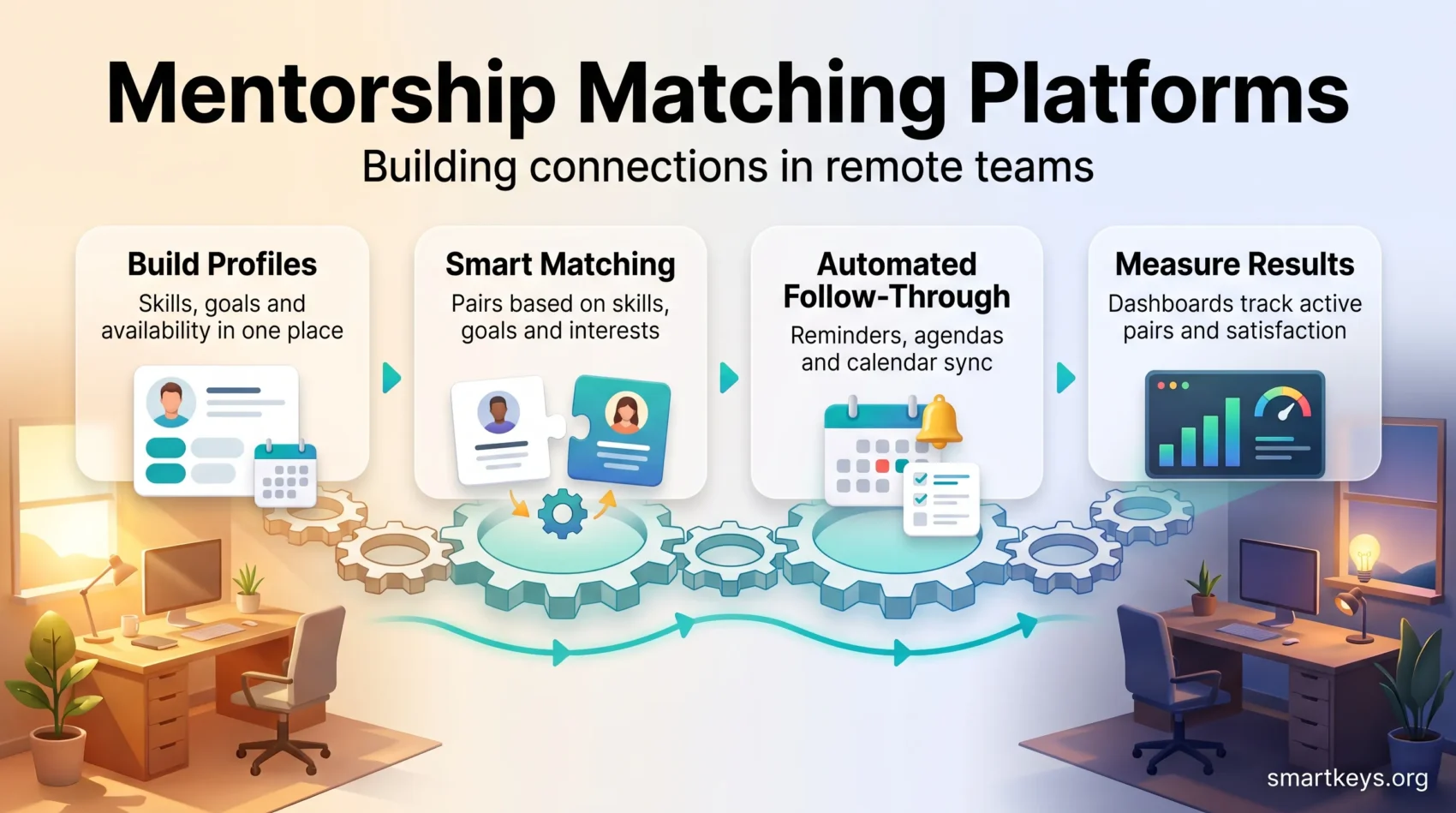
A matching platform tackles three practical problems:
- Pairing: it suggests matches based on skills, goals and interests instead of whoever the coordinator happens to know.
- Follow-through: reminders, agendas and calendar sync keep pairs meeting across time zones.
- Proof: dashboards show who is active, so you can fix stalled pairs and report results to leadership.
Structured mentoring also helps with a quieter remote-work risk. Proximity bias, the habit of favoring people you see in person, can leave remote staff with fewer sponsors. A mentor gives them someone who knows their work and can speak up for it.
What Mentoring Software Does
Mentoring software centralizes the full program cycle: enrollment, profiles, matching, scheduling, goal tracking and reporting. The goal is to cut admin work so the coordinator can focus on the people.
Here is what that looks like in practice. An employee fills in a short profile listing their skills, career goals and availability. The platform suggests three possible mentors. Once a pair is confirmed, both people get a calendar invite, a first-session agenda and a reminder a day before. After the session, a two-question survey asks how it went.
Most platforms support several program formats from the same dashboard:
- One-to-one mentoring: one mentor, one mentee, usually for three to twelve months.
- Group mentoring: one mentor guides a small cohort, which helps when experienced mentors are scarce.
- Reverse mentoring: a junior employee mentors a senior one, often on digital tools or new customer groups.
- Peer mentoring: colleagues at a similar level learn from each other.
Mentoring works best as part of a wider learning setup. New hires, for example, benefit when a mentor is assigned during remote onboarding rather than months later.
Mentoring Platforms vs. Coaching Platforms
When you search for tools, mentoring and coaching software often show up side by side. They solve different problems, so it helps to know which one you need before you book demos.
Mentoring connects an employee with a more experienced colleague, usually from inside the company. The mentor shares experience, context and contacts. Mentoring is typically voluntary, long-term and unpaid, and the platform mainly handles matching and follow-through.
Coaching connects an employee with a trained coach, often an external professional. The coach does not need to know your industry. Instead, they help the person work through a specific goal, such as becoming a better first-time manager, through structured questions and practice. Vendors like BetterUp and CoachHub provide the coaches as well as the software, and you usually pay per participant. CoachHub also offers an AI coach called AIMY for lighter, always-available support.
A simple rule of thumb:
- Choose a mentoring platform if you want to spread internal knowledge, build networks across locations and support career growth at scale.
- Choose a coaching platform if a smaller group, often managers and leaders, needs focused behavior change with professional support.
Many organizations run both: mentoring for broad reach and coaching for a smaller leadership group. Whichever you pick, mix live sessions with asynchronous practice in between, so learning continues when calendars are full. Our article on AI performance coaching looks at where automated coaching tools fit.
Essential Features in a Mentoring Platform
Focus on the features that save admin time, protect employee data and show results. These are what turn a pilot into a program that runs year after year.
Matching quality
Good platforms build profiles from several criteria: skills, goals, role, location and interests. You should be able to adjust how much each criterion counts. Look for three matching options: automatic suggestions, admin-assigned pairs and participant choice.
Chronus calls its AI-assisted matching MatchIQ. MentorcliQ uses a matching engine it calls SMART Match. Qooper and Together also offer AI-assisted matching, and Together lets participants pick their own mentor instead.
User experience
If the platform is confusing, people stop logging in. Look for short sign-up forms, clear prompts and ready-made agendas. A mobile app helps mentors who spend their day away from a desk.
Analytics and reporting
Dashboards should show sign-ups, active pairs, meeting frequency and satisfaction scores. You should also be able to export the data, so HR can combine it with retention and promotion figures from other systems.
Security and compliance
Mentoring profiles contain career goals and sometimes personal struggles. Treat that data seriously. Ask vendors for:
- A SOC 2 Type II report, an independent audit of how the vendor protects customer data over time.
- ISO 27001 certification, the international standard for information security management.
- GDPR compliance if you have employees in the EU, including a data processing agreement.
- Role-based access, so coordinators see program data while private notes stay private.
Ask for the documents, not just the logos on a sales page. Our overview of data privacy at work covers what employers owe employees when handling this kind of information.
Top Mentorship Matching Platforms for 2026
The platforms below are established vendors in workplace mentoring. Features change often, so confirm details in a demo before you decide.
Chronus
Chronus targets large enterprises. Its MatchIQ matching uses goals, skills, seniority and program rules. Mentoring plans include goals, tasks and milestones. Chronus lists a certified Workday integration plus connections to Microsoft Teams, Slack, Outlook, Google Calendar and Zoom.
MentorcliQ
MentorcliQ is built for enterprise programs and also supports employee resource groups (ERGs), the voluntary employee communities many companies run. It offers template-driven programs, milestone tracking and SMART Match matching on skills, goals, experience and personality.
Qooper
Qooper focuses on fast launch. It offers AI matching, built-in learning content and native iOS and Android apps. Qooper states that it is SOC 2 Type II certified and GDPR compliant, and it integrates with Teams, Slack and common HRIS systems.
Together
Together is known for a clean interface, session agendas and conversation guides. Participants can pick their own mentor or accept an AI-assisted suggestion. It suits companies that want high adoption with little setup.
Others to consider
- Guider: popular with UK and European organizations. It combines mentoring, coaching and peer learning in one platform.
- PushFar: offers a free tier alongside paid organizational plans, which makes it an easy way to test demand.
- Mentorloop: an Australian platform where a coordinator reviews every pair before it goes live.
- Ten Thousand Coffees (10KC): built for short networking introductions across teams, not long-term mentoring pairs.
- Graduway: an alumni and student mentoring platform, now part of Gravyty, aimed at universities and schools.
Individual marketplaces like ADPList and MentorCruise work differently. They let one person find an outside mentor. They are not built to run a company-wide program.
Best-Fit Recommendations by Organization Type
Different organizations need different things. Use these starting points to narrow your shortlist.
Large enterprises
Chronus and MentorcliQ fit organizations that run several programs across regions. Both offer advanced reporting and deep HR system connections.
Mid-size companies
Together and Guider keep admin work light and are quick to roll out. Guider is a natural fit if most of your staff are in Europe.
Small teams and pilots
PushFar lets you test a program on its free tier. Qooper is another option if you want mobile apps from day one.
Education and alumni programs
Graduway serves universities connecting students with alumni. Companies building similar networks with former staff can learn from corporate alumni networks.
Special use cases
- Reverse and cross-generational mentoring: choose a vendor that supports flexible formats. It pairs well with a plan for multigenerational teams.
- Internal mobility: mentoring works well alongside an internal talent marketplace, where employees find projects and roles inside the company.
- Cross-functional networking: Ten Thousand Coffees is designed for short introductions rather than long pairs.
Integrations, Data and Security
Integrations decide whether people actually use the platform. If mentors have to leave Teams or Slack to check a separate app, many will not bother.
Three connections matter most:
- HRIS: your human resources information system, such as Workday, holds job titles and departments. Syncing it keeps profiles accurate without manual updates.
- Calendar: Outlook or Google Calendar sync lets pairs book sessions in two clicks and cuts no-shows.
- Chat and video: Teams, Slack or Zoom integrations bring reminders and sessions into tools people already use.
If you are comparing mentoring software alongside other remote work tools, our overview of hybrid workforce tools shows how the pieces fit together.
What to require from any vendor
- SSO (single sign-on): employees log in with their existing work account.
- Audit logs: a record of who accessed or changed data, which IT teams need for reviews.
- Data retention and export: clear rules for how long data is kept, and a simple way to take it with you if you switch vendors.
AI matching and the EU AI Act
AI matching is useful, but understand how it works. Ask the vendor which data the algorithm uses and whether a person can review each pair.
This matters most if mentoring data feeds decisions about promotions or assignments. The EU AI Act treats some AI used in employment decisions as high-risk. After the Digital Omnibus entered into force in 2026, those high-risk obligations apply from 2 December 2027. GDPR rules on employee data apply today. Our guide to EU AI Act compliance explains what that means for employers.
Implementation Playbook for Remote Teams
Decide who will join, what success looks like and how you will pair people before you open any software.
Design the program
Name your audience and goal first. “Help first-year engineers reach full productivity faster” is a clear goal. “Improve culture” is not. Then choose the format (one-to-one, group or reverse) and decide whether pairs are suggested automatically, assigned by an admin or chosen by participants.
Onboard mentors and mentees
Keep onboarding short. Send a quick-start guide, a first-session agenda and a calendar invite in the same week people are matched. A first session that happens within 14 days builds momentum.
Automate the follow-through
Set reminders, short post-session surveys and nudges for pairs that have not met in a month. The structure of a good one-on-one meeting applies to mentoring sessions too: a shared agenda, clear next steps and a regular rhythm.
Train for consistency
Give mentors conversation guides and a simple goal-setting framework. Mentees should know how to ask for feedback. Mentoring also works best in teams with psychological safety, where people feel safe admitting what they do not know. For advice that should outlive a single pairing, peer learning platforms let mentors turn recurring guidance into short, searchable resources the whole team can reuse.
- Check in with participants through short pulse surveys.
- Offer asynchronous communication tools, such as short video messages, for pairs with little time zone overlap.
- Review matching rules, content and meeting rhythm every quarter.
Making Remote Mentoring Relationships Work
Software gets two people into the same meeting. What happens in that meeting still depends on them. Remote pairs miss the small signals of office life, such as a quick hallway chat or a mentor noticing that someone looks stressed. So they need to be more deliberate about building trust.
A few habits make a clear difference:
- Agree on expectations in the first session. Cover goals, how often you will meet, how long the pairing lasts and what stays confidential. A shared one-page agreement prevents awkward guessing later.
- Turn cameras on for live sessions. Video brings back some of the facial cues that text and audio lose, which makes rapport easier in the early weeks.
- Check understanding out loud. Without body language, silence is hard to read. Mentors should ask short questions like “Does that fit your situation?” instead of assuming agreement.
- Keep contact going between sessions. A short message or voice note about a win or a blocker keeps the relationship alive when calendars are full.
- Plan around time zones. Pairs with little overlap can rotate meeting times so the early or late slot is shared fairly. Our guide to follow-the-sun scheduling covers the same problem for whole teams.
Coordinators can support this with a short kickoff call for new pairs and a standard first-session template. Pairs that stall usually stall early, so a quick check-in after the second month catches most problems before they end the relationship.
Proving Impact: Reporting and ROI
Leaders will ask whether mentoring is worth the budget. Start with a small set of metrics and report them on a steady schedule.
Set realistic expectations. A widely cited meta-analysis by Allen and colleagues in the Journal of Applied Psychology found the research generally supports career benefits from mentoring. However, the effects on objective outcomes such as pay and promotions were small. Mentoring is a real help, not a guaranteed promotion machine, so track your own results.
Participation and relationship health
- Participation: sign-ups and the share of pairs that are still active after three months.
- Engagement: meeting frequency and satisfaction scores.
- Relationship health: progress on the goals each pair set.
Linking mentoring to retention and mobility
Combine platform data with HR data. Compare retention, internal moves and promotions for mentored employees against a similar group that did not join. A dedicated workforce analytics tool makes that comparison easier. Keep in mind that motivated employees are more likely to sign up, so part of any gap may come from who joins, not from the mentoring itself.
These figures connect directly to talent retention goals and to career advancement for remote employees, two topics leadership already cares about.
Executive-ready reporting
Share a one-page summary each quarter. Include three numbers, one short quote from a participant and one change you plan to make. Simple and consistent beats long and occasional.
How to Choose the Right Mentoring Software
Start with the outcome the program must deliver: faster onboarding, better retention, more internal moves or stronger leadership skills. Then test tools against that goal, not against the flashiest demo.
Match features to your program goals
Confirm the platform supports the formats you need (one-to-one, group, reverse) without heavy customization. Check profile depth, calendar sync, reporting and mentor training materials.
Plan for scale
Ask about running several programs at once, language support and HR system connections. A platform that works for 50 people in one office may struggle with 5,000 people in 20 countries.
Understand the real cost
Most enterprise vendors, including Chronus, MentorcliQ and Qooper, quote prices on request rather than publishing them. The license fee is only part of the cost. Add implementation, integrations and the internal time your coordinators spend running the program.
Evaluate vendor support
Ask who helps you launch, what admin guides exist and whether you get a named customer success contact. Clear service levels matter when something breaks during a program kickoff.
Demo checklist
- Interface: can a new user complete a profile in under five minutes?
- Matching: run a live test with sample profiles, then change a pair and see what happens.
- Admin load: review reporting, data export, SSO and security documents with your IT team.
Your Shortlist: Three Non-Negotiables
Build your shortlist around three things: ease of use, clear analytics and verified security.
Ease of use matters because adoption depends on simple workflows. Guided onboarding, templates and calendar sync get people started quickly.
Analytics should show participation, goal progress and outcomes, with data you can export for HR reviews.
Security should include SSO and audit logs, backed by documents such as a SOC 2 Type II report or ISO 27001 certificate. Ask for them in writing.
Then weigh cost against growth. A cheap tool you outgrow in a year can cost more than the right platform, because you have to rebuild programs and move data. Run a short pilot before you sign a multi-year contract.
Conclusion
Mentorship matching platforms solve a simple problem that remote work made harder: getting the right people talking regularly. The software handles matching, scheduling and reporting so coordinators can focus on the relationships.
Start with a clear goal and a small pilot. Pick a platform that is easy to use, connects to the tools your team already works in and gives you honest data. Check security documents and AI rules early. Then measure results, adjust each quarter and scale what works.
Found this useful?
Make SmartKeys a preferred source on Google, and our articles will surface more often in your Top Stories, AI Overviews, and AI Mode.
Add as Preferred Source




