

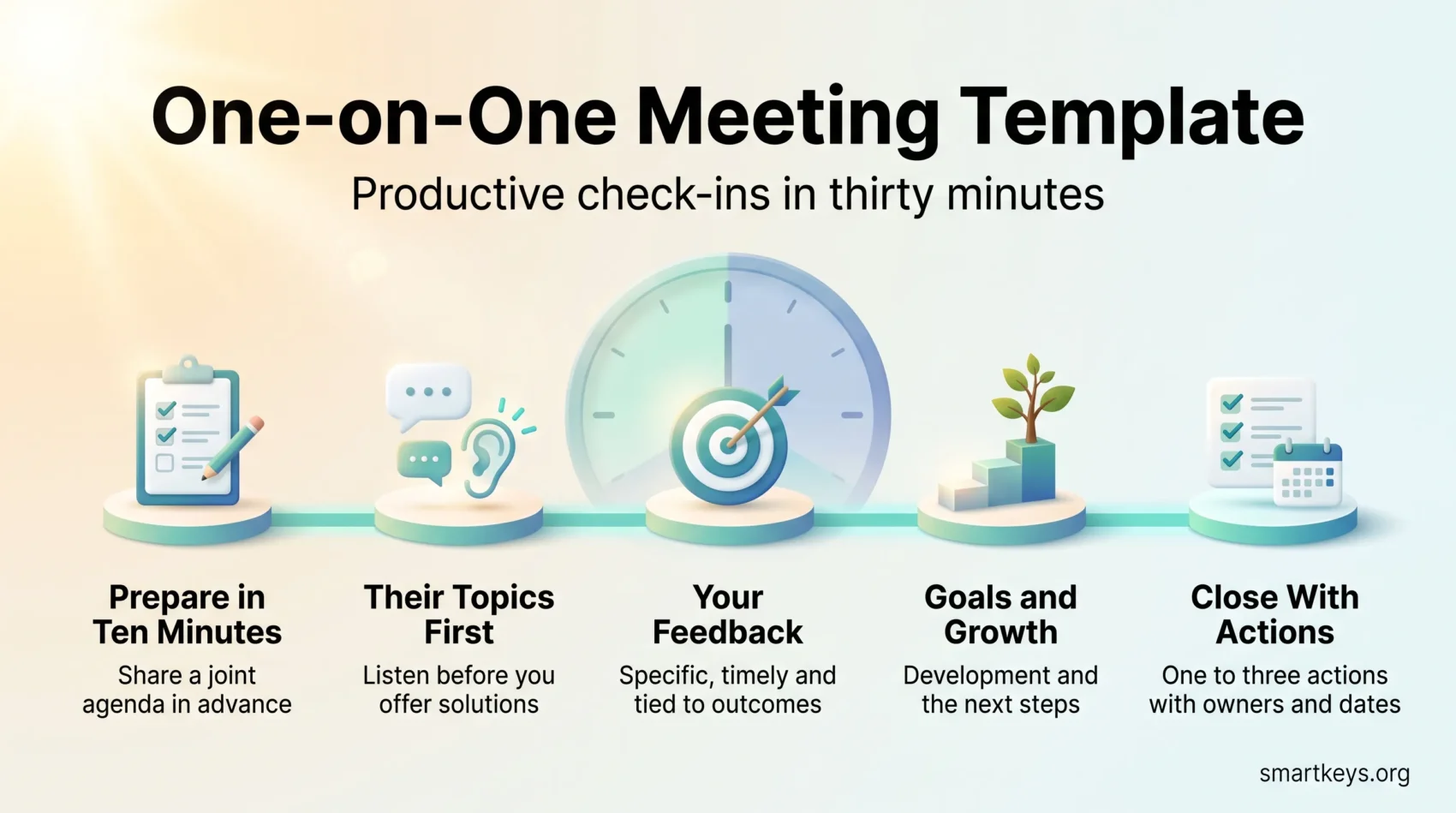
You need a simple, repeatable check-in that saves time and protects the relationship at the heart of good work. This guide gives you a one-on-one meeting template built around feedback, goals and career growth instead of status updates.
A one-on-one, often written as a 1:1, is a recurring private conversation between a manager and one person who reports to them. It is one of the few management habits with solid evidence behind it. Gallup reports that employees whose managers hold regular meetings with them are almost three times as likely to be engaged as employees whose managers do not. Google’s Project Oxygen, the company’s long-running internal study of what separates effective managers from the rest, put “is a good coach” at the top of its list of manager behaviours.
In practice, aim for a weekly or biweekly session of 30 to 60 minutes. Meet in person where that is realistic. Otherwise use video, so tone and facial expression survive the call. Share the agenda beforehand and keep the conversation on coaching, problem solving and progress.
Key Takeaways
- A compact template protects trust and still fits into 30 minutes.
- Set the agenda in advance and write down outcomes so nothing slips.
- Weekly or biweekly works best for feedback and development.
- Use video when the meeting is remote so you keep nonverbal cues.
- Short, purposeful sessions beat long, irregular ones.
What a One-on-One Meeting Actually Is
The best check-ins protect trust and speed up growth. They are employee-focused conversations, not project reviews. The person gets a predictable slot to raise what is on their mind, and the manager hears early signals while they are still cheap to act on.
The purpose: relationship, feedback and growth
Make the purpose explicit in the first session, or the slot fills with project updates by default. You are there to coach, give timely feedback, clear roadblocks and keep the person’s role and priorities clear.
A concrete example helps. If a developer says a dependency on another team keeps slipping, a status meeting records the delay. A one-on-one asks who owns it, whether you should escalate, and what the person needs from you this week. One produces a note, the other a decision.
Project work has other places to live. Run the team conversation in a separate slot and keep it short, using the ideas in our guide to running effective meetings.
Why the slot is harder to protect in 2026
Two pressures are squeezing the check-in from opposite directions.
First, managers have more people to see. Gallup put the average span of control, meaning direct reports per manager, at 12.1 in 2025, up from 10.9 the year before. Twelve weekly half-hour sessions eat most of a working day.
Second, the day is more interrupted than it used to be. Microsoft’s Work Trend Index report on the “infinite workday” found employees are interrupted roughly every two minutes during core hours by a message, email or notification. A short, protected conversation is worth more in that environment, not less.
The answer is not to drop the meeting but to make it tighter: a shorter default slot, a shared agenda, and a hard rule that you reschedule rather than cancel. If your calendar has no room at all, a focus time policy that clears recurring meeting hours usually frees the space.
The Business Case: Trust, Engagement and Performance
Consistent check-ins shorten feedback loops and keep work pointed at the right goals. That is the whole mechanism. Problems surface in days instead of quarters.
What the engagement data shows
Gallup’s State of the Global Workplace 2026 report puts global employee engagement at 20% for 2025, down from 21% the year before. Manager engagement fell further and faster: from 31% in 2022 to 22% in 2025. Gallup attributes most of the recent overall decline to managers themselves.
That matters in two ways. Disengaged managers are the ones most likely to let the slot slide. And Gallup’s span-of-control analysis names weekly, meaningful feedback as one of four factors deciding whether a larger team still performs. The check-in is where that feedback realistically happens. For the wider picture, see our overview of employee engagement trends.
Why managers benefit as much as their reports
The flow runs both ways. Candid questions and upward feedback tell you which of your expectations were never as clear as you thought. That saves rework later.
Retention improves for a simple reason: people who feel heard, and who can see a path forward, look around less. Our guide to talent retention covers what to offer once someone raises the subject.
Choose the Right Cadence and Format
Pick a rhythm that keeps feedback fresh without shredding everyone’s week. Set one default, then adjust with evidence rather than mood.
Weekly or biweekly: pick a default and hold it
Start with a weekly 30-minute slot. Move to biweekly when the person is experienced, the work is steady, or your team has grown past the point where weekly is realistic. Move back to weekly during onboarding, a role change or a difficult project.
The rule that matters most is the one about cancelling. If the time no longer works, reschedule it in the same week. Skipping it repeatedly tells the person where they sit in your priorities, whatever you say out loud.
Review the cadence once a quarter, not every time the week gets busy. If your calendar keeps overruling you, a meeting audit shows which recurring meetings to cut instead.
In person or video
Face to face still carries the most information. When that is not possible, use video with stable internet and decent audio rather than a phone call or a chat thread. Tone is easy to misread in text, and a one-on-one is exactly the conversation where misreading tone is expensive.
A few practical points:
- Choose a quiet space. An open desk is not a place for a candid conversation.
- Allow short questions between sessions so small items do not queue up and hijack the agenda.
If your team mixes office and remote attendance, the fairness rules in our guide to hybrid meeting etiquette apply here too. Our piece on remote leadership skills covers what holds a distributed team together between check-ins.
Your Core One-on-One Agenda Template
A simple template keeps the time on what matters this week. Treat a 30-minute slot as three roughly equal parts: their topics, your topics, then what comes next.
Theirs, yours, future: a 30-minute structure
First ten minutes. Open with the same question every time, such as “What is on your mind?” Give them the floor and listen without jumping in. This is the part most managers cut when they are running late, and it is the part that makes the meeting worth having.
Second ten minutes. Your material: specific feedback, clarifications, and the status of last week’s action items. Keep it concrete so any gap is clear and fixable.
Final ten minutes. Longer-term goals, development, and how the work lines up with team priorities. Agree one or two things that move before the next session.
Opening and closing rituals
Use the same opener each week so the person knows the space is theirs. Close with a repeatable question such as “What do you need from me this week?” It surfaces the small asks people otherwise sit on for days.
When to flex the template
Trade depth for breadth when something urgent lands, but do not cancel. If a crisis needs an hour, book a separate session and keep the regular slot for quick alignment.
- Predictable opener: sets a calm tone in seconds.
- Ten minutes each: a guide, not a stopwatch.
- Shared agenda: visible before the meeting so the person can add items.
Prepare in Ten Minutes
A short prep step turns a vague conversation into a useful one. Ten minutes is usually enough.
Share talking points in advance
Send a short agenda and invite the person to add items of their own. Co-writing it gives them ownership and gives you time to find real examples for any feedback.
Agree what success looks like this week
Name the top two goals for the week and how you will both know they are met. Collect status, blockers and resource needs beforehand, so the time goes on decisions rather than discovery. If goals keep drifting, our guide to goal setting covers how to write ones you can check.
Decide what is private and what is shared
Split your notes deliberately. Shared notes hold agreements, action items and anything the wider team may need. Private notes hold observations you are still forming a view on.
That split protects psychological safety, meaning the person’s confidence that raising a problem or admitting a mistake will not be used against them later. Without it, people bring you only good news.
Run the Conversation
Let the person lead, listen properly, then move to practical steps. Reflect back what you heard and ask clarifying questions before you offer solutions.
Listen first, and tell a vent from a problem
Some things need to be heard rather than fixed. If someone is frustrated by a decision they cannot change, jumping to solutions reads as dismissal. If the issue is solvable, move to defining the problem and the options.
A quick way to tell them apart: ask “Do you want help solving this, or do you just want me to know?” Most people answer honestly, and you stop guessing.
Give feedback that is timely and specific
Tie feedback to outcomes, not impressions. “The client deck landed well because the pricing section answered their question before they asked it” is usable. “Good job on the deck” is not. Recent examples beat a list saved up for a quarterly review, which is the logic behind continuous performance management.
Turn the discussion into action items
- Capture one to three actions, each with an owner and a date.
- Confirm out loud who is doing what before you close.
- Send a short recap the same day.
Questions You Can Reuse
Rotate your prompts so the conversation stays useful instead of becoming a script. Keep a short list and pull from it depending on what the week needs.
Performance and goals
Ask what progress looks like right now, what the biggest blocker is, and how you will both measure success. Agree the next step before you move on.
Career development
Hold at least one dedicated career conversation a year, and touch on it more often. Cover the skills the person wants to build, what roles those skills open up, and what you will actually do to support them. For distributed teams, our guide to remote career advancement covers the visibility problem that comes with it.
Feedback, recognition and resources
Bring any 360 feedback you have, meaning input gathered from peers and colleagues rather than from you alone, and recognise wins out loud. Ask which tools or processes are slowing the person down. Then ask for feedback on yourself: a survey tells you about the team, the check-in tells you about the person.
- Keep a rotating list so you never run out of questions.
- Be as transparent as you are allowed to be about pay, benefits and reorganisations.
- Ask about workload before someone tells you they are leaving.
Notes, Follow-Ups and Accountability
Shared running notes stop you relitigating the same conversation every few weeks. Keep one document per person that you both add to between sessions.
Shared notes versus private notes
The shared document holds the agenda, decisions and open actions. It makes patterns visible: the same blocker appearing four weeks running is a different problem from one that appears once.
Private notes stay with you, for observations that need more context before they become feedback. A digital note-taking system keeps both searchable, and a reusable meeting notes template saves you rebuilding the structure each week.
Recaps that keep momentum
Write the recap right after the session: actions, owners, dates. A three-line message is enough. Read the previous recap at the start of the next session so you pick up where you left off.
If you use an assistant to transcribe, agree that in advance and check what it records. Our guide to an AI meeting notes workflow covers the consent and accuracy questions, which matter more in a private conversation than in a team call.
Scaling One-on-Ones Across the Organization
Good tooling turns scattered conversations into a history that new managers can actually use. The goal is continuity, not surveillance.
Software for agendas and adoption
Performance management platforms let you share talking points, keep shared and private notes apart, and link goals to follow-ups. Standardising the template there keeps quality steady as the company grows. Track whether managers are holding the meetings at all, then support the ones who are not. Tools that score or coach managers automatically, covered in our piece on AI performance coaching, need a clear policy on what employee data they may use.
What HR and leadership have to do
Senior leaders have to hold their own one-on-ones visibly and stop treating them as optional when the quarter gets tight. Nothing kills the practice faster than an executive who cancels theirs. Our overview of leadership trends covers the wider expectations managers now face.
Alternatives when the calendar is full
With a large team, weekly individual sessions may not fit. Options that work: biweekly one-on-ones with a short written check-in in the off week, small-group sessions for peer problem solving, or brief asynchronous updates. Our guides to asynchronous communication tools and silent meetings cover the formats. Written updates supplement the conversation; they do not replace it.
New joiners are the exception. Keep them weekly until they are settled. Our guide to remote onboarding explains why the first weeks carry so much weight.
Conclusion
Turn short, regular check-ins into a system rather than a good intention. Use the template, put the employee’s agenda first, and meet weekly or biweekly so feedback stays current.
Prepare in ten minutes, share the topics in advance, and close with clear actions. When you show up, follow through, and answer the awkward questions honestly, the check-in stops being another meeting and becomes the one people plan their week around. For the habits that keep the rest of the week workable, see our guides to setting instant messaging boundaries and focused habits that support presence at work.
Found this useful?
Make SmartKeys a preferred source on Google, and our articles will surface more often in your Top Stories, AI Overviews, and AI Mode.
Add as Preferred Source




