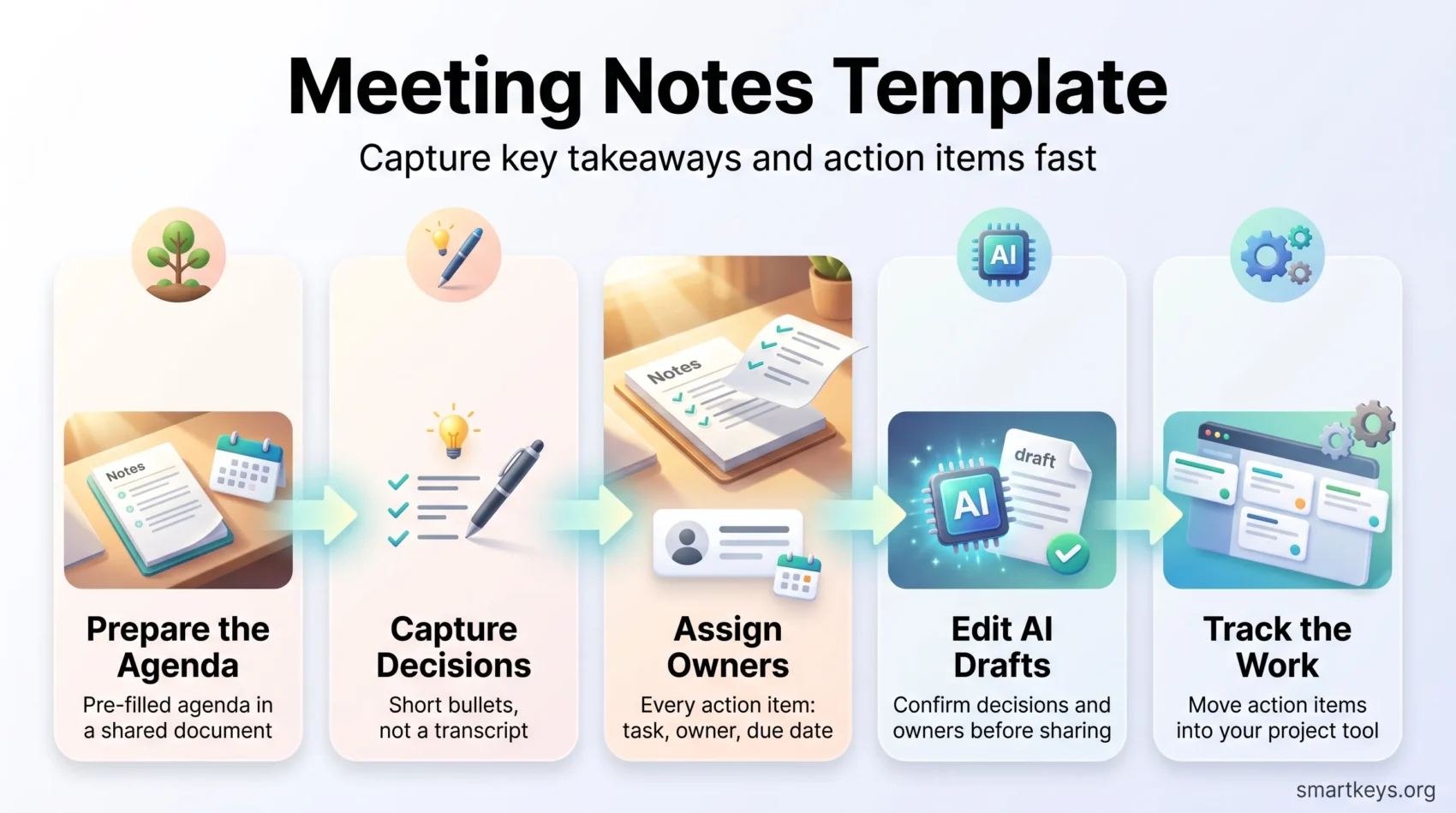
You need a simple way to capture what matters from every discussion. A meeting notes template is a fixed layout you fill in during the call. It records decisions, owners and deadlines in the same place every time, so nobody has to reconstruct the meeting from memory afterwards.
This guide gives you a template you can copy, variations for team, project, board and client meetings, a routine for filling it in while the meeting runs, and a clear rule for what to do when an AI assistant takes the notes for you. A team that leaves every call with three named tasks and three dates stops re-litigating the same points next week.
Key Takeaways
- Use one repeatable template so decisions and action items always land in the same spot.
- Write short summaries, then assign an owner and a due date to every action item.
- Capture decisions and next steps, not a transcript of who said what.
- AI notetakers save time, but you still own the consent question and the final edit.
- Push action items into your project tool the same day, or they quietly disappear.
What Better Meeting Notes Actually Change
When you capture outcomes and owners, every agenda item becomes a task instead of a loose end. Take a weekly project sync. Without notes, the same blocked ticket comes up in three consecutive meetings. With notes, it has a name next to it and a date, and it either moves or gets escalated.
Clear notes also protect the people who were not in the room. A short summary in the team channel lets a colleague on holiday catch up in two minutes instead of asking four people what was decided.
A third benefit shows up slowly. Written decisions become a searchable record of why your team chose one path. Six months later, that record answers questions faster than memory does, provided it lives in a shared system rather than a personal folder. That is the idea behind keeping organizational memory in a shared knowledge base.
Meeting Notes or Meeting Minutes: Which Do You Need?
Not every discussion needs the same level of documentation. The difference is not formality for its own sake. It is about whether the record might one day be used as evidence.
When informal notes are enough
Use informal notes for stand-ups, project check-ins and brainstorms. Keep them flexible. Capture outcomes, owners and action items rather than a full account of the discussion.
When you need formal minutes
Minutes are the official record of a meeting. Board meetings, works council sessions and shareholder meetings usually require them, and the law or the company bylaws often set the contents.
- Choose minutes for board sessions and formal stakeholder reviews, where the document may be produced later as proof.
- Include attendees, apologies, date, time, agenda items, votes and an approval line.
- Label the file clearly so readers know at a glance which of the two they are looking at.
“Minutes” comes from the Latin for a small or brief record: a condensed account of what happened, not a transcript.
The Meeting Notes Template You Can Copy Today
Start with a layout that makes outcomes and owners obvious at a glance. Here is the whole thing. Paste it into your notes app and reuse it.
- Header: meeting name, date, start and end time, attendees, link to the agenda.
- Purpose: one sentence on what this meeting is supposed to settle.
- Discussion: two or three bullets per agenda item, summarising the point rather than the debate.
- Decisions: one line per decision, written as a statement. For example: “We ship the beta on 14 October without the export feature.”
- Action items: task, owner, due date. One line each, nothing else.
- Open questions: anything that needs an answer before the next session.
- Parking lot: good ideas that were off topic today.
Two rules keep this template useful. Decisions and action items always get their own headings. And every action item has a name, because a task assigned to “the team” is assigned to nobody.
Save it as a reusable template in whatever tool your team already uses, whether that is a shared doc, a wiki or a project workspace.
Adapting the Template to Different Meeting Types
The core layout covers most meetings, but some meeting types need one or two extra fields. The reason is simple: the people who read the notes later ask different questions. A board member wants to see the vote, a client wants to see what was promised. Keep the seven base sections and add only what the meeting type calls for. More ready-made layouts are collected in these productivity templates.
Recurring team meetings
Weekly syncs benefit most from continuity. Start the action items block by copying over last week’s open items. Mark each one as done, moved or dropped before you add new ones.
Then add a “wins and blockers” field with one line per person or workstream. It shows quickly where another team could help. Close with the date of the next meeting and a draft agenda.
Project status meetings
Project notes work best as an early warning system. Open with an overall status in traffic-light terms: green for on track, yellow for at risk, red for off track. Add one sentence explaining why.
Below that, list milestones with their target dates and note any slip. Keep a small issues log with severity, owner and the next step. For dependencies on other teams, write down who must respond and by when.
Board meetings and formal minutes
Formal minutes follow stricter rules, because auditors or courts may read them later. Record whether a quorum was present, meaning the minimum number of members needed for valid decisions. Note any declared conflicts of interest.
Split the agenda into old business and new business. For each motion, record who proposed it, who seconded it and the exact result, including votes for, against and abstentions. Summarise the discussion neutrally, attach any reports you refer to, and note whether the previous minutes were approved or amended. Your bylaws or local law may require further items, so check them once and build them into the template.
Annual meetings use the same discipline. They simply need extra room for the financial review, elections and questions from members.
Client meetings
Client notes exist to prevent scope drift, the slow growth of a project beyond what was agreed. Write the agreed scope, deliverables, deadlines and acceptance criteria in plain language.
Split action items into two lists: one for your side and one for the client. Each line still needs an owner and a date. Add links to the recording and shared files, then send the notes the same day. That gives the client a chance to correct a misunderstanding before it turns into a dispute.
Brainstorms
Brainstorm notes should slow the session down as little as possible. Capture raw ideas as quick bullets and move off-topic points to the parking lot instead of debating them.
At the end, sort the strongest ideas with a simple impact versus effort filter. Give the two or three best ideas an owner and a small experiment with a short deadline. Otherwise, good ideas end up as a list nobody opens again.
Training and onboarding sessions
Training notes serve the learner after the session. List two or three objectives, written as things participants should be able to do by the end. Link the slides, recordings and exercises.
Record open questions together with the person who will answer them. Note feedback on pacing while it is fresh, so the next group gets a smoother session. Track attendance only when certification or compliance requires it.
Choosing the file format
Formal minutes often need a fixed document that can be signed and archived, so a Word or PDF file fits. A spreadsheet suits a long action item log that you want to filter by owner or status. For everyday team notes, a shared document that everyone can edit and comment on beats a file sent around by email.
Before the Meeting: Set Up the Agenda and the Document
A pre-filled agenda and an open shared document remove the first five minutes of friction. Prepare the workspace before anyone joins, so the session moves from opening remarks to decisions without a hunt for the right file.
Pre-populate agenda items and objectives
Open the shared document and add the agenda topics, the goal for each one, and any reference links. Attach the file to the calendar invite so attendees arrive with context.
Assign a note-taker and confirm access
Pick one person to capture key decisions and action items so the host can run the session. In smaller formats such as one-on-one meetings, agree up front which of you keeps the notes. Check sharing permissions in advance. Nothing kills momentum like a request-access screen at minute one.
If the meeting does not need to happen at all, a structured meeting audit beats a better template. For sessions that do earn their place, efficient meetings and a practical guide to running effective meetings cover the facilitation side.
During the Meeting: Capture Only What Matters
Focus on what changes because of the discussion, and on who will make it happen. Everything else is context you will never reread.
Listen for decisions, next steps and owners
Certain phrases signal something worth writing down. “Let’s go with”, “next step is”, “can you take” and “by Friday” all mark a line for your notes. Write the task, the name and the date immediately.
Use short bullets, not transcripts
Write bullets that summarise the point. A transcript records every word and hides the three sentences that mattered.
Clarify conflicts while people are still in the room
If two statements contradict each other, ask now. “So is the deadline the 14th or the 21st?” takes ten seconds and saves a thread of messages.
In hybrid meetings, where some people are in a room and others dial in, the note-taker also protects the remote half. Written decisions are the only version everyone sees identically, which is a core point of hybrid meeting etiquette.
Two Note-Taking Methods Worth Learning
Pick a capture style that matches the kind of meeting. Use a linear layout when you need clear decisions, and a visual one when you are mapping connections.
The Cornell method for linear summaries
The Cornell method splits the page into three parts. A wide right column holds the notes, a narrow left column holds cues and questions, and a strip at the bottom holds a short summary written afterwards.
The layout does the discipline for you. The narrow column forces you to name each point in a few words, and the bottom strip forces a recap. It suits status meetings and decision meetings.
Mind mapping for exploration
A mind map starts with the topic in the middle and branches outward. It suits brainstorms and strategy sessions, where the value lies in how ideas relate rather than in a sequence of decisions.
Standardise the formatting either way, so notes from different people still look familiar. Related habits are covered in digital note-taking and the second brain approach to organising what you capture.
AI Notetakers: What They Do Well and Where You Still Decide
AI assistants turn a recorded conversation into a searchable summary within minutes.
Tools such as Otter.ai, MeetGeek, Zoom’s built-in assistant and Microsoft Copilot record the call, produce a transcript and draft a list of decisions and action items. They work with the major meeting platforms, and most push the result into a channel or a document automatically.
Used well, they change the note-taker’s job. Instead of typing during the call, you edit a draft afterwards, which frees you to take part in the discussion.
Where they still get it wrong
Automatic summaries are strong on what was said and weak on what was meant. They miss decisions that were implied rather than stated, and they flatten disagreement, so a summary can read as settled when the room was not.
Treat the AI output as a draft. Read it once, fix the decisions, confirm the owners and delete what the tool invented. A workflow for that is set out in this AI meeting notes workflow.
Consent and compliance before you hit record
Recording is a legal question, not just a technical one. Several US states require consent from every participant rather than just one, and a recording made without it can be unlawful. In August 2025, a proposed class action was filed in the Northern District of California against Otter.ai, alleging that its assistant recorded conversations without the consent of everyone on the call.
The European Union has tightened disclosure separately. The transparency rules in Article 50 of the EU AI Act started applying on 2 August 2026, and they cover telling people when they are dealing with an AI system and marking artificially generated content.
- Announce the recording at the start and let people object.
- Keep AI notetakers out of HR, legal and disciplinary conversations.
- Check where your vendor stores transcripts and whether it trains models on them.
- Write the rule down once, as part of your internal AI policy, rather than deciding per meeting.
After the Meeting: Turn Notes into a Shareable Summary
Spend five to ten minutes tidying the notes while the discussion is fresh. Most teams skip this step, and it decides whether the notes get used.
Edit, tag owners, add dates
Clean the draft by removing side chatter and duplicates. Pull the decisions to the top. List action items as single lines with an owner and a due date.
Then confirm anything ambiguous with the person concerned before you publish. One message now prevents a week of drift.
Store it where people will find it
Save the document in the shared workspace your team opens daily, and link it from the calendar event. A summary in someone’s private drive does not exist. Distributed teams depend on this most, which is why written records sit at the heart of asynchronous communication and follow-the-sun handoffs between time zones.
A summary nobody can find is the same as no summary at all.
From Notes to Tracked Work
Move action items into your project tool the same day. A task that lives only in a document competes with nothing and gets done by nobody.
Create tasks from action items
Convert each action line into a task in the tool your team already uses, such as Asana, ClickUp or Jira. Assign the owner, set the due date and paste the link back to the notes so the context travels with the task.
Automate the handoff
Automation tools connect the apps so a new action item creates a task without anyone retyping it. Options are compared in Zapier and Make. Keep it simple: one trigger, one task, one notification.
- Review open items at the start of the next session, so the loop closes visibly.
- Delegate properly when you assign work, using the principles in effective delegation.
- Pick tools that fit your workflow rather than adding another one, as covered in productivity apps and task management.
Conclusion
A meeting notes template works because it is boring and identical every time. The same headings, the same three columns for action items, the same place to find them.
Keep the wrap-up short. Summarise the decisions, name an owner and set a due date, then publish where your team already looks. Add fields for board, project or client meetings only when that meeting type needs them. A regular weekly review is a good moment to check that last week’s action items actually moved.
Let AI handle the transcript if you want the speed, but read the draft before it goes out and settle the consent question once, in writing. Then protect the time to actually do the work, which is what a team-wide focus time policy is for.
Found this useful?
Make SmartKeys a preferred source on Google, and our articles will surface more often in your Top Stories, AI Overviews, and AI Mode.
Add as Preferred Source